
Find outdated python packages installed with pipx

Project description
Piplexed - Find outdated packages installed with pipx


Documentation: https://aj-white.github.io/piplexed/
Table of Contents
Overview: What is piplexed ?
Piplexed is a command line tool to identify outdated python packages, installed from PyPI, via pipx. It displays it's output as a nice rich printed tree.
Installation
Piplexed is designed to be installed globally via pipx.
To install piplexed:
pipx install piplexed
Alternatively you can run it wihtout installation, supplying the required arguments shown below
pipx run -- piplexed <ARGS>
Usage
List outdated packages installed with pipx (no pre or dev release)
piplexed list --outdated
Output ignores prelease and dev releases by default.

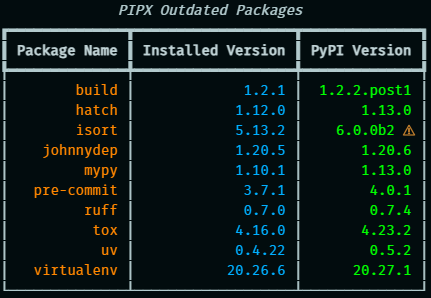
List outdated packages installed with pipx
piplexed list --outdated --pre
Output includes prerelease and dev releases and highlights them.
List packages installed with pipx
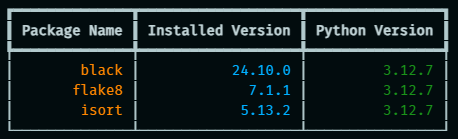
piplexed list
Outputs similar information to pipx list, albeit minus the names of the binaries, in a rich table format.
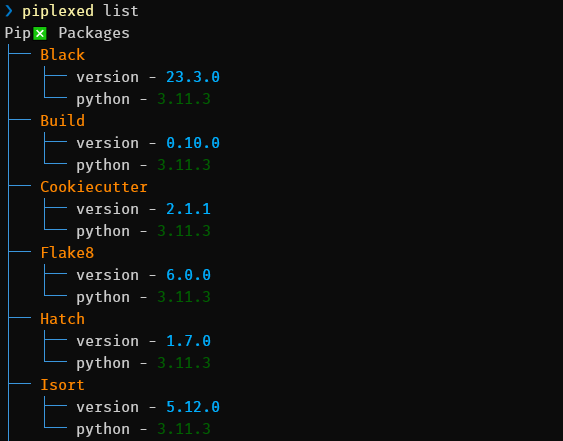
piplexed list --tree
An optional tree flag can be passed for a tree view (less useful if there are a lot of packages)
Why piplexed
The name piplexed is a play on words, it contains the letters for pipx and I was also mildly perplexed trying to find a simpler way to identify outdated pipx installed packages, only to discover it didn't exist. Put the two together and well.... you get the idea (naming things is hard after all!). For a longer answer see the documentation.
Caveats
Piplexed is a project that I built for my workflow, but it may not work for everyone.
It is only intended to work for packages that are installed from PyPI, so will not work for local packages or git/url etc.
License
Piplexed is distributed under the terms of the MIT license.
Release history Release notifications | RSS feed


Download files
Download the file for your platform. If you're not sure which to choose, learn more about installing packages.
Source Distribution
Built Distribution
Filter files by name, interpreter, ABI, and platform.
If you're not sure about the file name format, learn more about wheel file names.
Copy a direct link to the current filters
File details
Details for the file piplexed-0.5.0.tar.gz.
File metadata
- Download URL: piplexed-0.5.0.tar.gz
- Upload date:
- Size: 94.3 kB
- Tags: Source
- Uploaded using Trusted Publishing? No
- Uploaded via: python-httpx/0.25.0
File hashes
| Algorithm | Hash digest | |
|---|---|---|
| SHA256 |
d89d36050de8f735f52c3ce0fe9144c09bcc0bcabc82ba4bf73aae06156f1211
|
|
| MD5 |
07daf62af696978afa40f2886acfb983
|
|
| BLAKE2b-256 |
4d557a91d7e82a57436c15575754a42b871648b3afc5d3318bd4ef952ec5bdde
|
File details
Details for the file piplexed-0.5.0-py3-none-any.whl.
File metadata
- Download URL: piplexed-0.5.0-py3-none-any.whl
- Upload date:
- Size: 8.8 kB
- Tags: Python 3
- Uploaded using Trusted Publishing? No
- Uploaded via: python-httpx/0.25.0
File hashes
| Algorithm | Hash digest | |
|---|---|---|
| SHA256 |
7e8a01ee00fdcc197a516c80c462e6f25edf6d0e8a6046a79751b222c9e22700
|
|
| MD5 |
c9ea4629975d5c51d2560d78685ac7fe
|
|
| BLAKE2b-256 |
f5936cf50ecd4dd0798fd1f795a4526a1fe9d55e103008582f5b889285c41781
|






