
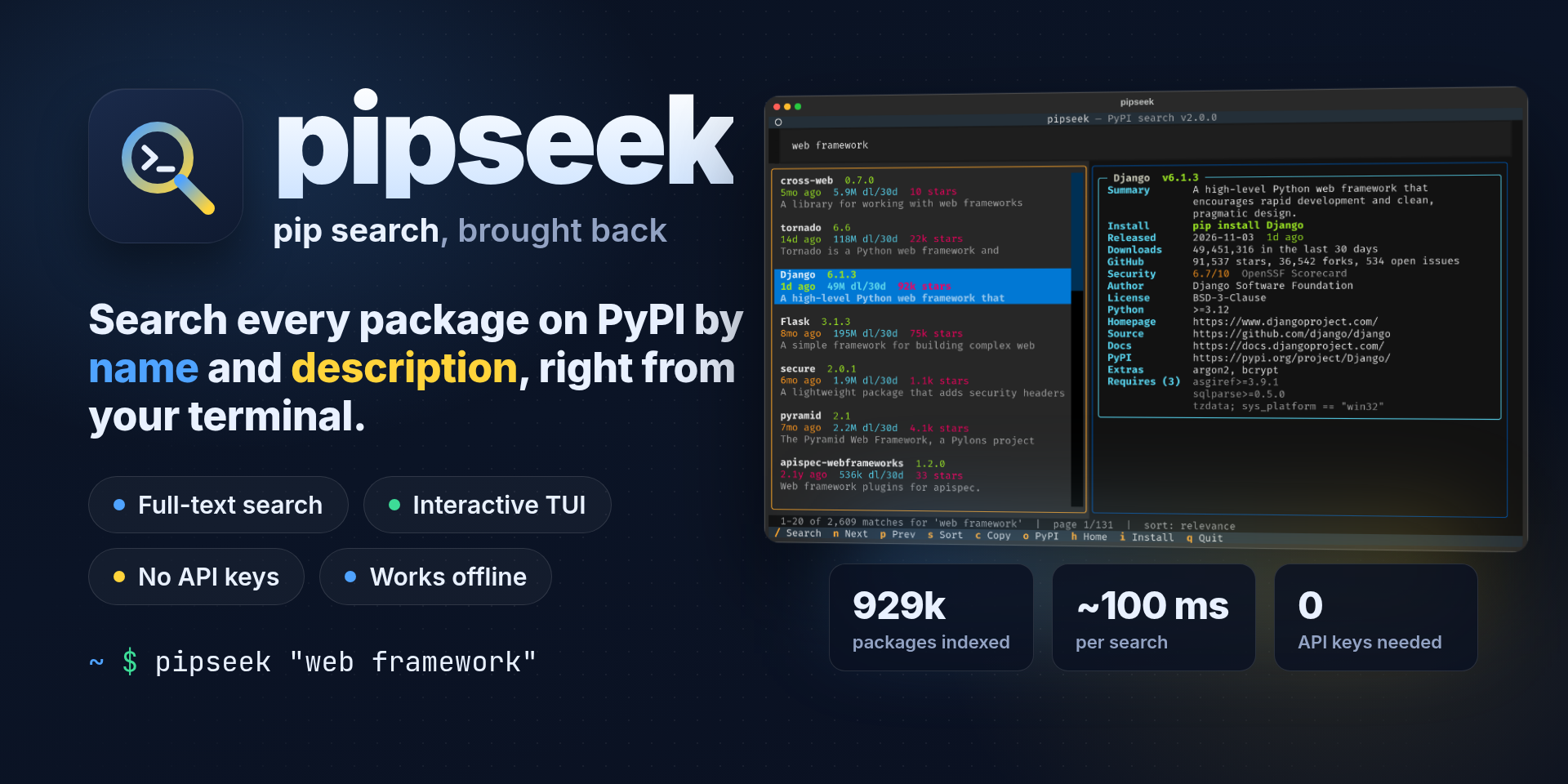
pipseek
Search all of PyPI from your terminal, by name and description, and check your own environment for outdated and vulnerable packages. The pip search that PyPI switched off, rebuilt with a full-text index, an interactive TUI and no API keys.




pip search stopped working years ago, and scraping pypi.org/search doesn't work either, because that page now sits behind a browser challenge. pipseek keeps its own full-text index of all ~930,000 projects on PyPI, searches it locally in about 100 ms, and pulls live details for the results you're looking at. It uses only public APIs: no scraping, no accounts, no keys.
pipx install git+https://github.com/ohmybahgosh/pipseek
pipseek "web framework"
Contents
- See it in action
- Features
- Install
- Usage
- How it works
- Where the data comes from
- Search tips
- FAQ
- Development
- Credits
- License
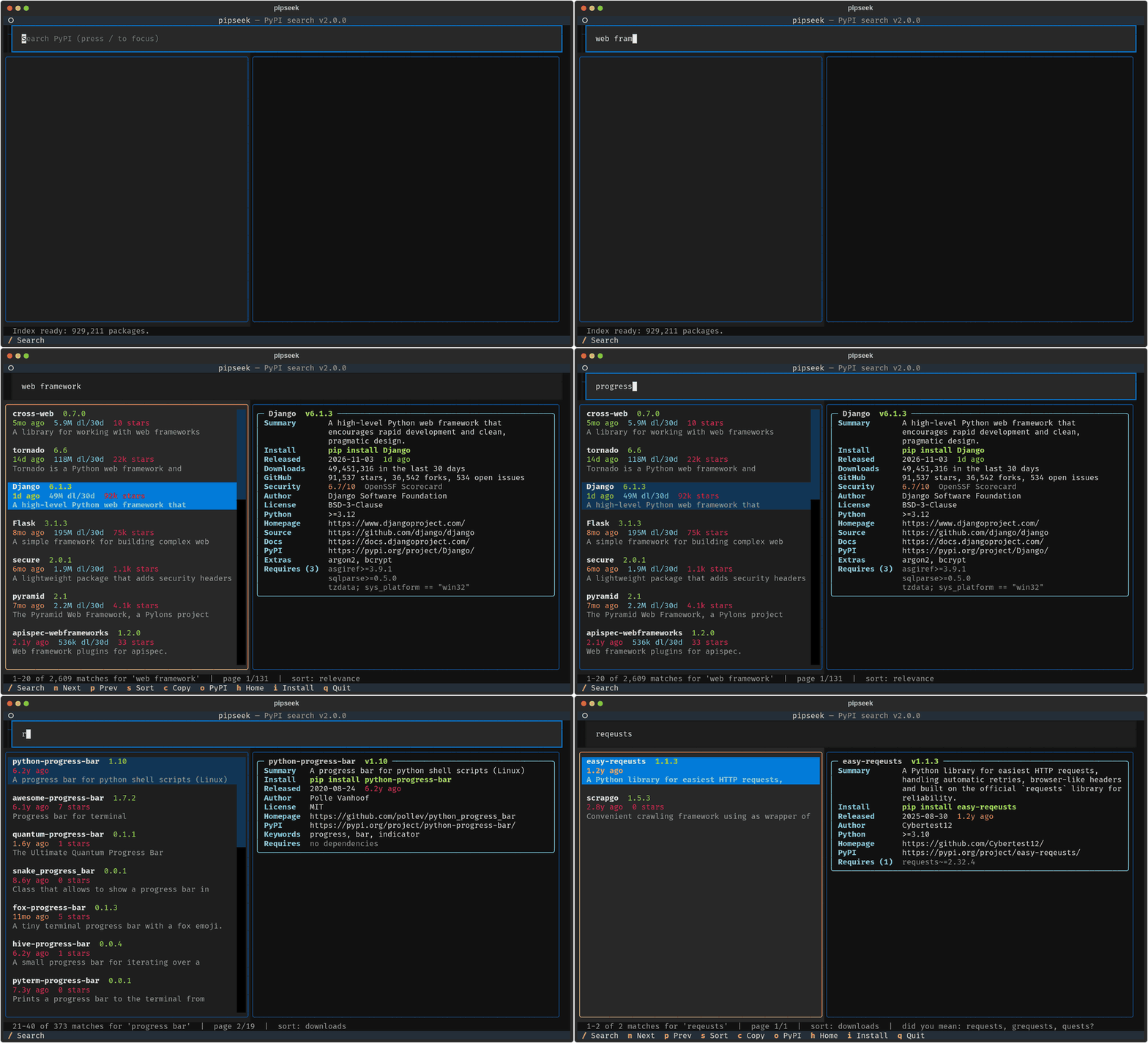
See it in action
 |
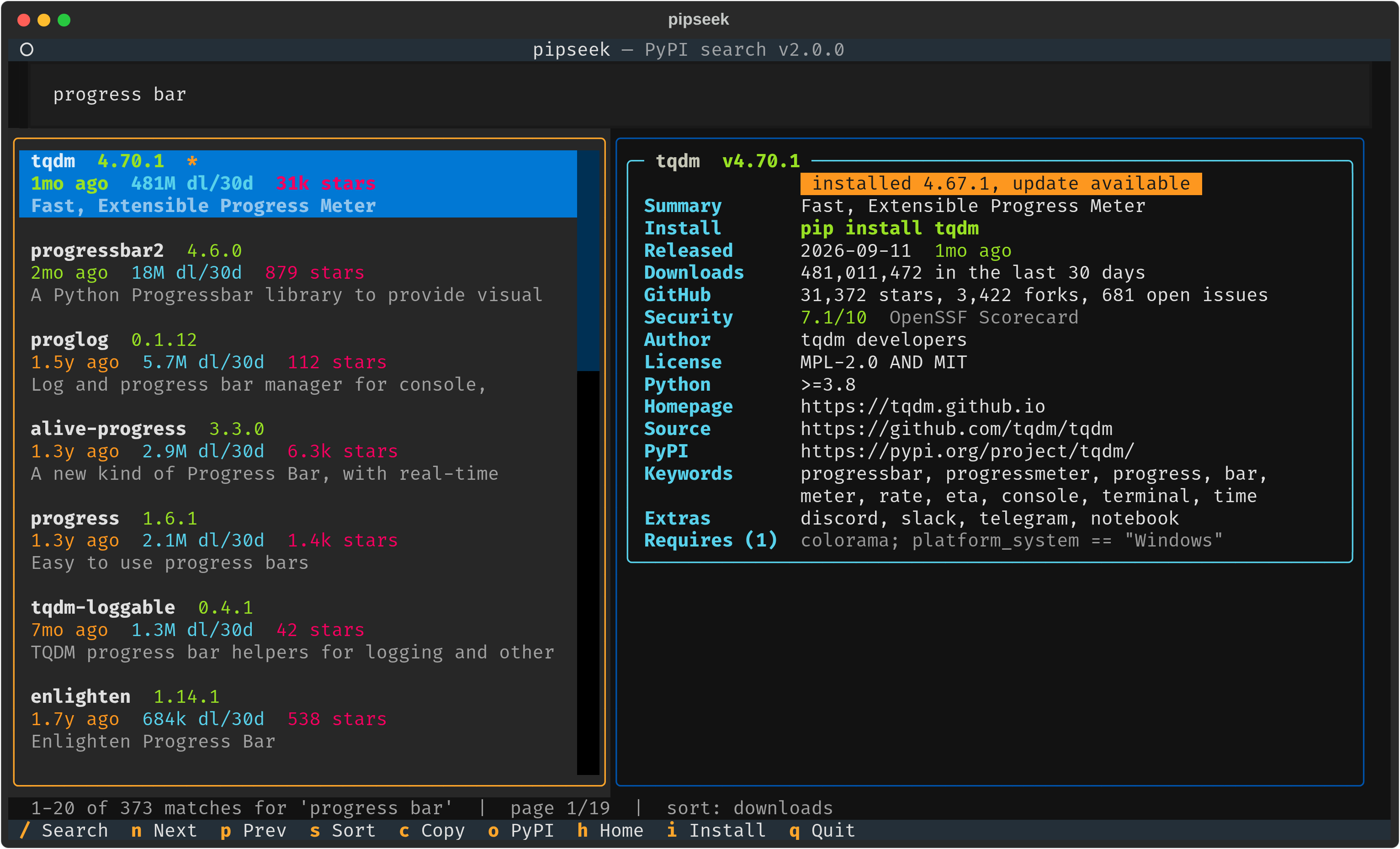 |
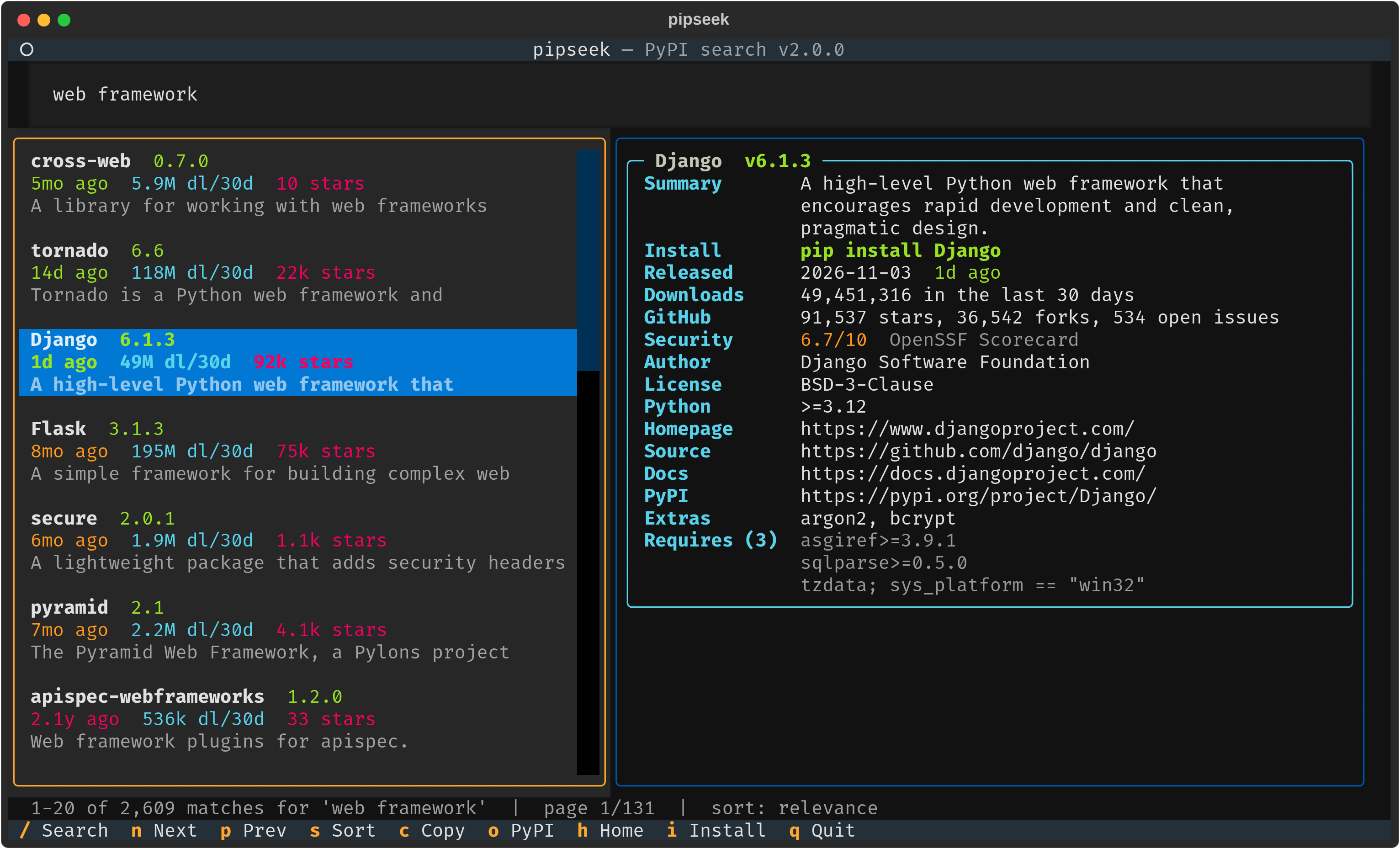
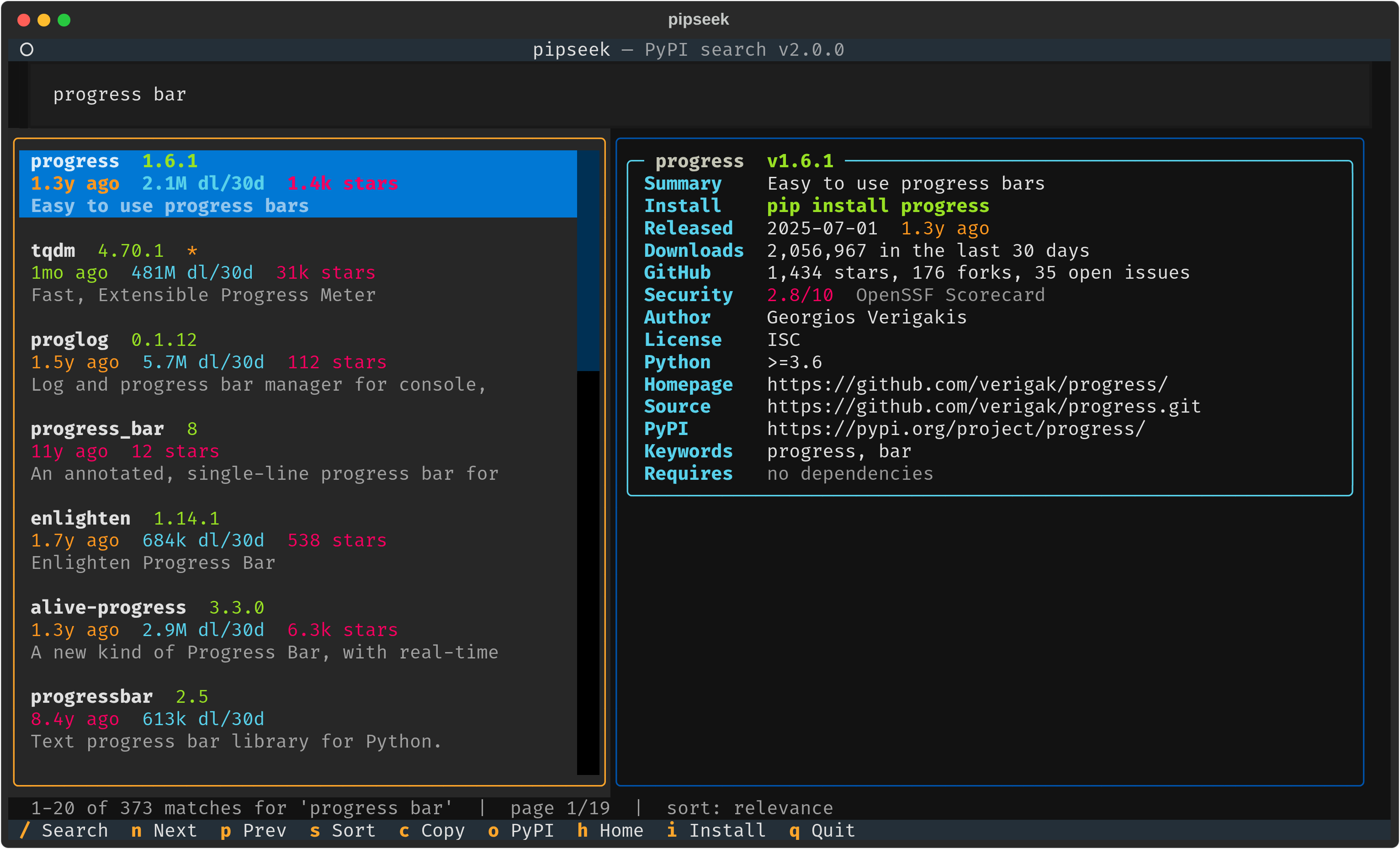
| Searches descriptions, not just names | Sort by downloads, see what's installed |
 |
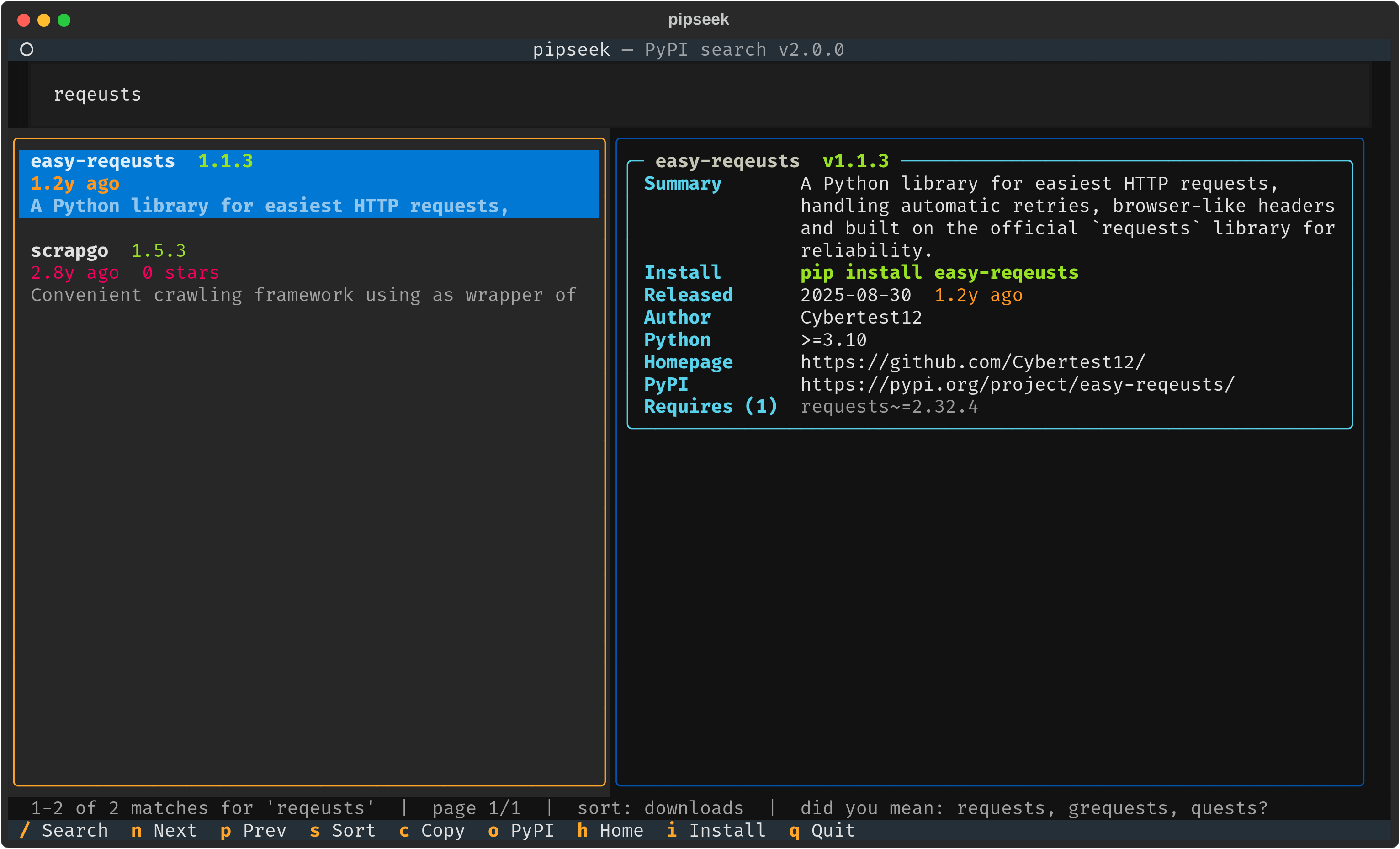 |
| Security score at a glance | "Did you mean?" for typos |
Features
- Full-text search over every project's name, summary and keywords.
pipseek "progress bar"finds tqdm,pipseek "web framework"finds Django, Flask and Tornado, andpipseek requestsstill putsrequestsfirst. - Ranked the way you'd expect: exact and prefix name matches, BM25 relevance over descriptions, and real 30-day download counts, so popular packages beat empty placeholders.
- Interactive TUI built on [Textual]: a search box, a results list and a detail pane that follows your cursor.
- Rich details: version, release age (green, yellow or red by freshness), downloads, stars and forks, open issues, the OpenSSF Scorecard security score, author, license, Python requirement, links, extras and dependencies.
- Known vulnerabilities from OSV.dev, for the latest version and for the version you have installed, with severity, CVE and the version that fixes it.
pipseek --outdatedchecks your whole environment: what's out of date, what's vulnerable, and the upgrade command to fix it.--strictmakes it fail CI when something installed is vulnerable.- Knows your environment: marks packages already installed in your active virtualenv (or
python3on your PATH) and flags available updates. - One-key actions: copy the install command, open PyPI or the repo in your browser, or install and upgrade without leaving the TUI.
- "Did you mean?" suggestions for typos, drawn from popular packages first.
- Script-friendly:
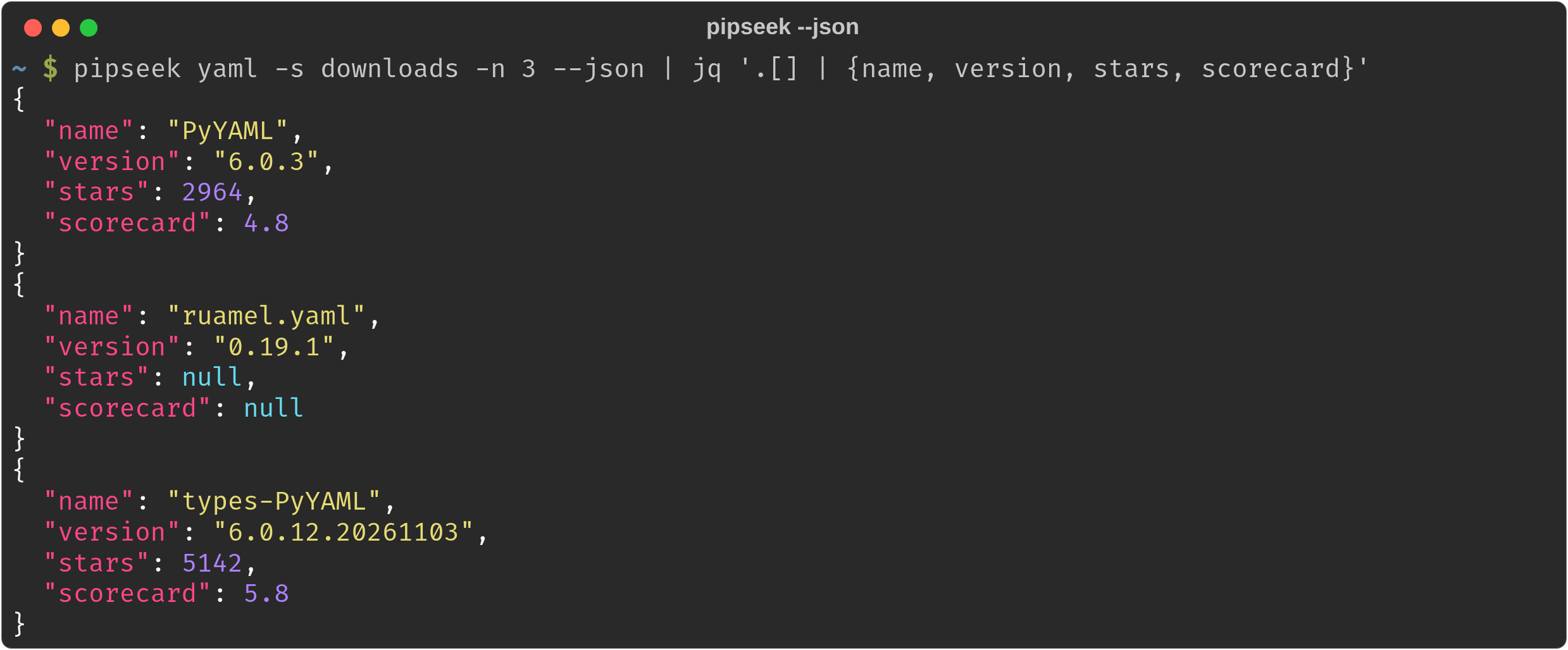
--plainprints a table,--jsongives structured output forjq, and piped output switches to plain mode on its own. - No API keys, no accounts: everything comes from public, keyless APIs.
- Fast and offline-friendly: the index lives in a local SQLite full-text database. After the first run, searches don't need the network, and details are cached for an hour.
Install
pipx or uv keep pipseek in its own isolated environment, which is the cleanest way:
pipx install git+https://github.com/ohmybahgosh/pipseek
# or
uv tool install git+https://github.com/ohmybahgosh/pipseek
Plain pip works too:
pip install git+https://github.com/ohmybahgosh/pipseek
Upgrade later with pipx upgrade pipseek or uv tool upgrade pipseek.
The first run downloads the search index (about 35 MB) and builds a local database from it, which takes about 10 seconds. After that it refreshes on its own once a week, or whenever you pass --refresh.
Usage
Interactive mode
pipseek                   # open the TUI with an empty search box
pipseek fastapi           # open the TUI and search right away
pipseek "pdf parser"      # multi-word searches match descriptions too
| Key | Action |
|---|---|
/ |
Focus the search box (Enter runs the search) |
↑ ↓ or j k |
Move through results; the detail pane follows |
n / p |
Next / previous page |
s |
Cycle the sort: relevance, downloads, updated, name, stars |
c |
Copy pip install <name> to the clipboard |
o |
Open the package on PyPI |
h |
Open the project's repository or homepage |
i |
pip install it, or upgrade it if a newer version is out |
Esc |
Jump from the search box back to the results |
q |
Quit |
The i key installs into the same environment pipseek checks for installed packages: your active virtualenv or conda env, otherwise the first python3 on your PATH. Use --python to pick a different one.
Plain, JSON and info modes
 |
 |
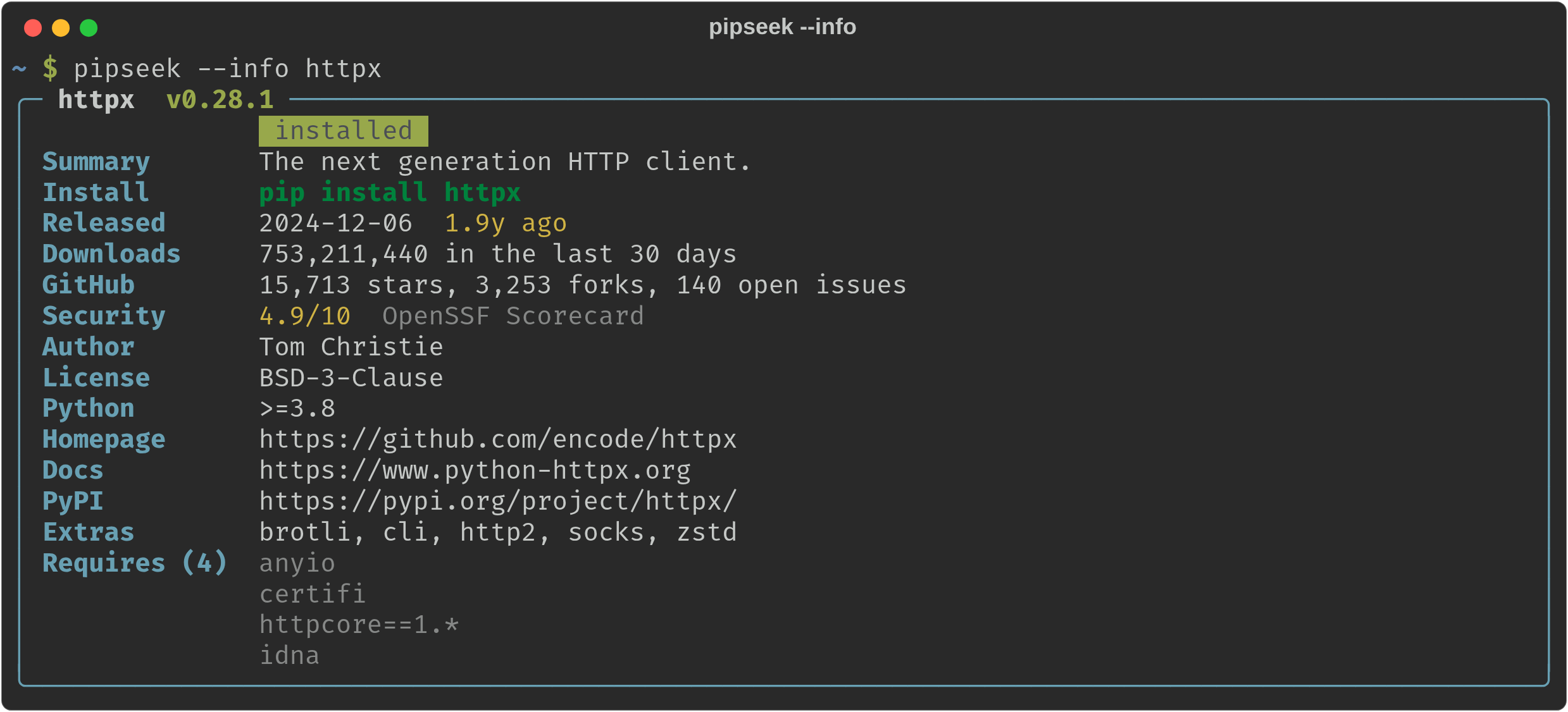
--info for one package |
--json for scripts |
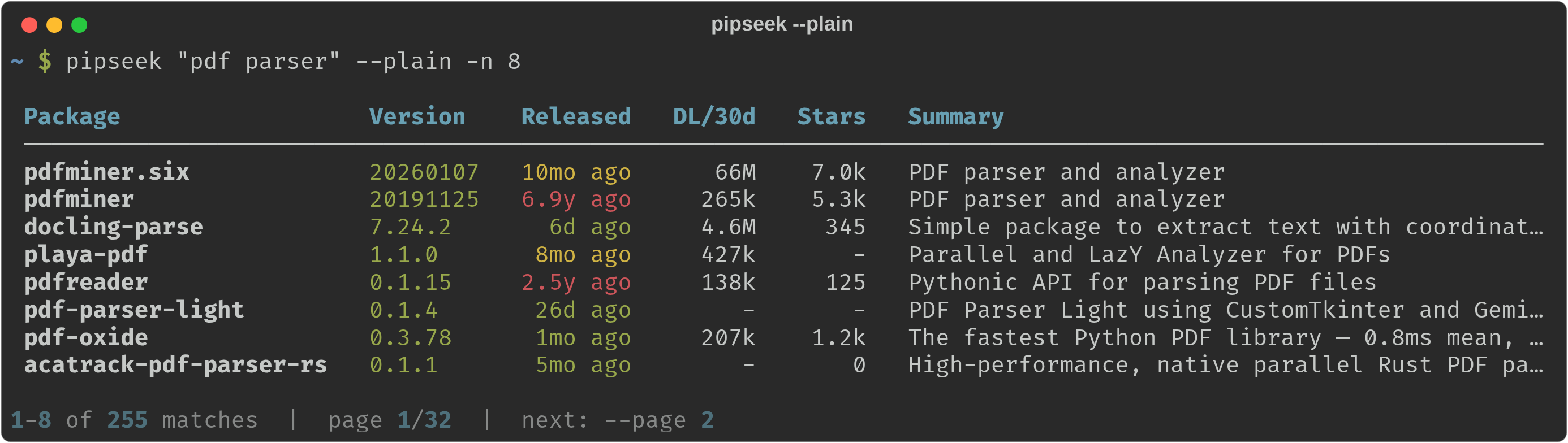
pipseek "pdf parser" --plain -n 8          # a table instead of the TUI
pipseek http -s downloads -n 10            # top 10 matches by downloads
pipseek --info requests                    # the full detail card for one package
pipseek django --json | jq '.[] | {name, version, released, stars}'
pipseek yaml --plain --page 2              # the next page of results
Check your environment
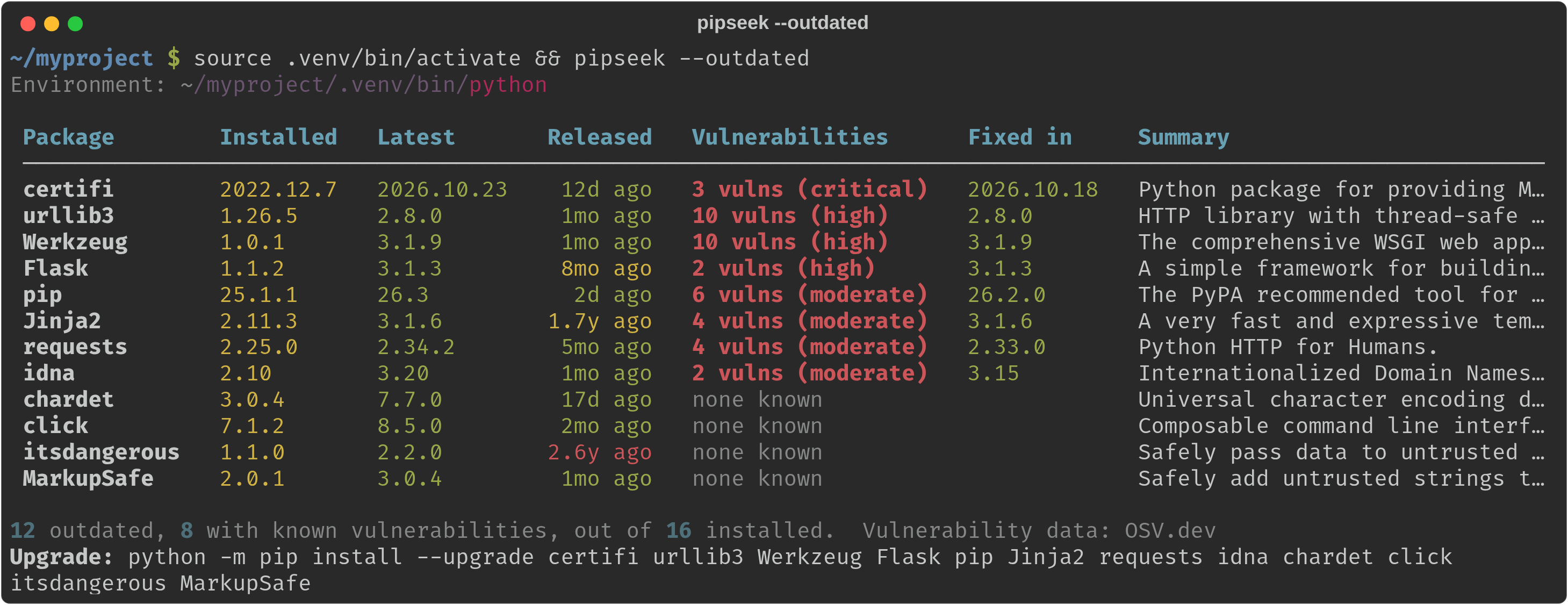
pipseek --outdated checks every package in your environment against PyPI and OSV.dev, puts the vulnerable ones first, and ends with the upgrade command. It checks the same environment pipseek uses for installed badges: your active virtualenv, otherwise the first python3 on your PATH, or whatever you pass to --python.
pipseek --outdated                    # outdated or vulnerable packages, worst first
pipseek --outdated --all              # every installed package
pipseek --outdated --json             # for scripts and dashboards
pipseek --outdated --strict           # exit 1 if anything installed is vulnerable (for CI)
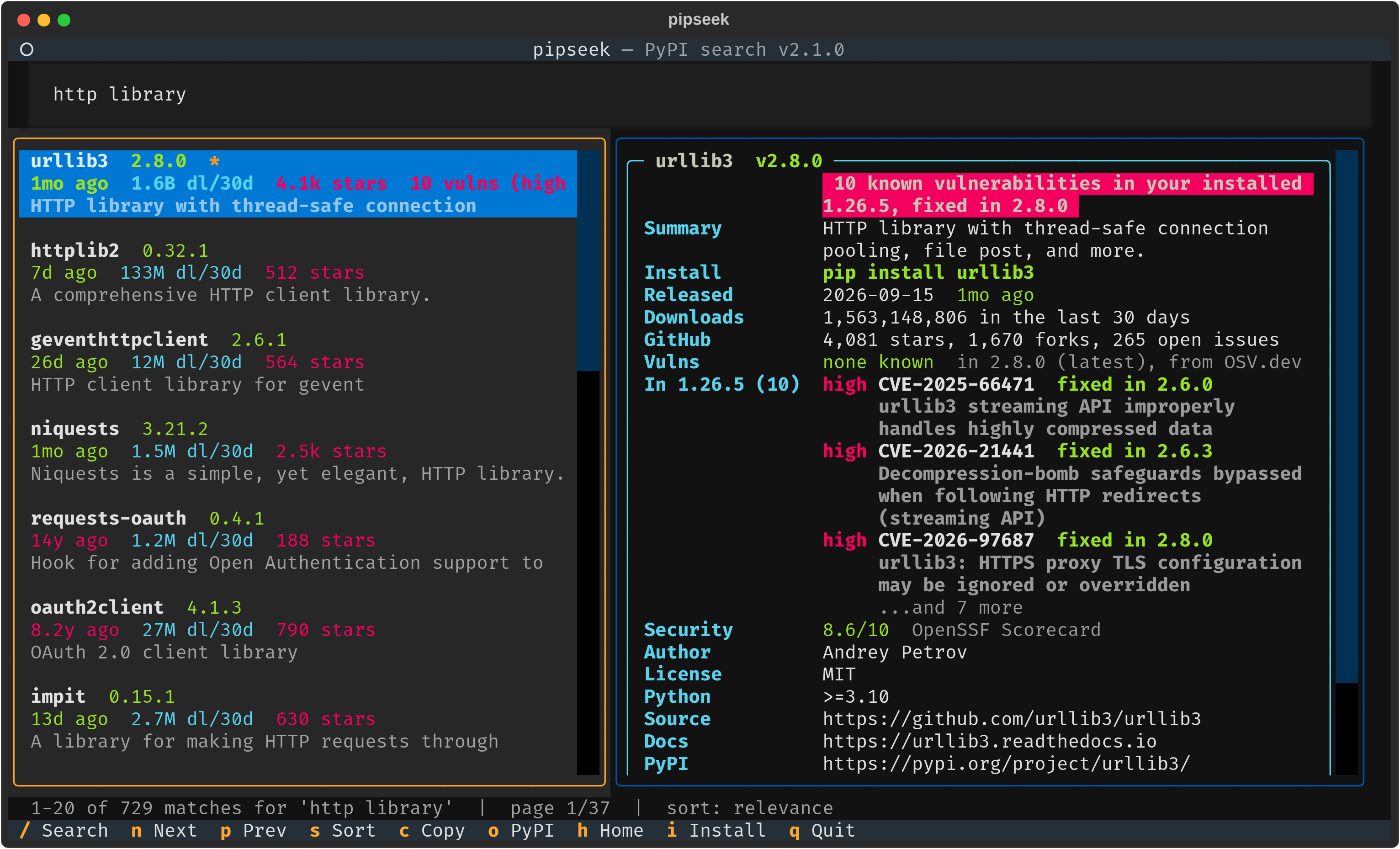
Search results show the same check. When the version you have installed has known vulnerabilities, the detail pane says so in red, lists them with the fix version, and the results list flags them:
 |
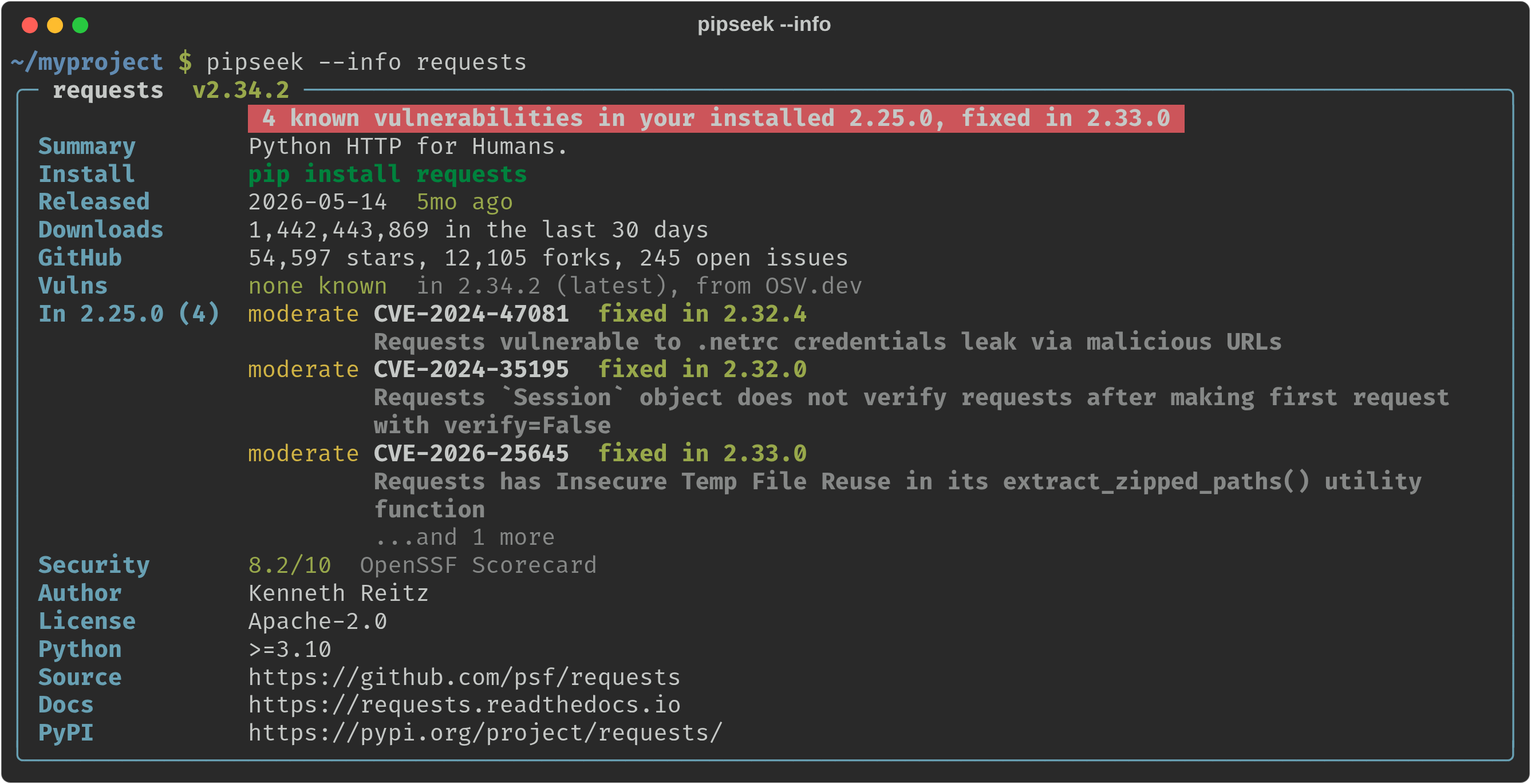 |
| In the TUI | With --info |
Options
| Option | Description |
|---|---|
-i, --info PACKAGE |
Show the full detail card for one package |
-o, --outdated |
List installed packages that are outdated or have known vulnerabilities |
--all |
With --outdated: list every installed package |
--strict |
With --outdated: exit with status 1 if an installed version has a known vulnerability |
-P, --plain |
Print a table instead of opening the TUI |
-j, --json |
Print results as JSON |
-n, --limit N |
Results per page (default 20) |
-p, --page N |
Page number |
-s, --sort |
relevance, downloads, updated, name or stars |
--python PATH |
Interpreter used for installed checks and i installs |
--no-stats |
Skip repository stats and vulnerability checks (faster, fewer requests) |
--refresh |
Download the search index again now |
--clear-cache |
Delete everything pipseek has cached |
-V, --version |
Print the version |
relevance, downloads and name sort all matches. updated and stars need live data, so they sort the page you're on.
| Environment variable | Purpose |
|---|---|
PIPSEEK_CACHE_DIR |
Use a different cache folder |
PIPSEEK_INDEX_URL |
Use a different prebuilt search index |
VIRTUAL_ENV / CONDA_PREFIX |
Picked up automatically to decide which environment counts as "installed" |
How it works
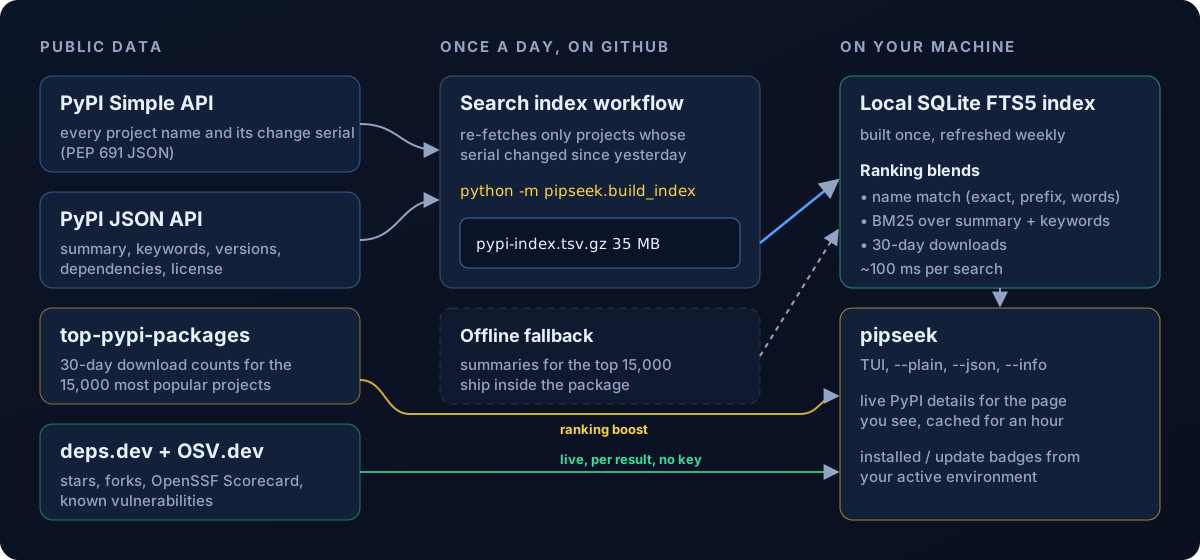
PyPI has no public full-text search API, so pipseek brings its own index:
- A daily GitHub Action (
index.yml) runspipseek.build_index. The PyPI Simple API reports a change serial for every project, so the build only re-fetches projects that changed since yesterday, usually a few thousand. It publishespypi-index.tsv.gz(name, summary and keywords for every project) on theindexrelease. - On your machine, pipseek downloads that file and builds a SQLite FTS5 database from it, once a week.
- Each search combines name matches, BM25 relevance over summaries and keywords, and 30-day download counts, then fetches live details for just the page you're viewing.
- If the release can't be reached, pipseek falls back to every project name from PyPI plus summaries for the 15,000 most popular projects, which ship inside the package, and tries for the full index again the next day.
Where the data comes from
| Data | Source | Key needed? |
|---|---|---|
| Every project name and change serial | PyPI Simple API | No |
| Summaries, keywords, versions, dependencies | PyPI JSON API | No |
| 30-day download counts | top-pypi-packages by Hugo van Kemenade | No |
| Stars, forks, open issues, OpenSSF Scorecard | deps.dev by Google (GitHub, GitLab and Bitbucket projects) | No |
| Known vulnerabilities | OSV.dev by Google, which merges the GitHub Advisory Database and the PyPA advisory database | No |
pipseek identifies itself to these services as pipseek/<version> with a link to this repo. The index workflow uses only the token GitHub gives every Action run, so there are no secrets to set up.
Search tips
- Describe what you want:
pipseek "async http client",pipseek "markdown to pdf",pipseek "json schema validation". - Or type the name: an exact name always comes first, and close names follow (
requests,requests-oauthlib,requests-toolbelt). - Sort by downloads (
sin the TUI,-s downloadson the command line) when you want the safe, popular choice. - Run
pipseek --outdatedin each project now and then, or with--strictin CI, to catch vulnerable dependencies early. - Check the Security row before adopting something new. It's the project's OpenSSF Scorecard: green is 7 or higher, yellow is 4 to 7, red is under 4.
FAQ
Why not just use pypi.org/search? You can in a browser, but it can't be scripted any more: it sits behind a JavaScript challenge meant to stop bots. pipseek doesn't try to get around that. It uses PyPI's official APIs instead, which are made for tools.
How fresh are the results? The index is rebuilt every day, and pipseek downloads it weekly. Versions, release dates and stats for the results you look at are always live (cached for an hour).
How much disk space does it use? About 175 MB for the search database, in ~/.cache/pipseek on Linux, ~/Library/Caches/pipseek on macOS, or %LOCALAPPDATA%\pipseek on Windows. pipseek --clear-cache removes it.
Does it work offline? Searching does, once the index is built. The detail pane needs the network for anything it hasn't cached yet.
Why is a package marked "installed" when I installed it somewhere else? pipseek checks one environment: your active virtualenv or conda env, otherwise the first python3 on your PATH. Pass --python /path/to/python to check a different one.
Is --outdated a replacement for pip-audit? For a quick look, often yes: it uses the same OSV data and adds what's outdated. pip-audit goes further for CI pipelines (requirements files, SBOMs, auto-fixing), so use it when you need those.
Can I build the index myself? Yes: python -m pipseek.build_index --out pypi-index.tsv.gz builds all of PyPI in about 30 minutes, then point pipseek at it with PIPSEEK_INDEX_URL.
Development
git clone https://github.com/ohmybahgosh/pipseek
cd pipseek
pip install -e ".[dev]"
ruff check src tests
pytest
The code lives in src/pipseek: index.py (local search index and ranking), build_index.py (the index builder), pypi.py (PyPI and deps.dev clients), search.py, tui.py, render.py and cli.py. Issues and pull requests are welcome.
Credits
- Textual and Rich by Will McGugan and Textualize, for the TUI and terminal output.
- top-pypi-packages by Hugo van Kemenade, for download counts.
- deps.dev by Google, for repository stats and OpenSSF Scorecard results.
- The Python Packaging Authority and the PyPI team, for the Simple and JSON APIs.
License
GPL-3.0-or-later. Made by OhMyBahGosh.
1 maintainer

Metadata
1 maintainer
Release files for pipseek 2.1.0
For a detailed explanation of source distributions (sdists) and built distributions (wheels), please see the package formats documentation.
Source distribution (sdist)
| File | Size | Uploaded | Provenance | Actions |
|---|---|---|---|---|
| pipseek-2.1.0.tar.gz | 6.4 MB | With provenance | Details for pipseek-2.1.0.tar.gz |
Built distribution (wheel)
| File | Interpreter | ABI | Platform | Actions Reset |
|---|---|---|---|---|
| pipseek-2.1.0-py3-none-any.whl | Python 3 | none | any | Details for pipseek-2.1.0-py3-none-any.whl |
Total release size: 7.1 MB
Release files / pipseek-2.1.0.tar.gz
| Download URL | pipseek-2.1.0.tar.gz |
|---|---|
| Size | 6.4 MB |
| Tags | Source |
|
SHA-256 checksum How to use checksums |
47b9099c0d6be9b606d329c28e6bcb7244c3ed9aea80dcc909f7967b75b95113
|
|
BLAKE2b-256 checksum How to use checksums |
0aeefd0fe420e9a93c4b2018f464062202d235c7ea62b58d60cd8e05badf50a0
|
| Upload date | |
|
Uploaded using Trusted Publishing? What is trusted publishing? |
Yes |
| Uploaded via |
twine/7.0.0 CPython/3.13.16
|
Provenance
Provenance describes where a file came from. On PyPI, provenance is shared via attestations, which provide a verifiable record of the build or publishing details. View details, limitations and caveats.


PyPI Publish Attestation
PyPI verified that this artifact, at this checksum, originated from the publisher listed below.
Signed by GitHub Actions, verified by PyPI on Nov 4, 2026.
Transparency logRelease files / pipseek-2.1.0-py3-none-any.whl
| Download URL | pipseek-2.1.0-py3-none-any.whl |
|---|---|
| Size | 661.9 kB |
| Tags | Python 3 |
|
SHA-256 checksum How to use checksums |
977c70fac20852e6f0d2fc42cd3dba209b0d7c97f88bdbf2822523610953a8df
|
|
BLAKE2b-256 checksum How to use checksums |
ffd4c687f3e9f3d4015f5f648e06558b4ab643ee2e773eab1fb950711c06d72a
|
| Upload date | |
|
Uploaded using Trusted Publishing? What is trusted publishing? |
Yes |
| Uploaded via |
twine/7.0.0 CPython/3.13.16
|
Provenance
Provenance describes where a file came from. On PyPI, provenance is shared via attestations, which provide a verifiable record of the build or publishing details. View details, limitations and caveats.
PyPI Publish Attestation
PyPI verified that this artifact, at this checksum, originated from the publisher listed below.
Signed by GitHub Actions, verified by PyPI on Nov 4, 2026.
Transparency logSecurity for pipseek 2.1.0
Provenance
Provenance describes where a file came from. On PyPI, provenance is shared via attestations, which provide a verifiable record of the build or publishing details. View details, limitations and caveats.
Full provenance
All 2 files in this release have been uploaded with provenance metadata.
Attestation for pipseek-2.1.0.tar.gz
PyPI Publish Attestation
PyPI verified that this artifact, at this checksum, originated from the publisher listed below.
Signed by GitHub Actions, verified by PyPI on Nov 4, 2026.
Transparency logA note on package security
PyPI is a repository for distributing packages, not a service for auditing them. While third-party security researchers and our staff do their best to detect and remove malicious packages, PyPI cannot guarantee the quality, security or suitability of any given package.
To learn more about protecting yourself from malicious actors, visit our package security documentation.














