

PISCES
AI-Assisted · Self-Healing · Human-Governed Python Security Remediation Patcher






Overview
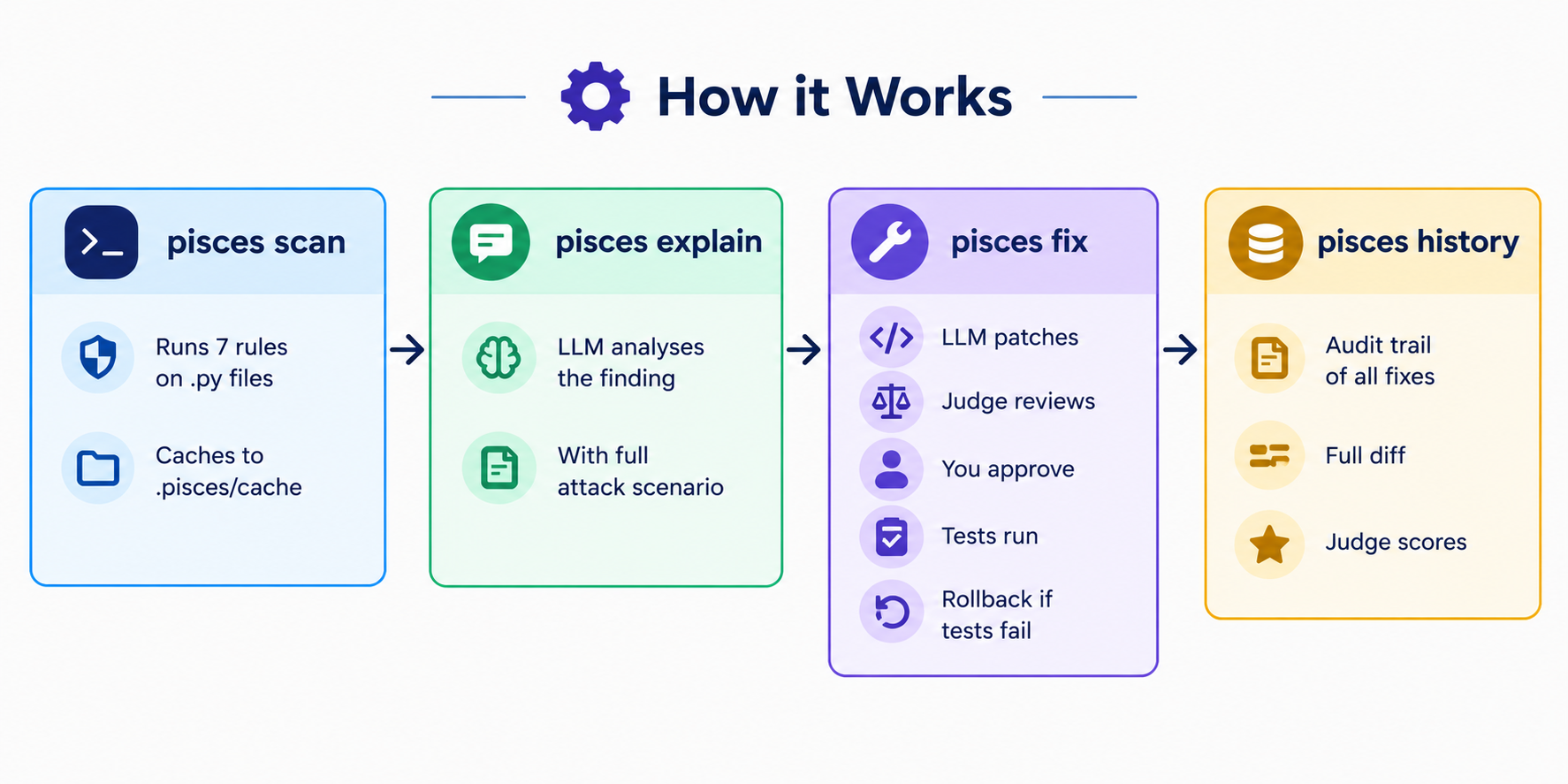
Pisces is a Python security CLI that detects common vulnerabilities, explains findings with an LLM, proposes minimal patches, validates them with your test suite, and rolls them back when validation fails. Source changes remain human-approved by default.
Key Features
- AST-first and regex-fallback security scanning.
- Seven built-in rules for secrets, command injection, unsafe subprocesses, unsafe deserialization, disabled TLS verification, code injection, and dangerous filesystem operations.
- Excludes
.venv,__pycache__, and other irrelevant directories. - LLM explanations with source snippets and AST context.
- Human-in-the-loop patch approval.
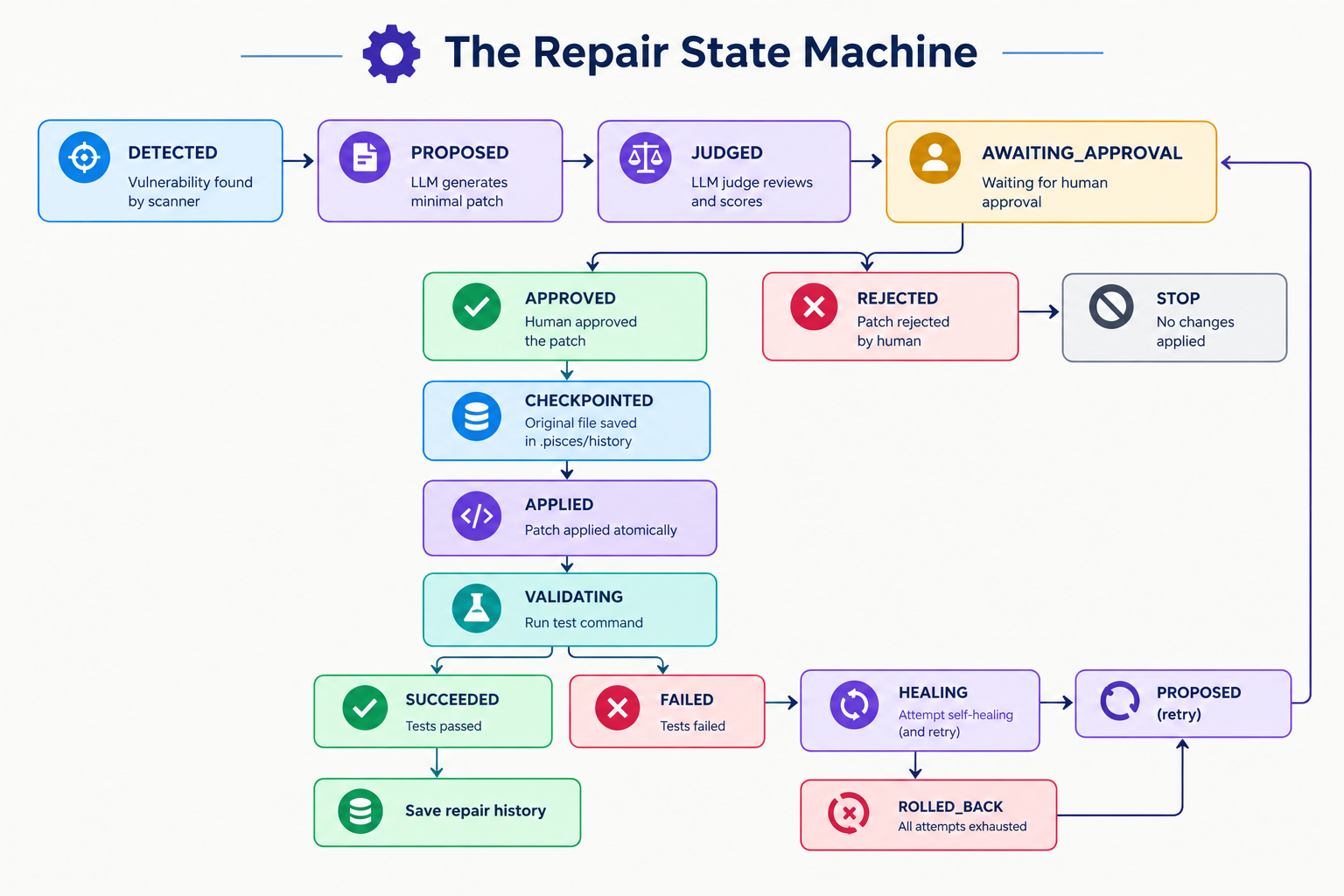
- Atomic patching, checkpoints, rollback, and self-healing retries.
- Local repair history and a debounced watch mode.
- OpenAI, Anthropic, Gemini, Groq, Ollama, and LM Studio support.
⚙️ How it Works
⚙️ The Repair State Machine
Installation
Pisces requires Python 3.10 or newer.
pip install pisces-cli
Quick Usage
pisces init
pisces config
pisces scan .
pisces explain path/to/file.py:42
pisces fix path/to/file.py:42
pisces history
Set the API key for the provider configured in pisces.toml, for example:
export GROQ_API_KEY="your-key"
On Windows PowerShell:
$env:GROQ_API_KEY = "your-key"
Ollama and LM Studio use local endpoints and do not require an API key.
Configuration
Run pisces init to create a project configuration:
[llm]
provider = "groq"
model = "llama-3.3-70b-versatile"

[repair]
max_attempts = 3
require_approval = true

[validation]
test_command = "pytest"

[scan]
exclude = [
    ".git",
    ".venv",
    "venv",
    "__pycache__",
    "node_modules",
    ".pisces",
    "dist",
    "build",
]
Do not put API keys in this file. Use environment variables instead.
CLI Reference
| Command | Purpose |
|---|---|
pisces init [PATH] |
Initialize pisces.toml and .pisces/. |
pisces config [PATH] --show |
Configure or display project settings. |
pisces scan [TARGET] -o FILE -s LEVEL |
Scan a directory or Python file. |
pisces explain FILE:LINE |
Explain a cached finding with an LLM. |
pisces fix FILE:LINE |
Generate, approve, apply, and validate a patch. |
pisces watch [PATH] |
Update project context as files change. |
pisces history [PATH] |
Browse repair records and diffs. |
pisces --version |
Show the installed version. |
pisces fix also supports --dry-run, --no-judge, and
--max-attempts N. pisces scan returns exit code 1 when findings meet
the selected severity threshold.
Built-in Security Rules
| Rule | ID | Severity | Detects |
|---|---|---|---|
| Hardcoded Secret | S001 |
HIGH | API keys, passwords, and tokens |
| Command Injection | S002 |
CRITICAL | Dynamic shell=True subprocess calls |
| Unsafe Subprocess | S003 |
HIGH | shell=True subprocess calls |
| Unsafe Deserialization | S004 |
HIGH | Unsafe pickle, marshal, or YAML loading |
| TLS Verify Disabled | S005 |
MEDIUM | Network calls using verify=False |
| Code Injection | S006 |
CRITICAL | Dynamic eval() or exec() |
| Dangerous Filesystem | S007 |
MEDIUM | Destructive operations on variable paths |
Architecture and Workflow
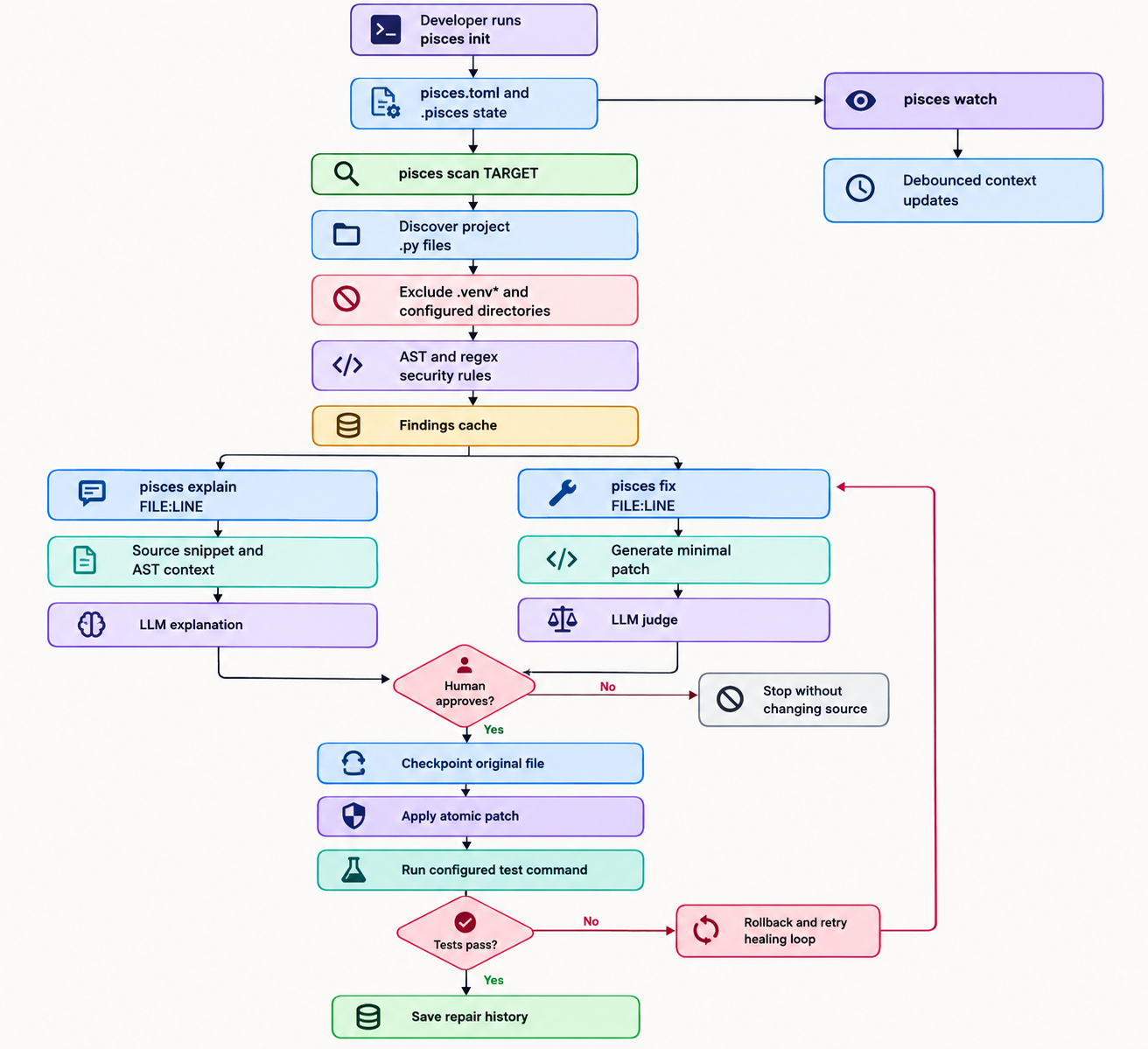
The workflow covers project initialization, deterministic security scanning, LLM-powered explanations and patch generation, human approval, checkpointing, test validation, rollback, and self-healing retries.
The deterministic scanner does not call an LLM. LLMs are used for explanations, patch generation, and optional patch judging. Source changes require human approval by default.
The deterministic scanner does not call an LLM. LLMs are used for explanations, patch generation, and optional patch judging.
Links
- GitHub: https://github.com/richochetclementine1315/pisces
- Issues: https://github.com/richochetclementine1315/pisces/issues
- PyPI: https://pypi.org/project/pisces-cli/
License
MIT © Mrinmoy Matilal
1 maintainer

Metadata
1 maintainer
Release files for pisces-cli 0.1.2
For a detailed explanation of source distributions (sdists) and built distributions (wheels), please see the package formats documentation.
Source distribution (sdist)
| File | Size | Uploaded | Provenance | |
|---|---|---|---|---|
| pisces_cli-0.1.2.tar.gz | 220.5 kB | Without provenance | Details |
Built distribution (wheel)
| File | Interpreter | ABI | Platform | Reset |
|---|---|---|---|---|
| pisces_cli-0.1.2-py3-none-any.whl | Python 3 | none | any | Details |
Total release size: 282.5 kB
Release files / pisces_cli-0.1.2.tar.gz
| Download URL | pisces_cli-0.1.2.tar.gz |
|---|---|
| Size | 220.5 kB |
| Tags | Source |
|
SHA-256 checksum How to use checksums |
ca23bcdebec0b7774bb7e39c20cf73a4be12c714ba2d513a72e3553294fb1cf1
|
|
BLAKE2b-256 checksum How to use checksums |
4b427916457c9f4b17946c0a91b90510ea467b6e7177975c303875eceff8e928
|
| Upload date | |
|
Uploaded using Trusted Publishing? What is trusted publishing? |
No |
| Uploaded via |
twine/7.0.0 CPython/3.13.16
|
Release files / pisces_cli-0.1.2-py3-none-any.whl
| Download URL | pisces_cli-0.1.2-py3-none-any.whl |
|---|---|
| Size | 62.1 kB |
| Tags | Python 3 |
|
SHA-256 checksum How to use checksums |
a6d81c797835242b80787bd348e122c6a89bebdcfa69e142bb6bc882b72416d8
|
|
BLAKE2b-256 checksum How to use checksums |
381705574d3df25eab46ca8eea8ff7ab466f1c146ddc4c122e68652752e393f8
|
| Upload date | |
|
Uploaded using Trusted Publishing? What is trusted publishing? |
No |
| Uploaded via |
twine/7.0.0 CPython/3.13.16
|
Security for pisces-cli 0.1.2
Provenance
Provenance describes where a file came from. On PyPI, provenance is shared via attestations, which provide a verifiable record of the build or publishing details. View details, limitations and caveats.
No provenance found
None of the files in this release were uploaded with provenance metadata.
A note on package security
PyPI is a repository for distributing packages, not a service for auditing them. While third-party security researchers and our staff do their best to detect and remove malicious packages, PyPI cannot guarantee the quality, security or suitability of any given package.
To learn more about protecting yourself from malicious actors, visit our package security documentation.














