
pitlane
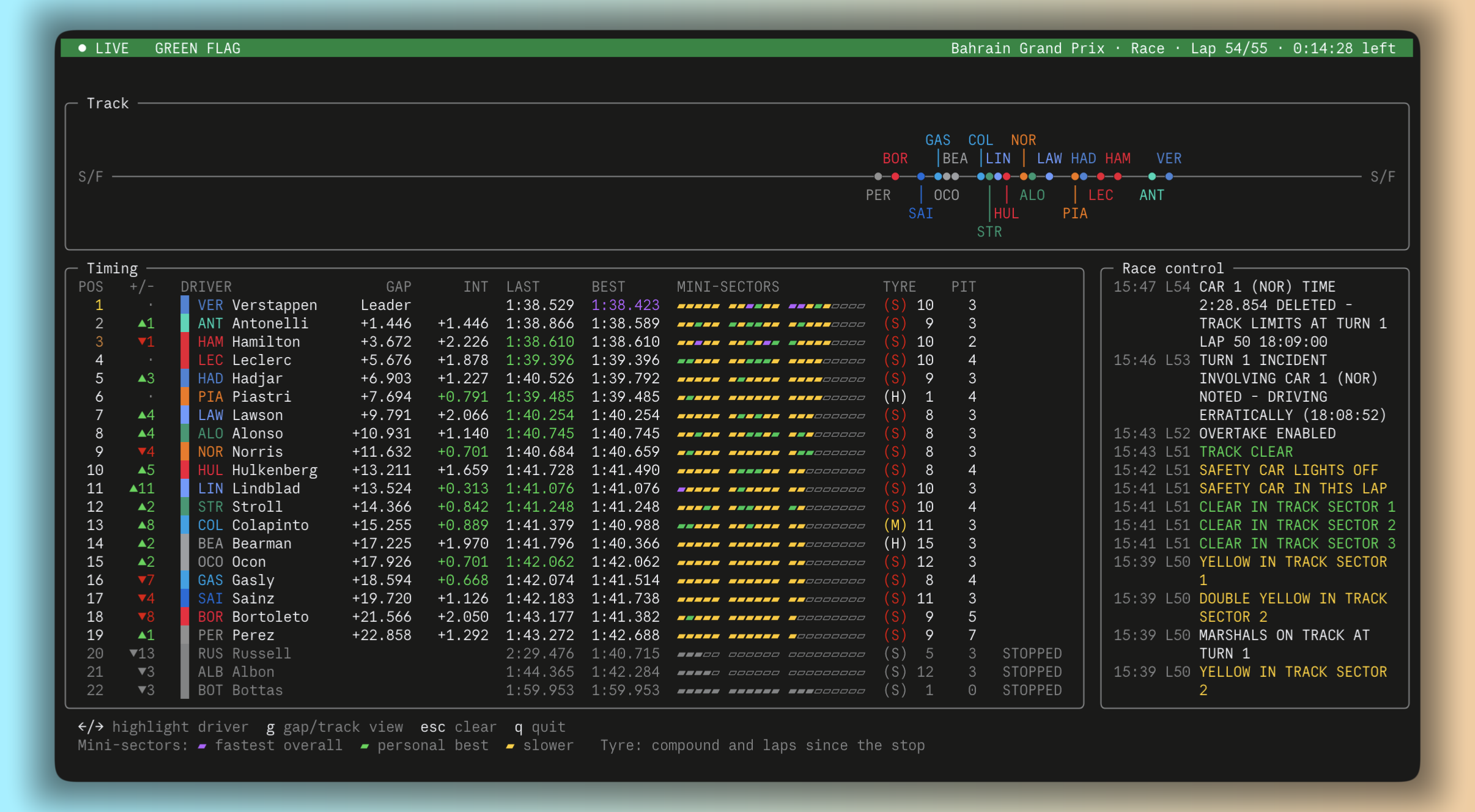
Formula 1 in your terminal. Live timing, a track position line, driver battles, standings, results and the season calendar. One Python file, no dependencies.
Features
Live timing (pitlane live), during practice, qualifying, sprint and race sessions:
- Status banner coloured by track status: green flag, yellow, Safety Car, VSC, red flag, chequered.
- Event pop-ups for overtakes, pit stops, fastest laps, retirements and Safety Car / red flags.
- Track line showing every car as a dot on one lap, so you can see who is physically near whom,
lapped cars included. Press
gto switch to a gap view, which shows trains of cars and DRS fights. - Timing tower:
- positions gained or lost against the grid
- gap and interval, with intervals under 1s highlighted for DRS range
- last and best laps
- live mini-sectors
- tyre compound and laps since the stop
- pit stops
- Driver focus (
←/→):- the battle with the cars ahead and behind, and whether each gap is closing
- live sector times and speed traps
- best laps and sectors, each with its rank in the field
- the full tyre history
- a lap-time graph
- Race control messages, colour-coded.
Everything else:
| Command | What it shows |
|---|---|
pitlane |
Dashboard: next race with session countdowns, last podium, both championships |
pitlane next [--watch] |
Next race weekend, with a live countdown to every session |
pitlane drivers |
Driver championship |
pitlane teams |
Constructor championship |
pitlane schedule |
Season calendar, with sprint weekends marked |
pitlane results [ROUND] |
Race result: grid, time or retirement, points, fastest lap |
pitlane quali [ROUND] |
Qualifying with Q1 / Q2 / Q3 times |
pitlane sprint [ROUND] |
Sprint result |
Options: -s 2021 for any past season, -r to skip the 5-minute cache, --no-color, --version.
All times are shown in your local timezone.
Install
You need Python 3.8 or newer. There are no other dependencies.
With pipx or uv (recommended, since they keep pitlane in its own environment):
pipx install pitlane
uv tool install pitlane
Or try it without installing anything:
uvx pitlane live
Plain pip install pitlane works too. You can also grab the single file and run it:
curl -O https://raw.githubusercontent.com/bilal-psd/pitlane/main/pitlane.py
python3 pitlane.py
To update later: pipx upgrade pitlane or uv tool upgrade pitlane.
Live timing keys
| Key | Action |
|---|---|
← / → (or h / l) |
Highlight a driver. Race control is replaced by their driver panel |
g |
Switch between track position and gap-to-leader view |
esc |
Clear the highlight |
q / Ctrl+C |
Quit |
The layout adapts to your terminal. On wide screens the side panel sits next to the timing tower. On narrower ones it moves underneath, and less important columns are hidden. Panels keep a fixed height, so nothing jumps around while the cars move.
How it works
-
Standings, results and calendar come from the Jolpica F1 API, the community-run successor to Ergast. Responses are cached for 5 minutes in
~/.cache/pitlane, and if you're offline the cached data is used. -
Live timing reads Formula 1's public live timing feed, the same one that powers the official live timing pages. No account is needed.
-
Track positions are estimates. The feed's car coordinates need an F1 TV subscription, so pitlane works out each car's place on the lap from timing data instead:
- Race: the leader's mini-sector progress, plus each car's gap.
- Practice and qualifying: each car's own mini-sectors.
They're usually within a second or two of where the car really is. They're less precise behind the Safety Car, when lap times change suddenly.
Limitations
- Driver history: F1 locks a session's archive until it ends. So the lap-time graph and "closing / dropping" trends in the driver panel only cover laps since you started pitlane.
- Not available: car telemetry, the circuit map, team radio and the live championship projection all need an F1 TV login.
- Platforms: tested on macOS. Linux should behave the same. On Windows, live timing runs without keyboard controls; WSL or Windows Terminal is recommended.
Disclaimer
pitlane is an unofficial fan project. It is not associated in any way with the Formula 1 companies. F1, FORMULA ONE, FORMULA 1, FIA FORMULA ONE WORLD CHAMPIONSHIP, GRAND PRIX and related marks are trade marks of Formula One Licensing B.V. Timing data belongs to its respective owners. This tool only displays it for personal use.
License
1 maintainer

Metadata
1 maintainer
Release files for pitlane 0.1.0
For a detailed explanation of source distributions (sdists) and built distributions (wheels), please see the package formats documentation.
Source distribution (sdist)
| File | Size | Uploaded | |
|---|---|---|---|
| pitlane-0.1.0.tar.gz | 24.1 kB | Details |
Built distribution (wheel)
| File | Interpreter | ABI | Platform | Reset |
|---|---|---|---|---|
| pitlane-0.1.0-py3-none-any.whl | Python 3 | none | any | Details |
Total release size: 48.4 kB
Release files / pitlane-0.1.0.tar.gz
| Download URL | pitlane-0.1.0.tar.gz |
|---|---|
| Size | 24.1 kB |
| Tags | Source |
|
SHA-256 checksum How to use checksums |
b461d035f9d592c868d0b493adb77763355d55af9e2b049045cb7c505729e3bc
|
|
BLAKE2b-256 checksum How to use checksums |
e6125c9d703648282fb01c6eae11200b0d0345a09aaab98b479643ff4f964096
|
| Upload date | |
|
Uploaded using Trusted Publishing? What is trusted publishing? |
Yes |
| Uploaded via |
twine/7.0.0 CPython/3.13.14
|
Provenance
Provenance describes where a file came from. On PyPI, provenance is shared via attestations, which provide a verifiable record of the build or publishing details. View details, limitations and caveats.


PyPI Publish Attestation
PyPI verified that this artifact, at this checksum, originated from the publisher listed below.
Signed by GitHub Actions, verified by PyPI on Oct 4, 2026.
Transparency logRelease files / pitlane-0.1.0-py3-none-any.whl
| Download URL | pitlane-0.1.0-py3-none-any.whl |
|---|---|
| Size | 24.3 kB |
| Tags | Python 3 |
|
SHA-256 checksum How to use checksums |
694c0bef4aba9ec3ca4f7ad77151ff1a63692c47abc8de2ace5fe5b183f78c85
|
|
BLAKE2b-256 checksum How to use checksums |
6f435ab8d573ff06b12b01b58caf18b7bad1987c95f7e2c9d99a2373d31a5c9f
|
| Upload date | |
|
Uploaded using Trusted Publishing? What is trusted publishing? |
Yes |
| Uploaded via |
twine/7.0.0 CPython/3.13.14
|
Provenance
Provenance describes where a file came from. On PyPI, provenance is shared via attestations, which provide a verifiable record of the build or publishing details. View details, limitations and caveats.
PyPI Publish Attestation
PyPI verified that this artifact, at this checksum, originated from the publisher listed below.
Signed by GitHub Actions, verified by PyPI on Oct 4, 2026.
Transparency log












