
pitt
an extremely simple terminal-based password manager
installation
pip
pip install pitt
uv
uv tool install pitt
demo
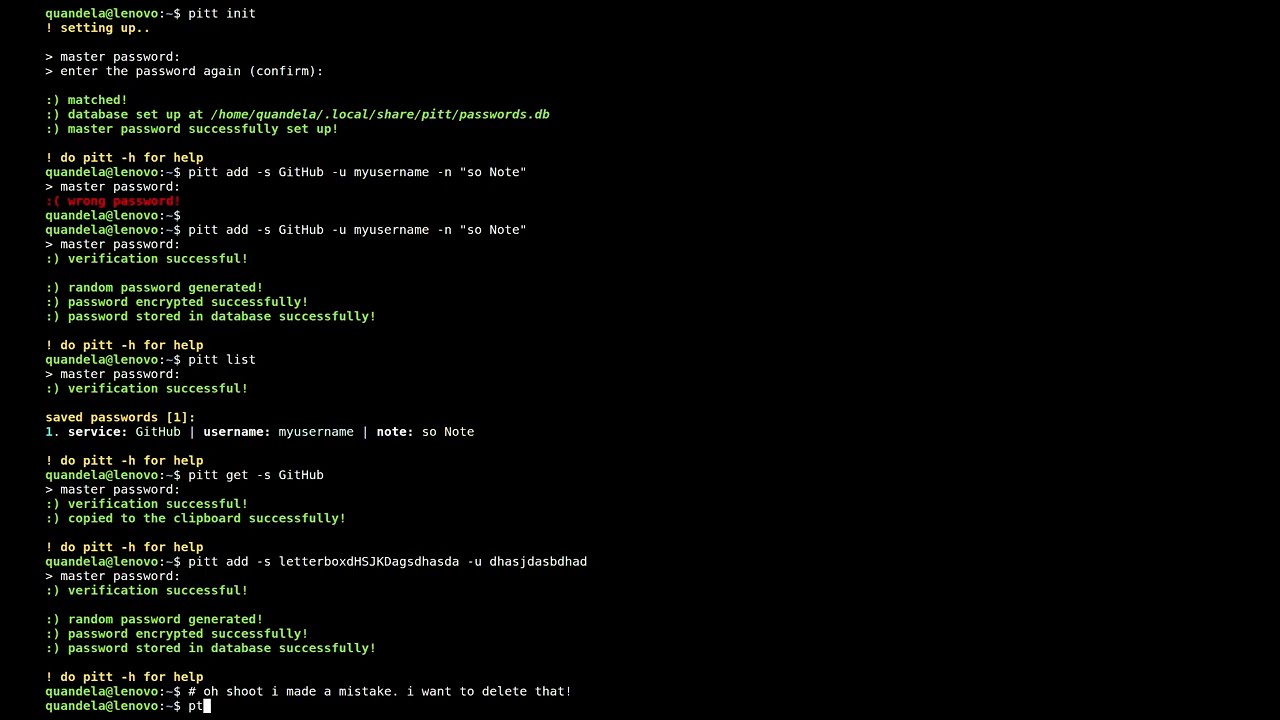
workflow
-
initializing the password manager:
- new:
pitt initand follow the instructions
- import from csv (exported pitt passwords):
pitt init -i /path/to/.csvand follow the instructions
- new:
-
adding a password:
- randomly generated password:
- you'd have to specify a service, username or a note that'll be attached with the newly generated password when saved.
pitt add -s service_example -u username_example -n "note example"
- custom password:
- you'd have to still specify one of the three things (username, service, note)
pitt add -s service_example -u username_example -n "note example" -c(note the added -c flag)
- randomly generated password:
-
deleting a password:
- you need to specify the service or username (can be both but cannot be the note) that is affiliated with the saved password you want to delete.
pitt del -s service_example -f(the -f or --force flag will disgard the 'are you sure' confirmations and straight up just deletes the password. use -f with caution)
-
getting a password:
- you need to specify the service or username (can be both) but cannot be the note that is affiliated with the saved password you want to get (copy to clipboard).
pitt get -s service_example
-
listing all the saved passwords' information:
pitt list(this will only list all the information that's attached to each password, not the passwords themselves.)
-
export all the saved passwords:
- interactive mode:
pitt exp
- manual mode:
pitt exp -p /path/to/wherever
- interactive mode:
license
this project is licensed under the MIT License - see the LICENSE file for details
credits
inspired by: themohitnair's sfnx | (https://github.com/themohitnair/sfnx)
curated by me alongside some rubber ducks
1 maintainer

Download files
Download the file for your platform. If you're not sure which to choose, learn more about installing packages.
Source Distribution
Built Distribution
Filter files by name, interpreter, ABI, and platform.
If you're not sure about the file name format, learn more about wheel file names.
Copy a direct link to the current filters
File details
Details for the file pitt-0.10.0.tar.gz.
File metadata
- Download URL: pitt-0.10.0.tar.gz
- Upload date:
- Size: 6.8 kB
- Tags: Source
- Uploaded using Trusted Publishing? No
- Uploaded via:
uv/0.12.10 {"installer":{"name":"uv","version":"0.12.10","subcommand":["publish"]},"python":null,"implementation":{"name":null,"version":null},"distro":{"name":"Arch Linux","version":null,"id":null,"libc":null},"system":{"name":null,"release":null},"cpu":null,"openssl_version":null,"setuptools_version":null,"rustc_version":null,"ci":null}
File hashes
| Algorithm | Hash digest | |
|---|---|---|
| SHA256 |
d05f6f8372a538f47b05f924f9f67e3db9e450751474ab1bb84f8d5352990cc4
|
|
| MD5 |
7a24f424fb43bf05ab07ad50d969f8e0
|
|
| BLAKE2b-256 |
dfe0f58755374f692780cd74cfdb4732203b81a7952793b71a732f9f54d08a71
|
File details
Details for the file pitt-0.10.0-py3-none-any.whl.
File metadata
- Download URL: pitt-0.10.0-py3-none-any.whl
- Upload date:
- Size: 8.9 kB
- Tags: Python 3
- Uploaded using Trusted Publishing? No
- Uploaded via:
uv/0.12.10 {"installer":{"name":"uv","version":"0.12.10","subcommand":["publish"]},"python":null,"implementation":{"name":null,"version":null},"distro":{"name":"Arch Linux","version":null,"id":null,"libc":null},"system":{"name":null,"release":null},"cpu":null,"openssl_version":null,"setuptools_version":null,"rustc_version":null,"ci":null}
File hashes
| Algorithm | Hash digest | |
|---|---|---|
| SHA256 |
cab9a049206d399b005407d02d1757dc72edb8445f04104dc94768392209f480
|
|
| MD5 |
9d4866ea704afc90a66fedf670bd48c5
|
|
| BLAKE2b-256 |
e34dbc77d50809a558fa7b456720b6c0098c37f508a63c5f65da1490687eb308
|














