
pivotal-lab
JupyterLab extension for Pivotal — a data analysis language for Python that compiles to Pandas, Polars, or DuckDB code.
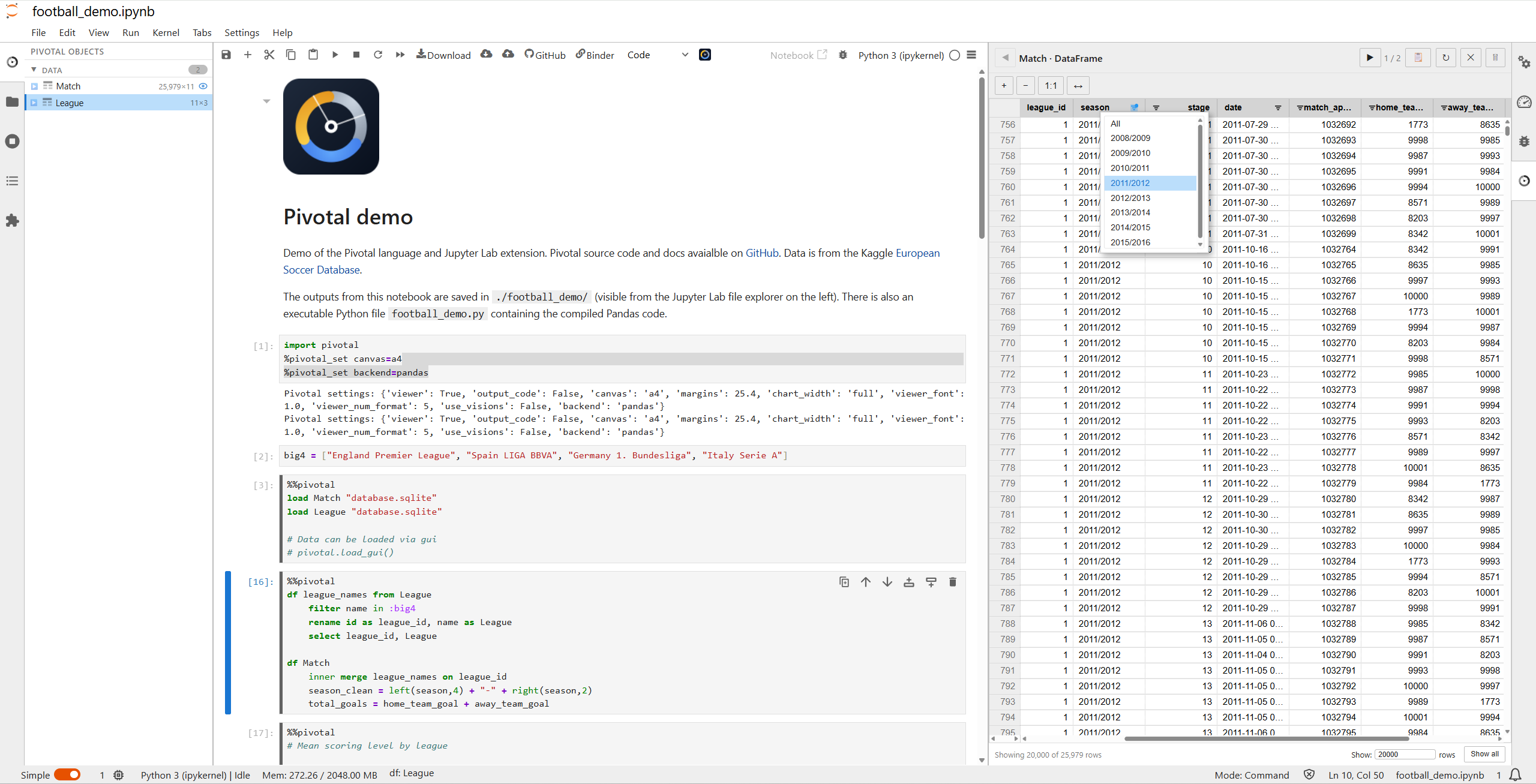
Features
%%pivotalcell magic to write and execute Pivotal DSL in JupyterLab notebooks- Syntax highlighting for Pivotal DSL cells
- Autocomplete for keywords, table names, and column names
- Interactive data viewer and object explorer for DataFrames, charts, and tables
- GUI controls for filtering and exploring data without writing code
Requirements
- JupyterLab 4.x
pivotal-lang(the Pivotal compiler and runtime)
Installation
pip install pivotal-lang
pip install pivotal-lab
Quick start
In a JupyterLab notebook, use the %%pivotal cell magic:
%%pivotal
load "data/sales.csv" as sales

with sales
    filter amount > 100
    group by region
        agg sum amount as total
Change the execution backend for the session:
%pivotal_set backend=duckdb
Documentation
Full documentation including syntax reference, backend guide, and examples:
License
MIT
1 maintainer

Metadata
1 maintainer
Release files for pivotal-lab 0.7.0
For a detailed explanation of source distributions (sdists) and built distributions (wheels), please see the package formats documentation.
Source distribution (sdist)
| File | Size | Uploaded | Provenance | |
|---|---|---|---|---|
| pivotal_lab-0.7.0.tar.gz | 356.8 kB | Without provenance | Details |
Built distribution (wheel)
| File | Interpreter | ABI | Platform | Reset |
|---|---|---|---|---|
| pivotal_lab-0.7.0-py3-none-any.whl | Python 3 | none | any | Details |
Total release size: 1.1 MB
Release files / pivotal_lab-0.7.0.tar.gz
| Download URL | pivotal_lab-0.7.0.tar.gz |
|---|---|
| Size | 356.8 kB |
| Tags | Source |
|
SHA-256 checksum How to use checksums |
84306690ebb30cc0f9992684bad336454ec79aca75f87f78968e5590362b9657
|
|
BLAKE2b-256 checksum How to use checksums |
72431c1c47c9aab5656fc5796891caf113c71abed3f05bde339776f7fb3a9f0d
|
| Upload date | |
|
Uploaded using Trusted Publishing? What is trusted publishing? |
No |
| Uploaded via |
twine/6.2.0 CPython/3.13.7
|
Release files / pivotal_lab-0.7.0-py3-none-any.whl
| Download URL | pivotal_lab-0.7.0-py3-none-any.whl |
|---|---|
| Size | 713.6 kB |
| Tags | Python 3 |
|
SHA-256 checksum How to use checksums |
7dff81553e8ca6c59f65943c2221c392794537d1b52263be8deb27cf14c671e2
|
|
BLAKE2b-256 checksum How to use checksums |
fa1107b00640f7ea2b9e5b3418b4cb5e199b89292b09e3fa4562eb2afd16c921
|
| Upload date | |
|
Uploaded using Trusted Publishing? What is trusted publishing? |
No |
| Uploaded via |
twine/6.2.0 CPython/3.13.7
|
Security for pivotal-lab 0.7.0
Provenance
Provenance describes where a file came from. On PyPI, provenance is shared via attestations, which provide a verifiable record of the build or publishing details. View details, limitations and caveats.
No provenance found
None of the files in this release were uploaded with provenance metadata.
A note on package security
PyPI is a repository for distributing packages, not a service for auditing them. While third-party security researchers and our staff do their best to detect and remove malicious packages, PyPI cannot guarantee the quality, security or suitability of any given package.
To learn more about protecting yourself from malicious actors, visit our package security documentation.














