
Local-first AI photo culling for professional photographers — 6-axis rubric, XMP/IPTC export, Lightroom & Capture One ready.

Project description
PixCull
Local-first AI photo culling for working photographers. Six calibrated scoring axes · burst folding · style-aware personalization · Lightroom / Capture One round-trip. No photo ever leaves your disk.
本地优先的 AI 摄影分拣:6 轴评分 · 连拍折叠 · 个性化学习 · Lr/C1 双向 round-trip, 原图永远不离开你的硬盘。
Install
pip install pixcull
Python 3.11–3.12. First run downloads the optional scoring models to
~/.pixcull/models/ (everything runs on-device; Apple-silicon accelerated).
Quickstart
# score a folder of photos (JPG / RAW) — keep/maybe/cull + per-axis rubric
pixcull run /path/to/photos -o ./out

# write the decisions back as XMP sidecars for Lightroom / Capture One
pixcull export ./out --xmp

# score a video → temporal windows + reel candidates
pixcull video clip.mp4 -o ./out

# fold near-duplicates, build a contact sheet, learn your taste, …
pixcull --help
# open the review workspace in your browser (v2.31 — now packaged)
pixcull serve
The pip package ships the full scoring engine, the CLI and the
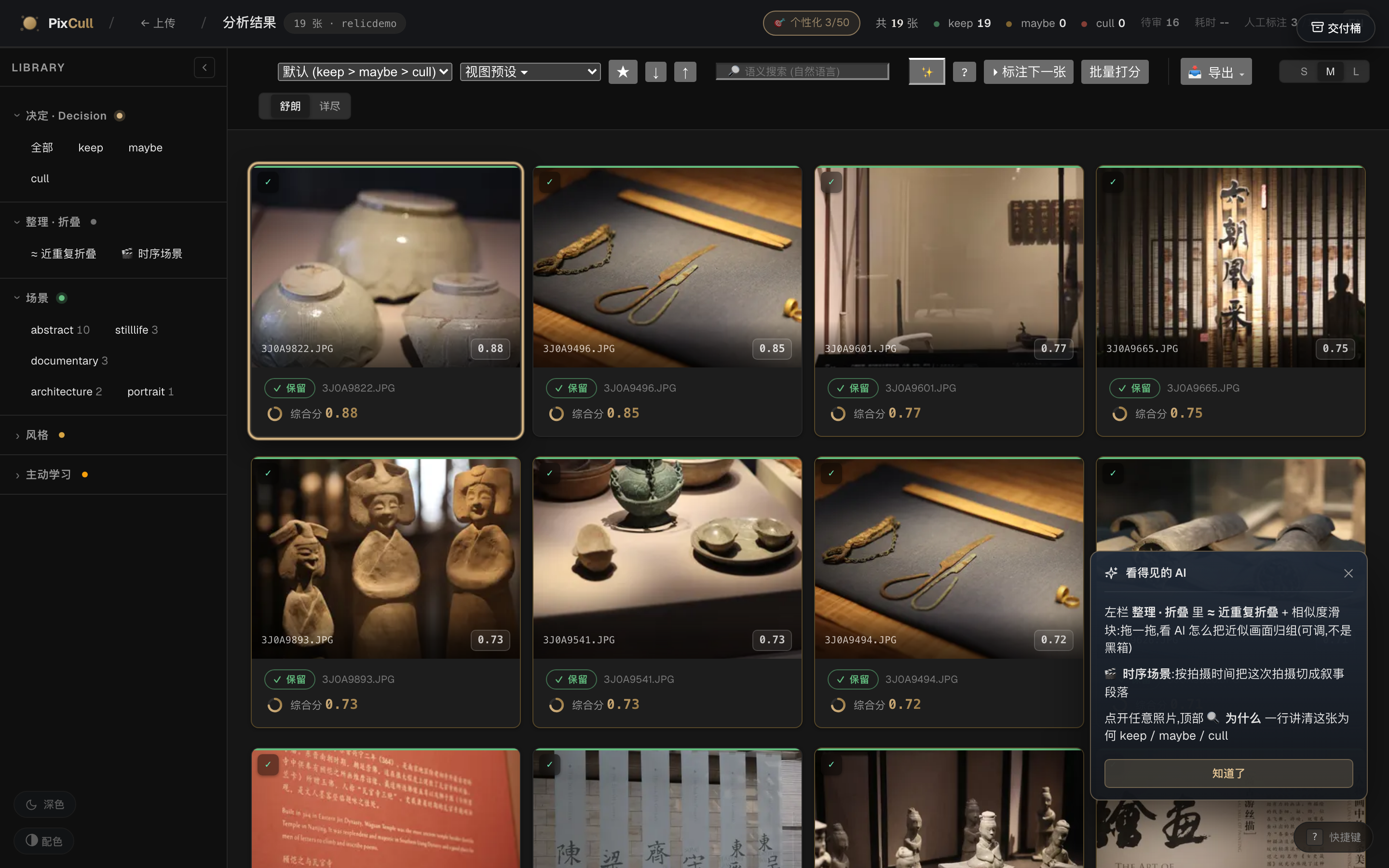
interactive review workspace: keyboard-first grid, ⌘K palette, per-axis
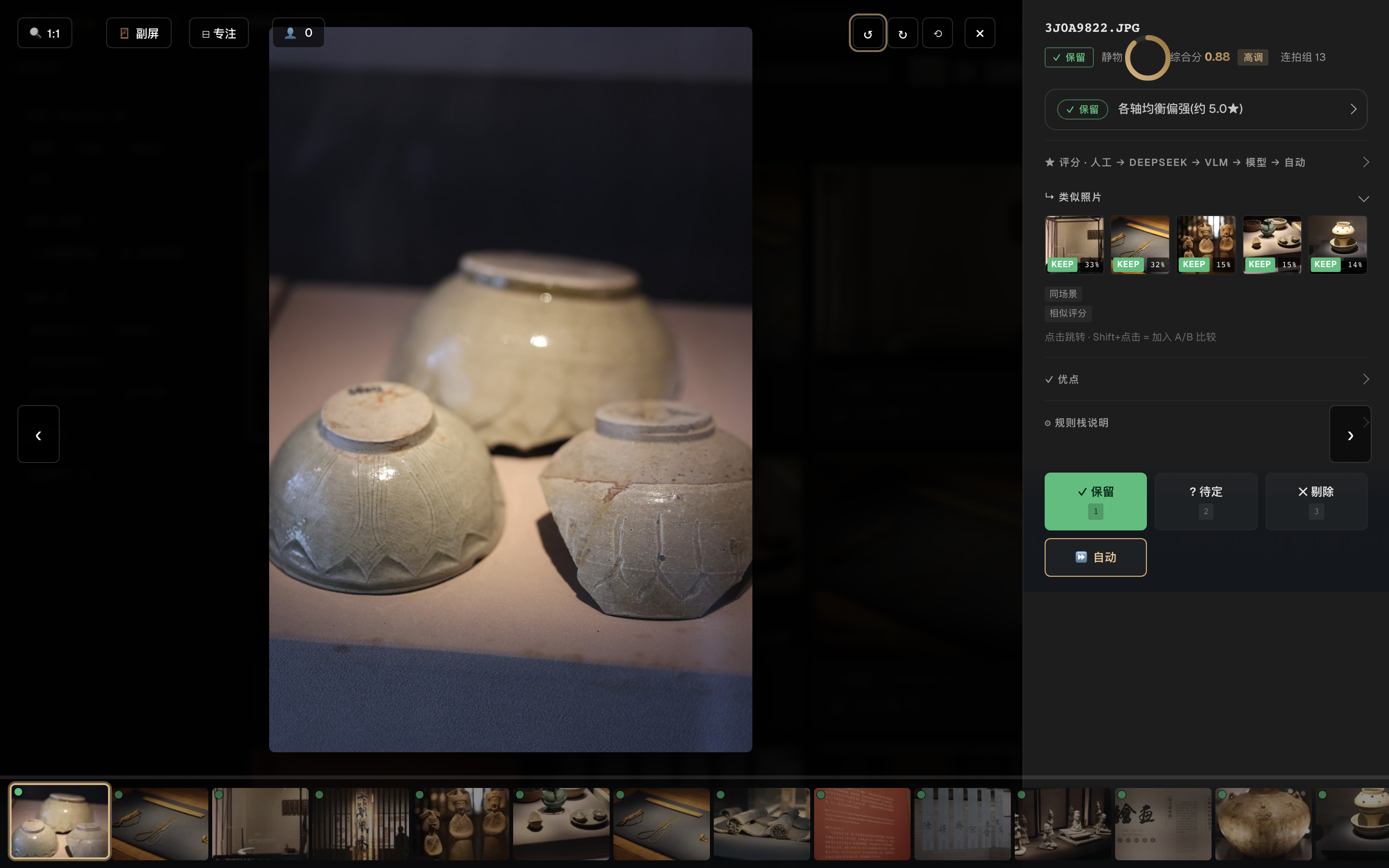
"why" explanations, n-way compare, maybe-resolution queue, XMP export.
pixcull serve stores runs under ~/.pixcull/runs by default
(--root to change, --host 0.0.0.0 to share on a trusted LAN).
Highlights
- Glass-box scoring — every keep/cull carries a per-axis breakdown (technical / subject / composition / light / moment / aesthetic) and a plain-language "why", not just a number.
- Learns your taste — corrections feed a personal profile that tilts the axis weights toward what you demonstrably value.
- Burst & near-dup folding — stacks collapse to the peak frame with a one-key compare.
- Video too — temporal scoring, audio events (laughter / applause / music), reel-candidate detection with the same glass-box treatment.
- 13 UI languages, dark/light studio-neutral themes, WCAG-conscious.
- Local-first, always — no uploads, no cloud, no telemetry.
Links
MIT © Chris Chen


Download files
Download the file for your platform. If you're not sure which to choose, learn more about installing packages.
Source Distribution
Built Distribution
Filter files by name, interpreter, ABI, and platform.
If you're not sure about the file name format, learn more about wheel file names.
Copy a direct link to the current filters
File details
Details for the file pixcull-2.45.0.tar.gz.
File metadata
- Download URL: pixcull-2.45.0.tar.gz
- Upload date:
- Size: 957.1 kB
- Tags: Source
- Uploaded using Trusted Publishing? No
- Uploaded via: twine/7.0.0 CPython/3.12.13
File hashes
| Algorithm | Hash digest | |
|---|---|---|
| SHA256 |
2ff25faef872e05b935bd84a47c37799b34c3bc52266c8fcb05b82b6575fdf02
|
|
| MD5 |
5f32fedcbe2c65e78540d17a63bc8451
|
|
| BLAKE2b-256 |
6cd8e144081e1005235321ffb3705683aa23004ff093f2b37804eb74edc47ae7
|
File details
Details for the file pixcull-2.45.0-py3-none-any.whl.
File metadata
- Download URL: pixcull-2.45.0-py3-none-any.whl
- Upload date:
- Size: 1.1 MB
- Tags: Python 3
- Uploaded using Trusted Publishing? No
- Uploaded via: twine/7.0.0 CPython/3.12.13
File hashes
| Algorithm | Hash digest | |
|---|---|---|
| SHA256 |
c461d20bdc0a1a1fb6039df5097506682be9fa233cd6d205eb35a39280bfef79
|
|
| MD5 |
b87e2a21ee3b4d78a06b4d50d0e26785
|
|
| BLAKE2b-256 |
da8f91225a18c4188e51eecad850a89013d8ff82e2453aef879f4ad15ea20d71
|






