
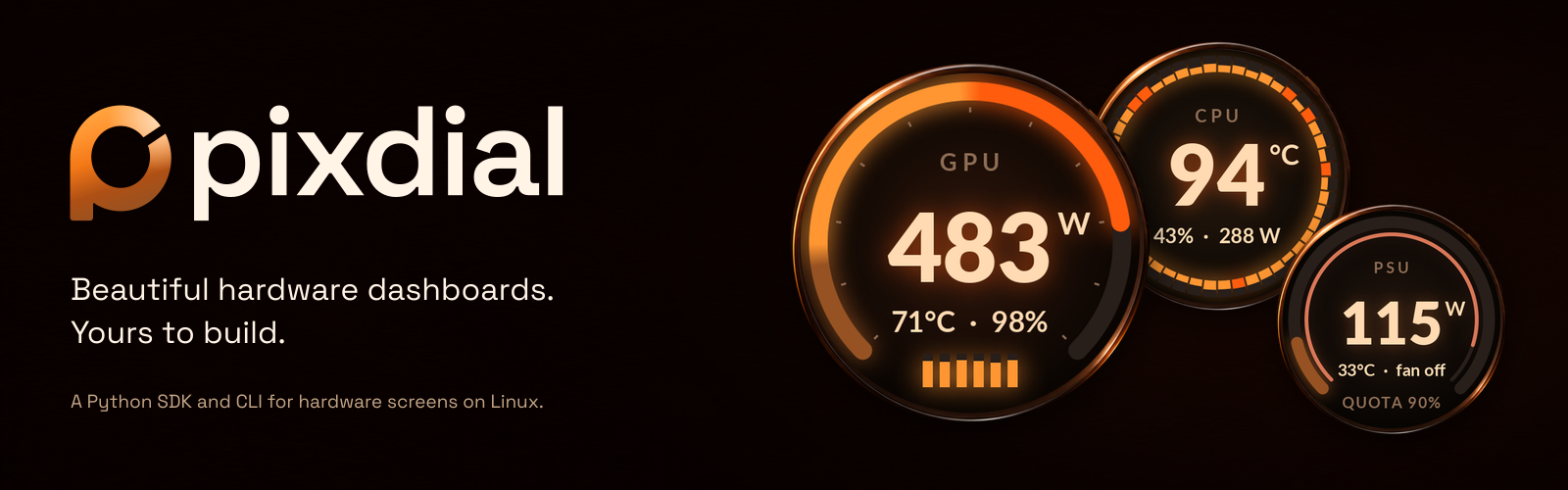



pixdial puts live hardware readings on Lian Li UNI FAN SL Wireless LCD (SL V3) fans on Linux. Build your own designs in Python.
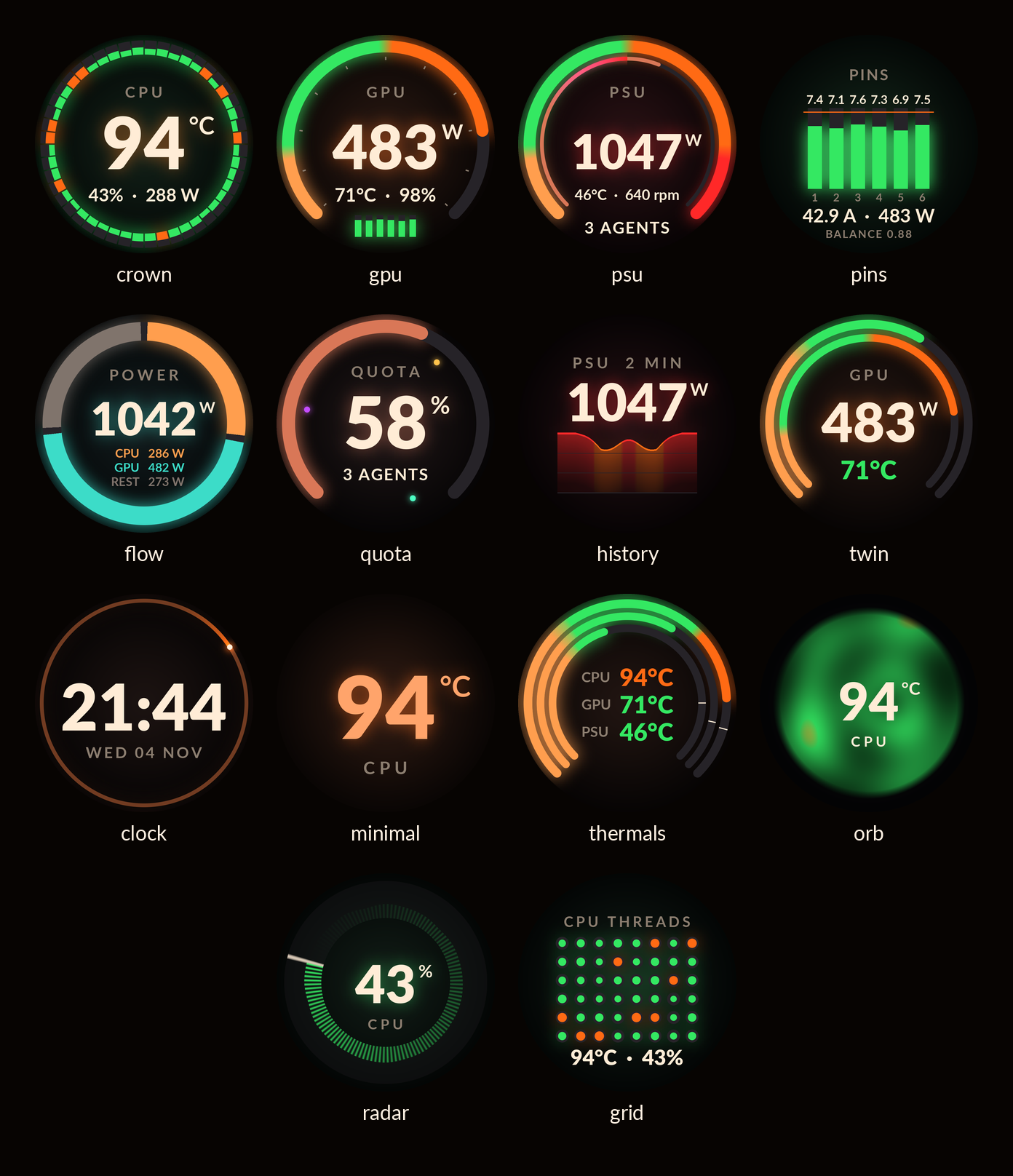
Pick from 14 designs for CPU load, temperatures, power, a clock and more, and match them to your build with three themes. pixdial draws each frame on the host and sends it over USB. It draws the screens only: fan speed and RGB stay with lian-li-linux, or whatever controls them now.
Website · Quick start · Supported hardware · Build a design
Quick start
You need Linux, Python 3.12 or newer, uv, and a
supported panel. For a preview without hardware, install pixdial and run
pixdial render crown --state busy --out preview.
-
Install.
uv tool install pixdial
pipx install pixdialworks too. If your shell cannot findpixdial, runuv tool update-shelland open a new terminal. -
Set up the panels.
pixdial setupSetup finds the attached panels and gives your user access to them. It prints the udev commands, then runs them through sudo, which asks for your password once. It writes
~/.config/pixdial/config.tomlwith a design for each panel and runs thepixdial doctorchecks.pixdial setup --dry-runshows the same steps and changes nothing. If a display is upside down, addturn = 180to its[[panels]]table in the config. -
Start the service.
pixdial service install
The panels show their designs now and after every login. To try pixdial in a terminal first, run
pixdial run; Ctrl-C stops it and turns the panels dark.
On a machine where pixdial starts with nobody logged in (linger, or no login at its seat), setup installs a group
rule instead and adds your user to the pixdial group. Log out and back in (on a machine with linger, reboot),
then run step 3.
To change the designs, give pixdial show one design per panel, such as pixdial show crown:ember for one panel.
pixdial show rotate cycles through the designs.
Set up by hand
-
Install the bundled udev rule. It gives the user logged in at the machine access to the panels. For a machine nobody logs in to, use the group rule instead.
sudo tee /etc/udev/rules.d/60-pixdial.rules >/dev/null <<'RULE'
SUBSYSTEM=="usb", ATTRS{idVendor}=="1cbe", ATTRS{idProduct}=="0005", TAG+="uaccess"
SUBSYSTEM=="usb", ATTRS{idVendor}=="1cbe", ATTRS{idProduct}=="0006", TAG+="uaccess"
RULE
sudo udevadm control --reload-rules
sudo udevadm trigger --subsystem-match=usb --action=add
pixdial devices
-
Write the config, with the serial that
pixdial devicesprinted in place ofYOUR_PANEL_SERIAL. Add one[[panels]]table and one layout entry for each extra panel.mkdir -p ~/.config/pixdial cat > ~/.config/pixdial/config.toml <<'TOML' layout = ["crown"] [[panels]] name = "cpu" serial = "YOUR_PANEL_SERIAL" TOML
-
Check the readings, then start pixdial.
pixdial doctor
pixdial service install
What it does
Designs that fit the screen
- Fourteen round layouts. Gauges, thread grids, power history, temperature rings and a clock, with type fitted to the panel.
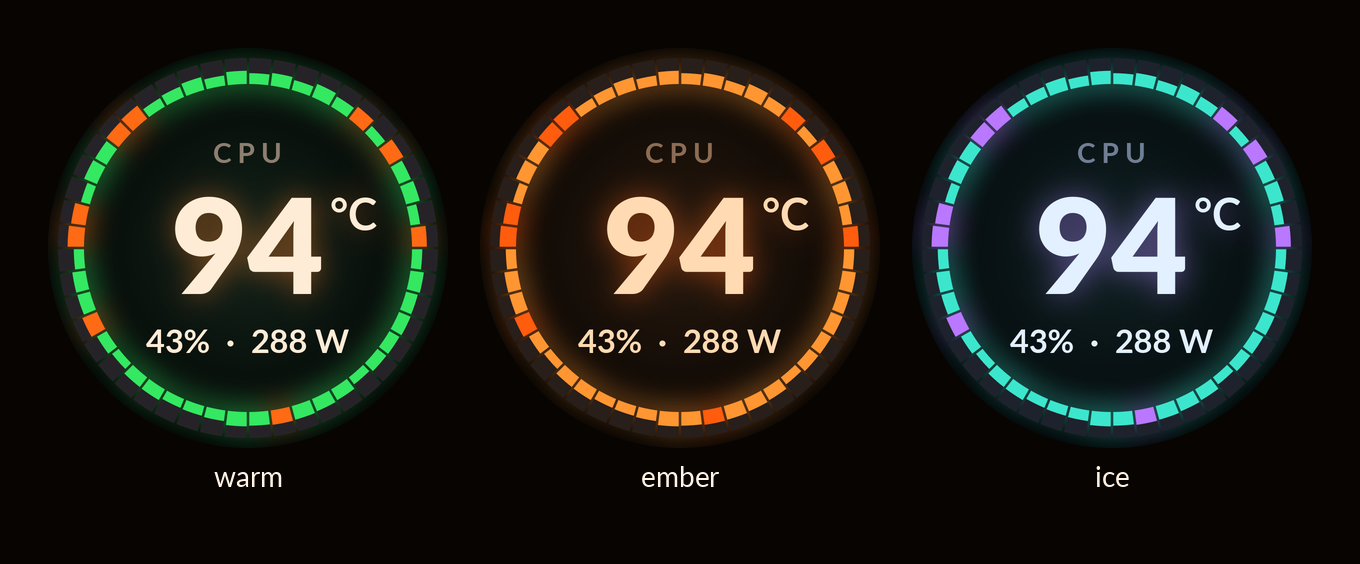
- Three themes.
warm,emberandice, selected per panel. Changing designs fades between them; animated designs run at up to 30 frames per second. - Readable when a sensor goes away. Missing or stale measurements show a dash instead of a frozen number.
Readings with useful scales
- Limits from the hardware. Gauges use reported sensor limits, GPU power limits and slowdown temperatures when available. Config overrides and fallback ranges cover the rest.
- Local sensors and your own data. CPU load and power, NVIDIA GPU readings, AMD GPU readings (experimental) and Linux hardware sensors are built in. Add PSU readings, connector currents or agent quota through configured sensors, a command that prints JSON, or a Python source.
Make it yours
- Python plugins. Add a design, source or device without changing pixdial. The runtime handles sampling, layout changes and frame delivery.
- Preview before connecting. Render PNGs and an HTML gallery from demo readings, or use the PNG device to try a live layout without a physical panel.
Supported hardware
| Panel | USB ID | Display | Status |
|---|---|---|---|
| Lian Li UNI FAN SL Wireless LCD (SL V3) | 1cbe:0005 |
Round, 400 × 400 | Tested |
| Lian Li UNI FAN TL Wireless LCD (TL V2) | 1cbe:0006 |
Round, 400 × 400 | Experimental |
Both run on Linux. Each LCD needs its own USB cable to a USB 2 header: despite the fan's name, its LCD receives
frames over USB, not over the wireless dongle. lsusb | grep 1cbe lists the panels attached.
The TL Wireless LCD speaks the same protocol as the SL V3, but no TL panel has been tested with pixdial yet. If you have one, a device test report helps. Other Lian Li LCDs and AIO screens need their own tested device plugins. pixdial does not control fan speed or RGB lighting.
CLI
| Command | Use |
|---|---|
pixdial setup |
Find the panels, give your user access, write the config and run the checks; --dry-run changes nothing. |
pixdial service install |
Start run now and at every login, as a systemd user service; service status and service remove too. |
pixdial run |
Run the configured panels until Ctrl-C or SIGTERM; --debug --log-file PATH writes a detailed log. |
pixdial show crown:ember |
Set one design per configured panel; show alone prints the selection, show rotate cycles designs. |
pixdial list |
List designs, themes, sources and devices, including installed plugins. |
pixdial devices |
Find attached panels and check access. |
pixdial render crown --out preview |
Render a PNG from demo readings; render --gallery preview builds the full gallery. |
pixdial doctor |
Check config, fonts, plugins, panel permissions, layout and source readings; --share prints them for an issue. |
Put --config PATH before the command to use another TOML file. Render states are idle, busy, waiting,
full and missing; --scale 2 produces an 800 × 800 image. Exit codes are 0 for success, 1 for a failed check
or no devices found, and 2 for a usage or config error.
Configuration covers multiple panels, sources, rotation and running at login.
Build a design
A design turns a snapshot into a picture. Save this as demo.py in a source checkout, then
run uv run python demo.py to write demo.png:
from pixdial.designs import LOAD, THEMES, Design
from pixdial.readings import Reading, Snapshot


class Load(Design):
    name = "load"
    shows = "CPU load on a gauge"

    def update(self, readings, now, dt):
        self.value = readings.number("cpu_load")
        return self.value, None

    def still(self):
        frame = self.frame(self.colour(LOAD, self.value))
        self.gauge(frame, self.value, LOAD)
        self.label(frame, "CPU LOAD")
        frame.number(246, self.value, "%")
        return frame.finish()


design = Load(THEMES["warm"])
design.update(Snapshot({"cpu_load": Reading(42, "%")}, wall=0), now=0, dt=0)
design.render(now=0).save("demo.png")
Register the class through the pixdial.designs entry-point group to use it by name in the CLI.
The plugin guide covers registration, animation, history and all three extension points.
examples/plugin is a complete installable plugin with a design, source and device.
What pixdial touches
The SL V3 driver talks to the panel over USB. It sends revision and version queries, frame-rate setup, JPEG
frames and brightness. It never sends firmware-write, reboot, panel-rotation, startup-image or storage commands.
The turn option rotates the image on the host. Stopping normally sets the panel's brightness to zero.
Built-in sensor readers read local files or NVML. pixdial has no telemetry or network service. A command source
or installed plugin can use the network and has your user's permissions; only configure code you trust.
doctor reads sources too, so it can execute configured commands.
show saves the layout in $XDG_STATE_HOME/pixdial/layout (default ~/.local/state/pixdial/layout).
render writes to its output directory; file devices write to the paths you configure.
See Architecture and Security for the boundaries.
Credits and alternatives
sgtaziz/lian-li-linux is a Linux replacement for L-Connect 3, under
the MIT licence. It controls fan speed, pumps and RGB lighting on many Lian Li devices, and drives their LCDs with
images, GIFs, video, sensor presets, templates and a template editor. pixdial's SL V3 driver follows its daemon's
slv3_lcd.rs and crypto.rs at v1.2.6 (Copyright (c) 2026 sgtaziz, MIT). Choose lian-li-linux for fans, RGB and
LCD layouts you build in an editor. pixdial draws the LCDs only, with its own designs, hardware-derived ranges and
Python plugins, and runs beside it.
Rendering uses Pillow and NumPy, with cryptography for the panel's command headers. The bundled Lato fonts by Łukasz Dziedzic retain their SIL Open Font License.
pixdial is not affiliated with Lian Li or the hardware manufacturers named here.
Troubleshooting and undo
pixdial doctor checks the config, the panels and each source, with a hint under each problem.
- No access to a panel.
doctorsaysno read and write access to ...: `pixdial setup` gives it. Runpixdial setup. - Another program holds a panel.
doctorsaysclaimed by <program> (pid <n>), so pixdial can't open it. If that is lian-li-linux, take the LCD out of its LCD list, as in the FAQ. - A panel stays black, or
pixdial devicesfinds none. Each LCD needs its own USB cable to a USB 2 header on the motherboard: the wireless dongle does not carry frames.lsusb | grep 1cbelists the panels attached. - GPU readings are missing. NVIDIA readings need the NVIDIA driver. AMD readings come from the experimental
amdgpusource: ifdoctorshows nothing forsource amdgpuon a Radeon card, a Radeon report helps. The default rotation leaves out designs whose readings no source gives, anddoctorlists them.
To report a problem, open a bug report
with the output of pixdial doctor --share. It takes out the panel serials, the hostname and your home folder.
For a log, stop the service first (only one program can hold a panel), run pixdial until the problem shows, then
press Ctrl-C and start the service again:
systemctl --user stop pixdial
pixdial run --debug --log-file pixdial.log
systemctl --user start pixdial
The log holds file paths, so read it before you share it.
To undo the setup, remove the service, the udev rule and pixdial's config and state folders:
pixdial service remove
sudo rm /etc/udev/rules.d/60-pixdial.rules
sudo udevadm control --reload-rules
rm -rf ~/.config/pixdial ~/.local/state/pixdial
uv tool uninstall pixdial
If setup added your user to the pixdial group, sudo gpasswd -d "$USER" pixdial takes it out. If you took
LCDs out of lian-li-linux's config, put them back and restart its daemon.
FAQ
Can I try it without a panel?
Yes. pixdial render crown --out preview needs no hardware. For a running layout, use the
PNG device example. Rendering also works on macOS;
physical panel support is Linux-only.
Why are some values missing?
The default sources read CPU load, RAPL package power, AMD GPU readings (experimental), NVIDIA GPU readings and
CPU temperature via hwmon. Availability depends on your hardware, drivers and file permissions. The default
rotation leaves out designs whose readings no source gives. PSU readings, connector currents and agent
quota need additional sources. pixdial doctor shows what each source can read.
Can I run it alongside lian-li-linux?
Yes. lian-li-linux keeps fan speed and RGB, and pixdial draws the LCDs. Each LCD takes one program at a time, so
take the LCDs pixdial drives out of lian-li-linux's LCD list: delete their entries under lcds in its
config.json (in ~/.config/lianli/ for its user service, /var/lib/lianli/ for its system service). Then
restart its daemon:
systemctl --user restart lianli-daemon       # the user service
sudo systemctl restart lianli-daemon-system  # the system service
While another program still holds a panel, pixdial doctor names it.
Does it need root?
No. pixdial runs as your user. The panel needs read and write access to its USB device node: pixdial setup
installs a udev rule for that through sudo, after it prints the commands. That is the only step that runs as
root. RAPL counters can need separate read permission.
Development
git clone https://github.com/YordiLorenzo/pixdial.git
cd pixdial
uv sync --locked
uv run ruff check
uv run mypy
uv run pytest -q
CONTRIBUTING.md covers golden images, rebuilding the graphics and adding designs, sources or devices. Architecture maps the code; CHANGELOG.md tracks changes. Report vulnerabilities privately through SECURITY.md.
Licence
pixdial is free software under the GNU General Public License, version 3 or later
(GPL-3.0-or-later). You may use, modify and redistribute it, including commercially, under those terms.
Bundled fonts keep their own licence as credited above.
1 maintainer

Metadata
1 maintainer
Release files for pixdial 0.1.1
For a detailed explanation of source distributions (sdists) and built distributions (wheels), please see the package formats documentation.
Source distribution (sdist)
| File | Size | Uploaded | Provenance | Actions |
|---|---|---|---|---|
| pixdial-0.1.1.tar.gz | 8.9 MB | Without provenance | Details for pixdial-0.1.1.tar.gz |
Built distribution (wheel)
| File | Interpreter | ABI | Platform | Actions Reset |
|---|---|---|---|---|
| pixdial-0.1.1-py3-none-any.whl | Python 3 | none | any | Details for pixdial-0.1.1-py3-none-any.whl |
Total release size: 10.0 MB
Release files / pixdial-0.1.1.tar.gz
| Download URL | pixdial-0.1.1.tar.gz |
|---|---|
| Size | 8.9 MB |
| Tags | Source |
|
SHA-256 checksum How to use checksums |
ece1b98e0ba54a41f6d9d10a4b7f98b94ad3e026e15c395b828cb71015d6dfe3
|
|
BLAKE2b-256 checksum How to use checksums |
2373f837434a81232ec37067fff062b96078ee20ae90174048b5fefa3cfc9267
|
| Upload date | |
|
Uploaded using Trusted Publishing? What is trusted publishing? |
No |
| Uploaded via |
uv/0.13.4 {"installer":{"name":"uv","version":"0.13.4","subcommand":["publish"]},"python":null,"implementation":{"name":null,"version":null},"distro":{"name":"macOS","version":null,"id":null,"libc":null},"system":{"name":null,"release":null},"cpu":null,"openssl_version":null,"setuptools_version":null,"rustc_version":null,"ci":null}
|
Release files / pixdial-0.1.1-py3-none-any.whl
| Download URL | pixdial-0.1.1-py3-none-any.whl |
|---|---|
| Size | 1.1 MB |
| Tags | Python 3 |
|
SHA-256 checksum How to use checksums |
a8a9521108258474fb30491161b022d60059c544384dcc9241386e5c24a8afb5
|
|
BLAKE2b-256 checksum How to use checksums |
91dee33a78f0c2f8f6b76cf5d1c07066fa8e21a3b59d7e383551ae91398aeb72
|
| Upload date | |
|
Uploaded using Trusted Publishing? What is trusted publishing? |
No |
| Uploaded via |
uv/0.13.4 {"installer":{"name":"uv","version":"0.13.4","subcommand":["publish"]},"python":null,"implementation":{"name":null,"version":null},"distro":{"name":"macOS","version":null,"id":null,"libc":null},"system":{"name":null,"release":null},"cpu":null,"openssl_version":null,"setuptools_version":null,"rustc_version":null,"ci":null}
|
Security for pixdial 0.1.1
Provenance
Provenance describes where a file came from. On PyPI, provenance is shared via attestations, which provide a verifiable record of the build or publishing details. View details, limitations and caveats.
No provenance found
None of the files in this release were uploaded with provenance metadata.
A note on package security
PyPI is a repository for distributing packages, not a service for auditing them. While third-party security researchers and our staff do their best to detect and remove malicious packages, PyPI cannot guarantee the quality, security or suitability of any given package.
To learn more about protecting yourself from malicious actors, visit our package security documentation.














