
Image prevalidation tool - PixelPatrol and its add-ons packages


Project description
 PixelPatrol
Scientific Dataset Quality Control and Data Exploration Tool

PixelPatrol is an early-version tool designed for the systematic validation of scientific image datasets. It helps researchers proactively assess their data before engaging in computationally intensive analysis, ensuring the quality and integrity of datasets for reliable downstream analysis.
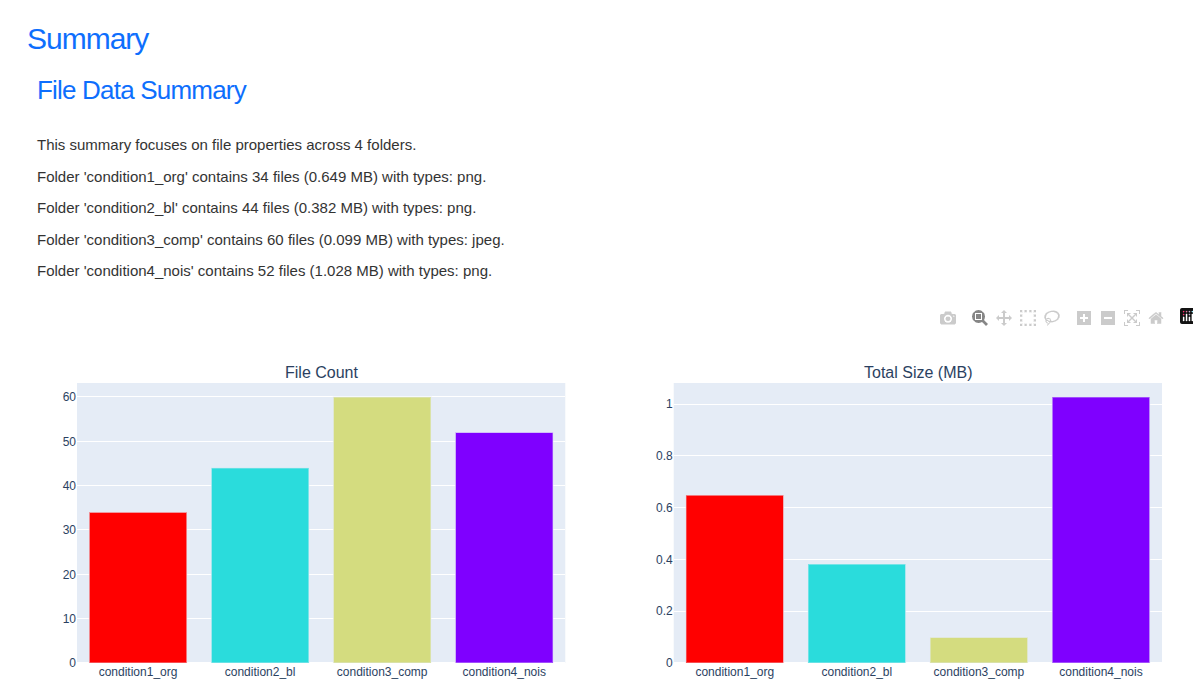
PixelPatrol's main viewer provides an interface for dataset exploration.
Features
- Dataset-wide Visualization and Interactive Exploration
- Detailed Statistical Summaries: Generates plots and distributions covering image dimensions.
- Early Identification of Issues: Helps in finding outliers and identifying potential issues, discrepancies, or unexpected characteristics, including those related to metadata and acquisition parameters.
- Interactive Processing Dashboard: A visual web interface to configure and launch processing (
pixel-patrol launch). - Interactive Viewer: Reports open as a fast static web app served locally — or deploy to GitHub Pages / any static host for sharing without a running server.
- Interactive comparison across experimental conditions or other user defined metrics.
Coming soon:
- Big(ger) data support: While processing already runs in parallel, we're working on handling bigger and bigger datasets and GPU support.
- Support for more file formats
Installation
PixelPatrol requires Python 3.11 or higher.
PixelPatrol and its add-on packages are published on PyPI: https://pypi.org/project/pixel-patrol/
1. Install uv (recommended)
uv provides fast virtualenv management and dependency resolution. Install it once and reuse it for all workflows.
-
🐧 macOS / Linux:
curl -Ls https://astral.sh/uv/install.sh | sh
-
🪟 Windows:
powershell -ExecutionPolicy Bypass -c "irm https://astral.sh/uv/install.ps1 | iex"
After installation, restart your shell (if needed) and verify it works:
uv --version
If you prefer an alternative installation method, consult the official guide: https://docs.astral.sh/uv/getting-started/installation/
2. Install PixelPatrol
Before installing the package, activate a clean virtual environment so its dependencies stay isolated from other projects. Create one with your preferred tool:
- 🐧 macOS / Linux:
uv venv --python 3.12 pixel-patrol-env
source pixel-patrol-env/bin/activate
- 🪟 Windows PowerShell:
uv venv --python 3.12 pixel-patrol-env
pixel-patrol-env\\Scripts\\Activate.ps1
Option A - Default - Full pixel-patrol Bundle
This is the quickest path to running Pixel Patrol with everything ready to go. Install it and you get the CLI plus the standard widgets, processors, and loaders.
Works the same on macOS, Windows (PowerShell), and Linux terminals:
uv pip install pixel-patrol
pixel-patrol --help
The first command downloads the latest release and adds pixel-patrol to your PATH; the second command confirms it's ready.
Option B — Build your own stack (pixel-patrol-base + add-ons)
Advanced users may prefer to assemble only the components they need:
uv pip install pixel-patrol-base
Add functionality by layering optional packages:
pixel-patrol-image– extra processors and widgets for image analysis.pixel-patrol-loader-bio– Adds the loaders Bioio and Zarr.
You can also add your own packages to add loaders, processors, and widgets to PixelPatrol.
See examples/minimal-extension for a minimal template.
Getting Started
- Install PixelPatrol (Instructions are in the previous section).
- Have all the files you would like to inspect under a common base directory.
- You can also specify subdirectories within the base directory — only those directories will be processed.
- Process your data — choose your way:
- Visual Interface: Run
pixel-patrol launchto configure and launch processing via a web interface. - Command Line: Run
pixel-patrol processto process your dataset and save a.parquetreport file. - Python API: Use
api.process_files(project)directly in a script.
- Visual Interface: Run
- Open the viewer: run
pixel-patrol view <report.parquet>to explore your data interactively in the browser.
Example visualizations
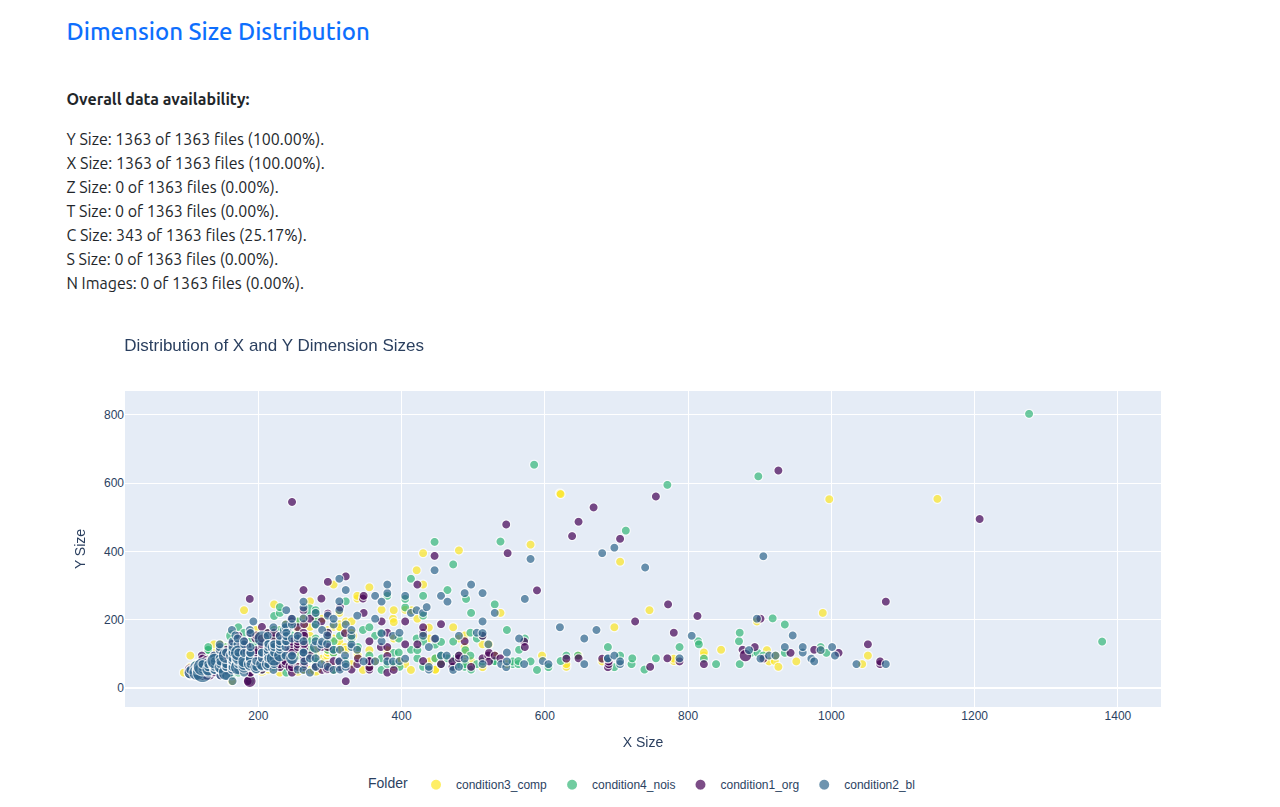
- Visualize the distribution of image sizes within your dataset.*
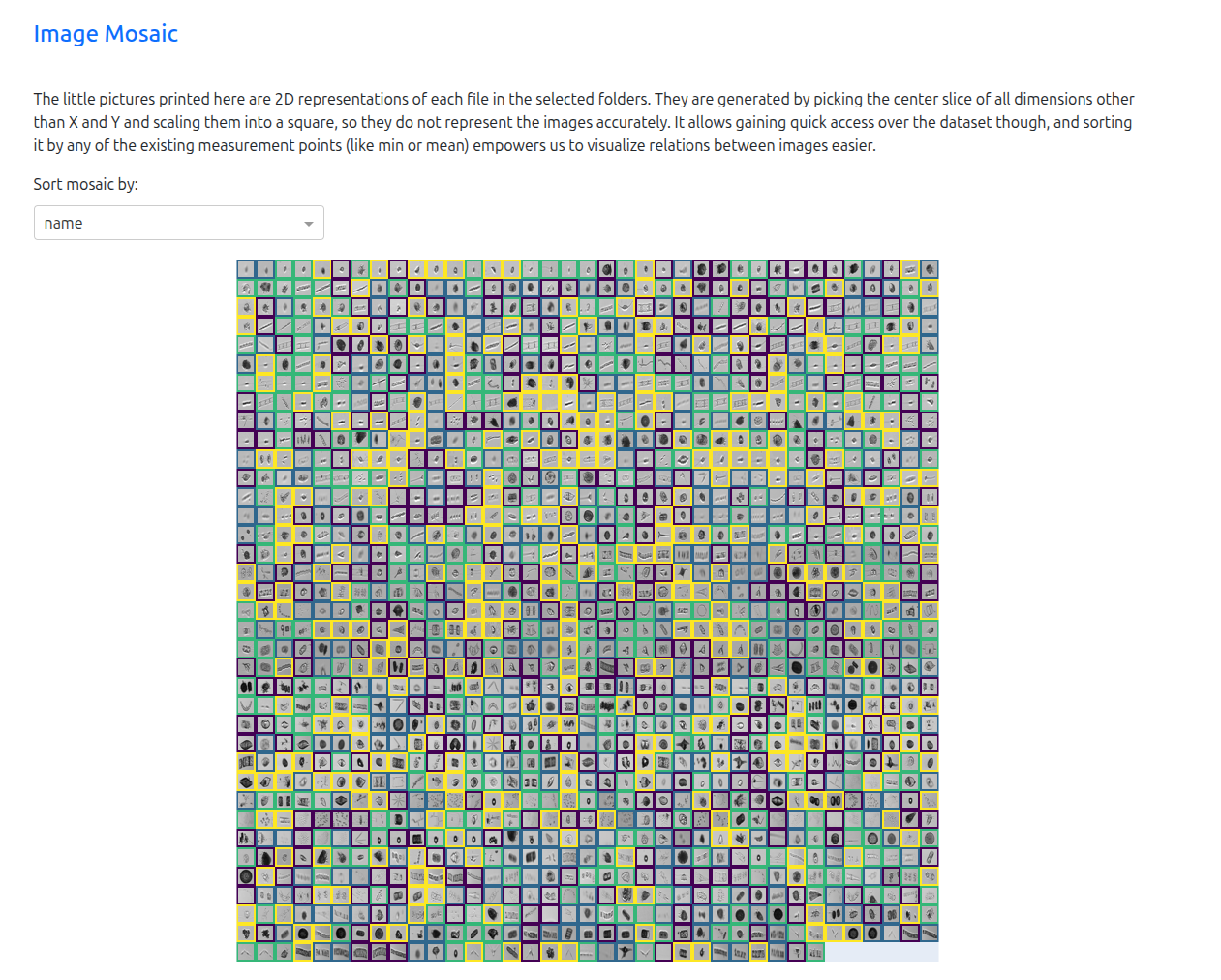
- A mosaic view can quickly highlight inconsistencies across images.*
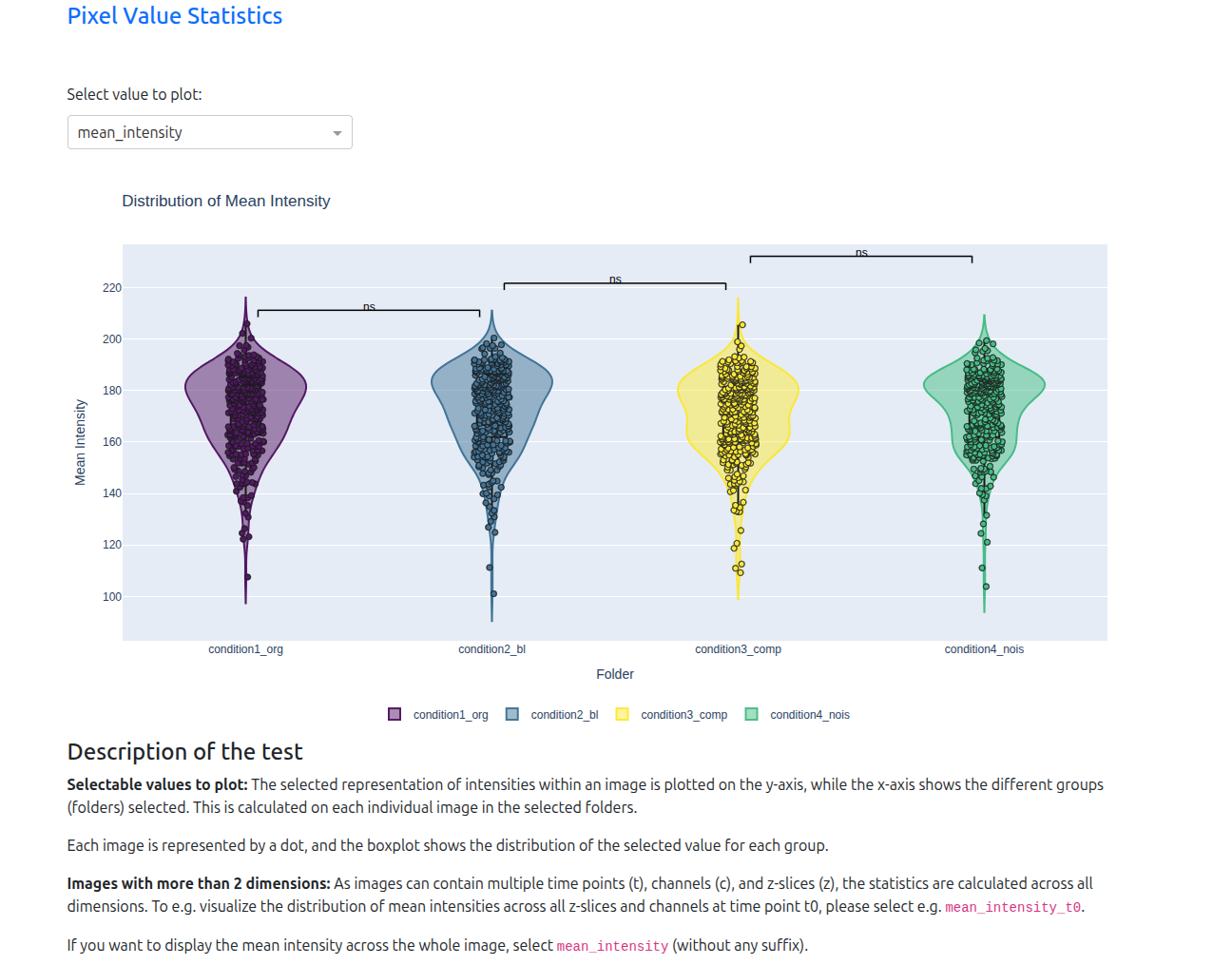
- Many additional plots and distributions are available.*
Interactive Processing Dashboard
For users who prefer a visual interface over command-line arguments, PixelPatrol includes the Processing Dashboard.
This will open a web browser tab that allows you to quickly and interactively configure your project.
To launch it, open your terminal (activate the env) and run:
pixel-patrol launch
Command-Line Interface
The typical two-step workflow:
- Run
pixel-patrol processto scan your dataset and write a.parquetreport file. - Run
pixel-patrol viewto open that report in the interactive viewer.
Common commands
pixel-patrol --help
pixel-patrol process --help
pixel-patrol view --help
pixel-patrol process
Scans a directory tree, applies the selected loader and processors, and writes a .parquet report file.
pixel-patrol process <BASE_DIRECTORY> -o <OUTPUT.parquet> [OPTIONS]
Key options:
BASE_DIRECTORY– the root folder that contains your dataset.-o, --output PATH(required) – where to save the generated.parquetreport file.--name TEXT– project name (defaults to the folder name).-p, --paths PATH– Optional. Subdirectories to treat as experimental conditions; use multiple-pflags for multiple paths. Resolved relative toBASE_DIRECTORY. If omitted, everything underBASE_DIRECTORYis processed.-l, --loader TEXT– Optional but recommended. Loader plug-in (e.g.bioio,zarr). If omitted, only basic file info is collected.-e, --file-extensions EXT– Optional. File extensions to include (e.g.tif,png). Defaults to all extensions supported by the loader.--flavor TEXT– Optional label shown next to the Pixel Patrol title in the viewer.--description TEXT– Optional free-form description embedded in the report metadata.--processors-include NAME/--processors-exclude NAME– Run only specific processors or skip named ones.--max-workers N– Number of parallel Dask workers (default: CPU count).--mb-per-task N– Memory budget per task in MB (default: 512). Lower for very large images.--max-images-per-task N– Max images per task for both regular and container files (default: 200). Lower values give more frequent progress updates.--slice-size DIM=SIZE– Spatial chunk size per dimension, e.g.--slice-size Z=1. Repeatable.--rows-per-part N– Flush intermediate results to disk every N rows (default: 10000). Lower values reduce memory use on very large datasets.--parquet-row-group-size N– Rows per parquet row group (default: 2048). Smaller values speed up thumbnail sampling in the viewer.--log-file– Write a debug log file alongside the output parquet.
Example (BioIO loader, two conditions, filtering to tif and png):
pixel-patrol process examples/datasets/bioio -o examples/out/my_report.parquet \
  --loader bioio --name "my_project" -p tifs -p pngs -e tif -e png
pixel-patrol view
Opens a .parquet report in the interactive viewer. Starts a local HTTP server and opens the browser automatically.
pixel-patrol view <REPORT.parquet> [OPTIONS]
Key options:
--port N– Port for the local server (default: 8052).--no-browser– Start the server without opening the browser.--group-by COL– Column to group by on first load.--filter-col COL,--filter-op OP,--filter-val VAL– Apply an initial filter (ops:eq,in,gt,lt,contains, …).--dim KEY=VALUE– Pre-select a dimension slice, e.g.--dim z=1 --dim t=0. Repeatable.--widgets-exclude NAME– Hide a viewer plugin by ID. Repeatable.--palette NAME– Color palette (default:tab10).
Example:
pixel-patrol view examples/out/my_report.parquet \
  --group-by file_extension \
  --filter-col dtype --filter-op eq --filter-val uint8 \
  --dim z=1 --dim t=0
pixel-patrol build-viewer-html
Packages the viewer as a self-contained static file or a GitHub Pages–style site so you can share or host your report without running a server.
# Single self-contained HTML file (share alongside the .parquet):
pixel-patrol build-viewer-html -o viewer.html

# GitHub Pages / static host site folder:
pixel-patrol build-viewer-html -o gh-pages-out/
Open the HTML file directly in the browser, or deploy the site folder to any static host and load your report via a ?data= URL pointing to the parquet.
Troubleshooting
- The CLI validates loader names at runtime; if you see
Unknown loader, ensure the corresponding plug-in package is installed and available in the active environment.
API Use
The examples/ directory demonstrates how to use the Pixel Patrol API and — for advanced users — how to extend it with custom loaders, processors, and widgets.
-
examples/01_quickstart_simple.py– minimal end-to-end walkthrough: create a project, process files, open the viewer.cd examples && uv run 01_quickstart_simple.py
-
examples/02_quickstart_extended.py– same flow with more configuration options demonstrated.
The core API steps:
from pixel_patrol_base import api

project = api.create_project("my_project", base_dir="path/to/data", loader="bioio")
api.add_paths(project, ["condition_a", "condition_b"])  # optional
api.process_files(project, selected_file_extensions={"tif", "png"})
api.view(project)  # opens the viewer in the browser
examples/minimal-extension/– complete plug-in package example: a custom loader (reads Markdown diary files), a custom processor (mood sentiment score), and two JavaScript viewer plugins (word frequency chart, mood trend chart). Use this as a starting point for your own plug-ins: updatepyproject.tomlmetadata (name, version, entry points) and replace the example identifiers with your own. Python entry points are registered underpixel_patrol.loader_pluginsandpixel_patrol.processor_plugins; viewer JS plugins are declared inviewer/extension.jsonand registered underpixel_patrol.viewer_extensions.
Release history Release notifications | RSS feed


Download files
Download the file for your platform. If you're not sure which to choose, learn more about installing packages.
Source Distribution
Built Distribution
Filter files by name, interpreter, ABI, and platform.
If you're not sure about the file name format, learn more about wheel file names.
Copy a direct link to the current filters
File details
Details for the file pixel_patrol-0.6.0.tar.gz.
File metadata
- Download URL: pixel_patrol-0.6.0.tar.gz
- Upload date:
- Size: 25.2 kB
- Tags: Source
- Uploaded using Trusted Publishing? No
- Uploaded via: twine/6.2.0 CPython/3.13.7
File hashes
| Algorithm | Hash digest | |
|---|---|---|
| SHA256 |
1eaceae846761895ec6f1a619c8825e7c51858f517d5c9cc7e10543fe75d6a49
|
|
| MD5 |
59d2a5befa81612b2562b4e38fec38c2
|
|
| BLAKE2b-256 |
990ce2de75cf3cf94f59924a8a07072177d69a29c1ec5707709cdcb31b9a2013
|
File details
Details for the file pixel_patrol-0.6.0-py3-none-any.whl.
File metadata
- Download URL: pixel_patrol-0.6.0-py3-none-any.whl
- Upload date:
- Size: 13.8 kB
- Tags: Python 3
- Uploaded using Trusted Publishing? No
- Uploaded via: twine/6.2.0 CPython/3.13.7
File hashes
| Algorithm | Hash digest | |
|---|---|---|
| SHA256 |
b89d1f0b50d325960c7dbd2707ed3997bb2e2b333e0e0bb0f5b8d36175956b8a
|
|
| MD5 |
2d79736fc9e9550696fbfae1e532474f
|
|
| BLAKE2b-256 |
64cc6f41d08c7234252e967c3635f661e22d30a224f3b8c8a7229436060b08a6
|






