
PixelArtConv - Pixel Art Converter
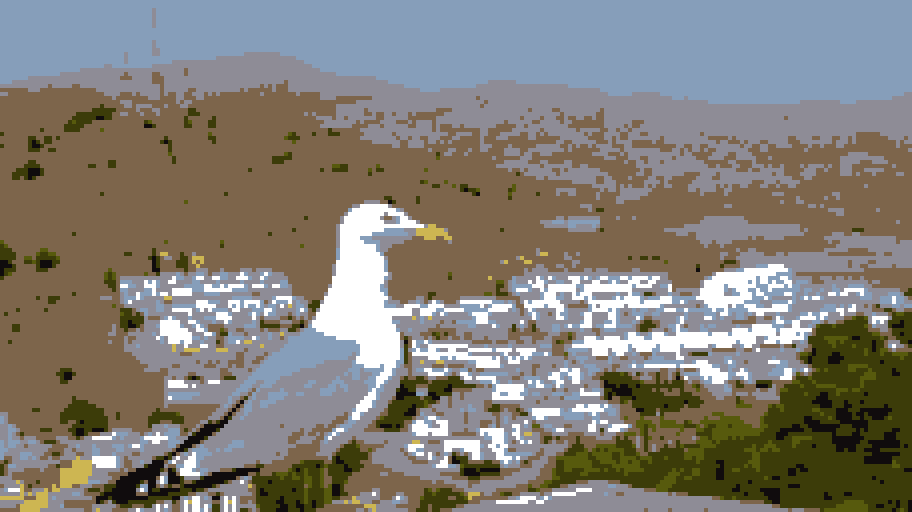
Python script/package to quickly convert your image into a "pixel art" style. Image is downscaled and its color palette is reduced to only handful given colors.
Created by Simon Ruzicka, 2023
Result Showcase
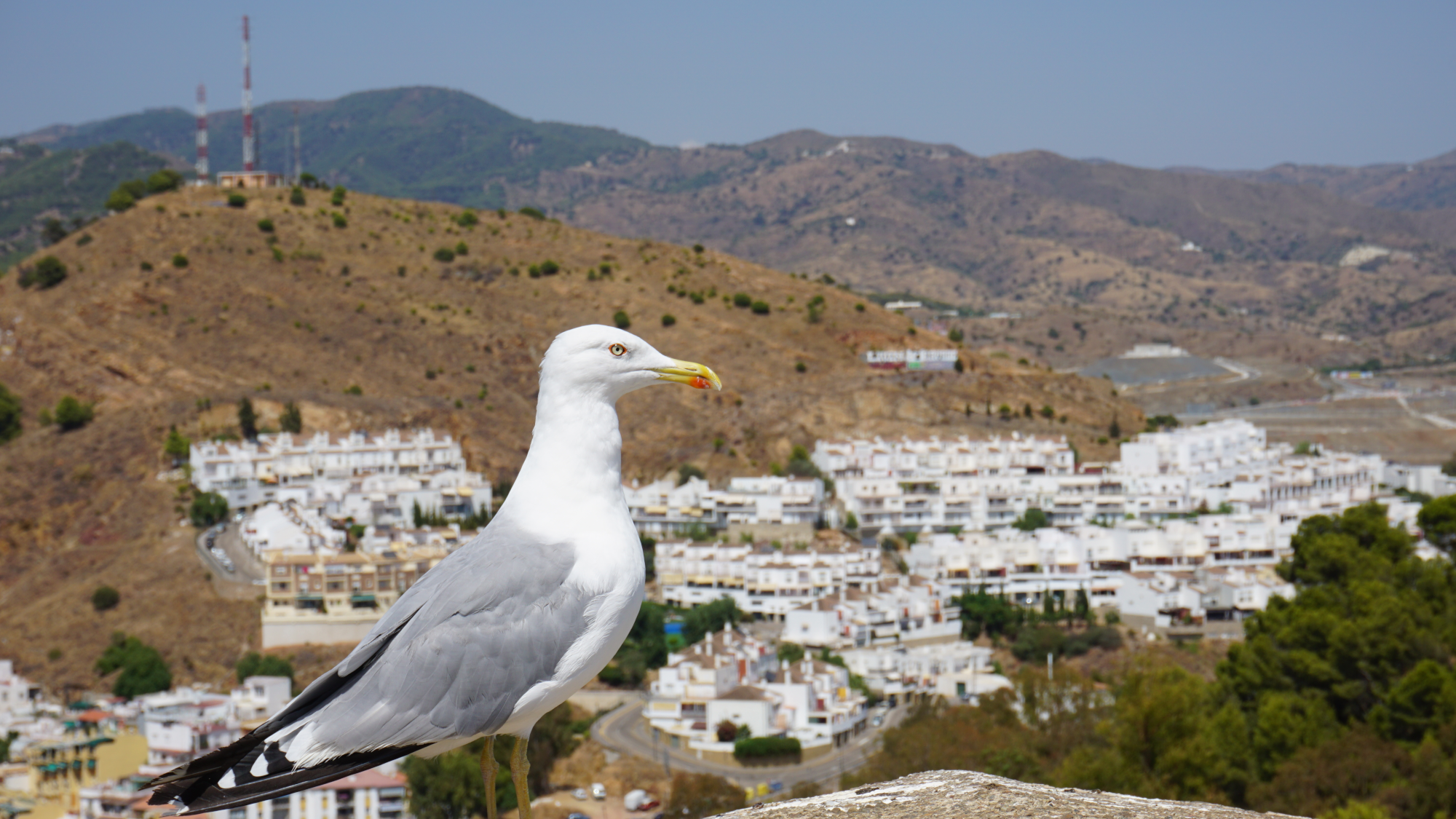
Original photo:
Generated pixel-art image - originally 128 px in height, with manually specified color palette:
You can find more examples on the GitHub project page including the text color palettes.
Installation
You can install this package with the following command:
pip install pixelartconv
Alternatively, you can download this repository and install it manually by yourself.
Prerequisites
First of all, make sure that the source image named [file_name].png is located in your current working directory. In case the file is in another directory, include the relative path instead of [file_name] when launching the script.
In addition, you can include a list of colors named [file_name].txt. In that case, the script parameter must be only the common name of the files - without any filename extension. Both files must be in one directory so that the script locates them both correctly.
The optional list of colors must have the following format (in RGB):
#00ff00
#ff00ff
...
Usage
You can launch the script using the following commands:
python -m pixelartconv [file_name]
python -m pixelartconv [file_name] [height]
python -m pixelartconv [file_name] [height] [width]
The behavior of script is as follows:
- The resulting image will be 64 px in height - width will be automatically calculated from the original image ratio.
- The resulting image will have given height - width will be automatically calculated from the original image ratio.
- The resulting image will have given height and width.
Imported package
Additionally, you can import the package from your code/interactive shell and use the convert function with following interface:
def convert(file_name: str, dims: tuple, palette_size: int = 6) -> float:
    """
    Converts an image to a pixel-art style.

    :param file_name: Name of file(s) or their relative path.
    :param dims: Target size of the resulting image.
    :param palette_size: Amount of colors in case the palette has to be generated.
    :return: Time duration of conversion (seconds).
    :raise FileNotFoundError: Image not found on given path.
    :raise ValueError: File with this name was found but was invalid.
    """
This will generate the image in the same way as if the script was launched. For example, the following snippet:
import pixelartconv

pixelartconv.convert("test_image", (80, 120))
will result in the same generated image as the terminal command python -m pixelartconv test_image 80 120.
Results
Resulting image will be generated in the same directory as source files, named as result.png. There will also be an upscaled version with height approximately equal to 512 pixels (so that the upscale factor is a whole number) named result_scaled.png. This generates only in case where this upscale would have an effect (when the factor is at least 2).
1 maintainer

Metadata
1 maintainer
Release files for pixelartconv 1.2.1
For a detailed explanation of source distributions (sdists) and built distributions (wheels), please see the package formats documentation.
Source distribution (sdist)
| File | Size | Uploaded | |
|---|---|---|---|
| pixelartconv-1.2.1.tar.gz | 8.2 kB | Details |
Built distribution (wheel)
| File | Interpreter | ABI | Platform | Reset |
|---|---|---|---|---|
| pixelartconv-1.2.1-py3-none-any.whl | Python 3 | none | any | Details |
Total release size: 17.4 kB
Release files / pixelartconv-1.2.1.tar.gz
| Download URL | pixelartconv-1.2.1.tar.gz |
|---|---|
| Size | 8.2 kB |
| Tags | Source |
|
SHA-256 checksum How to use checksums |
4b85f6b7f8390fe61428c1e4671902455beb8d4ccfc0fabf058e064c60201f6b
|
|
BLAKE2b-256 checksum How to use checksums |
9d2a775c9286993556abb738e1a476b783434eb1a6107994de2be92e40e15d39
|
| Upload date | |
|
Uploaded using Trusted Publishing? What is trusted publishing? |
No |
| Uploaded via |
uv/0.9.28 {"installer":{"name":"uv","version":"0.9.28","subcommand":["publish"]},"python":null,"implementation":{"name":null,"version":null},"distro":{"name":"Fedora Linux","version":"43","id":"","libc":null},"system":{"name":null,"release":null},"cpu":null,"openssl_version":null,"setuptools_version":null,"rustc_version":null,"ci":null}
|
Release files / pixelartconv-1.2.1-py3-none-any.whl
| Download URL | pixelartconv-1.2.1-py3-none-any.whl |
|---|---|
| Size | 9.2 kB |
| Tags | Python 3 |
|
SHA-256 checksum How to use checksums |
69470a5d7697a5bec241cd5bb892089549a28e1a896ecf31c4545ace9acc4d61
|
|
BLAKE2b-256 checksum How to use checksums |
65bc714415d5b57d6424ecaf9faf870efc04421bd418a8823520315d25cc1a35
|
| Upload date | |
|
Uploaded using Trusted Publishing? What is trusted publishing? |
No |
| Uploaded via |
uv/0.9.28 {"installer":{"name":"uv","version":"0.9.28","subcommand":["publish"]},"python":null,"implementation":{"name":null,"version":null},"distro":{"name":"Fedora Linux","version":"43","id":"","libc":null},"system":{"name":null,"release":null},"cpu":null,"openssl_version":null,"setuptools_version":null,"rustc_version":null,"ci":null}
|














