
pixelbudget
English | 한국어
Know what an image costs a vision LLM before you send it, shrink it to a token budget, cut a long screenshot into pieces whose text stays readable, or audit a whole folder and fail CI with an exit code when an image is over budget. It is a small offline Python library plus a CLI that depends only on Pillow, and every rule in its model table carries a source URL, a check date and a confidence level.
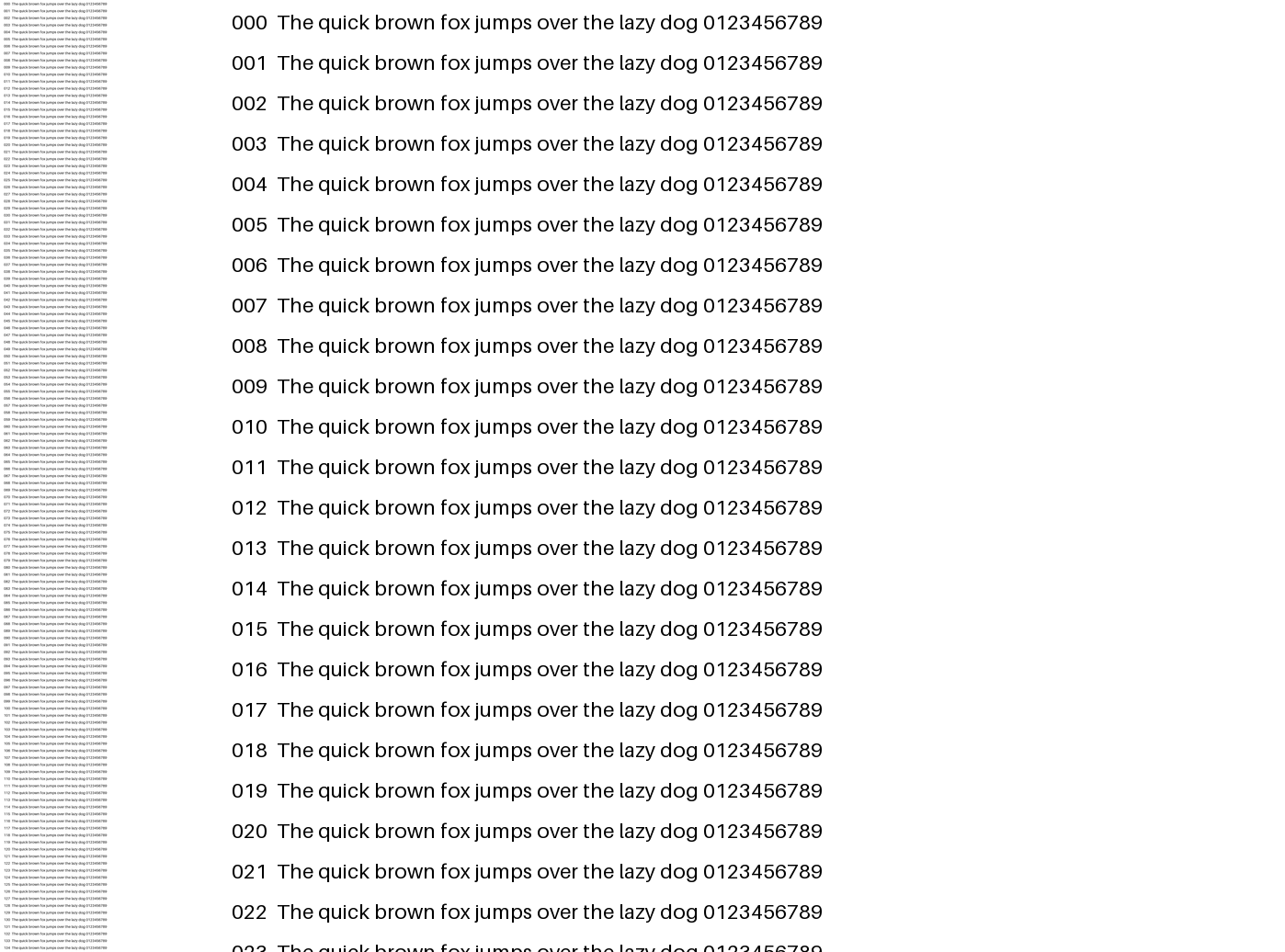
Left: the whole 1170x9000 page shrunk to fit Claude's token cap. Right: the first 1170x1036 slice at original scale. The page is synthetic (generated by pixelbudget demo).
Install
uv add git+https://github.com/LeeGyeongPil/pixelbudget
# or: pip install git+https://github.com/LeeGyeongPil/pixelbudget
Python 3.11+ and one runtime dependency (Pillow 13). Not published on PyPI yet. To try it from a clone:
git clone https://github.com/LeeGyeongPil/pixelbudget && cd pixelbudget
uv sync            # uv: https://docs.astral.sh/uv/ (curl -LsSf https://astral.sh/uv/install.sh | sh)
No API key and no network access are needed.
Quick start
from pixelbudget import estimate, fit_size

est = estimate((1920, 1080), "claude-standard")
print(f"claude-standard 1920x1080 -> {est.sent_size[0]}x{est.sent_size[1]} = {est.tokens} tokens")

plan = fit_size((1920, 1080), "claude-standard", budget=800)
print(f"fit_size budget=800 -> {plan.size[0]}x{plan.size[1]} = {plan.tokens} tokens ({plan.reason})")
This is examples/quickstart.py; run it with uv run python examples/quickstart.py:
claude-standard 1920x1080 -> 1456x819 = 1560 tokens
fit_size budget=800 -> 1046x588 = 798 tokens (resized_to_budget)
A 1920x1080 screenshot is not sent as is: the server shrinks it to 1456x819 before counting. Sending the smaller image yourself costs the same tokens and uploads fewer pixels.
Core concepts
- The pixel grid is what is billed, not the file size. Each provider turns the image into patches (28 px for Claude, 32 px for newer OpenAI models), 512 px tiles (older OpenAI models, Gemini 2), or a fixed number per image (Gemini 3).
- The server may shrink the image first. Past a maximum edge or token count it resizes silently.
estimatereturnssent_sizeandserver_downscaled, andreportshows theWasted pxyou uploaded for nothing. - Fit means "within the budget and not downscaled again". Token counts are a staircase (
ceil), sofitbinary-searches the long edge and never upscales. - Slice by the token cap, not the edge limit. A 1170 px wide page is 42 patches wide; 1568 tokens / 42 = 37 rows = 1036 px per piece. 1568 px pieces would be shrunk again.
flowchart LR
  IN["path, PIL image or (w, h)"] --> M["measure (header only)"]
  M --> R{"model table"}
  R -->|patch| P["28 / 32 px patches"]
  R -->|tile| T["512 / 768 px tiles"]
  R -->|fixed| F["media_resolution"]
  P --> E["estimate"]
  T --> E
  F --> E
  E --> FIT["fit"]
  E --> SL["slice"]
  E --> REP["report"]
Each input is measured, run through the rule of its model, and then used for an estimate, a fit, a slice plan or a report. More detail is in docs/how-it-works.md.
API
All names are importable from pixelbudget. Sources (ImageSource) are a path, a PIL.Image.Image or a (width, height) tuple.
| Name | What it does | Main arguments | Returns |
|---|---|---|---|
estimate |
Tokens and the size the server will process | source, model, detail=None |
Estimate |
fit_size |
Largest size within a budget and the provider limits, no pixels touched | size, model, budget=None, detail=None |
FitPlan |
fit |
fit_size plus the resized image (LANCZOS by default) |
image, model, budget, detail, resample, max_pixels |
FitResult(image, plan) |
plan_slices |
Piece boxes, tokens per piece and total | size, model, overlap=64, detail=None |
SlicePlan |
slice_image |
plan_slices plus the cropped images |
image, model, overlap, detail, max_pixels |
SliceResult(images, plan) |
report / build_report |
One row per image and model; build_report also lists skipped files |
paths, models, detail, max_tokens, prices |
list[ReportRow] / ReportResult |
measure |
Image size from the header (applies EXIF orientation) | source |
(w, h) |
list_models / get_model |
Read the model table | name |
list[ModelSpec] / ModelSpec |
Errors all derive from PixelBudgetError and carry a stable .code: UnknownModelError, UnsupportedDetailError, InvalidBudgetError, InvalidOverlapError, InvalidSizeError, UnreadableImageError, ImageTooLargeError, ModelTableError.
Warnings are stable codes in .warnings: server_downscaled, fixed_per_image, slice_increases_tokens, many_images, approx_rounding, approx_rule, docs_table_mismatch, decompression_guard, user_model_row.
Run pixelbudget models for the bundled models (16 rows, each with source URL, check date and confidence). Override or extend them with your own file via --models-file.
Usage
The examples below use three synthetic images. Create them first (a 1920x1080 frame, a 300x200 icon and a 1170x9000 tall page, drawn with Pillow):
uv run python examples/make_samples.py samples
wrote 3 images to samples/
1. Audit a folder, fail CI when it is over budget
uv run pixelbudget --lang en report samples --model claude-standard --model gpt-4o --max-tokens 1500
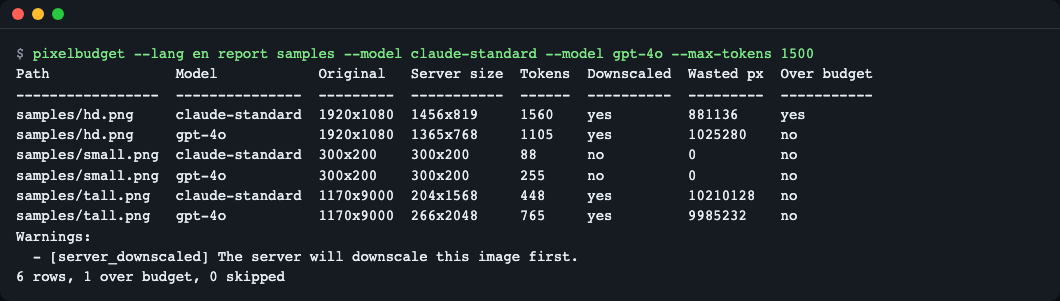
Each image and model gets a row. The exit code is 1 when any row is over --max-tokens (here hd.png on Claude: 1560 > 1500), so the command works as a CI check.
Path               Model            Original   Server size  Tokens  Downscaled  Wasted px  Over budget
-----------------  ---------------  ---------  -----------  ------  ----------  ---------  -----------
samples/hd.png     claude-standard  1920x1080  1456x819     1560    yes         881136     yes
samples/hd.png     gpt-4o           1920x1080  1365x768     1105    yes         1025280    no
samples/small.png  claude-standard  300x200    300x200      88      no          0          no
samples/small.png  gpt-4o           300x200    300x200      255     no          0          no
samples/tall.png   claude-standard  1170x9000  204x1568     448     yes         10210128   no
samples/tall.png   gpt-4o           1170x9000  266x2048     765     yes         9985232    no
Warnings:
  - [server_downscaled] The server will downscale this image first.
6 rows, 1 over budget, 0 skipped
pixelbudget estimate prints the same table without the budget column (it has no --price or --max-tokens; passing --price is rejected with exit 2). Only report shows costs, and only when you pass --price MODEL=USD (price per million tokens is your input, a finite number of 0 or more — anything else exits 2; no prices are bundled). --format json gives machine-readable output. pixelbudget estimate also accepts a size such as 1920x1080 in place of a path, so you can get an estimate without an image: uv run pixelbudget --lang en estimate 1920x1080 --model gpt-4o. You can mix sizes with files and folders; the path column shows the text you typed. A file or folder with that name wins over the size reading, and a size below 1 (0x100) is rejected with exit 2. report still takes files and folders only.
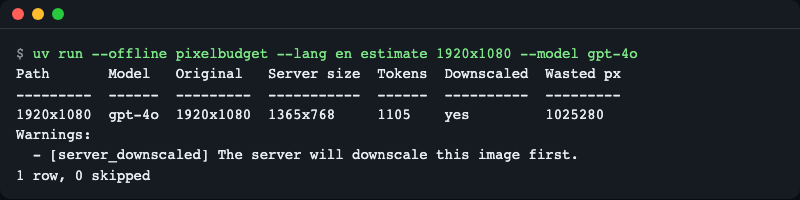
No image needed: 1920x1080 on gpt-4o gives 1105 tokens, and the server shrinks it to 1365x768 first.
2. Fit an image to a token budget
uv run pixelbudget --lang en fit samples/hd.png --model claude-standard --budget 800 --out out/hd-fit.png
Wrote out/hd-fit.png: 1046x588, 798 tokens (scale 0.545).
In Python: fitted = fit("samples/hd.png", "claude-standard", budget=800); fitted.image is a Pillow image, fitted.plan the details.
Gemini 3 charges per image, so resizing cannot help, and the tool says so instead of writing a file:
uv run pixelbudget --lang en fit samples/hd.png --model gemini-3 --budget 500
Resizing does not change the cost of gemini-3: tokens are fixed per image (1120). Nothing written.
To fit the budget of 500, set media_resolution low (280).
3. Slice a long screenshot so text stays readable
uv run pixelbudget --lang en slice samples/tall.png --model claude-standard --dry-run
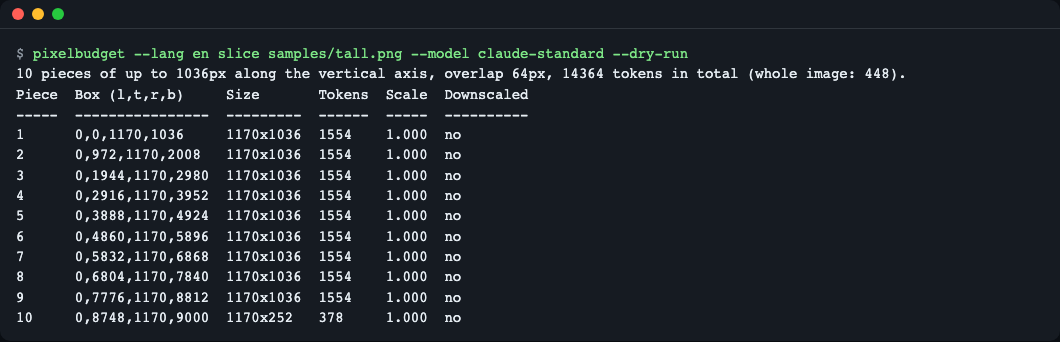
Ten pieces of 1170x1036 at scale 1.0. The whole image would cost 448 tokens but at 204x1568 the text is unreadable; the slices cost 14364 tokens in total. Slicing trades tokens for legibility.
10 pieces of up to 1036px along the vertical axis, overlap 64px, 14364 tokens in total (whole image: 448).
Piece  Box (l,t,r,b)     Size       Tokens  Scale  Downscaled
-----  ----------------  ---------  ------  -----  ----------
1      0,0,1170,1036     1170x1036  1554    1.000  no
2      0,972,1170,2008   1170x1036  1554    1.000  no
3      0,1944,1170,2980  1170x1036  1554    1.000  no
4      0,2916,1170,3952  1170x1036  1554    1.000  no
5      0,3888,1170,4924  1170x1036  1554    1.000  no
6      0,4860,1170,5896  1170x1036  1554    1.000  no
7      0,5832,1170,6868  1170x1036  1554    1.000  no
8      0,6804,1170,7840  1170x1036  1554    1.000  no
9      0,7776,1170,8812  1170x1036  1554    1.000  no
10     0,8748,1170,9000  1170x252   378     1.000  no
Drop --dry-run and add --out-dir out/pieces to write the ten files. In Python, examples/fit_and_slice.py:
from pixelbudget import fit, plan_slices, slice_image

fitted = fit("samples/tall.png", "claude-standard", budget=800)
print("fit:", fitted.plan.size, fitted.plan.tokens, "tokens", fitted.plan.reason)

plan = plan_slices((1170, 9000), "claude-standard")
print("pieces:", len(plan.pieces), "of", plan.pieces[0].size, "=", plan.total_tokens, "tokens")

result = slice_image("samples/tall.png", "claude-standard")
print("images ready to send:", len(result.images), result.images[0].size)
fit: (204, 1568) 448 tokens resized_to_limits
pieces: 10 of (1170, 1036) = 14364 tokens
images ready to send: 10 (1170, 1036)
On a fixed-per-image model slicing only multiplies the cost, and plan_slices warns with slice_increases_tokens.
4. Try it without your own images
uv run pixelbudget --lang en demo
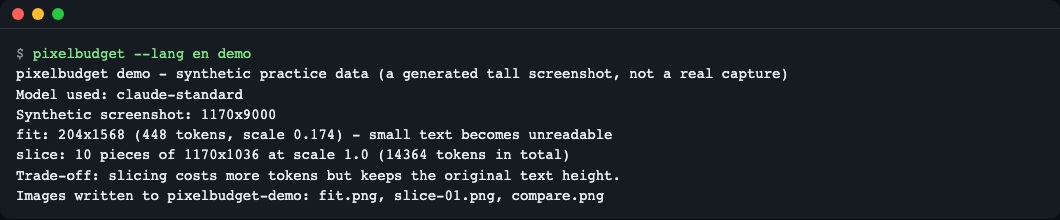
The demo draws a synthetic tall page, fits it, slices it and writes fit.png, slice-01.png and compare.png (the picture at the top of this README) to pixelbudget-demo/.
pixelbudget demo - synthetic practice data (a generated tall screenshot, not a real capture)
Model used: claude-standard
Synthetic screenshot: 1170x9000
fit: 204x1568 (448 tokens, scale 0.174) - small text becomes unreadable
slice: 10 pieces of 1170x1036 at scale 1.0 (14364 tokens in total)
Trade-off: slicing costs more tokens but keeps the original text height.
Images written to pixelbudget-demo: fit.png, slice-01.png, compare.png
Configuration
| Setting | How | Effect |
|---|---|---|
| Output language | --lang en|ko, PIXELBUDGET_LANG, then LC_ALL/LC_MESSAGES/LANG; English if none |
CLI text in English or Korean. Without --lang it follows your locale, so a Korean locale prints Korean. |
| Detail level | --detail / detail= |
The provider's detail setting (for example low/high on tile models, media_resolution on Gemini 3). Defaults come from the model table. |
| Budget exit code | report --max-tokens N |
N must be a positive integer (0 or negative exits 2). Exit 1 when any row is above N tokens; usage errors exit 2. |
| Unreadable files | report/estimate --strict |
Exit 1 when a file could not be read as an image. Without it, skipped files are listed and the exit code stays 0. |
| Decode guard | --max-pixels / max_pixels= |
fit and slice need pixels; images above this count raise ImageTooLargeError (default: Pillow's MAX_IMAGE_PIXELS). |
| Your own model rows | --models-file PATH, PIXELBUDGET_MODELS |
A JSON file in the bundled format ({"models": [...]}). A row with the same name replaces the bundled row, a new name is added. User rows show Origin user in pixelbudget models and carry the user_model_row warning. The flag wins over the variable. |
The option goes before the subcommand, for example:
pixelbudget --models-file my-models.json models
Limits (read this before trusting a number)
- Estimates, not invoices. Counts come from the providers' public documentation, checked on 2026-11-11. They can differ from billed usage. Each row says
documented,measuredorapprox. - OpenAI patch models over the patch budget are
approx. The docs say "scale down, round down, recompute" without the exact rounding, so those results carryapprox_rounding. - Gemini 2 is
approx. The AI Studio and Vertex pages describe the rule differently, and forum reports show counts and billed usage disagreeing. Treat it as a rough number (approx_rule). - Gemini 3 and later: resizing does not reduce tokens. Cost depends only on
media_resolution(low 280, medium 560, high 1120, ultra_high 2240 per image).fitleaves the image alone and suggests a level; slicing multiplies the cost. - Docs disagree with themselves in one place. Claude standard at 2000x1500: the docs table says 1269x952, the reference code on the same site gives 1270x952 (both 1564 tokens). pixelbudget follows the code and warns with
docs_table_mismatch. Details in docs/model-table.md. - Cosmetic quirks. In the Korean README screenshots of
reportandslicesome columns look shifted because the capture font draws Hangul narrower than two cells; the text output itself is aligned. - Only models with documented limits are in the table. Models whose limits could not be confirmed are left out (for example
gpt-5.4hashighonly). Providers change these rules; rows are plain JSON insrc/pixelbudget/data/models.json. To update a stale row, follow docs/model-table.md; the same page lists how each method counts tokens. Do not edit the installed package: override a row with--models-file(see Configuration); the numbers, source and confidence of such a row are yours. - Not implemented yet: scanning JSONL request logs and calibrating against real usage records. No pricing data is bundled.
- Slicing costs more tokens than a fitted single image. It does not OCR or check that text is actually readable; it only keeps the original scale.
Sources: Anthropic vision, OpenAI images and vision, Gemini tokens, Gemini media resolution (all checked 2026-11-11).
When to use it
- Good fit: you send many screenshots or document pages to a vision model and want to know the cost and any server-side shrinking before the request, offline, in code or CI.
- Another tool may suit you better: you want a request gateway that counts tokens for many kinds of calls, see LiteLLM
token_counter; you want a billing-accurate number, use the usage fields returned by the provider's own API.
Troubleshooting
| Symptom | Cause | Fix |
|---|---|---|
error: Unknown model 'foo'. Run pixelbudget models to list supported models. (exit 2) |
Model name not in the table | Run pixelbudget models; aliases such as gemini-4 map to gemini-3. |
error: models file ...: not valid JSON (...) (exit 2) |
The file given to --models-file / PIXELBUDGET_MODELS is not valid JSON (or not UTF-8) |
Save the file as UTF-8 and check the format; see docs/model-table.md for the row format. |
error: [Errno 2] No such file or directory: 'nope.png' (exit 2) |
Wrong path | Check the path; folders are scanned for images. |
error: Cannot save '...y.weird': unknown image file extension '.weird'. Use .png, .jpg or .webp. (exit 2) |
--out extension is not png, jpg or webp |
Use a supported extension such as --out out.png. |
error: [Errno 17] File exists: '...' (exit 2) |
A file occupies the place of the output folder | Move the file or choose another --out folder. |
| CLI prints Korean although you expected English | --lang not set and your locale is Korean |
Add --lang en or set PIXELBUDGET_LANG=en. |
fit writes nothing |
The model charges per image (Gemini 3) | Follow the printed media_resolution hint. |
ImageTooLargeError |
fit/slice need to decode a huge image |
Raise --max-pixels / max_pixels= if you trust the file. |
report prints No readable images found. and exits 0 |
The named file is not a valid image | Add --strict so unreadable files fail the run (exit 1); fix or remove the file. |
report counts extra rows |
Folders are scanned recursively, including earlier output | Write results to a different folder such as out/. |
Versions and compatibility
Semantic Versioning. While the version is 0.x the API may change in a minor release; changes are listed in CHANGELOG.md.
Development
uv sync
uv run pytest -q          # fully offline (sockets are blocked, API key variables removed)
uv run python examples/quickstart.py
CI runs the tests on Python 3.11 and 3.12.
License
MIT.
1 maintainer

Metadata
1 maintainer
Release files for pixelbudget 0.3.3
For a detailed explanation of source distributions (sdists) and built distributions (wheels), please see the package formats documentation.
Source distribution (sdist)
| File | Size | Uploaded | Provenance | Actions |
|---|---|---|---|---|
| pixelbudget-0.3.3.tar.gz | 814.7 kB | Without provenance | Details for pixelbudget-0.3.3.tar.gz |
Built distribution (wheel)
| File | Interpreter | ABI | Platform | Actions Reset |
|---|---|---|---|---|
| pixelbudget-0.3.3-py3-none-any.whl | Python 3 | none | any | Details for pixelbudget-0.3.3-py3-none-any.whl |
Total release size: 858.5 kB
Release files / pixelbudget-0.3.3.tar.gz
| Download URL | pixelbudget-0.3.3.tar.gz |
|---|---|
| Size | 814.7 kB |
| Tags | Source |
|
SHA-256 checksum How to use checksums |
79e1adda42d8ed3a9b23cb8fa35f3d4a29eb93f9a0e4ab1a7e910871bb437983
|
|
BLAKE2b-256 checksum How to use checksums |
cb9650f434088f9c6b78a40b6c6748dd79ca4a4adda6c2885d01804f6cf43850
|
| Upload date | |
|
Uploaded using Trusted Publishing? What is trusted publishing? |
No |
| Uploaded via |
uv/0.13.6 {"installer":{"name":"uv","version":"0.13.6","subcommand":["publish"]},"python":null,"implementation":{"name":null,"version":null},"distro":{"name":"macOS","version":null,"id":null,"libc":null},"system":{"name":null,"release":null},"cpu":null,"openssl_version":null,"setuptools_version":null,"rustc_version":null,"ci":null}
|
Release files / pixelbudget-0.3.3-py3-none-any.whl
| Download URL | pixelbudget-0.3.3-py3-none-any.whl |
|---|---|
| Size | 43.8 kB |
| Tags | Python 3 |
|
SHA-256 checksum How to use checksums |
f99c0d568fa55d8568d78be3289725bb4335dfae96d01c055284454ca60d77c0
|
|
BLAKE2b-256 checksum How to use checksums |
eaeff66e4eb0834d14c2bfba73310939a8408506de8c3392b6a90d47fe580ed9
|
| Upload date | |
|
Uploaded using Trusted Publishing? What is trusted publishing? |
No |
| Uploaded via |
uv/0.13.6 {"installer":{"name":"uv","version":"0.13.6","subcommand":["publish"]},"python":null,"implementation":{"name":null,"version":null},"distro":{"name":"macOS","version":null,"id":null,"libc":null},"system":{"name":null,"release":null},"cpu":null,"openssl_version":null,"setuptools_version":null,"rustc_version":null,"ci":null}
|
Security for pixelbudget 0.3.3
Provenance
Provenance describes where a file came from. On PyPI, provenance is shared via attestations, which provide a verifiable record of the build or publishing details. View details, limitations and caveats.
No provenance found
None of the files in this release were uploaded with provenance metadata.
A note on package security
PyPI is a repository for distributing packages, not a service for auditing them. While third-party security researchers and our staff do their best to detect and remove malicious packages, PyPI cannot guarantee the quality, security or suitability of any given package.
To learn more about protecting yourself from malicious actors, visit our package security documentation.














