
A versatile image processing library for Python with built-in support for caching, using Pillow, NumPy, and PyTorch.

Project description
PixelCache
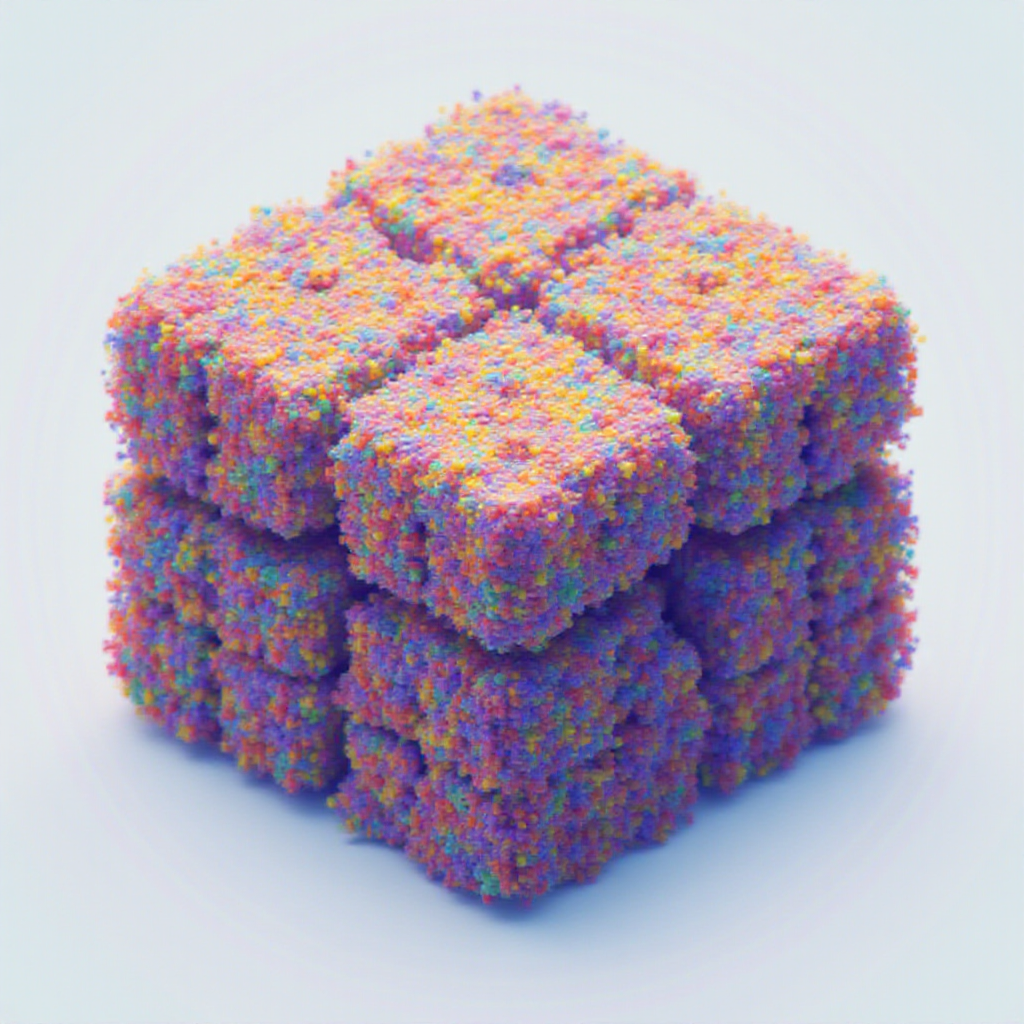
One hashable wrapper for images stored as PIL, NumPy, or PyTorch — convert between them on demand, hash them safely as cache keys, and stop transferring pixel data through disk.










                  ┌──────────────┐
   path / URL ──▶ │              │ ──▶ .pil()           PIL.Image
   bytes      ──▶ │ HashableImage│ ──▶ .numpy()         np.ndarray  (h w 3 | h w)
   ndarray    ──▶ │              │ ──▶ .tensor()        torch.Tensor (1 c h w)
   tensor     ──▶ │  (immutable) │ ──▶ .raw()           native type
   PIL.Image  ──▶ │              │ ──▶ hash(img)        xxhash content fingerprint
                  └──────────────┘
Every accessor returns an independent copy by default. Need the zero-copy view? Use the explicit .numpy_view(), .tensor_view(), .pil_view(), or .raw_view() — and never mutate them.
What can you build with it?
PixelCache is the glue layer between PIL / NumPy / PyTorch image code that doesn't want to know which one it's holding. Some workflows it makes much simpler:
- ML inference pipelines — Hugging Face / diffusion / SAM-style models want torch tensors; preprocessing libs want NumPy; visualization wants PIL. Wrap once at the input boundary; convert at the call site without copying through
Image.fromarray/torch.from_numpyglue. - Content-addressed caching —
@functools.lru_cacheand@cachetools.cachedneed hashable keys.hash(HashableImage(arr))is a stablexxhashfingerprint of the pixel content, notid(), so the same image hits the cache regardless of which path / array / tensor it came in as. - Mask-driven crop / paste workflows —
mask.mask2bbox()→image.crop_from_bbox(boxes)→ process →cropped.uncrop_from_bbox(base, boxes)lets you run heavy models on the relevant region only, then composite back. - Reproducible test fixtures — feed the same image into
HashableImagefrom any source (path, bytes, ndarray, tensor) and you'll get the same content hash. Useful for snapshot tests and regression suites. - Annotated debug grids —
HashableImage.make_image_grid({"label": [img]})stitches a labeled comparison sheet from a dict of HashableLists. One line. Saves to PNG/JPG. - EXIF-correct phone-photo loading —
HashableImage("IMG_1234.HEIC")decodes viapillow-heif, applies EXIF orientation, and gives you an RGB tensor or array. No more sideways portraits. - Bounding box arithmetic —
BoundingBox(xmin, ymin, xmax, ymax, image_size=...)carries normalized vs. pixel coords explicitly with.xyxy/.xywh/.xyxyn/.xywhn; arithmetic and equality compare by field, not just hash. - Hashable params for ML configs —
HashableDict({"image": img, "prompt": "...", "seed": 42})makes whole inference configurations content-hashable so you can cache by what the call looks like, not by argument identity.
Visual examples
The same HashableImage instance can drive a whole pipeline — color, threshold, palette, geometric ops — without ever touching disk:
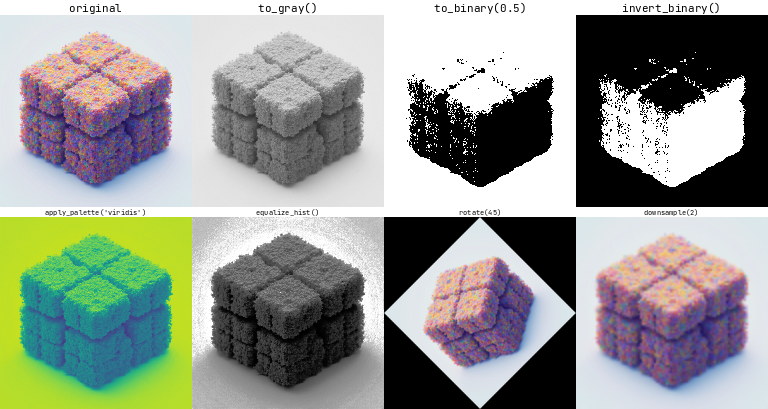
from pixelcache import HashableImage, ImageSize

img = HashableImage("photo.jpg").resize(ImageSize(height=256, width=256))

HashableImage.make_image_grid(
    {
        "original":      [img],
        "to_gray()":     [img.to_gray().to_rgb()],
        "to_binary(.5)": [img.to_gray().to_binary(0.5).to_rgb()],
        "apply_palette": [img.to_gray().apply_palette("viridis")],
        "equalize_hist": [img.equalize_hist().to_rgb()],
        "rotate(45)":    [img.rotate(45.0).resize(ImageSize(height=256, width=256))],
    },
    orientation="vertical",
    with_text=True,
).save("transformations.png")
Mask-driven workflows are one chain — derive a mask, blend it for debugging, crop the region of interest:
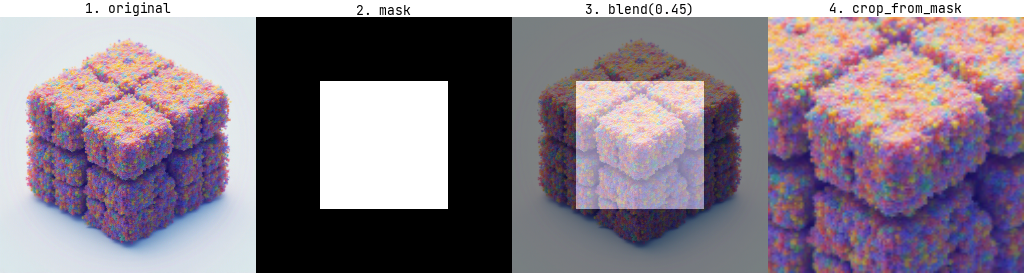
import numpy as np
from pixelcache import HashableImage

img     = HashableImage("photo.jpg")
h, w    = img.size().height, img.size().width
mask_np = np.zeros((h, w), dtype=np.uint8)
mask_np[h // 4 : 3 * h // 4, w // 4 : 3 * w // 4] = 255    # or any source: torch / PIL / detection model
mask    = HashableImage(mask_np).to_binary(0.5)
debug   = img.blend(mask.to_rgb(), alpha=0.45, with_bbox=False)
region  = img.crop_from_mask(mask)                          # send `region` to your model
The full reproducible generator for both PNGs lives in pixelcache/examples/visuals.py.
Installation
# From PyPI
uv add pixelcache
# or
pip install pixelcache

# From source
uv add git+https://github.com/affromero/pixelcache.git
Requires Python ≥ 3.10. Runtime deps: numpy, torch, torchvision, pillow, opencv-python, pydantic, jaxtyping, beartype, xxhash, matplotlib, difflogtest, einops, pillow-heif, rich, tyro.
Basic Usage
HashableImage accepts any of these input types:
| Input | Notes |
|---|---|
str / pathlib.Path |
Local file or HTTP/HTTPS URL — decoded once via torchvision (fast path for JPEG/PNG) or PIL (everything else, plus HEIC) |
bytes |
Decoded eagerly, doesn't retain the buffer |
PIL.Image.Image |
RGBA / P / CMYK / YCbCr / LAB inputs normalize to RGB |
UInt8[np.ndarray, "h w 3"] / UInt8[np.ndarray, "h w"] / Bool[np.ndarray, "h w"] |
uint8 / bool numpy arrays |
Float[torch.Tensor, "1 c h w"] / Bool[torch.Tensor, "1 1 h w"] |
torch tensors in [0, 1] |
import torch
from pixelcache import HashableImage

image = HashableImage(torch.rand(1, 3, 256, 256))
image_pil    = image.pil()              # PIL.Image — safe to mutate
image_np     = image.numpy()            # np.ndarray — safe to mutate
image_t      = image.tensor()           # torch.Tensor — safe to mutate
image_bool   = image.to_binary(0.5)     # → HashableImage in "1" mode

# Zero-copy escape hatches (read-only):
image_np_ro  = image.numpy_view()       # writeable=False
image_t_ro   = image.tensor_view()      # do not mutate
image_pil_ro = image.pil_view()         # do not mutate

# Cache key usage — hash is stable within a process:
cache: dict[HashableImage, str] = {}
cache[image] = "first-seen"
Common transformations
image.resize(ImageSize(height=128, width=128))   # bilinear by default
image.downsample(factor=2)                       # halves both dims
image.rotate(45.0)
image.to_gray()                                  # → "L" mode
image.to_rgb()                                   # → "RGB" mode
image.to_binary(threshold=0.5)                   # → "1" mode
image.equalize_hist()
image.center_pad(ImageSize(height=512, width=512), fill=255)
image.crop_from_bbox(bboxes)
image.save("/path/to/out.png")
Usage Example 1 — Blending
Blending two images and saving an annotated comparison grid:
from pathlib import Path

from difflogtest import get_logger
from pixelcache import HashableDict, HashableImage, HashableList

logger = get_logger()

image0 = "https://images.pexels.com/photos/28811907/pexels-photo-28811907/free-photo-of-majestic-elk-standing-in-forest-clearing.jpeg"
image1 = Path("pixelcache") / "assets" / "pixel_cache.png"

images_hash = [HashableImage(image) for image in [image0, image1]]
for image in images_hash:
    logger.info(f"Image: {image} - Hash: {hash(image)}")
logger.info(f"Hash for list of images: {hash(HashableList(images_hash))}")

image_size = images_hash[1].size()
resized_images = [image.resize(image_size) for image in images_hash]

blended = resized_images[0].blend(resized_images[1], alpha=0.5, with_bbox=False)
blended_bin = resized_images[0].blend(
    resized_images[1].to_binary(0.5).invert_binary(),
    alpha=0.2,
    with_bbox=True,
)

output_debug = HashableDict({
    "image base":              HashableList([resized_images[0]]),
    "image reference":         HashableList([resized_images[1]]),
    "blended_image":           HashableList([blended]),
    "blended_image_binarized": HashableList([blended_bin]),
})
output = image1.parent / f"{image1.stem}_demo_blend.jpg"
HashableImage.make_image_grid(
    output_debug, orientation="horizontal", with_text=True,
).save(output)
logger.success(f"Output saved to: {output}")

Usage Example 2 — Mask → BBox → Crop / Uncrop
Pull a binary mask off a reference image, crop the reference by the mask, then place the crop back onto a base image using mask2bbox. Any chain that produces a HashableImage in binary "1" mode works as the mask input.
from pathlib import Path

from difflogtest import get_logger
from pixelcache import HashableDict, HashableImage, HashableList, ImageSize

logger = get_logger()

image0 = "https://images.pexels.com/photos/18624700/pexels-photo-18624700/free-photo-of-a-vintage-typewriter.jpeg"
image1 = Path("pixelcache") / "assets" / "pixel_cache.png"

images_hash = [HashableImage(image) for image in [image0, image1]]
image_size = images_hash[1].size()
resized_images = [image.resize(image_size) for image in images_hash]

increased_size_pad = ImageSize(
    width=image_size.width + 1000,
    height=image_size.height + 1000,
)
mask = (
    images_hash[1]
    .center_pad(increased_size_pad, fill=255)
    .resize(image_size)
    .to_gray()
    .to_binary(0.3)
)

cropped = resized_images[1].crop_from_mask(mask)
uncropped = cropped.uncrop_from_bbox(
    base=resized_images[0],
    bboxes=mask.mask2bbox(margin=0.0),
    resize=True,
)

output_debug = HashableDict({
    "image base":      HashableList([resized_images[0]]),
    "image reference": HashableList([resized_images[1]]),
    "cropped_image":   HashableList([cropped.resize(image_size)]),
    "uncropped_image": HashableList([uncropped]),
})
output = image1.parent / f"{image1.stem}_demo_cropUncrop.jpg"
HashableImage.make_image_grid(
    output_debug, orientation="horizontal", with_text=True,
).save(output)
logger.success(f"Output saved to: {output}")

Both examples are runnable as-is from
pixelcache/examples/.
Project conventions
This project follows CLAUDE.md: jaxtyping shape/dtype annotations on public surfaces, difflogtest.utils.path instead of raw pathlib, no Any/# noqa/# type: ignore in new code, files under 1000 lines, immutable value types where possible.
Contributing
Contributions are welcome. Open an issue or submit a pull request — pre-commit run --all-files and pytest tests/ must both pass.
License
MIT — see LICENSE.md.
You might also like
If you found PixelCache useful, check out some other projects from the same author:
| DiffLogTest | Snapshot testing through print output comparison |
Python · pytest |
| fairtrail | Track flight prices over time. Self-hosted. Bring your own LLM. | Next.js · Prisma |
| gitpane | Multi-repo git workspace dashboard for the terminal | Rust · TUI |
| kin3o | AI-powered Lottie animation generator CLI | TypeScript · LLM |
| pricetoken | Real-time LLM pricing API · REST + npm + historical data | TypeScript |
| yazi-ssh.yazi | Browse remote filesystems in yazi over SSH | Lua · yazi plugin |
| ply2lcc | Convert Gaussian Splats in PLY → XGRIDS LCC format | Python · 3D |
| riasec-co | Bayesian vocational orientation engine for Colombia | npm · PyPI · CRAN |
What's new in 0.1.0
This is a near-complete rewrite of pixelcache. See CHANGELOG.md for the full breakdown.
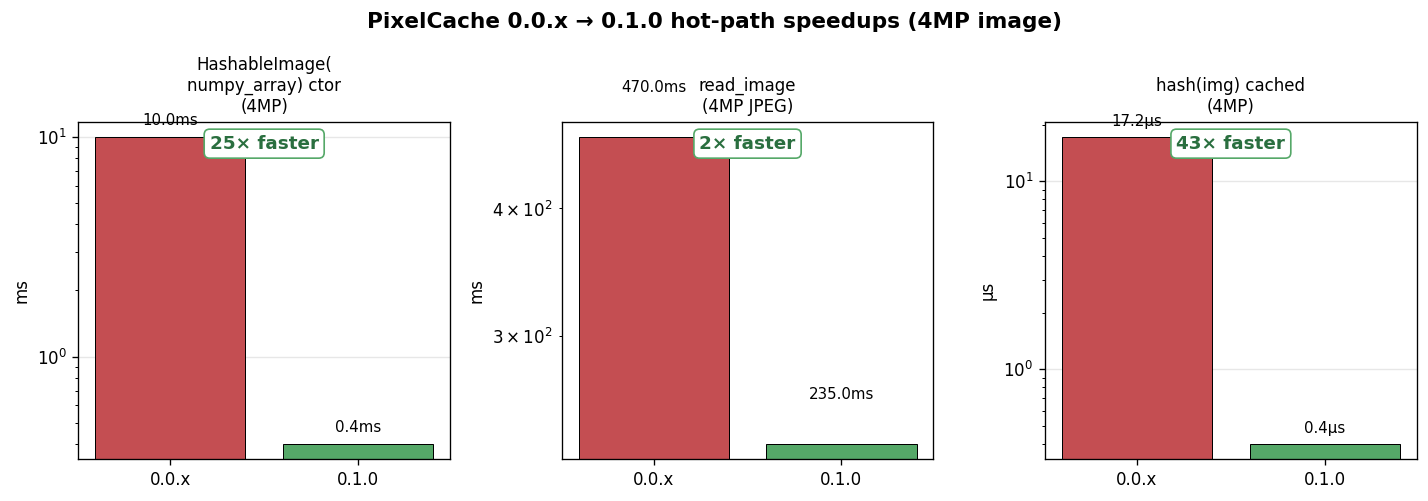
| Operation | 0.0.x | 0.1.0 |
|---|---|---|
HashableImage(numpy_array) ctor |
~10 ms (always wrote a temp PNG to disk) |
<1 ms (lazy — only writes on get_filename()) |
read_image(path) |
Double-decode (EXIF check + actual decode) | Single-decode (one PIL open or torchvision fast-path) |
hash(img) (cached) |
~17 μs (re-materialized full pixel bytes every call) |
~0.4 μs (xxhash content fingerprint cached on the instance) |
img.numpy() |
Returned the internal buffer (footgun) | Returns an independent copy — numpy_view() for explicit zero-copy |
HashableDict / HashableList |
Mutable, with stale-hash hazards | Immutable; deep-copy mutable leaves; read-side leaf protection |
Plus 12+ correctness bugs fixed (ImageCrop dims, Points axes, PIL-mode handling, mask2bbox, bgr2rgb torch path, get_filename fidelity, …) across 8 rounds of adversarial review.


Download files
Download the file for your platform. If you're not sure which to choose, learn more about installing packages.
Source Distribution
Built Distribution
Filter files by name, interpreter, ABI, and platform.
If you're not sure about the file name format, learn more about wheel file names.
Copy a direct link to the current filters
File details
Details for the file pixelcache-0.1.0.tar.gz.
File metadata
- Download URL: pixelcache-0.1.0.tar.gz
- Upload date:
- Size: 6.2 MB
- Tags: Source
- Uploaded using Trusted Publishing? No
- Uploaded via: twine/6.2.0 CPython/3.14.5
File hashes
| Algorithm | Hash digest | |
|---|---|---|
| SHA256 |
60188d48e4ac8bf8b48ff4b8ec09d6c5efe612e83d632705cc68f390007fe565
|
|
| MD5 |
510791474533da34ff763628693964ce
|
|
| BLAKE2b-256 |
72e049b779b10ee231e92edabd0c22de41525f8c57b5f6a21ab6f77f7d94dd45
|
File details
Details for the file pixelcache-0.1.0-py3-none-any.whl.
File metadata
- Download URL: pixelcache-0.1.0-py3-none-any.whl
- Upload date:
- Size: 6.2 MB
- Tags: Python 3
- Uploaded using Trusted Publishing? No
- Uploaded via: twine/6.2.0 CPython/3.14.5
File hashes
| Algorithm | Hash digest | |
|---|---|---|
| SHA256 |
0eb877b0c68fe0fe1c6016bad32d9168420fe73d3ae7fcebeb97a14bfa473b1c
|
|
| MD5 |
96607b6daef8729afdd4b1dd9cc2502b
|
|
| BLAKE2b-256 |
b4d3cb2843eec1536d5ee0a887b3a8f5217cbdf11f306f74ed752efc652e183e
|






