
pixi-browse





An interactive terminal UI for browsing conda package metadata. Explore packages, versions, dependencies, and more from any conda channel — right from your terminal.
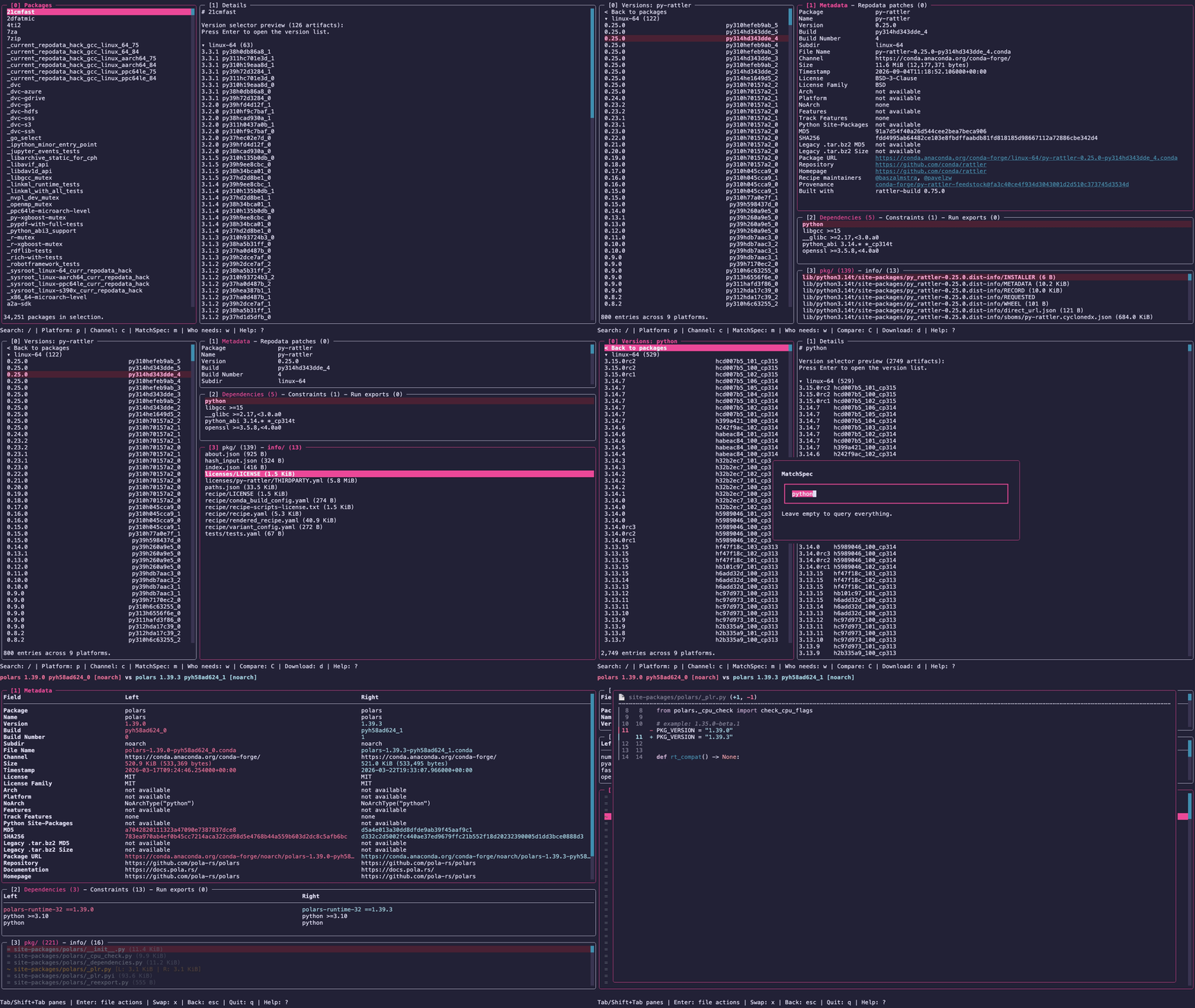
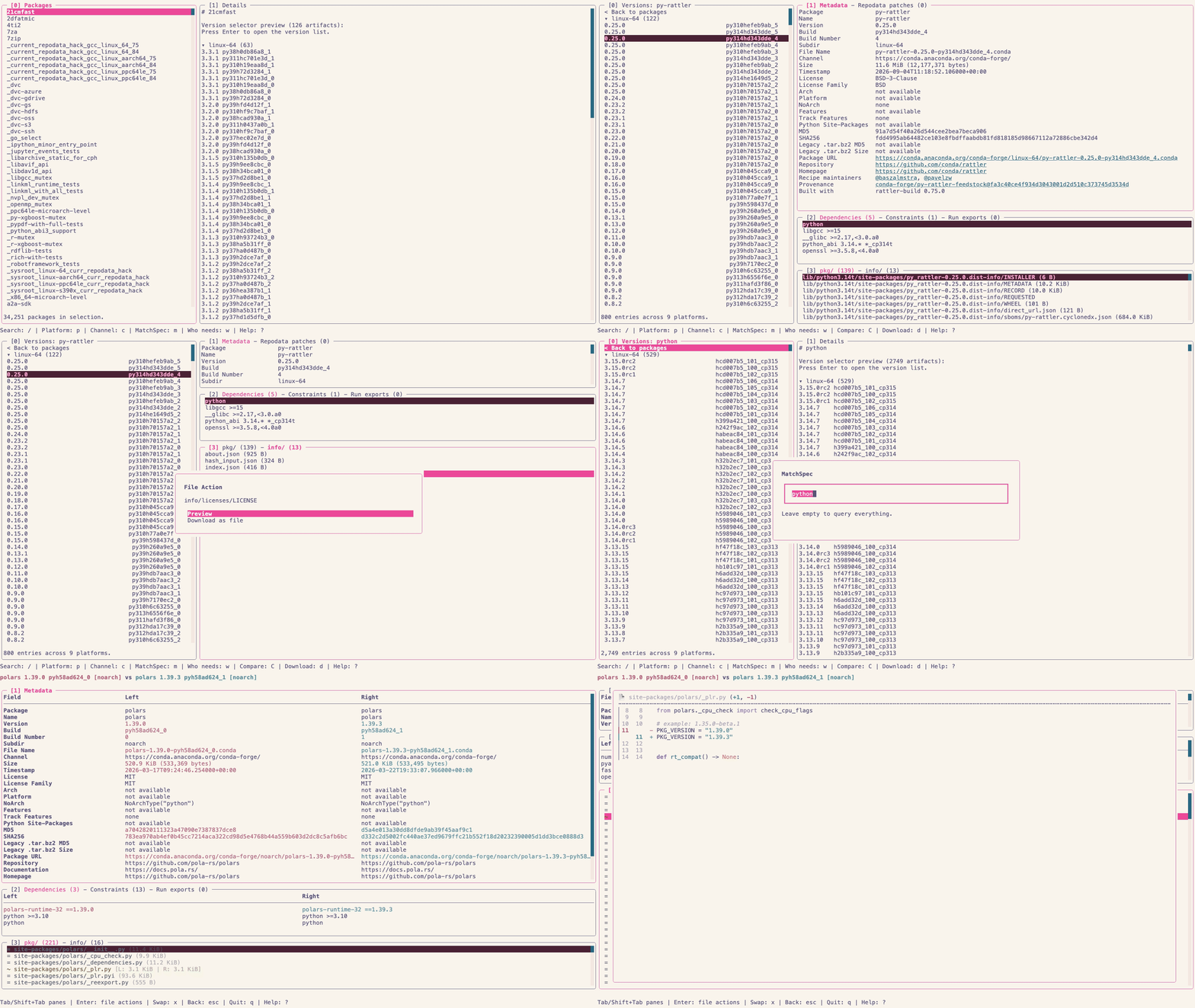
Features
- Browse packages from any conda channel (conda-forge, prefix.dev, etc.)
- Substring search to quickly filter through thousands of packages, as well as through a package's versions, dependencies and files
- Inspect versions grouped by platform with collapsible sections
- View detailed metadata including dependencies, license, checksums, build info, and timestamps
- Inspect package contents — file listings and
about.jsonextracted directly from artifacts - Spot repodata patches — diff an artifact's original
index.jsonagainst the patched repodata served by the channel - Compare artifacts — metadata, dependencies, and file lists of two builds side by side, with optional file diffs
- Clickable links to source repositories, maintainer GitHub profiles, and provenance commits
- Download artifacts directly to your working directory
- Vim-style keybindings for fast keyboard-driven navigation
Installation
From conda-forge
pixi global install pixi-browse
# or use without installation
pixi exec pixi-browse
From PyPI
uv tool install pixi-browse
# or use without installation
uvx pixi-browse
Optional: file diffs
Comparing two artifacts (C) can show a side-by-side diff of a file that
differs between them. This uses
textual-diff-view, which is
AGPL-3.0 licensed and therefore not installed by default:
pixi global install 'pixi-browse[extras=diff]'
pixi exec -s 'pixi-browse[extras=diff]' pixi-browse

# or from PyPI
uv tool install 'pixi-browse[diff]'
uvx 'pixi-browse[diff]'
Without it, the Diff left / right action in the compare view asks for this
package.
Usage
# Browse configured default channels (conda-forge if unset) across all platforms
pixi-browse

# Read a specific config file
pixi-browse --config ./config.toml

# Browse a different channel
pixi-browse -c https://prefix.dev/conda-forge

# Browse several channels at once
pixi-browse -c conda-forge -c bioconda

# Restrict to specific platforms
pixi-browse -p linux-64 -p osx-arm64

# Start with a MatchSpec query applied
pixi-browse -m "numpy >=2"

# Combine channel, platform, and MatchSpec filters
pixi-browse -c https://prefix.dev/conda-forge -p linux-64 -m "python >=3.13"

# Show version
pixi-browse --version
CLI Options
| Option | Description |
|---|---|
-c, --channel |
Startup channels (repeat for multiple; overrides configured defaults) |
--config |
Config file to read instead of the default locations |
-p, --platform |
Platforms to include (repeat for multiple) |
-m, --matchspec |
MatchSpec query to apply at startup |
--version |
Show version and exit |
--help |
Show help and exit |
Configuration
Without --config, pixi-browse loads Pixi's default configuration locations
through rattler, including shared rattler configuration. These include system
configuration, the platform's user configuration directory (and
XDG_CONFIG_HOME), and $PIXI_HOME/config.toml or ~/.pixi/config.toml.
Later files override earlier ones; missing default files are skipped.
--config <path> reads only that file and reports missing or invalid files.
default-channels = ["conda-forge", "bioconda"]

[mirrors]
"https://conda.anaconda.org/conda-forge" = ["https://prefix.dev/conda-forge"]

[repodata-config]
disable-sharded = true
The shared network client applies mirrors, S3 options, authentication, proxy,
and TLS settings to repodata, package previews, and downloads. Repodata format
settings (including per-channel overrides) and concurrency.downloads are
applied to the gateway. Who-needs queries scan the full channel repodata,
even when sharded repodata is enabled for browsing.
Explicit -c flags replace default-channels. If neither is set, pixi-browse
uses conda-forge.
Keybindings
Navigation
| Key | Action |
|---|---|
j / k |
Move selection or scroll |
h / l |
Focus left / right pane |
gg / G |
Jump to top / bottom |
Ctrl+u / Ctrl+d |
Page up / down |
Enter |
Open / select |
Esc |
Back or close current overlay |
App
| Key | Action |
|---|---|
? |
Show help |
/ |
Search packages, versions, dependencies, or files |
p |
Open platform selector |
c |
Select channels |
C |
Compare selected artifact (in versions view) |
m |
Query packages with a MatchSpec |
w |
Query packages that need a package |
d |
Download selected artifact (in versions view) |
q |
Quit |
Channel selector
c opens a dialog with the channels being browsed. The package list and the
MatchSpec and who-needs queries run against all of them.
| Control | Action |
|---|---|
| Text field | Type a channel name or URL, Enter adds it |
✕ button |
Remove that channel (the last one cannot be removed) |
Apply button |
Load the listed channels and the one typed, if any |
Up / Down, Tab |
Move between the ✕ buttons, the field and Apply |
Esc |
Cancel |
Development
This project is managed by pixi.
git clone https://github.com/pavelzw/pixi-browse
cd pixi-browse

pixi run pre-commit-install
Running Tests
pixi run test
The tests run the app against small offline conda channels (conda-forge and
bioconda) made of real artifacts listed in tests/fixtures/channel_artifacts.toml.
They are downloaded into the git-ignored tests/fixtures/channels/ directory on
first use (or ahead of time with pixi run fetch-test-channel) and verified by
SHA256, so later runs work offline. TUI screens are checked with
pytest-textual-snapshot.
The app draws in ANSI colors, so the terminal palette alone decides how it looks.
Every screen is therefore snapshotted twice from a single app run, with the two
palettes pixi run demo records the demos with (rose-pine-moon and
rose-pine-dawn), side by side as
tests/__snapshots__/<module>/<test>.{dark,light}.svg.
After an intentional UI change, review snapshot_report.html and accept the new
screenshots with:
pixi run snapshot-update
To review committed snapshot changes against main without rerunning the tests:
pixi run snapshot-report
Linting
pixi run pre-commit-run
1 maintainer

Download files
Download the file for your platform. If you're not sure which to choose, learn more about installing packages.
Source Distribution
Built Distribution
Filter files by name, interpreter, ABI, and platform.
If you're not sure about the file name format, learn more about wheel file names.
Copy a direct link to the current filters
File details
Details for the file pixi_browse-0.0.17.tar.gz.
File metadata
- Download URL: pixi_browse-0.0.17.tar.gz
- Upload date:
- Size: 20.2 MB
- Tags: Source
- Uploaded using Trusted Publishing? Yes
- Uploaded via:
twine/7.0.0 CPython/3.13.14
File hashes
| Algorithm | Hash digest | |
|---|---|---|
| SHA256 |
96e2b1302c063bfbb25e1b4afbfeb9e95eab8c77aa5ccf630a0cf9288d411993
|
|
| MD5 |
448216e5ed60fac2754460d2303098c7
|
|
| BLAKE2b-256 |
adc6a4b35b353ed71121729a01148cbcb4b2fe8fefebe6b27be7edbf85c386a5
|
Provenance
The following attestation bundles were made for pixi_browse-0.0.17.tar.gz:
Publisher:
build.yml on pavelzw/pixi-browse
-
Statement:
-
Statement type:
https://in-toto.io/Statement/v1 -
Predicate type:
https://docs.pypi.org/attestations/publish/v1 -
Subject name:
pixi_browse-0.0.17.tar.gz -
Subject digest:
96e2b1302c063bfbb25e1b4afbfeb9e95eab8c77aa5ccf630a0cf9288d411993 - Sigstore transparency entry: 2836310540
- Sigstore integration time:
-
Permalink:
pavelzw/pixi-browse@2e70225aa9ec301744eedc005237412327a0b52e -
Branch / Tag:
refs/tags/v0.0.17 - Owner: https://github.com/pavelzw
-
Access:
public
-
Token Issuer:
https://token.actions.githubusercontent.com -
Runner Environment:
github-hosted -
Publication workflow:
build.yml@2e70225aa9ec301744eedc005237412327a0b52e -
Trigger Event:
push
-
Statement type:
File details
Details for the file pixi_browse-0.0.17-py3-none-any.whl.
File metadata
- Download URL: pixi_browse-0.0.17-py3-none-any.whl
- Upload date:
- Size: 75.1 kB
- Tags: Python 3
- Uploaded using Trusted Publishing? Yes
- Uploaded via:
twine/7.0.0 CPython/3.13.14
File hashes
| Algorithm | Hash digest | |
|---|---|---|
| SHA256 |
d554f417d5d93d0cacb05903ba920b4d35163d7982349a414eadd498ef04e757
|
|
| MD5 |
0b6e413c10f1fe2536098829e69e2831
|
|
| BLAKE2b-256 |
2f4ebe4404f9145084dfe80d607250fb09878950f655d32dab03a200059a5b3a
|
Provenance
The following attestation bundles were made for pixi_browse-0.0.17-py3-none-any.whl:
Publisher:
build.yml on pavelzw/pixi-browse
-
Statement:
-
Statement type:
https://in-toto.io/Statement/v1 -
Predicate type:
https://docs.pypi.org/attestations/publish/v1 -
Subject name:
pixi_browse-0.0.17-py3-none-any.whl -
Subject digest:
d554f417d5d93d0cacb05903ba920b4d35163d7982349a414eadd498ef04e757 - Sigstore transparency entry: 2836310597
- Sigstore integration time:
-
Permalink:
pavelzw/pixi-browse@2e70225aa9ec301744eedc005237412327a0b52e -
Branch / Tag:
refs/tags/v0.0.17 - Owner: https://github.com/pavelzw
-
Access:
public
-
Token Issuer:
https://token.actions.githubusercontent.com -
Runner Environment:
github-hosted -
Publication workflow:
build.yml@2e70225aa9ec301744eedc005237412327a0b52e -
Trigger Event:
push
-
Statement type:














