




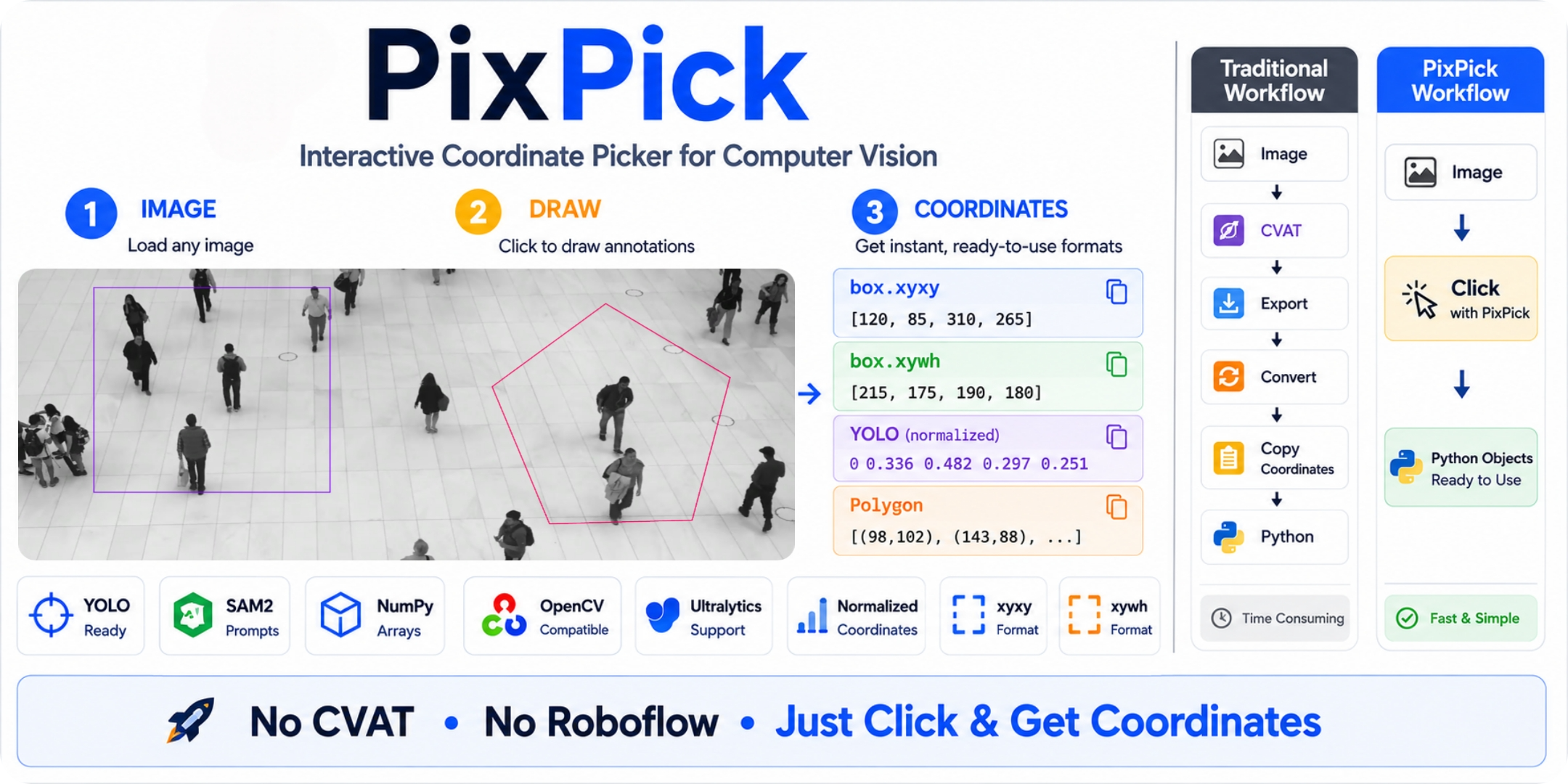
The problem
Every major CV framework needs coordinates before it can run.
# YOLO
regioncounter = RegionCounter(region=[120, 80, 640, 480])    # where does this region come from?

# SAM2/SAM3
predictor.predict(box=np.array([120, 80, 640, 480]))         # same problem
The standard workflow: open CVAT or Roboflow → grab coordinates → paste them back into code. Every. Single. Time.
The fix
import pixpick

region = pixpick.box("video.mp4", frame=10)  # drag a box on a specific video frame
zone   = pixpick.polygon("image.jpg")        # click polygon vertices

# coordinates are ready — unpack directly into any framework
# YOLO:
regioncounter = RegionCounter(
     region=zone.yolo_region,  # pass region points
     model="yolo26n.pt",
 )

# same for YOLOE
model.predict("image.jpg", visual_prompt= region.yolo_prompt)

# SAM/SAM2/SAM3:
predictor.predict(box=region.sam)
A window opens on your image, video, or a specific video frame. You interact. You get framework-ready coordinates back in Python. No round-trips.
pixpick.box() and pixpick.polygon() both accept a frame= argument when the source is a video file.
Install
pip install pixpick
Selectors
| Selector | How to use | Returns |
|---|---|---|
pixpick.box() |
Left-click + drag | Box |
pixpick.polygon() |
Click vertices | Polygon |
pixpick.line() |
Click start → click end | Line |
Box controls — drag to draw · R to reset · Enter to confirm · Esc to cancel
Polygon controls — LMB add point · RMB undo · Z clear · Enter confirm · Esc cancel
Line controls — LMB start → LMB end · RMB undo · Z clear · Enter confirm · Esc cancel
Output formats
Every selection object carries all the formats you'll ever need.
# ── Box ──────────────────────────────────────────────────────
region = pixpick.box("frame.jpg")

region.xyxy              # [x1, y1, x2, y2]            absolute pixels
region.xywh              # [x, y, w, h]                absolute pixels
region.norm_xywh         # [x, y, w, h]                0.0 – 1.0  ← YOLO label format
region.center            # (cx, cy)
region.area              # pixels²


# ── Polygon ───────────────────────────────────────────────────
zone = pixpick.polygon("frame.jpg")

zone.points              # [(x0,y0), (x1,y1), ...]     absolute pixels
zone.as_numpy            # np.array shape (N, 2)
zone.norm                # [(x0n,y0n), ...]             0.0 – 1.0
zone.bbox                # → Box   tight bbox around the polygon
zone.npoints             # int


## ── Line ─────────────────────────────────────────────────────
line = pixpick.line("frame.jpg")

line.points              # [(x0,y0), (x1,y1)]           absolute pixels
line.as_numpy            # np.array shape (2, 2)
line.norm                # [(x0n,y0n), (x1n,y1n)]       0.0 – 1.0
line.center              # (cx, cy)
line.length              # pixels
For more details, see Selectors.
Framework integration
| Framework | Selector | Method |
|---|---|---|
| Ultralytics YOLOE — visual prompt | Box |
region.yolo_prompt |
| Ultralytics YOLO — region | Box/Polygon |
region.yolo_region |
| SAM / SAM2 / SAM3 — box prompt | Box |
region.sam |
| Supervision PolygonZone — polygon | Polygon |
region.supervision |
| Any other format | Box / Polygon |
region.raw |
Persistence
Pick once, reuse forever.
region.save("zone.json")
region = pixpick.load("zone.json")   # Box and Polygon both work
Production pattern — pick interactively the first time, load on every subsequent run:
from pathlib import Path
import pixpick

ZONE = "config/count_zone.json"

zone = pixpick.load(ZONE) if Path(ZONE).exists() else pixpick.polygon("frame.jpg")
zone.save(ZONE)
Docs
| 🚀 Getting Started | Installation, first selection, controls |
| 🎯 Selectors | All properties and methods for Box and Polygon |
| 🔌 Framework Integration | YOLO, SAM2/SAM3 and more |
| 💾 Persistence | Save, load, JSON schema |
| 🏗️ Architecture | How it's built and how to extend it |
| 🗺️ Roadmap | What's coming next |
Contributing
We welcome contributions! Please open a GitHub issue or submit a pull request. For more information, see Contribution Guidelines.
1 maintainer

Metadata
1 maintainer
Release files for pixpick 0.2.2
For a detailed explanation of source distributions (sdists) and built distributions (wheels), please see the package formats documentation.
Source distribution (sdist)
| File | Size | Uploaded | |
|---|---|---|---|
| pixpick-0.2.2.tar.gz | 21.3 kB | Details |
Built distribution (wheel)
| File | Interpreter | ABI | Platform | Reset |
|---|---|---|---|---|
| pixpick-0.2.2-py3-none-any.whl | Python 3 | none | any | Details |
Total release size: 42.7 kB
Release files / pixpick-0.2.2.tar.gz
| Download URL | pixpick-0.2.2.tar.gz |
|---|---|
| Size | 21.3 kB |
| Tags | Source |
|
SHA-256 checksum How to use checksums |
627ddea626adaf23fe701566114c8de7ebff567c9ab8c6d575bd24567a86dc81
|
|
BLAKE2b-256 checksum How to use checksums |
859988322cc39969f391f243fdd065f13e7d2aa89e2d9b4510633e284c768712
|
| Upload date | |
|
Uploaded using Trusted Publishing? What is trusted publishing? |
No |
| Uploaded via |
twine/6.2.0 CPython/3.10.18
|
Release files / pixpick-0.2.2-py3-none-any.whl
| Download URL | pixpick-0.2.2-py3-none-any.whl |
|---|---|
| Size | 21.5 kB |
| Tags | Python 3 |
|
SHA-256 checksum How to use checksums |
71593eecf2d0a7687ae7000685fb5b15195366d6209d4db4f781420b71c34715
|
|
BLAKE2b-256 checksum How to use checksums |
91be286625a19a5cdc3736def5a45280383da5220e3e859dbcc3cb29c7d37351
|
| Upload date | |
|
Uploaded using Trusted Publishing? What is trusted publishing? |
No |
| Uploaded via |
twine/6.2.0 CPython/3.10.18
|














