
Pixsaw
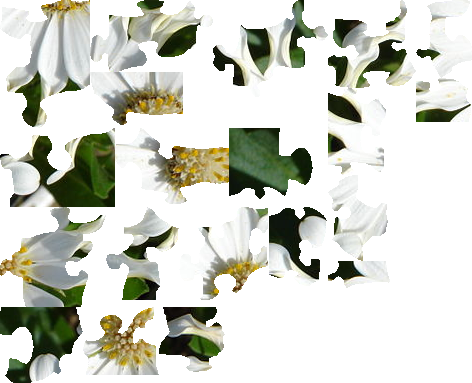
Cuts an image up into multiple pieces by following pixel lines that contrast with targeted piece color. Most pixels are kept in the process since very fine saw blades are used.
Try out by running the pixsaw.sh script that will prompt for necessary options
and run pixsaw inside a docker container. It will use the files in the examples
directory by default.
# Build and run using docker
./pixsaw.sh
Installing
Requires:
Install with pip in editable mode for developing and use virtualenv to isolate python dependencies::
python3 -m venv .venv
source .venv/bin/activate
pip install -e .
Usage
Running the pixsaw script will show some help. It basically needs a
path to a directory to store the generated files, an image that shows where to
cut, and the image that should be cut into pieces.
Example
mkdir tmp-small-puzzle-example
pixsaw --dir tmp-small-puzzle-example --lines examples/small-puzzle-lines.png examples/320px-White_Spoon_Osteospermum.jpg


Image from: http://en.wikipedia.org/wiki/File:White_Spoon_Osteospermum.JPG
The output (combined into one file with glue to better show it):
Contributing
Please contact me or create an issue.
Any submitted changes to this project require the commits to be signed off with the git command option '--signoff'. This ensures that the committer has the rights to submit the changes under the project's license and agrees to the Developer Certificate of Origin.
License
GNU Lesser General Public License v3.0
Maintenance
Where possible, an upkeep comment has been added to various parts of the source code. These are known areas that will require updates over time to reduce software rot. The upkeep comment follows this pattern to make it easier for commands like grep to find these comments.
Example UPKEEP comment has at least a 'due:' or 'label:' or 'interval:' value surrounded by double quotes (").
Example-> # UPKEEP due: "2022-12-14" label: "an example upkeep label" interval: "+4 months"
1 maintainer

Release files for pixsaw 0.6.1
For a detailed explanation of source distributions (sdists) and built distributions (wheels), please see the package formats documentation.
Source distribution (sdist)
| File | Size | Uploaded | |
|---|---|---|---|
| pixsaw-0.6.1.tar.gz | 21.9 kB | Details |
Built distribution (wheel)
| File | Interpreter | ABI | Platform | Reset |
|---|---|---|---|---|
| pixsaw-0.6.1-py3-none-any.whl | Python 3 | none | any | Details |
Total release size: 46.4 kB
Release files / pixsaw-0.6.1.tar.gz
| Download URL | pixsaw-0.6.1.tar.gz |
|---|---|
| Size | 21.9 kB |
| Tags | Source |
|
SHA-256 checksum How to use checksums |
35d60dfa8c325b076cd6d060e5bdec8b59e8e56980dccf2511b93c906512cdd4
|
|
BLAKE2b-256 checksum How to use checksums |
9336e466ac76bd10c980a7fd73955771cd00af942a0f333e8880d22a86bc5822
|
| Upload date | |
|
Uploaded using Trusted Publishing? What is trusted publishing? |
No |
| Uploaded via |
twine/6.2.0 CPython/3.13.5
|
Release files / pixsaw-0.6.1-py3-none-any.whl
| Download URL | pixsaw-0.6.1-py3-none-any.whl |
|---|---|
| Size | 24.4 kB |
| Tags | Python 3 |
|
SHA-256 checksum How to use checksums |
d456cc6d96c121466114cdaa9163ddefa4dd1bc03244b4f6ae2b934b8e96aff3
|
|
BLAKE2b-256 checksum How to use checksums |
efce2290e78b1184c3027d1facaef6457d60daffcc5a9539e20004efd8068dc9
|
| Upload date | |
|
Uploaded using Trusted Publishing? What is trusted publishing? |
No |
| Uploaded via |
twine/6.2.0 CPython/3.13.5
|















