





Pizzoo is a robust Python library designed for developers who want to unlock the full potential of matrix LED displays, particularly the Pixoo64, a 64x64 pixel LED display, and extend its functionalities to various other devices. Whether you're looking to create dynamic animations, develop interactive games, or integrate unique display functionalities, Pizzoo provides you with the tools and flexibility to innovate and express your creative ideas.
Features
-
Full Animation Creation and Control: With frame-by-frame programatic drawing capabilities you can craft detailed animations directly on your LED display, allowing you to visually conceptualize, iterate, and render animations seamlessly.
-
Template Rendering: Our built-in compiler supports an XML/HTML-like language for template processing. This facilitates the design of UIs with relative positioning, defined areas, and reusable components, helping you creating fast and reusable interfaces.
-
Flexible integration with any device: Even with the Pixoo64 being the default target, the Renderer class can be easily extended to support additional methods and integrate with various hardware. This ensures that Pizzoo can adapt to your specific project and hardware requirements.
-
Game Development Toolkit: Tap into the possibilities of micro game development with our mini game engine. Design, develop, and deploy small-scale games that can be played right on your LED devices, perfect for creating engaging interactive experiences.
Install
Just use pip to install the package:
pip install pizzoo
That's it! Everything should be installed correctly and pizzoo is ready to be used!
Drawing on your device
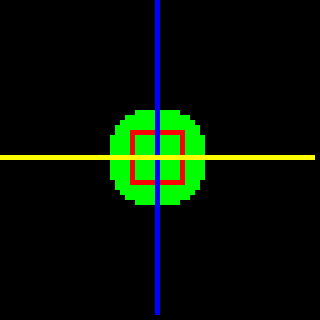
Frame manipulation is the core of the pizzoo library. Every time the library is created and the render method is called, the buffer is filled with a new frame we can use to draw on. Lets start by drawing three pixels on the screen and rendering:
pizzoo.cls()
pizzoo.draw_circle((31, 31), 10, '#00ff00', filled=True) # Green circle, filled
pizzoo.draw_rectangle((26, 26), 11, 11, '#ff0000', filled=False) # Red rectangle, not filled
pizzoo.draw_line((31, 0), (31, 63), '#0000ff') # Blue line
pizzoo.draw_line((0, 31), (63, 31), (255, 255, 0)) # Yellow line, tuple rgb color format
pizzoo.render()
Creating animations
Aside from simple gif drawing (That is also supported), custom animations can be created using frame-by-frame manipulation. As an example:
'''
This will create a simple diagonal moving circle
'''
for i in range(0, 54):
	pizzoo.cls()
	pizzoo.draw_circle((i + 4, i + 4), 2, '#00ff00', filled=True)
	pizzoo.add_frame()
pizzoo.render(frame_speed=100)

Rendering templates
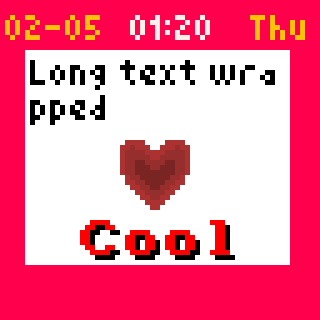
The most powerful feature of this library is the ability of render templates. Custom XML/HTML like templates can be made to create images, Pixoo64 dials and even reusable parts or components.
'''
This template uses custom nodes for Pixoo64 for creating auto-updating dials, as date or time, so these are missing when
rendering on any other renderer
'''
pizzoo.load_font('amstrad', './files/amstrad_cpc_extended.bdf')
pizzoo.render_template('''
	<pizzoo>
		<rectangle x="0" y="0" width="100%" height="100%" color="8" filled="true">
			<section x="0" y="2">
				<date format="DD" x="1" color="#ffc107" font="small"></date>
				<text x="9" color="#ffc107">-</text>
				<date format="MM" x="13" color="#ffc107" font="small"></date>
				<time format="HH:mm" x="26" font="small"></time>
				<date format="WWW" width="63" x="50" color="#ffc107" font="small"></date>
			</section>
			<section x="5" y="10" width="53" height="43">
				<rectangle x="0" y="0" width="100%" height="100%" color="#FFFFFF" filled="true" />
				<section x="1" y="1" width="51" height="51">
					<text x="0" y="0" color="#000000" wrap="true">Long text wrapped</text>
					<text x="10" y="80%" shadow="diagonal" color="#FF0000" font="amstrad">Cool</text>
					<image x="17" y="40%" src="./files/test_image.png" />
				</section>
			</section>
		</rectangle>
	</pizzoo>
''')
Template rendering provide a lot of options, including self-updating time, date, weather...(Using tags like , and so on) and even support for using images or gifs as backgrounds (check the examples).
There's also have a dedicated section for this on our docs.
Do you want to know more?
Here's a dedicated page for documentation with a lot of examples so you can get quickly started.
Contribute and/or donate
This library was created and is maintained by a single developer, consider contributing with pull requests, new integrations, proposals or simply by doing a small donation on ko-fi.
Special thanks
This library exists thanks to other libraries that were an inspiration, specially the Pixoo library by SomethingWithComputers and the Matrix-Fonts matrix bdf font collection by trip5.
Also I want to give a special thanks to my lovely fiancee for all her support while developing this library, both technical and emotional 💖
1 maintainer

Metadata
1 maintainer
Release files for pizzoo 0.9.14
For a detailed explanation of source distributions (sdists) and built distributions (wheels), please see the package formats documentation.
Source distribution (sdist)
| File | Size | Uploaded | |
|---|---|---|---|
| pizzoo-0.9.14.tar.gz | 35.7 kB | Details |
Built distribution (wheel)
| File | Interpreter | ABI | Platform | Reset |
|---|---|---|---|---|
| pizzoo-0.9.14-py3-none-any.whl | Python 3 | none | any | Details |
Total release size: 69.0 kB
Release files / pizzoo-0.9.14.tar.gz
| Download URL | pizzoo-0.9.14.tar.gz |
|---|---|
| Size | 35.7 kB |
| Tags | Source |
|
SHA-256 checksum How to use checksums |
d09440020858674865a77f1ab00b8d315bbee8c282be7d82b173d26b6600f266
|
|
BLAKE2b-256 checksum How to use checksums |
3d48a34005643e85257a471ec009767e9d09226d9b21552420d8e91bf1ed823f
|
| Upload date | |
|
Uploaded using Trusted Publishing? What is trusted publishing? |
No |
| Uploaded via |
twine/6.1.0 CPython/3.13.2
|
Release files / pizzoo-0.9.14-py3-none-any.whl
| Download URL | pizzoo-0.9.14-py3-none-any.whl |
|---|---|
| Size | 33.4 kB |
| Tags | Python 3 |
|
SHA-256 checksum How to use checksums |
f1e7c69c6cb4e267c074f1d94ede4bc5a72c5e1179a77bb99bfb0f06816b3180
|
|
BLAKE2b-256 checksum How to use checksums |
fbf23f642107b0b7d839b53df1391f4462342ced801c27e241eebd6d5ab295c7
|
| Upload date | |
|
Uploaded using Trusted Publishing? What is trusted publishing? |
No |
| Uploaded via |
twine/6.1.0 CPython/3.13.2
|














