
Cluster host monitor CLI.

Project description
hstat




Lightweight cluster resource monitor CLI.
hstat helps you inspect CPU/MEM/GPU utilization by host or by user with a clear terminal table.
Table of Contents
Screenshots
Query all
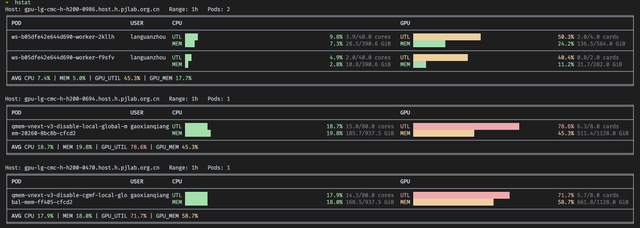
Query by host

Query by user
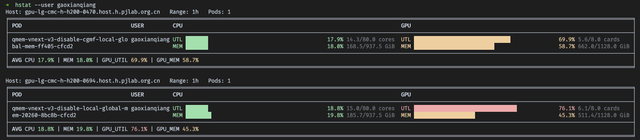
Installation
From source (recommended for now)
git clone <your-repo-url>
cd h-monitor
pip install .
Editable mode (development)
pip install -e .
Verify install
hstat --help
Quick Start
Query one host
hstat --host <hostname>
Query one user
hstat --user <username> --range 1h
CLI Reference
| Argument | Alias | Description | Default |
|---|---|---|---|
--host |
-w, -n, --node |
Query by host/node | - |
--user |
-u |
Query by user and auto-discover pods | - |
--tenant |
- | Tenant label used in metrics query | ailab |
--namespace |
- | Namespace for brainctl/rjob lookup |
ailab-ipec |
--range |
- | Prometheus range (e.g. 30m, 1h, 6h) |
1h |
Output Interpretation
UTL: utilization meter, percentage-based loadMEM: memory usage ratio against requested resources- Row order: sorted by GPU utilization (high -> low)
- Footer
AVG: average CPU/MEM/GPU usage across listed pods
Release history Release notifications | RSS feed


Download files
Download the file for your platform. If you're not sure which to choose, learn more about installing packages.
Source Distribution
Built Distribution
Filter files by name, interpreter, ABI, and platform.
If you're not sure about the file name format, learn more about wheel file names.
Copy a direct link to the current filters
File details
Details for the file pjlab_hstat-0.1.0.post1.tar.gz.
File metadata
- Download URL: pjlab_hstat-0.1.0.post1.tar.gz
- Upload date:
- Size: 9.3 kB
- Tags: Source
- Uploaded using Trusted Publishing? No
- Uploaded via: twine/6.2.0 CPython/3.10.12
File hashes
| Algorithm | Hash digest | |
|---|---|---|
| SHA256 |
8e909c32cc5b27cdf68cf562d7986d5d4a771164de4a8c6d9c9e3637c12a3af9
|
|
| MD5 |
e1b9e3d5f50f53c153d3b9fe706770e5
|
|
| BLAKE2b-256 |
585a7c1a95b3e096f83b6d79014ddfea4c9c5f563d5f3fe382740ab792913fd6
|
File details
Details for the file pjlab_hstat-0.1.0.post1-py3-none-any.whl.
File metadata
- Download URL: pjlab_hstat-0.1.0.post1-py3-none-any.whl
- Upload date:
- Size: 9.8 kB
- Tags: Python 3
- Uploaded using Trusted Publishing? No
- Uploaded via: twine/6.2.0 CPython/3.10.12
File hashes
| Algorithm | Hash digest | |
|---|---|---|
| SHA256 |
de64ea41c10e2891c2872233862a451a4f202013ce7f2fc26429f2e6a808b489
|
|
| MD5 |
7333238ea10b9a99f47add3fde60773f
|
|
| BLAKE2b-256 |
cb6bfc96dcefd06b37e545692d05729dab9daa8492c0a3c4b04a9e5fee014642
|






