
plain.code
Preconfigured code formatting and linting.
Overview
Plain.code provides comprehensive code quality tools with sensible defaults:
- Ruff - Python linting and formatting
- ty - Python type checking
- Biome - JavaScript, JSON, and CSS formatting
Ruff and ty are installed as Python dependencies. Biome is managed automatically as a standalone binary (npm is not required).
Commands
plain fix
The most used command is plain fix, which automatically fixes linting issues and formats your code:
plain fix
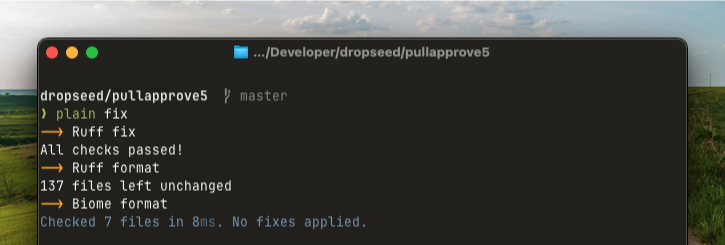
You can also apply unsafe fixes or add noqa comments to suppress errors:
# Apply Ruff's unsafe fixes
plain fix --unsafe-fixes

# Add noqa comments instead of fixing
plain fix --add-noqa
plain code check
To check your code without making changes (including type checking):
plain code check
You can skip specific tools if needed:
# Skip type checking during rapid development
plain code check --skip-ty

# Only run type checks
plain code check --skip-ruff --skip-biome

# Skip Biome checks
plain code check --skip-biome

# Skip annotation coverage checks
plain code check --skip-annotations
If plain.dev is installed, plain code check will be run automatically as a part of plain pre-commit to help catch issues before they are committed.
plain code annotations
Check the type annotation coverage of your codebase:
plain code annotations
This outputs a summary like 85.2% typed (23/27 functions).
To see which functions are missing annotations:
plain code annotations --details
You can also output the results as JSON for use in CI or other tools:
plain code annotations --json
Settings
Default configuration is provided by ruff_defaults.toml and biome_defaults.json.
You can customize the behavior in your pyproject.toml:
[tool.plain.code]
exclude = ["path/to/exclude"]

[tool.plain.code.ty]
enabled = true  # Set to false to disable ty

[tool.plain.code.biome]
enabled = true  # Set to false to disable Biome
version = "1.5.3"  # Pin to a specific version

[tool.plain.code.annotations]
enabled = true  # Set to false to disable annotation checks
exclude = ["migrations"]  # Exclude specific patterns
For more advanced configuration options, see get_code_config.
Generally you won't need to change the configuration. The defaults are designed to "just work" for most projects. If you find yourself needing extensive customization, consider using the underlying tools (Ruff, ty, Biome) directly instead.
FAQs
How do I install or update Biome manually?
Biome is installed automatically when you run plain fix or plain code check. If you need to manage it manually:
# Install Biome (or reinstall if corrupted)
plain code install

# Force reinstall even if up to date
plain code install --force

# Update to the latest version
plain code update
Why are test files excluded from annotation coverage?
Test files (test_*.py, *_test.py, and files in tests/ or test/ directories) are excluded by default because they typically contain many small helper functions where type annotations add noise without providing significant value. You can customize this behavior via the exclude option in the annotations configuration.
How do I check a specific directory?
All commands accept a path argument:
plain fix path/to/directory
plain code check path/to/directory
plain code annotations path/to/directory
Installation
Install the plain.code package from PyPI:
uv add plain.code
1 maintainer

Metadata
1 maintainer
Release files for plain.code 0.20.1
For a detailed explanation of source distributions (sdists) and built distributions (wheels), please see the package formats documentation.
Source distribution (sdist)
| File | Size | Uploaded | Provenance | Actions |
|---|---|---|---|---|
| plain_code-0.20.1.tar.gz | 14.5 kB | Without provenance | Details for plain_code-0.20.1.tar.gz |
Built distribution (wheel)
| File | Interpreter | ABI | Platform | Actions Reset |
|---|---|---|---|---|
| plain_code-0.20.1-py3-none-any.whl | Python 3 | none | any | Details for plain_code-0.20.1-py3-none-any.whl |
Total release size: 32.6 kB
Release files / plain_code-0.20.1.tar.gz
| Download URL | plain_code-0.20.1.tar.gz |
|---|---|
| Size | 14.5 kB |
| Tags | Source |
|
SHA-256 checksum How to use checksums |
25315d2af0b5f4018a2efd39605f6a6a3879ca61c49341140903ab0da4f9b920
|
|
BLAKE2b-256 checksum How to use checksums |
5c23dc64d618033343ca70c5496d381f0290980df8f09f5f05ea933af3d7087c
|
| Upload date | |
|
Uploaded using Trusted Publishing? What is trusted publishing? |
Yes |
| Uploaded via |
uv/0.9.27 {"installer":{"name":"uv","version":"0.9.27","subcommand":["publish"]},"python":null,"implementation":{"name":null,"version":null},"distro":{"name":"Ubuntu","version":"24.04","id":"noble","libc":null},"system":{"name":null,"release":null},"cpu":null,"openssl_version":null,"setuptools_version":null,"rustc_version":null,"ci":true}
|
Release files / plain_code-0.20.1-py3-none-any.whl
| Download URL | plain_code-0.20.1-py3-none-any.whl |
|---|---|
| Size | 18.0 kB |
| Tags | Python 3 |
|
SHA-256 checksum How to use checksums |
90ef49d5a29c057571118590af6a4d5ff15d67e582a8d29b58362e75ff7437d6
|
|
BLAKE2b-256 checksum How to use checksums |
3e56e9b4dfe153e7dfa37cba46e883e865edfc029c7ad1d15f5fccb209072358
|
| Upload date | |
|
Uploaded using Trusted Publishing? What is trusted publishing? |
Yes |
| Uploaded via |
uv/0.9.27 {"installer":{"name":"uv","version":"0.9.27","subcommand":["publish"]},"python":null,"implementation":{"name":null,"version":null},"distro":{"name":"Ubuntu","version":"24.04","id":"noble","libc":null},"system":{"name":null,"release":null},"cpu":null,"openssl_version":null,"setuptools_version":null,"rustc_version":null,"ci":true}
|
Security for plain.code 0.20.1
Provenance
Provenance describes where a file came from. On PyPI, provenance is shared via attestations, which provide a verifiable record of the build or publishing details. View details, limitations and caveats.
No provenance found
None of the files in this release were uploaded with provenance metadata.
A note on package security
PyPI is a repository for distributing packages, not a service for auditing them. While third-party security researchers and our staff do their best to detect and remove malicious packages, PyPI cannot guarantee the quality, security or suitability of any given package.
To learn more about protecting yourself from malicious actors, visit our package security documentation.














