
Preconfigured code formatting and linting.

Project description
plain.code
Preconfigured code formatting and linting.
Overview
The plain code command provides comprehensive code quality tools:
- Ruff - Python linting and formatting
- ty - Python type checking
- Biome - JavaScript, JSON, and CSS formatting
Ruff and ty are installed as Python dependencies. Biome is managed automatically as a standalone binary (npm is not required).
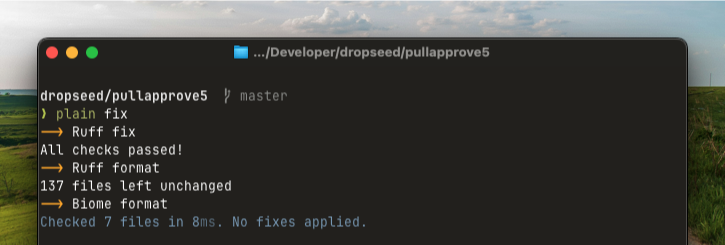
The most used command is plain code fix, which can be run using the alias plain fix:
plain fix
This will automatically fix linting issues and format your code according to the configured rules.
To check your code without making changes (including type checking):
plain code check
You can skip specific tools if needed:
# Skip type checking during rapid development
plain code check --skip-ty

# Only run type checks
plain code check --skip-ruff --skip-biome

# Skip Biome checks
plain code check --skip-biome
If plain.dev is installed then plain code check will be run automatically as a part of plain precommit to help catch issues before they are committed.
Configuration
Default configuration is provided by ruff_defaults.toml and biome_defaults.json.
You can customize the behavior in your pyproject.toml:
[tool.plain.code]
exclude = ["path/to/exclude"]

[tool.plain.code.ty]
enabled = true  # Set to false to disable ty

[tool.plain.code.biome]
enabled = true  # Set to false to disable Biome
version = "1.5.3"  # Pin to a specific version
For more advanced configuration options, see get_code_config.
Generally it's expected that you won't change the configuration! We've tried to pick defaults that "just work" for most projects. If you find yourself needing to customize things, you should probably just move to using the tools themselves directly instead of the plain.code package.
Installation
Install the plain.code package from PyPI:
uv add plain.code
Release history Release notifications | RSS feed


Download files
Download the file for your platform. If you're not sure which to choose, learn more about installing packages.
Source Distribution
Built Distribution
Filter files by name, interpreter, ABI, and platform.
If you're not sure about the file name format, learn more about wheel file names.
Copy a direct link to the current filters
File details
Details for the file plain_code-0.13.0.tar.gz.
File metadata
- Download URL: plain_code-0.13.0.tar.gz
- Upload date:
- Size: 8.0 kB
- Tags: Source
- Uploaded using Trusted Publishing? Yes
- Uploaded via: uv/0.9.14 {"installer":{"name":"uv","version":"0.9.14","subcommand":["publish"]},"python":null,"implementation":{"name":null,"version":null},"distro":{"name":"Ubuntu","version":"24.04","id":"noble","libc":null},"system":{"name":null,"release":null},"cpu":null,"openssl_version":null,"setuptools_version":null,"rustc_version":null,"ci":true}
File hashes
| Algorithm | Hash digest | |
|---|---|---|
| SHA256 |
ffe5dc1faafde8b3765e21c0d341f40eb392d597ec06bbe12434ee5ccf8cc0b0
|
|
| MD5 |
b6fa00f6fedd3fb3339d8ff7bba6d375
|
|
| BLAKE2b-256 |
7ea48510949e182d9d5f1fabe2202a4940911a745e7eb7a743678d38581b30ae
|
File details
Details for the file plain_code-0.13.0-py3-none-any.whl.
File metadata
- Download URL: plain_code-0.13.0-py3-none-any.whl
- Upload date:
- Size: 11.5 kB
- Tags: Python 3
- Uploaded using Trusted Publishing? Yes
- Uploaded via: uv/0.9.14 {"installer":{"name":"uv","version":"0.9.14","subcommand":["publish"]},"python":null,"implementation":{"name":null,"version":null},"distro":{"name":"Ubuntu","version":"24.04","id":"noble","libc":null},"system":{"name":null,"release":null},"cpu":null,"openssl_version":null,"setuptools_version":null,"rustc_version":null,"ci":true}
File hashes
| Algorithm | Hash digest | |
|---|---|---|
| SHA256 |
6b4d4fcb3e21ca1158bb5441d9b281b255836b069b9049a3c5e636028c698f5a
|
|
| MD5 |
b419720eae832630b8cf3e7a85a3ccb7
|
|
| BLAKE2b-256 |
0c5ecbce8c7587b036e28547b9ee2b68fcd87eca5e523b7c771e7299c81c3eeb
|






