
Manage your app with a backend interface.

Project description
plain.admin
Manage your app with a backend interface.
Overview
The Plain Admin provides a combination of built-in views and the flexibility to create your own. You can use it to quickly get visibility into your app's data and to manage it.
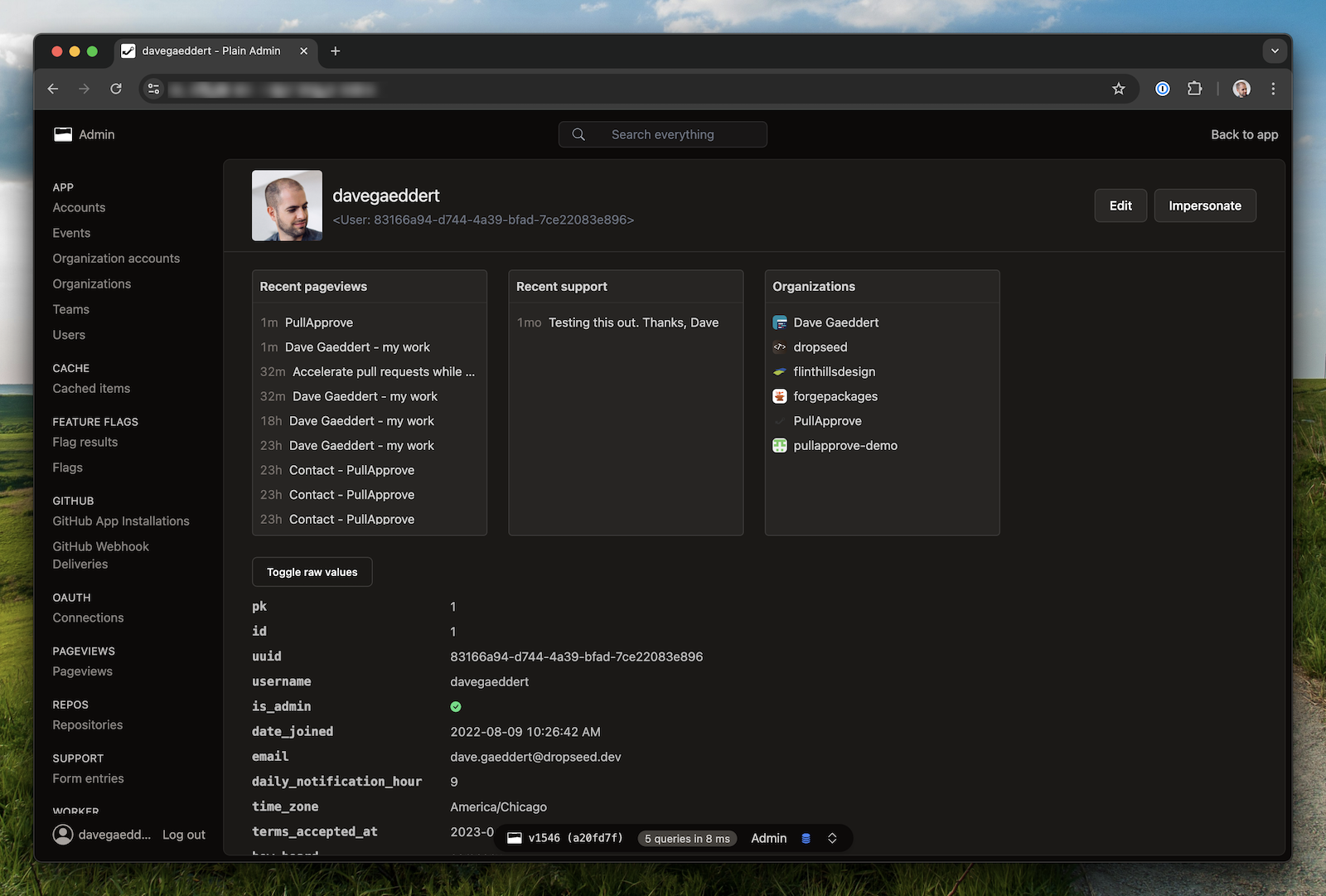
The most common use of the admin is to manage your plain.models. To do this, create a viewset with inner/nested views:
# app/users/admin.py
from plain.admin.views import (
    AdminModelDetailView,
    AdminModelListView,
    AdminModelUpdateView,
    AdminViewset,
    register_viewset,
)
from plain.models.forms import ModelForm

from .models import User


class UserForm(ModelForm):
    class Meta:
        model = User
        fields = ["email"]


@register_viewset
class UserAdmin(AdminViewset):
    class ListView(AdminModelListView):
        model = User
        fields = [
            "id",
            "email",
            "created_at__date",
        ]
        queryset_order = ["-created_at"]
        search_fields = [
            "email",
        ]

    class DetailView(AdminModelDetailView):
        model = User

    class UpdateView(AdminModelUpdateView):
        template_name = "admin/users/user_form.html"
        model = User
        form_class = UserForm
Admin viewsets
The AdminViewset will automatically recognize inner views named ListView, CreateView, DetailView, UpdateView, and DeleteView. It will interlink these views automatically in the UI and form success URLs. You can define additional views too, but you will need to implement a couple methods to hook them up.
Admin cards
TODO
Admin forms
TODO
List displays
On AdminListView and AdminModelListView, you can define different displays to build predefined views of your data. The display choices will be shown in the UI, and you can use the current self.display in your view logic.
# app/users/admin.py
from plain.admin.views import AdminModelListView, register_viewset

from .models import User


@register_viewset
class UserAdmin(AdminViewset):
    class ListView(AdminModelListView):
        model = User
        fields = [
            "id",
            "email",
            "created_at__date",
        ]
        displays = ["Users without email"]

        def get_objects(self):
            objects = super().get_objects()

            if self.display == "Users without email":
                objects = objects.filter(email="")

            return objects
Toolbar
TODO
Impersonate
TODO
Installation
Install the plain.admin package from PyPI:
uv add plain.admin
The admin uses a combination of other Plain packages, most of which you will already have installed. Ultimately, your settings will look something like this:
# app/settings.py
INSTALLED_PACKAGES = [
    "plain.models",
    "plain.tailwind",
    "plain.auth",
    "plain.sessions",
    "plain.htmx",
    "plain.admin",
    "plain.elements",
    # other packages...
]

AUTH_USER_MODEL = "users.User"
AUTH_LOGIN_URL = "login"

MIDDLEWARE = [
    "plain.sessions.middleware.SessionMiddleware",
    "plain.admin.AdminMiddleware",
]
Your User model is expected to have an is_admin field (or attribute) for checking who has permission to access the admin.
# app/users/models.py
from plain import models


@models.register_model
class User(models.Model):
    is_admin = models.BooleanField(default=False)
    # other fields...
To make the admin accessible, add the AdminRouter to your root URLs.
# app/urls.py
from plain.admin.urls import AdminRouter
from plain.urls import Router, include, path

from . import views


class AppRouter(Router):
    namespace = ""
    urls = [
        include("admin/", AdminRouter),
        path("login/", views.LoginView, name="login"),
        path("logout/", LogoutView, name="logout"),
        # other urls...
    ]
Release history Release notifications | RSS feed


Download files
Download the file for your platform. If you're not sure which to choose, learn more about installing packages.
Source Distribution
Built Distribution
Filter files by name, interpreter, ABI, and platform.
If you're not sure about the file name format, learn more about wheel file names.
Copy a direct link to the current filters
File details
Details for the file plain_admin-0.51.0.tar.gz.
File metadata
- Download URL: plain_admin-0.51.0.tar.gz
- Upload date:
- Size: 380.1 kB
- Tags: Source
- Uploaded using Trusted Publishing? Yes
- Uploaded via: uv/0.9.5
File hashes
| Algorithm | Hash digest | |
|---|---|---|
| SHA256 |
be316b49c9ff2cfbde05cc6c21ab517b8dbdcb8d6ffe51eb2b58b7230b6fc7cf
|
|
| MD5 |
2f3d38a29c7920b59501fdb8b02f1c8a
|
|
| BLAKE2b-256 |
7445c0ee08cbe4c8260fc44a756a8ac14e15032a2cc14b388adba04041f41af2
|
File details
Details for the file plain_admin-0.51.0-py3-none-any.whl.
File metadata
- Download URL: plain_admin-0.51.0-py3-none-any.whl
- Upload date:
- Size: 402.5 kB
- Tags: Python 3
- Uploaded using Trusted Publishing? Yes
- Uploaded via: uv/0.9.5
File hashes
| Algorithm | Hash digest | |
|---|---|---|
| SHA256 |
819458dc1697fcf58d3841cfc06985897fc115740b68a8e5e0f79f37564d7e01
|
|
| MD5 |
29a5745d2bae6859f11dd272161be085
|
|
| BLAKE2b-256 |
5078075eeb715ab6a0746dd9e3db434d65bbae7cc2bb5c3118df5874ef47baba
|






