
plain.tunnel
Expose your local development server to the internet.
Overview
Plain Tunnel is a hosted tunneling service that gives your local development server a public URL. You can use it to test webhooks from third-party services, preview your site on a mobile device, or share your work with someone temporarily.
To create a tunnel, run:
plain tunnel https://app.localhost:8443
This connects your local server to a randomly generated subdomain like yourname-abc1234.plaintunnel.com. The tunnel stays open until you stop it with Ctrl+C.
To use a consistent subdomain, pass the --subdomain option:
plain tunnel https://app.localhost:8443 --subdomain myapp
Now your tunnel will always be available at https://myapp.plaintunnel.com.
Integrating with plain.dev
You can run the tunnel automatically alongside your development server by adding it to your pyproject.toml:
[tool.plain.dev.run]
tunnel = {cmd = "plain tunnel $DEV_URL --subdomain myapp --quiet"}
The $DEV_URL variable is automatically set to your local server URL. The --quiet flag reduces log output so it does not clutter your terminal.
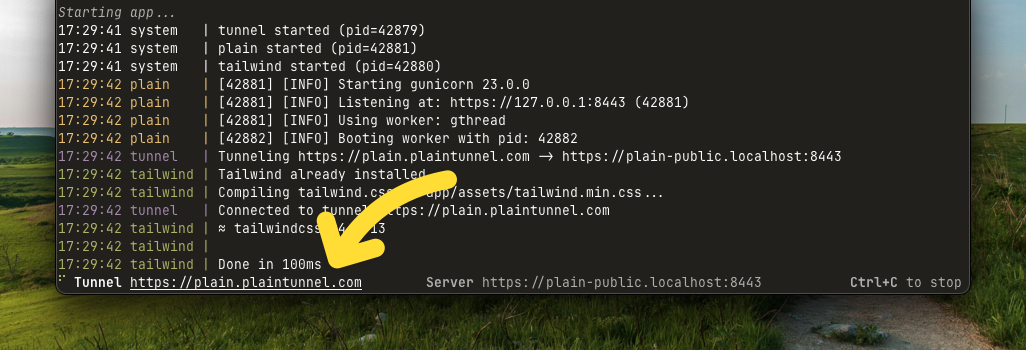
To display the tunnel URL in the plain dev header, add DEV_TUNNEL_URL to your .env file:
DEV_TUNNEL_URL=https://myapp.plaintunnel.com
CLI options
The cli command accepts these options:
| Option | Description |
|---|---|
destination |
URL of your local server (required) |
--subdomain |
Custom subdomain to use |
--debug |
Enable debug logging |
--quiet |
Only log warnings and errors |
Examples:
# With debug logging to troubleshoot connection issues
plain tunnel https://app.localhost:8443 --debug

# Run as a standalone tool without installing
uvx plain-tunnel https://app.localhost:8443
Environment variables
You can configure the tunnel using environment variables instead of CLI options:
| Variable | Description |
|---|---|
PLAIN_TUNNEL_SUBDOMAIN |
Default subdomain to use |
PLAIN_TUNNEL_HOST |
Tunnel host (defaults to plaintunnel.com) |
FAQs
How does the tunnel work?
The tunnel establishes a WebSocket connection to the Plain Tunnel server. When a request arrives at your public URL, the server forwards it through the WebSocket to your local machine. The TunnelClient then makes the request to your local server and sends the response back.
What happens if the connection drops?
The tunnel automatically reconnects if the connection is lost. It will retry up to 5 times with a 2-second delay between attempts.
Can I use this without installing Plain?
Yes. You can run the tunnel as a standalone tool using uvx:
uvx plain-tunnel https://localhost:8000
Do I need to configure ALLOWED_HOSTS?
If you are using Plain with a custom subdomain, you may need to add it to your ALLOWED_HOSTS setting:
# app/settings.py
ALLOWED_HOSTS = [
    "localhost",
    "app.localhost",
    "myapp.plaintunnel.com",
]
Installation
Install from PyPI:
uv add plain.tunnel --dev
Then run the tunnel:
plain tunnel https://app.localhost:8443
1 maintainer

Download files
Download the file for your platform. If you're not sure which to choose, learn more about installing packages.
Source Distribution
Built Distribution
Filter files by name, interpreter, ABI, and platform.
If you're not sure about the file name format, learn more about wheel file names.
Copy a direct link to the current filters
File details
Details for the file plain_tunnel-0.12.9.tar.gz.
File metadata
- Download URL: plain_tunnel-0.12.9.tar.gz
- Upload date:
- Size: 35.5 kB
- Tags: Source
- Uploaded using Trusted Publishing? Yes
- Uploaded via:
uv/0.12.3 {"installer":{"name":"uv","version":"0.12.3","subcommand":["publish"]},"python":null,"implementation":{"name":null,"version":null},"distro":{"name":"Ubuntu","version":"24.04","id":"noble","libc":null},"system":{"name":null,"release":null},"cpu":null,"openssl_version":null,"setuptools_version":null,"rustc_version":null,"ci":true}
File hashes
| Algorithm | Hash digest | |
|---|---|---|
| SHA256 |
311949a5ce6ad73d17c8ef9eef463781fdbfd593a8383b667bceb4e14dc87dc5
|
|
| MD5 |
a4cd351e69abcefe9907547096b3e850
|
|
| BLAKE2b-256 |
c6d058c140be695c69fa7adcd2f506d4df4c42c2278fd7536f8b3b0df776fb95
|
File details
Details for the file plain_tunnel-0.12.9-py3-none-any.whl.
File metadata
- Download URL: plain_tunnel-0.12.9-py3-none-any.whl
- Upload date:
- Size: 15.6 kB
- Tags: Python 3
- Uploaded using Trusted Publishing? Yes
- Uploaded via:
uv/0.12.3 {"installer":{"name":"uv","version":"0.12.3","subcommand":["publish"]},"python":null,"implementation":{"name":null,"version":null},"distro":{"name":"Ubuntu","version":"24.04","id":"noble","libc":null},"system":{"name":null,"release":null},"cpu":null,"openssl_version":null,"setuptools_version":null,"rustc_version":null,"ci":true}
File hashes
| Algorithm | Hash digest | |
|---|---|---|
| SHA256 |
4e5b8e2b332fb1fea7755c8bfb97650adb1bda910a6e9d3f4a3d0fe87e30d038
|
|
| MD5 |
b779488e5566b0ee98e6a180df5ed9ad
|
|
| BLAKE2b-256 |
7eeaa5a5ee9be6f0c7f97deaf73ad391028b9a75fa0a4ee8852b6c57cf2067bb
|







