
🌿 PlantDoc-Predictor



A Python library for predicting plant diseases from leaf images using pre-trained or custom deep learning models — now with multi-dataset support (PlantVillage + Rice, and more on the way), selectable through a single dataset argument.
🚀 Features
- ✅ Pretrained models included — Ready-to-use architectures like InceptionV3, ResNet50, MobileNetV2, ViT, Swin, DeiT3 and more.
- 🌍 Multi-dataset support (1.1.0+) — Detect diseases across multiple datasets (PlantVillage 38-class + Rice 6-class, more coming) via a single
datasetargument. Pick a dataset and the best model is chosen for you. - 🧠 Unified API — One interface for both built-in and custom
.h5/.pthmodels from Keras and PyTorch. - 🧩 Custom model support — Load your own model and label mapping JSON.
- 🌱 Extensible — Add a whole new dataset by dropping in one
<dataset>_registry.json— no code changes. - 🧰 Visualization support — Displays prediction confidence and leaf images.
- ⚙️ Cross-platform — Works seamlessly on Windows, macOS, and Linux.
🔬 Advanced Features (NEW 🚀) Added in release 1.0.0 and above.
- 🧠 Full Model Access — Retrieve the complete loaded model for fine-tuning and experimentation.
- ⚙️ Weights Extraction — Access model weights for analysis, comparison, and research.
- 🧩 Layer Introspection — List all layers and inspect architecture programmatically.
- 🏆 Top-K Predictions — Get ranked predictions, not just the top-1 label (1.0.2+).
- 🖼️ PIL Image Input — Pass
PIL.Imageobjects directly — ideal for Streamlit / FastAPI (1.0.2+). - 📦 Batch Prediction —
BatchPredictorover folders/lists with CSV & JSON export (1.0.2+). - 💻 Command-Line Interface —
plantdoc models/plantdoc predict(1.0.2+). - 🛡️ Guarded Prediction —
GuardedPredictorrejects non-leaf images with a CLIP-based guard (1.0.3+). - 🔥 Grad-CAM Explainability —
ExplainablePredictoroverlays a heatmap showing which leaf regions drove the prediction (1.0.3+). - 🌍 Multi-Dataset Support — Select a dataset with
Predictor(dataset="rice"); each dataset lives in its own auto-merged registry file. Ships 7 PyTorch rice models (1.1.0+).
🔥 Feature Extraction (Research-Grade 🚀)
- 📊 Extract intermediate representations from any layer
- 🧪 Enables feature-space SMOTE, clustering, and embedding analysis
- 🧠 Works across all models in the model zoo
- 🔍 Supports custom layer selection
👉 This transforms PlantDoc-Predictor into a feature extraction + research framework, not just an inference tool.
🧠 Why Use PlantDoc-Predictor
PlantDoc-Predictor was created to reduce repetitive work in plant-disease research.
Researchers and agritech developers often train from scratch — this tool eliminates that friction by providing:
- Pretrained baselines for benchmarking new models.
- Standardized label sets and metadata for reproducibility.
- Plug-and-play inference for agricultural image datasets.
- A unified interface for rapid experimentation and deployment.
Whether you’re a researcher, startup, or precision-agriculture developer, PlantDoc-Predictor simplifies your workflow and lets you focus on innovation — not setup.
🧬 Supported Models
PlantDoc-Predictor includes a diverse model zoo of pretrained CNN and transformer architectures across multiple datasets. Models are automatically downloaded from the remote registry when first used, making them ready for plug-and-play inference.
Use any model by name via Predictor(model_name=...), or pick a whole dataset with Predictor(dataset=...) to get its default model.
🌱 PlantVillage — 38-class dataset
The original model zoo, fine-tuned on the PlantVillage 38-class dataset (0.2.1+). Select with Predictor(dataset="plantvillage") (also the library default). Default model: rec_add_attention_v1.
| Model Name | Input Size | Accuracy | Framework | Description |
|---|---|---|---|---|
| Recursive Additive Attention v1 | 224×224 | 99.7% | Keras | Custom CNN with Recursive Additive Attention (research model) |
| ConvNeXt Base v1 | 224×224 | 99.1% | Keras | Modern ConvNet architecture inspired by transformers |
| ConvNeXt Small v1 | 224×224 | 99.5% | Keras | Lightweight ConvNeXt variant with high accuracy |
| ConvNeXt Tiny v1 | 224×224 | 99.23% | Keras | Efficient ConvNeXt model for faster inference |
| Swin Base Patch4 Window7 | 224×224 | 99.1% | PyTorch | Hierarchical Vision Transformer with shifted windows |
| Swin Tiny Patch4 Window7 | 224×224 | 99.1% | PyTorch | Lightweight Swin Transformer for efficient inference |
| ViT Base 16 v1 | 224×224 | 99.1% | PyTorch | Vision Transformer base model |
| ViT Large 16 v1 | 224×224 | 99.1% | PyTorch | Larger ViT model with higher capacity |
| ViT Small 16 v1 | 224×224 | 99.1% | PyTorch | Smaller ViT model for faster inference |
| ViT Tiny 16 v1 | 224×224 | 99.1% | PyTorch | Lightweight Vision Transformer |
| RegNetX-160 v1 (NEW) | 224×224 | 99.1% | PyTorch | RegNetX-160 fine-tuned on PlantVillage dataset |
| RegNetY-160 v1 (NEW) | 224×224 | 99.1% | PyTorch | RegNetY-160 fine-tuned on PlantVillage dataset |
| RegNetY-320 v1 (NEW) | 224×224 | 99.1% | PyTorch | RegNetY-320 fine-tuned on PlantVillage dataset |
| DenseNet169 v1 | 224×224 | 99.68% | Keras | Best performing DenseNet variant |
| VGG19 v1 | 224×224 | 98.98% | Keras | Deep VGG architecture with strong performance |
| DenseNet121 v1 | 224×224 | 98.68% | Keras | Dense connectivity for efficient feature reuse |
| InceptionV3 v1 | 299×299 | 98.2% | Keras | Inception architecture with multi-scale feature extraction |
| ResNet50 v1 | 224×224 | 97.8% | Keras | Residual network for deep feature learning |
| EfficientNetB50 v1 | 224×224 | 97.8% | Keras | Efficient scaling of CNN architecture |
| DenseNet210 v1 | 224×224 | 97.0% | Keras | Very deep DenseNet variant |
| MobileNetV2 v1 | 224×224 | 96.8% | Keras | Mobile-friendly lightweight architecture |
| VGG16 v1 | 224×224 | 96.8% | Keras | Classic deep CNN architecture |
| AlexNet v1 | 224×224 | 92.8% | Keras | Early CNN baseline model |
🌾 Rice Disease Detection — 6-class dataset (1.1.0+)
7 PyTorch (timm) models fine-tuned on a 6-class rice-leaf dataset — Bacterial Leaf Blight, Brown Spot, Healthy Rice Leaf, Leaf Blast, Leaf scald, Sheath Blight. Select with Predictor(dataset="rice"). Default model: rice_swin_base_v1. Labels come straight from each checkpoint's embedded class_to_idx.
| Model Name | model_name |
Input Size | Accuracy | Framework | Description |
|---|---|---|---|---|---|
| Swin-Base (default) | rice_swin_base_v1 |
224×224 | — | PyTorch | Swin-Base (patch4, window7) fine-tuned on Rice 6-class |
| Swin-Tiny | rice_swin_tiny_v1 |
224×224 | — | PyTorch | Lightweight Swin Transformer |
| DeiT3-Base | rice_deit3_base_v1 |
224×224 | 96.74% | PyTorch | Data-efficient image transformer (patch16) |
| ViT-Small | rice_vit_small_v1 |
224×224 | — | PyTorch | Vision Transformer small (patch16) |
| DenseNet-121 | rice_densenet121_v1 |
224×224 | 94.78% | PyTorch | Dense connectivity CNN |
| ResNet-101 | rice_resnet101_v1 |
224×224 | — | PyTorch | Deep residual network |
| RegNetY-160 | rice_regnety_160_v1 |
224×224 | — | PyTorch | RegNetY design-space CNN |
See the Multi-Dataset Support section above for a runnable example that compares all 7 models on one image. Accuracies shown are the measured validation figures;
—means not benchmarked yet.
🧪 Research Models (Published Work)
PlantDoc-Predictor also includes models derived from peer-reviewed research papers, enabling reproducibility and direct comparison with published work.
These models represent novel architectures and contributions to the field of plant disease classification.
| Model | Paper | Authors | Accuracy | Description |
|---|---|---|---|---|
| Recursive Additive Attention v1 | IEEE Paper | Subham Divakar, Rojalina Priyadarshini | 99.70% | Custom CNN with Recursive Additive Attention mechanism for enhanced feature interaction and classification performance |
🚀 Upcoming Models
PlantDoc-Predictor is actively expanding its Model Zoo.
Vision Transformers (ViT), ConvNeXt, Swin Transformers, and RegNet are already included (see the Model Zoo above). Future releases aim to add:
- EfficientNetV2 family
- Hybrid CNN–Transformer models
- Multimodal models for plant disease detection (presented at several conferences)
These additions will let researchers and developers experiment with state-of-the-art deep learning architectures for plant disease classification.
Stay tuned for future releases as the PlantDoc Model Zoo continues to grow. 🌿
🌍 Multi-Dataset Support
PlantDoc-Predictor now ships models across multiple datasets, selectable through a single dataset argument. When you don't specify anything, it defaults to PlantVillage (backward-compatible).
| Dataset | Classes | Images | Crops | Notes |
|---|---|---|---|---|
| PlantVillage | 38 | ~54K | 14 crops | ✅ Available — lab-condition images (23 models) |
| Rice Leaf Disease | 6 | ~3.8K | Rice | ✅ Available — 7 PyTorch models (bacterial leaf blight, brown spot, healthy, leaf blast, leaf scald, sheath blight) |
| PlantDoc | 27 | ~2.6K | 13 crops | 🔜 Real-world field images, more challenging |
| Cassava Leaf Disease | 5 | ~21K | Cassava | 🔜 Kaggle competition dataset, field images |
| Citrus Disease | 5 | ~759 | Citrus | 🔜 Blackspot, canker, greening, healthy |
| Wheat Disease | 3+ | varies | Wheat | 🔜 Rust, septoria, yellow rust |
| Corn / Maize Disease | 4 | ~3K | Maize | 🔜 Blight, common rust, gray leaf spot |
Discover everything available at runtime:
from plantdoc_predictor import list_datasets
list_datasets()                        # datasets + their default models
plantdoc datasets # same, from the CLI
📌 Each dataset lives in its own
<dataset>_registry.jsonunderplantdoc_predictor/models/, auto-discovered and merged at load time. Adding a new dataset is a pure data change — no code edits.
🌱 PlantVillage (default dataset)
The original 38-class lab-condition dataset across 14 crops, with 23 models spanning CNN and transformer families (InceptionV3, ResNet50, EfficientNet, MobileNetV2, DenseNet121/169/210, VGG16/19, AlexNet, ConvNeXt, ViT, Swin, RegNet, and the custom Recursive Additive Attention model). Default model: rec_add_attention_v1.
from plantdoc_predictor import Predictor

# Nothing specified -> PlantVillage default (fully backward-compatible)
Predictor().predict("leaf.jpg")

# Equivalent, explicit
Predictor(dataset="plantvillage").predict("leaf.jpg")

# Or pick any PlantVillage model by name
Predictor(model_name="convnext_small_v1").predict("leaf.jpg")
plantdoc models --dataset plantvillage      # list the 23 PlantVillage models
plantdoc predict leaf.jpg                    # uses the PlantVillage default
🌾 Rice Disease Detection (1.1.0+)
A 6-class rice-leaf dataset (Bacterial Leaf Blight, Brown Spot, Healthy Rice Leaf, Leaf Blast, Leaf scald, Sheath Blight) with 7 PyTorch (timm) models. Default model: rice_swin_base_v1. Labels are read directly from each checkpoint's embedded class_to_idx, and weights are downloaded from HuggingFace on first use (cached under ~/.plantdoc/).
| Registry name | Architecture | Val Acc |
|---|---|---|
rice_swin_base_v1 (default) |
Swin-Base (patch4, window7, 224) | — |
rice_swin_tiny_v1 |
Swin-Tiny (patch4, window7, 224) | — |
rice_deit3_base_v1 |
DeiT3-Base (patch16, 224) | 96.74% |
rice_vit_small_v1 |
ViT-Small (patch16, 224) | — |
rice_densenet121_v1 |
DenseNet-121 | 94.78% |
rice_resnet101_v1 |
ResNet-101 | — |
rice_regnety_160_v1 |
RegNetY-160 | — |
from plantdoc_predictor import Predictor

# Auto-picks the rice default model (Swin-Base)
Predictor(dataset="rice").predict("rice_leaf.jpg")

# Pick a specific rice model
Predictor(model_name="rice_deit3_base_v1").predict("rice_leaf.jpg")
plantdoc models --dataset rice
plantdoc predict rice_leaf.jpg --dataset rice
Compare all 7 rice models on one image:
from plantdoc_predictor import Predictor, list_available_models

img = "rice_leaf.jpg"

for name in list_available_models(dataset="rice"):
    r = Predictor(model_name=name).predict(img)
    print(f"{name:22} -> {r['label']:22} {r['confidence']*100:5.1f}%")
Example output on a Brown Spot leaf — all models agree:
rice_swin_base_v1      -> Brown Spot              99.8%
rice_swin_tiny_v1      -> Brown Spot             100.0%
rice_deit3_base_v1     -> Brown Spot             100.0%
rice_vit_small_v1      -> Brown Spot             100.0%
rice_densenet121_v1    -> Brown Spot             100.0%
rice_resnet101_v1      -> Brown Spot             100.0%
rice_regnety_160_v1    -> Brown Spot             100.0%
💡
list_available_models(dataset="rice")also prints a table as a side effect. To stay quiet, pull names from the registry instead:from plantdoc_predictor.predictor import load_model_registry rice_models = [m["name"] for m in load_model_registry() if m.get("dataset") == "rice"]⚠️ Grad-CAM (
plantdoc explain) is not available for rice models yet — they are all PyTorch, and Grad-CAM is currently Keras-only.
🌍 Community & Contact
PlantDoc-Predictor is growing into a widely used open-source machine learning library for plant disease classification.
Community participation is essential to help expand the PlantDoc Model Zoo and improve the ecosystem.
📈 Current Usage
The library is actively used by researchers, developers, and agritech enthusiasts worldwide.
These downloads reflect the growing interest in AI-powered plant disease detection and encourage further development of the library.
🤝 Contribute to the Project
We warmly welcome contributions from the community to help improve and expand PlantDoc-Predictor.
You can contribute by:
- 🧠 Adding new pretrained models to the PlantDoc Model Zoo
- ⚙️ Improving preprocessing or inference pipelines
- 📊 Benchmarking new architectures
- 🧪 Adding test cases and improving reproducibility
- 📚 Improving documentation and tutorials
- 🐛 Fixing bugs and optimizing performance
If you are interested in contributing to the development of this widely used ML library, feel free to open a pull request or start a discussion.
📫 Contact the Author
If you have ideas, questions, research collaboration proposals, or model suggestions, feel free to reach out.
Author: Subham Divakar
📧 Email: shubham.divakar@gmail.com
🐙 GitHub: https://github.com/shubham10divakar
We welcome researchers, ML engineers, and contributors who want to help make PlantDoc-Predictor the largest open-source model zoo for plant disease detection. 🌿
📊 Model Zoo Comparison
The following table compares the pretrained models included in PlantDoc-Predictor .
| Model | Parameters | Input Size | Accuracy | Framework | Best Use Case |
|---|---|---|---|---|---|
| Recursive Additive Attention v1 | ~12–15M* | 224×224 | 99.7% | Keras | Research-grade model with attention (best overall) |
| ConvNeXt Base v1 | ~89M | 224×224 | 99.1% | Keras | Modern CNN alternative to transformers |
| ConvNeXt Small v1 | ~50M | 224×224 | 99.5% | Keras | High accuracy with better efficiency |
| ConvNeXt Tiny v1 | ~28M | 224×224 | 99.23% | Keras | Efficient modern CNN |
| Swin Base Patch4 Window7 | ~88M | 224×224 | 99.1% | PyTorch | Hierarchical Vision Transformer |
| Swin Tiny Patch4 Window7 | ~28M | 224×224 | 99.1% | PyTorch | Lightweight transformer |
| ViT Large 16 v1 | ~307M | 224×224 | 99.1% | PyTorch | Maximum capacity transformer |
| ViT Base 16 v1 | ~86M | 224×224 | 99.1% | PyTorch | Standard transformer baseline |
| ViT Small 16 v1 | ~48M | 224×224 | 99.1% | PyTorch | Balanced transformer |
| ViT Tiny 16 v1 | ~22M | 224×224 | 99.1% | PyTorch | Lightweight transformer |
| RegNetX-160 v1 (NEW) | ~83M | 224×224 | 99.1% | PyTorch | Efficient CNN with quantizable design |
| RegNetY-160 v1 (NEW) | ~84M | 224×224 | 99.1% | PyTorch | RegNet + SE attention for better accuracy |
| RegNetY-320 v1 (NEW) | ~145M | 224×224 | 99.1% | PyTorch | Largest RegNet variant, highest capacity |
| DenseNet169 v1 | ~14M | 224×224 | 99.68% | Keras | Best classical CNN |
| VGG19 v1 | ~144M | 224×224 | 98.98% | Keras | High-capacity CNN |
| DenseNet121 v1 | ~8M | 224×224 | 98.68% | Keras | Efficient deep CNN |
| InceptionV3 v1 | ~23M | 299×299 | 98.2% | Keras | Multi-scale feature extraction |
| ResNet50 v1 | ~25M | 224×224 | 97.8% | Keras | Deep residual learning |
| EfficientNetB50 v1 | ~30M | 224×224 | 97.8% | Keras | Accuracy-efficiency tradeoff |
| DenseNet210 v1 | ~20M | 224×224 | 97.0% | Keras | Very deep dense architecture |
| MobileNetV2 v1 | ~3.5M | 224×224 | 96.8% | Keras | Mobile / edge devices |
| VGG16 v1 | ~138M | 224×224 | 96.8% | Keras | Benchmark model |
| AlexNet v1 | ~60M | 224×224 | 92.8% | Keras | Historical baseline |
🏆 Model Performance Leaderboard
Top performing models on the PlantVillage 38-class dataset.
| Rank | Model | Accuracy | Framework |
|---|---|---|---|
| 🥇 | Recursive Additive Attention v1 | 99.70% | Keras |
| 🥈 | DenseNet169 v1 | 99.68% | Keras |
| 🥉 | ConvNeXt Small v1 | 99.50% | Keras |
| 4 | ConvNeXt Tiny v1 | 99.23% | Keras |
| 5 | ConvNeXt Base v1 | 99.10% | Keras |
| 6 | Swin Base Patch4 Window7 | 99.10% | PyTorch |
| 7 | Swin Tiny Patch4 Window7 | 99.10% | PyTorch |
| 8 | ViT Base 16 v1 | 99.10% | PyTorch |
| 9 | ViT Large 16 v1 | 99.10% | PyTorch |
| 10 | ViT Small 16 v1 | 99.10% | PyTorch |
| 11 | ViT Tiny 16 v1 | 99.10% | PyTorch |
| 12 | RegNetX-160 v1 (NEW) | 99.10% | PyTorch |
| 13 | RegNetY-160 v1 (NEW) | 99.10% | PyTorch |
| 14 | RegNetY-320 v1 (NEW) | 99.10% | PyTorch |
| 15 | VGG19 v1 | 98.98% | Keras |
| 16 | DenseNet121 v1 | 98.68% | Keras |
| 17 | InceptionV3 v1 | 98.20% | Keras |
| 18 | ResNet50 v1 | 97.80% | Keras |
| 19 | EfficientNetB50 v1 | 97.80% | Keras |
| 20 | DenseNet210 v1 | 97.00% | Keras |
| 21 | MobileNetV2 v1 | 96.80% | Keras |
| 22 | VGG16 v1 | 96.80% | Keras |
| 23 | AlexNet v1 | 92.80% | Keras |
📦 Installation
Install directly via pip:
pip install plantdoc-predictor
🚀 How to Use plantdoc_predictor
plantdoc_predictor provides an easy-to-use interface for plant disease prediction using multiple pretrained deep learning models trained on the PlantVillage 38-class dataset.
1️⃣ List Available Models
You can view all available pretrained models using:
from plantdoc_predictor import predictor, Predictor

predictor.list_available_models()

Output:-

Available Models:
-----------------
- rec_add_attention_v1      | Input: [224, 224] | Acc: 99.70% | Recursive Additive Attention CNN (best overall model)
- convnext_base_v1          | Input: [224, 224] | Acc: 99.10% | ConvNeXt Base fine-tuned on PlantVillage dataset
- convnext_small_v1         | Input: [224, 224] | Acc: 99.50% | ConvNeXt Small (high accuracy + efficient)
- convnext_tiny_v1          | Input: [224, 224] | Acc: 99.23% | Lightweight ConvNeXt for fast inference
- swin_base_patch4_window7  | Input: [224, 224] | Acc: 99.10% | Swin Transformer (hierarchical vision transformer)
- swin_tiny_patch4_window7  | Input: [224, 224] | Acc: 99.10% | Lightweight Swin Transformer
- vit_base_16_v1            | Input: [224, 224] | Acc: 99.10% | Vision Transformer (base)
- vit_large_16_v1           | Input: [224, 224] | Acc: 99.10% | Vision Transformer (large)
- vit_small_16_v1           | Input: [224, 224] | Acc: 99.10% | Vision Transformer (small)
- vit_tiny_16_v1            | Input: [224, 224] | Acc: 99.10% | Vision Transformer (tiny)
- regnetx_160_v1            | Input: [224, 224] | Acc: 99.10% | RegNetX-160 fine-tuned on PlantVillage dataset
- regnety_160_v1            | Input: [224, 224] | Acc: 99.10% | RegNetY-160 fine-tuned on PlantVillage dataset
- regnety_320_v1            | Input: [224, 224] | Acc: 99.10% | RegNetY-320 fine-tuned on PlantVillage dataset
- densenet169_v1            | Input: [224, 224] | Acc: 99.68% | Best-performing classical CNN
- vgg19_v1                  | Input: [224, 224] | Acc: 98.98% | Deep VGG architecture
- densenet121_v1            | Input: [224, 224] | Acc: 98.68% | Efficient DenseNet variant
- inceptionv3_v1            | Input: [299, 299] | Acc: 98.20% | InceptionV3 with multi-scale feature extraction
- resnet50_v1               | Input: [224, 224] | Acc: 97.80% | Residual learning-based CNN
- efficientnetb50_v1        | Input: [224, 224] | Acc: 97.80% | EfficientNet balancing accuracy & efficiency
- densenet210_v1            | Input: [224, 224] | Acc: 97.00% | Deep DenseNet architecture
- mobilenetv2_v1            | Input: [224, 224] | Acc: 96.80% | Mobile/edge optimized model
- vgg16_v1                  | Input: [224, 224] | Acc: 96.80% | Classic CNN baseline
- alexnet_v1                | Input: [224, 224] | Acc: 92.80% | Early CNN baseline
2. Choose a model from the available ones and use it below.
from plantdoc_predictor import predictor, Predictor
#predictor.list_available_models()

predictor = Predictor(model_name="efficientnetb50_v1", verbose=False)
result = predictor.predict("D:/D/my docs/my docs/projects/plant disease detection on streamlit cloud/streamlit plant disease detection/data/plantvillagedataset/train/color/Blueberry___healthy/0a3f8b2f-9bb1-4da9-85a1-fb5a52c059e2___RS_HL 2478.JPG")
print(result)

Output:-
{
 'model': 'efficientnetb50_v1',
 'label': 'Blueberry___healthy',
 'confidence': 0.9999573230743408
}
when verbose=True in Predictor(model_name="efficientnetb50_v1", verbose=True)
from plantdoc_predictor import predictor, Predictor
#predictor.list_available_models()

predictor = Predictor(model_name="efficientnetb50_v1", verbose=True)
result = predictor.predict("D:/D/my docs/my docs/projects/plant disease detection on streamlit cloud/streamlit plant disease detection/data/plantvillagedataset/train/color/Blueberry___healthy/0a3f8b2f-9bb1-4da9-85a1-fb5a52c059e2___RS_HL 2478.JPG")
print(result)

OUTPUT:-

✔ Using cached file: efficientnetb50_v1.h5
✔ Using cached file: efficientnetb50_v1_labels.json
WARNING:absl:Compiled the loaded model, but the compiled metrics have yet to be built. `model.compile_metrics` will be empty until you train or evaluate the model.
1/1 ━━━━━━━━━━━━━━━━━━━━ 2s 2s/step

================= Prediction Result =================
📂 Image Path     : D:/D/my docs/my docs/projects/plant disease detection on streamlit cloud/streamlit plant disease detection/data/plantvillagedataset/train/color/Blueberry___healthy/0a3f8b2f-9bb1-4da9-85a1-fb5a52c059e2___RS_HL 2478.JPG
🧩 Model Used     : efficientnetb50_v1
✅ Predicted Class: Blueberry___healthy
🔢 Confidence     : 100.00%
{'model': 'efficientnetb50_v1', 'label': 'Blueberry___healthy', 'confidence': 0.9999573230743408}
🧠 Access Full Model now
You can retrieve the full Keras model for advanced use cases like fine-tuning or inspection.
from plantdoc_predictor import Predictor

predictor = Predictor(model_name="resnet50_v1")

model = predictor.get_model()

print(type(model))

Output:
%runfile 'D:/D/my docs/my docs/projects/plantdoc-predictor/plantdoc-predictor/plantdoc_predictor/Test_v1.py' --wdir
2026-03-21 12:39:04.100272: I tensorflow/core/util/port.cc:153] oneDNN custom operations are on. You may see slightly different numerical results due to floating-point round-off errors from different computation orders. To turn them off, set the environment variable `TF_ENABLE_ONEDNN_OPTS=0`.
2026-03-21 12:39:06.296357: I tensorflow/core/util/port.cc:153] oneDNN custom operations are on. You may see slightly different numerical results due to floating-point round-off errors from different computation orders. To turn them off, set the environment variable `TF_ENABLE_ONEDNN_OPTS=0`.
2026-03-21 12:39:06.914439: I tensorflow/core/platform/cpu_feature_guard.cc:210] This TensorFlow binary is optimized to use available CPU instructions in performance-critical operations.
To enable the following instructions: SSE3 SSE4.1 SSE4.2 AVX AVX2 FMA, in other operations, rebuild TensorFlow with the appropriate compiler flags.
WARNING:absl:Compiled the loaded model, but the compiled metrics have yet to be built. `model.compile_metrics` will be empty until you train or evaluate the model.
<class 'keras.src.models.functional.Functional'>
⚙️ Extract Model Weights
Access raw model weights for research and experimentation.
from plantdoc_predictor import Predictor

predictor = Predictor(model_name="resnet50_v1")

model = predictor.get_model()
#print(type(model))
weights = predictor.get_weights()

print("Total weight tensors:", len(weights))
print("First tensor shape:", weights[0].shape)

Output:
%runfile 'D:/D/my docs/my docs/projects/plantdoc-predictor/plantdoc-predictor/plantdoc_predictor/Test_v1.py' --wdir
Reloaded modules: recursive_additive_attention_v1, predictor
WARNING:absl:Compiled the loaded model, but the compiled metrics have yet to be built. `model.compile_metrics` will be empty until you train or evaluate the model.
Total weight tensors: 320
First tensor shape: (7, 7, 3, 64)
🧩 Layer-wise Weight Info
Get structured information about model weights.
from plantdoc_predictor import Predictor
predictor = Predictor(model_name="resnet50_v1")

model = predictor.get_model()
#print(type(model))
weights = predictor.get_weights()

weights_info = predictor.get_weights_info()

for layer, shapes in weights_info.items():
    print(layer, shapes)

Output:
%runfile 'D:/D/my docs/my docs/projects/plantdoc-predictor/plantdoc-predictor/plantdoc_predictor/Test_v1.py' --wdir
Reloaded modules: recursive_additive_attention_v1, predictor
WARNING:absl:Compiled the loaded model, but the compiled metrics have yet to be built. `model.compile_metrics` will be empty until you train or evaluate the model.
conv1_conv [(7, 7, 3, 64), (64,)]
conv1_bn [(64,), (64,), (64,), (64,)]
conv2_block1_1_conv [(1, 1, 64, 64), (64,)]
conv2_block1_1_bn [(64,), (64,), (64,), (64,)]
conv2_block1_2_conv [(3, 3, 64, 64), (64,)]
conv2_block1_2_bn [(64,), (64,), (64,), (64,)]
conv2_block1_0_conv [(1, 1, 64, 256), (256,)]
conv2_block1_3_conv [(1, 1, 64, 256), (256,)]
conv2_block1_0_bn [(256,), (256,), (256,), (256,)]
conv2_block1_3_bn [(256,), (256,), (256,), (256,)]
conv2_block2_1_conv [(1, 1, 256, 64), (64,)]
conv2_block2_1_bn [(64,), (64,), (64,), (64,)]
conv2_block2_2_conv [(3, 3, 64, 64), (64,)]
conv2_block2_2_bn [(64,), (64,), (64,), (64,)]
conv2_block2_3_conv [(1, 1, 64, 256), (256,)]
conv2_block2_3_bn [(256,), (256,), (256,), (256,)]
conv2_block3_1_conv [(1, 1, 256, 64), (64,)]
conv2_block3_1_bn [(64,), (64,), (64,), (64,)]
conv2_block3_2_conv [(3, 3, 64, 64), (64,)]
conv2_block3_2_bn [(64,), (64,), (64,), (64,)]
conv2_block3_3_conv [(1, 1, 64, 256), (256,)]
conv2_block3_3_bn [(256,), (256,), (256,), (256,)]
conv3_block1_1_conv [(1, 1, 256, 128), (128,)]
conv3_block1_1_bn [(128,), (128,), (128,), (128,)]
conv3_block1_2_conv [(3, 3, 128, 128), (128,)]
conv3_block1_2_bn [(128,), (128,), (128,), (128,)]
conv3_block1_0_conv [(1, 1, 256, 512), (512,)]
conv3_block1_3_conv [(1, 1, 128, 512), (512,)]
conv3_block1_0_bn [(512,), (512,), (512,), (512,)]
conv3_block1_3_bn [(512,), (512,), (512,), (512,)]
conv3_block2_1_conv [(1, 1, 512, 128), (128,)]
conv3_block2_1_bn [(128,), (128,), (128,), (128,)]
conv3_block2_2_conv [(3, 3, 128, 128), (128,)]
conv3_block2_2_bn [(128,), (128,), (128,), (128,)]
conv3_block2_3_conv [(1, 1, 128, 512), (512,)]
conv3_block2_3_bn [(512,), (512,), (512,), (512,)]
conv3_block3_1_conv [(1, 1, 512, 128), (128,)]
conv3_block3_1_bn [(128,), (128,), (128,), (128,)]
conv3_block3_2_conv [(3, 3, 128, 128), (128,)]
conv3_block3_2_bn [(128,), (128,), (128,), (128,)]
conv3_block3_3_conv [(1, 1, 128, 512), (512,)]
conv3_block3_3_bn [(512,), (512,), (512,), (512,)]
conv3_block4_1_conv [(1, 1, 512, 128), (128,)]
conv3_block4_1_bn [(128,), (128,), (128,), (128,)]
conv3_block4_2_conv [(3, 3, 128, 128), (128,)]
conv3_block4_2_bn [(128,), (128,), (128,), (128,)]
conv3_block4_3_conv [(1, 1, 128, 512), (512,)]
conv3_block4_3_bn [(512,), (512,), (512,), (512,)]
conv4_block1_1_conv [(1, 1, 512, 256), (256,)]
conv4_block1_1_bn [(256,), (256,), (256,), (256,)]
conv4_block1_2_conv [(3, 3, 256, 256), (256,)]
conv4_block1_2_bn [(256,), (256,), (256,), (256,)]
conv4_block1_0_conv [(1, 1, 512, 1024), (1024,)]
conv4_block1_3_conv [(1, 1, 256, 1024), (1024,)]
conv4_block1_0_bn [(1024,), (1024,), (1024,), (1024,)]
conv4_block1_3_bn [(1024,), (1024,), (1024,), (1024,)]
conv4_block2_1_conv [(1, 1, 1024, 256), (256,)]
conv4_block2_1_bn [(256,), (256,), (256,), (256,)]
conv4_block2_2_conv [(3, 3, 256, 256), (256,)]
conv4_block2_2_bn [(256,), (256,), (256,), (256,)]
conv4_block2_3_conv [(1, 1, 256, 1024), (1024,)]
conv4_block2_3_bn [(1024,), (1024,), (1024,), (1024,)]
conv4_block3_1_conv [(1, 1, 1024, 256), (256,)]
conv4_block3_1_bn [(256,), (256,), (256,), (256,)]
conv4_block3_2_conv [(3, 3, 256, 256), (256,)]
conv4_block3_2_bn [(256,), (256,), (256,), (256,)]
conv4_block3_3_conv [(1, 1, 256, 1024), (1024,)]
conv4_block3_3_bn [(1024,), (1024,), (1024,), (1024,)]
conv4_block4_1_conv [(1, 1, 1024, 256), (256,)]
conv4_block4_1_bn [(256,), (256,), (256,), (256,)]
conv4_block4_2_conv [(3, 3, 256, 256), (256,)]
conv4_block4_2_bn [(256,), (256,), (256,), (256,)]
conv4_block4_3_conv [(1, 1, 256, 1024), (1024,)]
conv4_block4_3_bn [(1024,), (1024,), (1024,), (1024,)]
conv4_block5_1_conv [(1, 1, 1024, 256), (256,)]
conv4_block5_1_bn [(256,), (256,), (256,), (256,)]
conv4_block5_2_conv [(3, 3, 256, 256), (256,)]
conv4_block5_2_bn [(256,), (256,), (256,), (256,)]
conv4_block5_3_conv [(1, 1, 256, 1024), (1024,)]
conv4_block5_3_bn [(1024,), (1024,), (1024,), (1024,)]
conv4_block6_1_conv [(1, 1, 1024, 256), (256,)]
conv4_block6_1_bn [(256,), (256,), (256,), (256,)]
conv4_block6_2_conv [(3, 3, 256, 256), (256,)]
conv4_block6_2_bn [(256,), (256,), (256,), (256,)]
conv4_block6_3_conv [(1, 1, 256, 1024), (1024,)]
conv4_block6_3_bn [(1024,), (1024,), (1024,), (1024,)]
conv5_block1_1_conv [(1, 1, 1024, 512), (512,)]
conv5_block1_1_bn [(512,), (512,), (512,), (512,)]
conv5_block1_2_conv [(3, 3, 512, 512), (512,)]
conv5_block1_2_bn [(512,), (512,), (512,), (512,)]
conv5_block1_0_conv [(1, 1, 1024, 2048), (2048,)]
conv5_block1_3_conv [(1, 1, 512, 2048), (2048,)]
conv5_block1_0_bn [(2048,), (2048,), (2048,), (2048,)]
conv5_block1_3_bn [(2048,), (2048,), (2048,), (2048,)]
conv5_block2_1_conv [(1, 1, 2048, 512), (512,)]
conv5_block2_1_bn [(512,), (512,), (512,), (512,)]
conv5_block2_2_conv [(3, 3, 512, 512), (512,)]
conv5_block2_2_bn [(512,), (512,), (512,), (512,)]
conv5_block2_3_conv [(1, 1, 512, 2048), (2048,)]
conv5_block2_3_bn [(2048,), (2048,), (2048,), (2048,)]
conv5_block3_1_conv [(1, 1, 2048, 512), (512,)]
conv5_block3_1_bn [(512,), (512,), (512,), (512,)]
conv5_block3_2_conv [(3, 3, 512, 512), (512,)]
conv5_block3_2_bn [(512,), (512,), (512,), (512,)]
conv5_block3_3_conv [(1, 1, 512, 2048), (2048,)]
conv5_block3_3_bn [(2048,), (2048,), (2048,), (2048,)]
dense [(2048, 38), (38,)]
🏆 Top-K Predictions
Return the top N ranked predictions instead of just the best one. Works on both Keras and PyTorch models.
from plantdoc_predictor import Predictor

predictor = Predictor(model_name="densenet169_v1")
result = predictor.predict("leaf.jpg", top_k=3)
print(result)

# {
#   'model': 'densenet169_v1',
#   'label': 'Apple___Apple_scab',
#   'confidence': 0.984,
#   'top_k': [
#       {'label': 'Apple___Apple_scab',   'confidence': 0.984},
#       {'label': 'Apple___Black_rot',    'confidence': 0.011},
#       {'label': 'Apple___Cedar_apple_rust', 'confidence': 0.003}
#   ]
# }
🖼️ PIL Image Input
predict() accepts a PIL.Image directly — no need to save to disk first. Perfect for Streamlit, FastAPI, and in-memory pipelines.
from PIL import Image
from plantdoc_predictor import Predictor

predictor = Predictor(model_name="densenet169_v1")
result = predictor.predict(Image.open("leaf.jpg"))
🔥 Feature Extraction (Research-Grade)
Extract intermediate representations from any layer for feature-space SMOTE, clustering, or embedding analysis. (Keras models)
from plantdoc_predictor import Predictor

predictor = Predictor(model_name="densenet169_v1")

# Default: second-to-last layer (embedding); or pass layer_name="..."
features = predictor.extract_features("leaf.jpg")
print(features.shape)   # e.g. (1, 1664)

# Inspect available layers to target a specific one
print(predictor.list_layers())
features = predictor.extract_features("leaf.jpg", layer_name="conv5_block16_concat")
📦 Batch Prediction
Run inference over a list of paths or PIL.Image objects and export results.
from plantdoc_predictor import BatchPredictor

bp = BatchPredictor(model_name="densenet169_v1")
results = bp.run(["img1.jpg", "img2.jpg", "img3.jpg"], top_k=3)

bp.export_csv(results, "results.csv")
bp.export_json(results, "results.json")
bp.summary(results)
🛡️ GuardedPredictor — Reject Non-Leaf Images
The disease model is a closed-world 38-class classifier — feed it a dog photo and it still returns a confident disease label. GuardedPredictor adds a two-layer guard:
- CLIP leaf guard —
openai/clip-vit-base-patch32scores how leaf-like the image is. - Confidence floor (optional) — rejects low-confidence disease predictions.
from plantdoc_predictor import GuardedPredictor

gp = GuardedPredictor(model_name="densenet169_v1", guard_threshold=0.5)

# Non-leaf image → rejected
gp.predict("dog.jpg")
# {'model': 'densenet169_v1', 'is_leaf': False, 'guard_score': 0.13,
#  'label': 'unknown', 'confidence': None, 'crop': None, 'disease': None, 'is_healthy': None}

# Leaf image → passes guard, returns parsed result
gp.predict("apple_scab.jpg")
# {'model': 'densenet169_v1', 'is_leaf': True, 'guard_score': 0.88,
#  'label': 'Apple___Apple_scab', 'confidence': 0.98,
#  'crop': 'Apple', 'disease': 'Apple scab', 'is_healthy': False}
| Parameter | Default | Description |
|---|---|---|
guard_threshold |
0.5 |
CLIP leaf-score cutoff. Below this → rejected as non-leaf. |
min_confidence |
0.0 (off) |
Disease-model confidence floor. Below this → "unknown". |
ℹ️ CLIP lazy-loads on first
predict()(~400 MB one-time download, cached in~/.cache/huggingface/). ImportingGuardedPredictoris instant.
🔥 ExplainablePredictor — Grad-CAM Heatmaps (NEW 🚀)
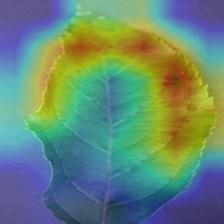
See why a model made its prediction. ExplainablePredictor produces a Grad-CAM heatmap highlighting the leaf regions that drove the result — ideal for research papers, debugging, and user trust. (Keras models; PyTorch ViT/Swin support is on the roadmap.)
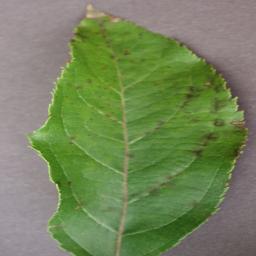
Example — Apple scab leaf: the heatmap concentrates on the scab lesions, exactly the regions a plant pathologist would inspect.
| Input leaf | Grad-CAM heatmap |
|---|---|
 |
 |
from plantdoc_predictor import ExplainablePredictor

ep = ExplainablePredictor(model_name="densenet169_v1")

# Predict + save an overlaid heatmap to disk
result = ep.explain("leaf.JPG", save_to="heatmap.jpg")
print(result)
# {
#   'model': 'densenet169_v1',
#   'label': 'Apple___Apple_scab',
#   'confidence': 0.98,
#   'crop': 'Apple', 'disease': 'Apple scab', 'is_healthy': False,
#   'layer_name': 'conv5_block16_concat',   # auto-detected last conv layer
#   'heatmap_path': 'heatmap.jpg'
# }
Options:
# Target a specific layer (defaults to the last conv feature map)
ep.explain("leaf.jpg", save_to="cam.jpg", layer_name="conv5_block16_concat")

# Explain a class other than the predicted one
ep.explain("leaf.jpg", save_to="cam.jpg", class_index=12)

# Control overlay strength (0–1)
ep.explain("leaf.jpg", save_to="cam.jpg", alpha=0.6)

# Get the raw arrays back instead of (or in addition to) saving
result = ep.explain("leaf.jpg", return_heatmap=True)
heatmap = result["heatmap"]   # HxW float array in [0, 1]
overlay = result["overlay"]   # HxWx3 uint8 RGB image
| Parameter | Default | Description |
|---|---|---|
save_to |
None |
Path to write the overlaid heatmap (.jpg/.png). |
layer_name |
auto | Target conv layer; defaults to the last 4D feature-map layer. |
class_index |
predicted | Which class to explain. |
alpha |
0.4 |
Heatmap blend strength. |
return_heatmap |
False |
Also return the raw heatmap + overlay arrays. |
💻 Command-Line Interface
After installing, the plantdoc command is available in your terminal.
# List all available models
plantdoc models

# Predict a single image
plantdoc predict leaf.jpg

# Choose a model + top-3 predictions
plantdoc predict leaf.jpg --model densenet169_v1 --top-k 3

# Machine-readable JSON output
plantdoc predict leaf.jpg --json

# Guarded prediction — reject non-leaf images via the CLIP guard
plantdoc predict leaf.jpg --guard --guard-threshold 0.5
plantdoc predict leaf.jpg --guard --min-confidence 0.6

# Batch a whole folder → export results
plantdoc predict ./images_folder/ --output results.csv
plantdoc predict ./images_folder/ --output results.json

# Grad-CAM explanation — write a heatmap overlay
plantdoc explain leaf.jpg --save-to cam.jpg
plantdoc explain leaf.jpg --model densenet169_v1 --layer conv5_block16_concat --alpha 0.6
plantdoc explain leaf.jpg --json
📝 License
This project is licensed under the MIT License.
You are free to:
- ✅ Use the library for both commercial and academic purposes
- 🔧 Modify, distribute, or integrate it into your own software
- 🌍 Reference and extend it in research or production projects
Just ensure you include the original copyright notice and this license file.
See the full text in the LICENSE file.
🌍 Contributing
Contributions are warmly welcomed! 🌱
We value community participation to make PlantDoc-Predictor more robust, accurate, and user-friendly.
You can contribute by:
- 🧠 Adding new pretrained or fine-tuned models
- ⚙️ Improving preprocessing or postprocessing modules
- 🧩 Extending model registry or dataset support
- 🧪 Writing new test cases for reproducibility
- 🐛 Fixing bugs and optimizing performance
- 📚 Improving documentation and adding usage examples
🔧 Steps to Contribute
- Fork this repository
- Create your feature branch
git checkout -b feature/your-feature
📫 Contact
Author: Subham Divakar
Email: shubham.divakar@gmail.com
GitHub: shubham10divakar
PyPI: https://pypi.org/project/plantdoc-predictor/
LinkedIn: linkedin.com/in/subhamdivakar
Project Website: My Site
If you have any questions, collaboration ideas, or model suggestions — feel free to reach out!
You can also open an issue or submit a pull request in the GitHub repository.
❤️ Acknowledgements
A heartfelt thank you to all the open-source contributors and researchers who made this project possible:
- 🌿 PlantVillage Dataset — for providing an invaluable resource for agricultural disease detection.
- 🤖 TensorFlow/Keras — for powering deep learning model training and inference.
- 🧩 Python Open Source Community — for libraries that make AI tools easier to build.
- 🧪 Researchers & Reviewers — for advancing the field of AI in agriculture.
- 💻 Contributors — for helping test, improve, and document PlantDoc-Predictor.
Your support continues to make plant disease prediction accessible and impactful across the world.
“Empowering agriculture with AI — one leaf at a time.” 🌾
— Subham Divakar, Creator of PlantDoc-Predictor
1 maintainer

Release files for plantdoc-predictor 1.1.1
For a detailed explanation of source distributions (sdists) and built distributions (wheels), please see the package formats documentation.
Source distribution (sdist)
| File | Size | Uploaded | |
|---|---|---|---|
| plantdoc_predictor-1.1.1.tar.gz | 65.9 kB | Details |
Built distribution (wheel)
| File | Interpreter | ABI | Platform | Reset |
|---|---|---|---|---|
| plantdoc_predictor-1.1.1-py3-none-any.whl | Python 3 | none | any | Details |
Total release size: 115.7 kB
Release files / plantdoc_predictor-1.1.1.tar.gz
| Download URL | plantdoc_predictor-1.1.1.tar.gz |
|---|---|
| Size | 65.9 kB |
| Tags | Source |
|
SHA-256 checksum How to use checksums |
5f27d3674e795dee746556a1f7faed002a4ef2d4ebe4952039d5a2103e307030
|
|
BLAKE2b-256 checksum How to use checksums |
9f28783792c1e0d496a214f90975a653397ae0bba4ee3d35bc2f1b7efcb8eb6d
|
| Upload date | |
|
Uploaded using Trusted Publishing? What is trusted publishing? |
No |
| Uploaded via |
twine/6.2.0 CPython/3.14.5
|
Release files / plantdoc_predictor-1.1.1-py3-none-any.whl
| Download URL | plantdoc_predictor-1.1.1-py3-none-any.whl |
|---|---|
| Size | 49.8 kB |
| Tags | Python 3 |
|
SHA-256 checksum How to use checksums |
bd4106372f44740ae0994d436ee7d40ddafb112e27039ad2b8b3e3677ecb3d31
|
|
BLAKE2b-256 checksum How to use checksums |
fad1178397e61a657b6da976f1a47ed3507dbe54bff4fb0b786330794d152c2b
|
| Upload date | |
|
Uploaded using Trusted Publishing? What is trusted publishing? |
No |
| Uploaded via |
twine/6.2.0 CPython/3.14.5
|














