
A VFX plate-preparation workflow — inspect footage, set IN/OUT, export EXR sequences + proxies

Project description
Plate
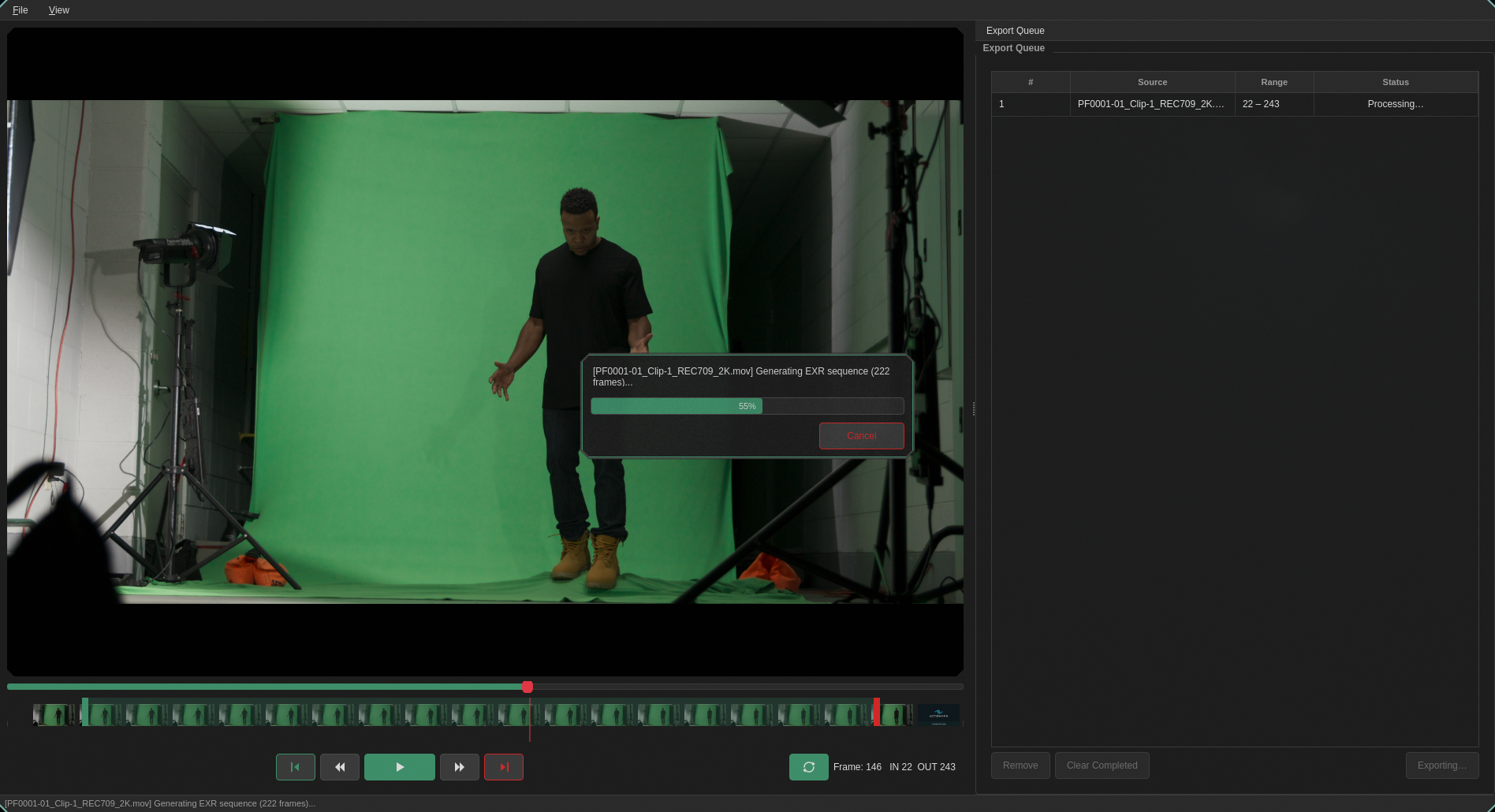
A VFX plate-preparation workflow built on FFmpeg — inspect footage, set IN/OUT, and export EXR sequences + proxies in one step.
What it does
Plate orchestrates FFprobe, FFmpeg, and (optionally) PySide6 into a single plate-prep pipeline. Open a clip, choose your frame range, and get back:
- A proxy — lightweight H.264 for review
- An EXR sequence — ready for compositing
- A manifest.json — machine-readable metadata
All in one shot-named folder.
Quick start
# Prerequisites: FFmpeg on your PATH, Python 3.10+
pip install plateprep

# CLI — single clip
plate footage.mov --in 1204 --out 1389 --start-frame 1001 --output ./shots

# GUI
pip install "plateprep[gui]"
plate-gui
CLI example output
shots/
└── footage/
    ├── proxy.mp4
    ├── exr/
    │   ├── footage.001204.exr
    │   ├── footage.001205.exr
    │   └── ...
    └── manifest.json
Features
- Visual frame-range selection — GUI timeline with draggable IN/OUT handles
- EXR export — 32-bit float, configurable compression (none/rle/zip1/zip16)
- Proxy generation — H.264, configurable max width, burn-in (frame number, timecode, source name)
- Color management — LUT (.cube) or OCIO colorspace transform baked into EXRs and proxies
- Batch processing — process multiple clips from a JSON file
- Export presets — "ACES 2K", "Rec709 HD", "Archival 4K" with user-defined presets
- Nuke script export — auto-generate a
.nkscript pointing at your EXR sequence - Shot queue — queue multiple exports from the GUI, run them in the background

CLI reference
plate SOURCE --in IN --out OUT [options]
plate --batch BATCH_FILE [options]
| Option | Default | Description |
|---|---|---|
--in |
required | IN frame (inclusive) |
--out |
required | OUT frame (inclusive) |
--start-frame |
0 |
First frame number in the source |
--output |
./output |
Root output directory |
--proxy-width |
1920 |
Max proxy width (never scales up) |
--exr-pixfmt |
gbrpf32le |
EXR pixel format |
--exr-codec |
zip1 |
EXR compression (none/rle/zip1/zip16) |
--frame-padding |
6 |
Zero-padding for EXR frame numbers |
--skip-exr |
off | Skip EXR generation |
--skip-proxy |
off | Skip proxy generation |
--nuke-script |
off | Generate a Nuke script |
--preset |
— | Export preset name |
--burn-in |
— | Overlays on proxy: frame_number, timecode, source_name |
--lut |
— | Path to .cube LUT |
--ocio-config |
— | OCIO config path |
--ocio-src |
— | Source colorspace |
--ocio-dst |
— | Destination colorspace |
Batch mode
[
  {"source": "clip_a.mov", "in": 1001, "out": 1100},
  {"source": "clip_b.mov", "in": 1204, "out": 1389, "proxy_width": 1280}
]
plate --batch jobs.json --output ./shots
manifest.json
Every export produces a manifest.json with shot metadata — designed to
plug into downstream automation or AI-assisted ingest pipelines.
{
  "shot": "footage",
  "source": "footage.mov",
  "in": 1204,
  "out": 1389,
  "exported_frames": 186,
  "proxy": "shots/footage/proxy.mp4",
  "exr_dir": "shots/footage/exr",
  "fps": 23.976,
  "width": 4096,
  "height": 2160,
  "colorspace": "bt709",
  "has_audio": true
}
Using it as a library
from plate.pipeline import PlatePipeline

pipeline = PlatePipeline(
    source="footage.mov",
    in_frame=1204,
    out_frame=1389,
    start_frame=1001,
    output_root="./shots",
)
result = pipeline.run()
print(result.manifest_path)
Requirements
- Python 3.10+
- FFmpeg (provides both
ffmpegandffprobe) on yourPATH - PySide6 — only for the GUI (
pip install plateprep[gui]) - OpenColorIO — only for OCIO transforms (
pip install plateprep[ocio])
License
MIT
Release history Release notifications | RSS feed

Download files
Download the file for your platform. If you're not sure which to choose, learn more about installing packages.
Source Distribution
Built Distribution
Filter files by name, interpreter, ABI, and platform.
If you're not sure about the file name format, learn more about wheel file names.
Copy a direct link to the current filters
File details
Details for the file plateprep-0.2.0.tar.gz.
File metadata
- Download URL: plateprep-0.2.0.tar.gz
- Upload date:
- Size: 50.9 kB
- Tags: Source
- Uploaded using Trusted Publishing? No
- Uploaded via: twine/6.2.0 CPython/3.14.5
File hashes
| Algorithm | Hash digest | |
|---|---|---|
| SHA256 |
5599c8e9c088b02be1bfc44d6d5165683678d9a02e81292c178bbf0ba4f2dcda
|
|
| MD5 |
b12a01c4768dd93ce8cef847953010a4
|
|
| BLAKE2b-256 |
72755a6553b387ff2930e63afe8421ede2d72d8e7044f038dc9f416181ae1455
|
File details
Details for the file plateprep-0.2.0-py3-none-any.whl.
File metadata
- Download URL: plateprep-0.2.0-py3-none-any.whl
- Upload date:
- Size: 50.3 kB
- Tags: Python 3
- Uploaded using Trusted Publishing? No
- Uploaded via: twine/6.2.0 CPython/3.14.5
File hashes
| Algorithm | Hash digest | |
|---|---|---|
| SHA256 |
e7cfee77224baa490d4ec890896aaefc860a22cdf325509731a67dbca00e26ad
|
|
| MD5 |
8602f4ef89d435422a845915f1611f78
|
|
| BLAKE2b-256 |
73adc1115d33f94074f8585b0504c68f8f74931010b4eee4aa883000523bb0a3
|






