





A hub for small data platforms.
Create a project, pick where its tables live, connect sources, build models —
from a cloud-console-style UI, the CLI or plain YAML.
v0.1.0— first release. Install it from PyPI, run it with one command, keep everything it builds in git. See the CHANGELOG for what is in it.
Contents
- What it is
- Install
- Quick start
- Features
- Stores
- Plugins
- Architecture
- Development
- Roadmap
- Documentation
What it is
Standing up even a small analytics stack usually means wiring object storage, a warehouse, an orchestrator, dbt and a BI tool together. Platybus packs that into one process with a small core and everything optional as a plugin.
One Platybus server is a hub of projects. Each project is a data platform of its own, built from three kinds of services — the same idea as a Google Cloud project:
| Service | What it does | Options |
|---|---|---|
| Store | Where the tables live. Every store is attached to DuckDB as a catalog, so one project can have several and query across them | DuckLake (default, zero config), DuckDB file, Apache Iceberg (REST catalog), PostgreSQL |
| Ingestion | Sources by URL and ingestion jobs: full, append, incremental (cursor) or merge (key), on a cron schedule |
PostgreSQL, MySQL, SQLite, ClickHouse, S3, GCS, HTTP and local files |
| Transform | Models, data quality checks, run history | dbt (default) or a lightweight dbt-style SQL engine |
Around them: a SQL editor, a catalog browser with snapshots and time travel, dashboards as code, a sandbox of local test containers and ready-made sample datasets.
Everything a project is made of is a file you can keep in git: platybus.yml, stores.yml,
connections.yml, pipelines/*.yml, models/**/*.sql, dashboards/*.yml. Secrets live only
in .env and are masked in logs, the API and the UI.
Install
pip install "platybus[standard]"         # or: uv tool install "platybus[standard]"
platybus --version
Python 3.12+. The standard extra brings what a new project expects: dbt, native dashboards,
PostgreSQL, file sources, sample datasets and the AI assistant; platybus[all] installs every
plugin, and single plugins are extras too (platybus[iceberg], platybus[clickhouse], …).
Docker is needed only for the sandbox and for platybus up in full mode, which runs the
image ghcr.io/robbythefish/platybus.
Quick start
1. Start a hub
platybus hub init myhub && cd myhub
platybus up -d                               # http://127.0.0.1:8765
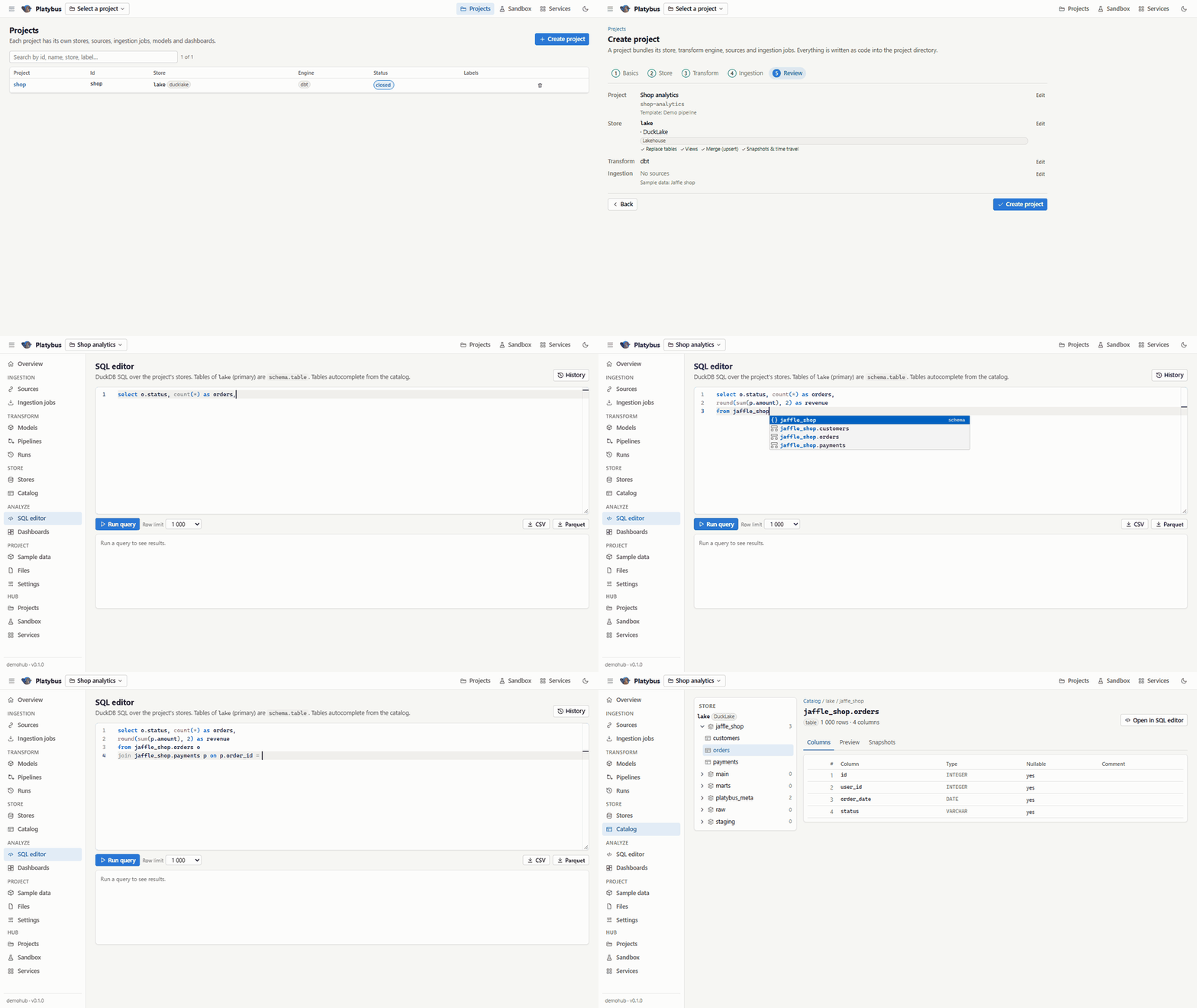
Open http://127.0.0.1:8765 and click Create project. The wizard goes
Basics → Store → Transform → Ingestion → Review: for a first try pick the Demo pipeline
template, the DuckLake store, the dbt engine and the Jaffle shop sample dataset. Then run the
demo pipeline and look at the result in Catalog and the SQL editor.
The same from the CLI:
platybus projects create shop
platybus -P shop datasets load jaffle_shop
platybus -P shop sql "select count(*) from jaffle_shop.orders"
2. Ask the assistant
In a project open Settings → Assistant, choose a provider (Anthropic, an OpenAI-compatible
API or a local Ollama) and enter its API key (it is saved to the project's .env). Then ask in Assistant or in the side panel
(Ctrl/Cmd+I), for example "which customers ordered most last month? make a dashboard": it looks up the
catalog, runs read-only SQL and saves a dashboard. Install more skills from Marketplace.
The same tools are available to Claude Desktop, Cursor and other MCP clients:
platybus mcp -P shop # stdio; or http://127.0.0.1:8765/mcp/shop
3. Try Iceberg or PostgreSQL with the sandbox
platybus sandbox up        # S3, Postgres, ClickHouse, Iceberg REST catalog (first start pulls images)
platybus sandbox status
In the wizard choose Apache Iceberg or PostgreSQL and click Use sandbox; the store
settings are filled in for the local containers. The sandbox Postgres also has a shop
database with source data for ingestion jobs. Details: docs/sandbox.md.
4. Stop
platybus down
platybus sandbox down      # --volumes also deletes the sandbox data
A single project without a hub
platybus init demo --example jaffle-shop && cd demo
platybus up --lite -d      # no Docker: local files + SQLite catalog
platybus run jaffle        # seeds -> models -> checks
platybus sql "select * from marts.orders_daily order by day desc limit 7"
platybus up without --lite runs the project with Docker Compose (SeaweedFS + Postgres +
Platybus): see docs/deployment.md.
Features
- Hub of projects — create, list, rename, label and delete projects in the UI, the CLI
(
platybus projects) or the API (/api/projects); every project resource lives under/api/projects/{id}/…. See docs/hub.md. - Stores on demand — DuckLake, DuckDB, Apache Iceberg and
PostgreSQL; several stores per project and queries across them
(
lake.raw.orders join wh.public.customers). See Stores. - Connect anything by URL —
postgres://,mysql://,sqlite:///,clickhouse://,s3://,gs://,https://…csv|parquet,file://. - ETL as code — YAML pipelines with seeds, extracts in four load modes, models, checks and cron schedules; incremental watermarks are committed right after each extract.
- Models with dbt or plain SQL — dbt runs in a persistent worker
process against the project's stores (DuckLake and PostgreSQL), passwords never touch the
disk; the
sqlengine starts instantly and needs no dbt. - Dashboards as code — YAML + SQL rendered with ECharts, or existing Superset / Redash embedded as web views.
- Sandbox — local S3, Postgres (with seeded source data), ClickHouse and Iceberg REST
containers with one command, bound to
127.0.0.1only. - Sample datasets —
tpch(scale 0.01 / 0.1 / 1),jaffle_shop,web_events,taxi_trips, loadable into any store. See docs/datasets.md. - Cloud-console UI — project picker, create-project wizard, per-project Overview, Ingestion, Transform, Store, SQL, Dashboards, Sample data, Files and Settings pages; compact, light and dark, down to phone width. See docs/ui.md.
- AI assistant — a chat in every project (and a side panel, Ctrl/Cmd+I) that browses the catalog, runs read-only SQL, reads run and server logs and builds native dashboards. Works with Anthropic, any OpenAI-compatible API (OpenAI, OpenRouter, vLLM, LM Studio) and Ollama. See docs/assistant.md.
- Skills marketplace — instruction packs for the assistant (SQL analyst, dashboard builder, data quality, pipeline debugging, dbt modeling) installed per project, plus your own or a remote index. See docs/skills.md.
- MCP server — the same tools for Claude Desktop, Cursor and other MCP clients:
platybus mcp(stdio) or/mcp/<project>on the running server. See docs/mcp.md. - Modular — stores, connectors, transform engines, dashboard providers, datasets and sandbox services are plugins discovered through entry points.
Stores
| Type | Kind | Plugin | Views | Atomic replace | MERGE | Snapshots | Engines |
|---|---|---|---|---|---|---|---|
ducklake |
lakehouse (Parquet + SQLite/Postgres catalog) | core | ✅ | ✅ | ✅ | ✅ | sql, dbt |
duckdb |
warehouse (one local file) | core | ✅ | ✅ | ✅ | — | sql |
iceberg |
lakehouse (REST catalog + S3) | platybus-iceberg |
— | ✅¹ | ✅ | ✅ | sql, dbt |
postgres |
warehouse | platybus-postgres |
— | ✅ | ✅ | — | sql, dbt |
¹ One atomic catalog commit that keeps the table's history (through pyiceberg); not with
SigV4-signed catalogs, and not for dbt table models. See docs/stores/iceberg.md.
Pipelines and models adapt to what a store lacks: a view model becomes a table (the run
log says so), MERGE falls back to DELETE + INSERT in one transaction. Configuration is
stores.yml in the project:
default: lake
stores:
  lake:
    type: ducklake
  wh:
    type: postgres
    host: db.internal
    database: dwh
    user: dwh
    password: ${WH_PASSWORD}   # the value is in .env
More: docs/stores/README.md.
Plugins
| Plugin | Provides |
|---|---|
platybus-dbt |
dbt transform engine (default) |
platybus-sqlmodels |
built-in-style SQL transform engine |
platybus-iceberg |
Apache Iceberg store, Iceberg REST sandbox service |
platybus-postgres |
PostgreSQL connector and warehouse store |
platybus-clickhouse |
ClickHouse connector and sandbox service |
platybus-mysql, platybus-sqlite, platybus-files |
MySQL, SQLite, S3/GCS/HTTP/local file connectors |
platybus-samples |
sample datasets |
platybus-assistant |
assistant providers: Anthropic, OpenAI-compatible, Ollama |
platybus-skills |
bundled assistant skills |
platybus-dashboards |
native YAML dashboards |
platybus-superset, platybus-redash |
web-view dashboards |
Extras: platybus[standard] (dbt, native dashboards, Postgres, files, samples) and
platybus[all]. Writing a plugin: docs/plugins/README.md.
Architecture
            web UI (React) ── CLI (Typer)
                     │            │
                     ▼            ▼
   hub ── FastAPI server: /api/projects/{id}/… · scheduler · sandbox runner
                     │
         ┌───────────┼──────────────────────────────┐
         ▼           ▼                              ▼
   connectors ─▶ ETL runner ─▶ transform plugin (dbt | sql)
   (plugins)         │
                     ▼
              DuckDB engine ── attaches every store of the project as a catalog
                     │
     ┌───────────┬───┴──────────┬──────────────┐
     ▼           ▼              ▼              ▼
  DuckLake    DuckDB file    Iceberg REST    PostgreSQL
  (S3/local)                 (+ S3)
Module boundaries: docs/ARCHITECTURE.md · decisions: docs/adr/ · full map of the code (in Russian): docs/PROJECT_OVERVIEW.md.
Development
From a checkout — uv, Node.js ≥ 20.18 for the UI:
git clone https://github.com/RobbyTheFish/platybus.git && cd platybus
uv sync --all-packages --all-extras          # core + every plugin in plugins/
cd web && npm ci && npm run build && cd ..   # web UI, bundled into the Python package
uv run platybus --version                    # in a checkout, prefix commands with `uv run`
Checks:
uv run ruff check . && uv run ruff format --check .
uv run mypy src plugins/*/src
uv run pytest -m "not integration"         # ~850 unit tests, no Docker
uv run pytest -m integration               # needs Docker (testcontainers)
cd web && npm ci && npm run lint && npm run typecheck && npm test
cd web && npm run build && npm run e2e     # Playwright tests against a real hub
cd web && npm run dev                      # UI dev server, proxies /api to :8765
uv run --only-group docs mkdocs serve      # documentation site
uv run python scripts/benchmark.py --scale 0.1   # TPC-H benchmark (docs/benchmark.md)
Conventions (Conventional Commits, ADRs, secrets handling, tests for every fix) are in AGENTS.md.
Roadmap
v0.1.0 completes milestones M0–M7 and the first part of M8 (assistant, skills, MCP). The
full plan with checkpoints (in Russian) is docs/PLAN.md.
| Milestone | |
|---|---|
| ✅ | M0–M6 Foundation, DuckLake lakehouse, engine and HTTP API, connectors by URL, ETL, web UI and dashboards, one-command deployment |
| ✅ | M6.5–M6.6 Plugin architecture; hub of projects, Iceberg and PostgreSQL stores, sandbox, sample datasets |
| ✅ | M7 First release: docs site, TPC-H benchmark, PyPI packages and GHCR image |
| ✅ | M8.1 AI assistant, skills marketplace, MCP server |
| ⬜ | M8 Next — see below |
Next
- Authentication with tokens and read-only roles.
- Column-level lineage graph of models in the UI.
- Postgres wire protocol or Arrow Flight SQL for external BI tools.
- Python steps in pipelines,
dltintegration for SaaS sources. - Helm chart for Kubernetes.
Known limitations
- Iceberg: DuckDB cannot read Iceberg views, so
viewmodels stay tables; AWS Glue / SigV4 catalogs are unverified and fall back to non-atomic rebuilds; sandbox projects share one Iceberg catalog. - dbt on PostgreSQL: types Postgres cannot hold must be cast in the model.
- Assistant providers are tested against mocked API streams; report issues with live APIs.
- Integration tests run in CI on demand (
workflow_dispatch), unit and e2e tests on every push.
Documentation
| Topic | Where |
|---|---|
| Hub and projects | docs/hub.md |
| Stores, Iceberg, PostgreSQL | docs/stores/ |
| Sandbox and sample data | docs/sandbox.md, docs/datasets.md |
| Pipelines, models, dashboards | docs/pipelines.md, docs/models.md, docs/dashboards.md |
| Connectors | docs/connectors/ |
| Plugins, dbt, web-view dashboards | docs/plugins/ |
| Web UI | docs/ui.md |
| AI assistant, skills, MCP | docs/assistant.md, docs/skills.md, docs/mcp.md |
| CLI reference | docs/cli.md |
| Deployment | docs/deployment.md |
| Benchmark | docs/benchmark.md |
| Releasing | docs/releasing.md |
License
1 maintainer

Metadata
1 maintainer
Release files for platybus 0.1.0
For a detailed explanation of source distributions (sdists) and built distributions (wheels), please see the package formats documentation.
Source distribution (sdist)
| File | Size | Uploaded | Provenance | Actions |
|---|---|---|---|---|
| platybus-0.1.0.tar.gz | 1.9 MB | Without provenance | Details for platybus-0.1.0.tar.gz |
Built distribution (wheel)
| File | Interpreter | ABI | Platform | Actions Reset |
|---|---|---|---|---|
| platybus-0.1.0-py3-none-any.whl | Python 3 | none | any | Details for platybus-0.1.0-py3-none-any.whl |
Total release size: 3.7 MB
Release files / platybus-0.1.0.tar.gz
| Download URL | platybus-0.1.0.tar.gz |
|---|---|
| Size | 1.9 MB |
| Tags | Source |
|
SHA-256 checksum How to use checksums |
4a19e7879f0be59813266e0e39d9d378c3309961314e660dd53f4ce4ca0586a5
|
|
BLAKE2b-256 checksum How to use checksums |
e01a3c07b21f1ba755e90676b5ba8c7151436db904b95fb58f13229d97f9aa2d
|
| Upload date | |
|
Uploaded using Trusted Publishing? What is trusted publishing? |
No |
| Uploaded via |
twine/7.0.0 CPython/3.14.4
|
Release files / platybus-0.1.0-py3-none-any.whl
| Download URL | platybus-0.1.0-py3-none-any.whl |
|---|---|
| Size | 1.8 MB |
| Tags | Python 3 |
|
SHA-256 checksum How to use checksums |
6a138a612e4dd69b1b4e088eaa68bb9d9eb2536fc991926152baa96b7ed7bc62
|
|
BLAKE2b-256 checksum How to use checksums |
60b46edb36326500e02c0d30e2e6944bed1c895f3fd63a7331e9d6ccacf74c1f
|
| Upload date | |
|
Uploaded using Trusted Publishing? What is trusted publishing? |
No |
| Uploaded via |
twine/7.0.0 CPython/3.13.16
|
Security for platybus 0.1.0
Provenance
Provenance describes where a file came from. On PyPI, provenance is shared via attestations, which provide a verifiable record of the build or publishing details. View details, limitations and caveats.
No provenance found
None of the files in this release were uploaded with provenance metadata.
A note on package security
PyPI is a repository for distributing packages, not a service for auditing them. While third-party security researchers and our staff do their best to detect and remove malicious packages, PyPI cannot guarantee the quality, security or suitability of any given package.
To learn more about protecting yourself from malicious actors, visit our package security documentation.













