
📽️ playNano
AFM processing and analysis platform for high-speed AFM videos and time-series












playNano is a Python tool for loading, filtering, visualising, and exporting time-series AFM data, such as high-speed AFM (HS-AFM) videos. It supports interactive playback, flexible processing pipelines, and provenance-aware analysis tracking, and export in multiple formats, including OME-TIFF, NPZ (NumPy zipped archive), HDF5 bundles, and animated videos and GIFs.
The playNano package handles complete time-series datasets—such as high-speed AFM videos—as unified, time-aware stacks rather than separate frames. Every step in a processing or analysis pipeline is recorded for full reproducibility and provenance tracking.
Learn more about the motivation, design, and structure of playNano in the Introduction.
Files read:
.h5-jpk, .jpk, .asd, .spm, .aris
This project requires Python 3.10 - 3.13 and is in development. If you find any issues, please open an issue at: https://github.com/derollins/playNano/issues
Questions? Email: d.e.rollins@leeds.ac.uk
📘 Documentation
Full documentation: https://derollins.github.io/playNano/
✨ Features
- 📂 AFM time-series extraction — reads
.h5-jpk,.asdand.arisfiles, and folders of.jpkor.spmframes. - ▶️ Interactive video viewer — PySide6-based GUI with playback, z-scale control, and export tools.
- 🪟 Processing pipeline — applies filters and masks with full provenance tracking.
- 📏 Analysis pipeline — runs detection, clustering, and tracking with reproducible outputs.
- 📩 Flexible exports — save data to OME-TIFF, NPZ, HDF5, and annotated videos as GIF, MP4, AVI or a folder of PNG files.
- 🎨 Optimised colormaps — new perceptually uniform colourmaps for clear and artifact free visualisation, alongside
traditional AFM colour maps and
matplotlibdefaults. - 🔌 Extensible design — add your own filters or analysis modules as plugins.
📦 Installation and Dependencies
Python compatibility: 3.10 – 3.13
It is recommended to use a virtual environment such as conda to isolate the installation. There are instructions on how to do this in the docs: Installation
If you have Anaconda or miniconda installed, open the terminal (or Anaconda PowerShell Prompt on Windows) and create and activate a new virtual environment.
conda create -n playnano_env python=3.11 # Create a new virtual environment with Python 3.11
conda activate playnano_env  # Activate the virtual environment
The simplest way to install playNano is through PyPi using the command:
pip install playnano
More information on installation is available in the documentation: https://derollins.github.io/playNano/main/installation.html
For development setup see CONTRIBUTING.md.
🚀 Quickstart
Play a file (GUI):
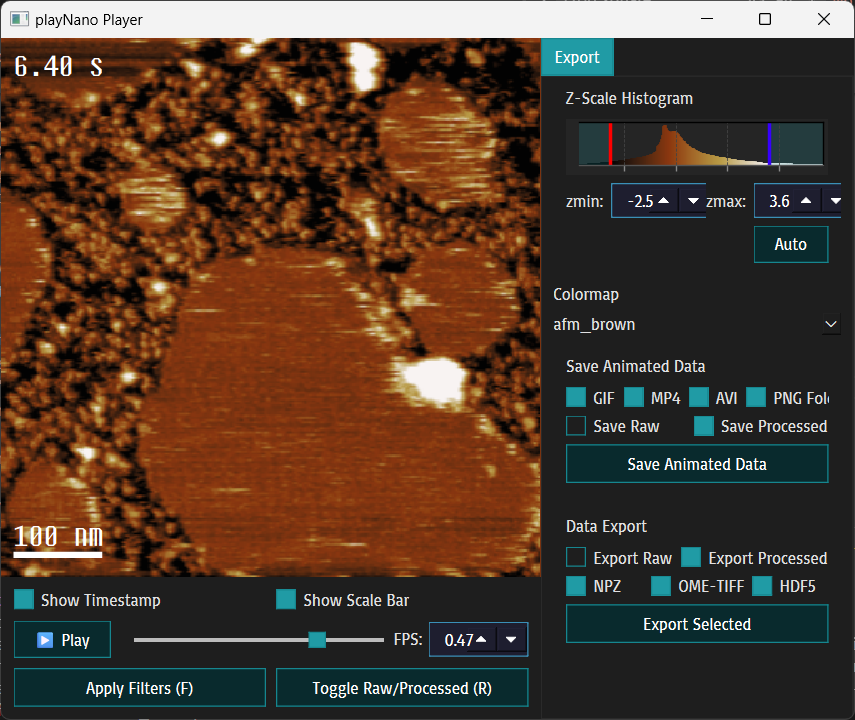
playnano play ./tests/resources/sample_0.h5-jpk # This command opens example data if run in the project root
Replace the path with the location of your data (file for asd/h5-jpk or folder for spm/jpk) This opens an interactive window that can be used to view the videos and configure formatting, annotations and colormaps, for the display and animated exports.
Press the f key or press Apply Filters to level the data with default steps.
Batch process + make GIF:
playnano process ./tests/resources/sample_0.h5-jpk \
  --processing "remove_plane;gaussian_filter:sigma=1.0" \
  --export tif,npz --make-gif --draw-ts --output-folder ./results
See the full docs for the complete CLI reference, GUI guide, filters, YAML schemas, and examples.
🎨 Optimised Colormaps
playNano features new perceptually linear colormaps designed to eliminate the "black plateau" and "banding" found in
traditional AFM visualisation. The default, afm_brown, uses monotonically increasing luminance to resolve fine substrate
detail and ensure visual stability in HS-AFM videos, preventing the "flicker" artifacts caused by non-linear lightness
discontinuities, while retaining the classic orange-brown AFM character. The package also includes playnano_gold, a
monotone-lightness high-contrast colormap spanning the full luminance range (L* 0–100) for complex, feature-rich samples,
and classic_afm, a non-linear map replicating the common brown AFM colormap for continuity with existing workflows.

All three colormaps are registered globally on import as matplotlib cmaps, making them available across the entire
toolkit and in your own scripts alongside built-in options such as afmhot and viridis.
📒 Notebooks
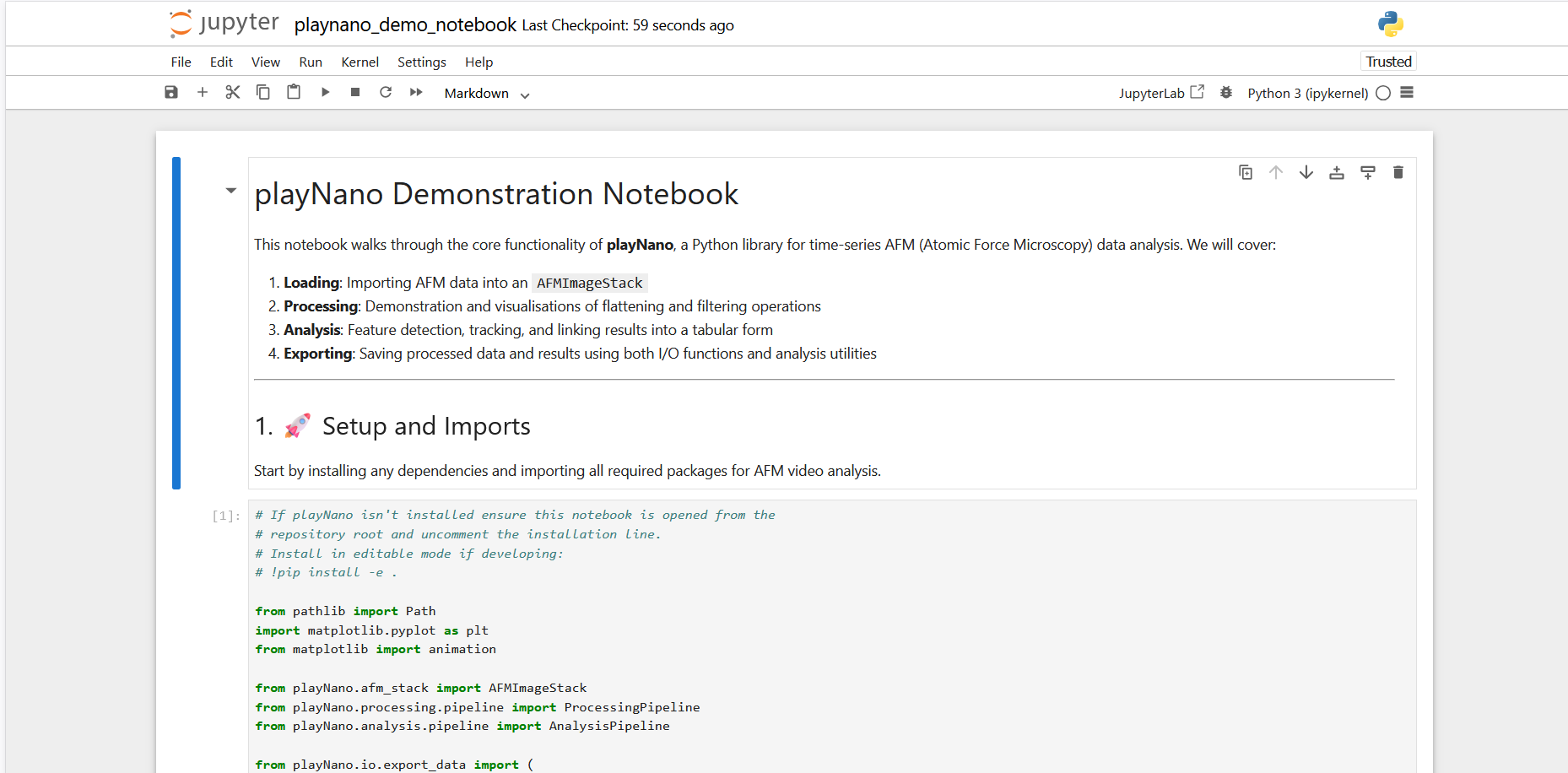
To access and use the Notebooks you need to clone the
repository and install the required dependencies pip install -e .[notebooks] see the docs page for more
details and full instructions: https://derollins.github.io/playNano/main/notebooks.html
Once installed use jupyter notebook to open jupyter notebook and navigate to the notebooks\ folder. These
notebooks allow the user to experiment with using playNano programmatically and allows the user to test
pipelines interactively and with rapid feedback on the parameters that may need adjusting in order to process
a high-speed dataset.
🤝 Contributing
Contributions are welcome — bug reports, new features, processing plugins, and analysis modules. See CONTRIBUTING.md for development setup, code style requirements, and guidance on how to contribute analysis modules and processing plugins either directly or via the playNano-plugins repository.
🔗 Related Software
These are some software packages that have helped and inspired this project:
Topostats
A general AFM image processing programme written in Python that batch processes AFM images. Topostats is able to flatten raw AFM images, mask objects and provides advanced analysis tools including U-net based masking.
AFMReader
Spun out of Topostats, AFMReader is Python library for loading a variety of AFM file formats. It opens each as a tuple containing a NumPy array and a float referring to the planar pixel to nanometer conversion factor. Within playNano this library is used to open the folder-based AFM video formats.
NanoLocz
A free MATLAB app with an interactive GUI that is able to load, process and analyse AFM images and high-speed AFM videos. Featuring mask analysis, particle detection and tracking, it also integrates Localization AFM (L-AFM).
NOW AVAILABLE: The masking, levelling and auto levelling routines rewritten in Python can be found here: Python-NanoLocz-Library. This project also contains playNano entry points so can be used directly when installed in the same environment as playNano.
📜 License
This project is licensed under the GNU General Public License v3.0 (GPLv3)
📖 Citing playNano
If you use playNano in academic work, please cite it as:
Rollins, D. E. (2026). playNano: AFM Video Processing and Analysis Toolkit. GitHub repository: https://github.com/derollins/playNano
Show BibTeX
@misc{rollins2026playnano,
  author = {Rollins, D. E.},
  title  = {playNano: AFM Video Processing and Analysis Toolkit},
  year   = {2026},
  url    = {https://github.com/derollins/playNano}
}
AI Transparency Note
AI-based tools were used for limited typing/formatting assistance and for debugging, refactoring, and documentation suggestions. All code paths, algorithms, and final behaviour were reviewed and validated by the author.
Included Fonts
This project bundles the following fonts:
-
Steps Mono by Velvetyne Type Foundry, licensed under the SIL Open Font License 1.1.
-
Basic by Eben Sorkin, licensed under the SIL Open Font License 1.1.
Full license texts and attribution are provided in:
src/playnano/resources/fonts/Steps-Mono/LICENSE.txtsrc/playnano/resources/fonts/basic/LICENSE.txt
1 maintainer

Metadata
1 maintainer
Release files for playnano 0.4.0.post1
For a detailed explanation of source distributions (sdists) and built distributions (wheels), please see the package formats documentation.
Source distribution (sdist)
| File | Size | Uploaded | |
|---|---|---|---|
| playnano-0.4.0.post1.tar.gz | 205.5 kB | Details |
Built distribution (wheel)
| File | Interpreter | ABI | Platform | Reset |
|---|---|---|---|---|
| playnano-0.4.0.post1-py3-none-any.whl | Python 3 | none | any | Details |
Total release size: 454.3 kB
Release files / playnano-0.4.0.post1.tar.gz
| Download URL | playnano-0.4.0.post1.tar.gz |
|---|---|
| Size | 205.5 kB |
| Tags | Source |
|
SHA-256 checksum How to use checksums |
6c0271fa55b2e96aa9ebfc1b0a0cf952a1d17fa872dd8b20631f220a67d00e0f
|
|
BLAKE2b-256 checksum How to use checksums |
49df3bf4339fe759be03ca95a480c413cfcd28b2429c5adf14e997774db2b319
|
| Upload date | |
|
Uploaded using Trusted Publishing? What is trusted publishing? |
Yes |
| Uploaded via |
twine/6.1.0 CPython/3.13.12
|
Provenance
Provenance describes where a file came from. On PyPI, provenance is shared via attestations, which provide a verifiable record of the build or publishing details. View details, limitations and caveats.


PyPI Publish Attestation
PyPI verified that this artifact, at this checksum, originated from the publisher listed below.
Signed by GitHub Actions, verified by PyPI on May 11, 2026.
Transparency logRelease files / playnano-0.4.0.post1-py3-none-any.whl
| Download URL | playnano-0.4.0.post1-py3-none-any.whl |
|---|---|
| Size | 248.7 kB |
| Tags | Python 3 |
|
SHA-256 checksum How to use checksums |
047d38f2347853f84b1bf76163481423f2fb34fa00755ac74637b3c504516a06
|
|
BLAKE2b-256 checksum How to use checksums |
80a2bec163f416c78901e1992e110174ed02f7f41ee3dafe152a8c86a674b449
|
| Upload date | |
|
Uploaded using Trusted Publishing? What is trusted publishing? |
Yes |
| Uploaded via |
twine/6.1.0 CPython/3.13.12
|
Provenance
Provenance describes where a file came from. On PyPI, provenance is shared via attestations, which provide a verifiable record of the build or publishing details. View details, limitations and caveats.
PyPI Publish Attestation
PyPI verified that this artifact, at this checksum, originated from the publisher listed below.
Signed by GitHub Actions, verified by PyPI on May 11, 2026.
Transparency log













