
MCP server for Plex Media Server - Control your Plex server via Claude Desktop, Cursor, or any MCP-compatible client
Verified details
These details have been verified by PyPIProject links
GitHub Statistics
Maintainers

Project description
Plex MCP Server
A powerful Model-Context-Protocol (MCP) server for interacting with Plex Media Server. It provides a standardized JSON-based interface for automation, AI agents (like Claude), and custom integrations.
Features
- Standardized API: Unified JSON responses for all Plex operations.
- Multiple Transports: Supports both
stdioandSSE(Server-Sent Events). - Comprehensive Control: Manage libraries, media, collections, playlists, clients, and users.
- Remote Ready: Built-in OAuth 2.1 support for integration with remote AI platforms like Claude.ai.
- Admin Tools: Access logs, monitor bandwidth, and run Butler tasks.
Installation
Option 1: Using uv (Recommended)
Run directly without installation:
uvx plex-mcp-server --transport stdio --plex-url http://your-server:32400 --plex-token your-token
Option 2: Install via pip
pip install plex-mcp-server
Option 3: Development / Source
git clone https://github.com/vladimir-tutin/plex-mcp-server.git
cd plex-mcp-server
pip install -e .
Configuration
Set your Plex server URL and Token using one of these methods:
1. Command Line Arguments
plex-mcp-server --plex-url "http://192.168.1.10:32400" --plex-token "ABC123XYZ"
2. Environment Variables (.env)
Create a .env file in the current directory or ~/.config/plex-mcp-server/.env:
PLEX_URL=http://localhost:32400
PLEX_TOKEN=your-authentication-token
MCP_OAUTH_ENABLED=false
or with OAuth Enabled
PLEX_URL=http://localhost:32400
PLEX_TOKEN=your-authentication-token
MCP_OAUTH_ENABLED=true
MCP_OAUTH_ISSUER=https://auth.example.com/application/o/plexmcp-oauth/
MCP_SERVER_URL=https://plexmcp.example.com
3. MCP Client Config
Example for Claude Desktop (%APPDATA%/Claude/claude_desktop_config.json):
{
  "mcpServers": {
    "plex": {
      "command": "uvx",
      "args": [
        "plex-mcp-server",
        "--transport",
        "stdio",
        "--plex-url",
        "http://your-server:32400",
        "--plex-token",
        "your-token"
      ]
    }
  }
}
4. Claude Connector Installation
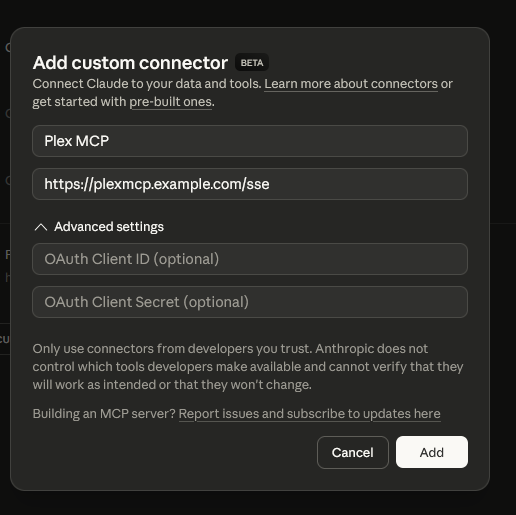
Go to https://claude.ai/settings/connectors and add a new connector with the following settings:
- Name: Plex MCP
- URL: https://plexmcp.example.com/sse
- Add OAuth Client ID and Client Secret if OAuth is enabled
Command Reference
Library Module
Tools for exploring and managing your Plex libraries.
| Command | Description | Parameters |
|---|---|---|
library_list |
Lists all available libraries. | None |
library_get_stats |
Gets statistics (count, size, types) for a library. | library_name |
library_refresh |
Triggers a metadata refresh for a library. | library_name |
library_scan |
Scans a library for new files. | library_name |
library_get_details |
Gets detailed information about a library. | library_name |
library_get_recently_added |
Lists recently added items in a library. | library_name, limit: int |
library_get_contents |
Lists all items in a library. | library_name, limit: int |
Media Module
Tools for searching, inspecting, and editing specific media items.
| Command | Description | Parameters |
|---|---|---|
media_search |
Search for media across all libraries. | query, library_name, content_type |
media_get_details |
Get comprehensive details for an item. | media_title, library_name, media_id |
media_edit_metadata |
Update tags, genres, summary, or title. | media_title, library_name, new_title, new_summary, new_rating, new_release_date, new_genre, remove_genre, new_director, new_studio, new_tags |
media_delete |
Remove an item from Plex. | media_title, library_name, media_id |
media_get_artwork |
Retrieve posters or background artwork. | media_title, library_name, art_type: str |
media_set_artwork |
Set artwork from a local path or URL. | media_title, library_name, poster_path, poster_url, background_path, background_url |
media_list_available_artwork |
List alternative artwork available for selection. | media_title, library_name, art_type |
Playlist Module
Manage your personal and shared playlists.
| Command | Description | Parameters |
|---|---|---|
playlist_list |
List all available playlists. | None |
playlist_get_contents |
List items contained in a playlist. | playlist_title, playlist_id |
playlist_create |
Create a new playlist from items. | title, items: List[str] |
playlist_delete |
Delete a playlist. | playlist_title, playlist_id |
playlist_add_to |
Add media items to a playlist. | playlist_title, items: List[str], playlist_id |
playlist_remove_from |
Remove specific items from a playlist. | playlist_title, items: List[str], playlist_id |
playlist_edit |
Change playlist title or summary. | playlist_title, new_title, new_summary, playlist_id |
playlist_upload_poster |
Upload a custom poster image. | playlist_title, image_path, playlist_id |
playlist_copy_to_user |
Share/Copy a playlist to another user. | playlist_title, username, playlist_id |
Collection Module
Organize movies and shows into collections.
| Command | Description | Parameters |
|---|---|---|
collection_list |
List collections in a specific library. | library_name |
collection_create |
Create a new collection. | library_name, title, items: List[str] |
collection_add_to |
Add items to an existing collection. | library_name, collection_title, items: List[str], collection_id |
collection_remove_from |
Remove items from a collection. | library_name, collection_title, items: List[str], collection_id |
collection_edit |
Edit collection metadata and settings. | collection_title, collection_id, library_name, new_title, new_sort_title, new_summary, new_content_rating, new_labels, add_labels, remove_labels, poster_path, poster_url, background_path, background_url, new_advanced_settings |
collection_delete |
Delete a collection. | collection_title, collection_id, library_name |
User Module
Information about the server owner and shared users.
| Command | Description | Parameters |
|---|---|---|
user_search_users |
Search for shared users. | search_term |
user_list_all_users |
List all users with types and IDs. | None |
user_get_info |
Detailed info for a specific user. | username |
user_get_on_deck |
Get "On Deck" items for a user. | username |
user_get_watch_history |
Retrieve personal watch history. | username, limit, content_type, user_id |
user_get_statistics |
Watch progress and usage statistics. | time_period, username |
Sessions Module
Monitor real-time server activity.
| Command | Description | Parameters |
|---|---|---|
sessions_get_active |
Get currently playing items and clients. | None |
sessions_get_media_playback_history |
History for a specific media item. | media_title, library_name, media_id |
Server Module
Maintenance and administrative tools.
| Command | Description | Parameters |
|---|---|---|
server_get_plex_logs |
Retrieve lines from Plex logs. | num_lines, log_type, start_line, list_files, search_term |
server_get_info |
Basic server health and version info. | None |
server_get_bandwidth |
Bandwidth usage statistics. | timespan, lan |
server_get_current_resources |
CPU/Memory usage of the host/process. | None |
server_get_butler_tasks |
List scheduled maintenance tasks. | None |
server_get_alerts |
Listen for server notifications/alerts. | timeout |
server_run_butler_task |
Manually trigger a Butler task. | task_name |
server_empty_trash |
Empty trash for libraries. | library_name |
server_optimize_database |
Run database optimization. | None |
server_clean_bundles |
Clean up unused media bundles. | None |
Client Module
Control playback and navigation on Plex clients.
| Command | Description | Parameters |
|---|---|---|
client_list |
List all available playback clients. | include_details: bool, active_only: bool |
client_get_details |
Detailed info for a client. | client_name, client_id |
client_get_timelines |
Current playback state/trackers. | client_name, client_id |
client_start_playback |
Start playing a media item on a client. | client_name, media_title, client_id, media_id |
client_control_playback |
Play, Pause, Stop, Seek, Skip. | client_name, action, offset, client_id |
client_navigate |
Send remote control navigation commands. | client_name, command, client_id |
client_set_streams |
Changes audio or subtitle tracks. | client_name, audio_stream_id, subtitle_stream_id, client_id |
Remote Access & OAuth
The Plex MCP Server can be integrated with remote platforms like Claude.ai via SSE and optional OAuth 2.1. This allows you to talk to your MCP server directly from the Claude interface from anywhere.
Enabling OAuth
- Set
MCP_OAUTH_ENABLED=truein your environment. - Configure
MCP_OAUTH_ISSUER(e.g., your OAuth provider URL). - Set
MCP_SERVER_URLto your public-facing URL. - Configure your client to use your OAuth provider Client ID and Secret
Discovery Endpoints
When OAuth is active, the following standard endpoints are exposed:
/.well-known/oauth-protected-resource/.well-known/oauth-authorization-server
Response Formats
All tools return information in JSON format for consistent parsing.
Success Example
{
  "status": "success",
  "data": {
    "title": "Inception",
    "year": 2010,
    "rating": 8.8
  }
}
Error Example
{
  "status": "error",
  "message": "Library 'Missing' not found."
}
Multiple Matches
If an operation finds multiple items with the same name, it returns a list of specific identifiers:
[
  {
    "title": "The Office",
    "id": 123,
    "type": "show",
    "year": 2005
  },
  {
    "title": "The Office",
    "id": 456,
    "type": "show",
    "year": 1995
  }
]
Troubleshooting OAuth
- 401 Unauthorized: Ensure your
MCP_OAUTH_ISSUERexactly matches the issuer URL in your identity provider (including trailing slashes). - Public URL:
MCP_SERVER_URLmust be reachable by the client (e.g., plexmcp.example.com) and should use HTTPS. - Redirect URIs: For Claude.ai, the redirect URI in your provider must be
https://claude.ai/api/mcp/auth_callback.
Project details
Verified details
These details have been verified by PyPIProject links
GitHub Statistics
Maintainers


Download files
Download the file for your platform. If you're not sure which to choose, learn more about installing packages.
Source Distribution
Built Distribution
Filter files by name, interpreter, ABI, and platform.
If you're not sure about the file name format, learn more about wheel file names.
Copy a direct link to the current filters
File details
Details for the file plex_mcp_server-1.1.4.tar.gz.
File metadata
- Download URL: plex_mcp_server-1.1.4.tar.gz
- Upload date:
- Size: 62.7 kB
- Tags: Source
- Uploaded using Trusted Publishing? Yes
- Uploaded via: twine/6.1.0 CPython/3.13.7
File hashes
| Algorithm | Hash digest | |
|---|---|---|
| SHA256 |
2826590e864a484b5526778dafd8d5a1bd2ebc9dd85de68df50d2f9b10fa9f58
|
|
| MD5 |
83011d545c36e6164f1ffe23db48b182
|
|
| BLAKE2b-256 |
c51d63127de84cab6784a4ae96c64413d78be66d1693bcc92c5854ecb7501549
|
Provenance
The following attestation bundles were made for plex_mcp_server-1.1.4.tar.gz:
Publisher:
python-publish.yml on vladimir-tutin/plex-mcp-server
-
Statement:
-
Statement type:
https://in-toto.io/Statement/v1 -
Predicate type:
https://docs.pypi.org/attestations/publish/v1 -
Subject name:
plex_mcp_server-1.1.4.tar.gz -
Subject digest:
2826590e864a484b5526778dafd8d5a1bd2ebc9dd85de68df50d2f9b10fa9f58 - Sigstore transparency entry: 928180342
- Sigstore integration time:
-
Permalink:
vladimir-tutin/plex-mcp-server@e55c19e44012d6b9e5691005544fc31c168abae9 -
Branch / Tag:
refs/tags/v1.1.4 - Owner: https://github.com/vladimir-tutin
-
Access:
public
-
Token Issuer:
https://token.actions.githubusercontent.com -
Runner Environment:
github-hosted -
Publication workflow:
python-publish.yml@e55c19e44012d6b9e5691005544fc31c168abae9 -
Trigger Event:
release
-
Statement type:
File details
Details for the file plex_mcp_server-1.1.4-py3-none-any.whl.
File metadata
- Download URL: plex_mcp_server-1.1.4-py3-none-any.whl
- Upload date:
- Size: 64.6 kB
- Tags: Python 3
- Uploaded using Trusted Publishing? Yes
- Uploaded via: twine/6.1.0 CPython/3.13.7
File hashes
| Algorithm | Hash digest | |
|---|---|---|
| SHA256 |
85eeae102c92b90a592eb1e756854509a8e8b21c651791818a4ad3cd5fce9b16
|
|
| MD5 |
42759dff58f70ec4712f80fb791560cd
|
|
| BLAKE2b-256 |
53f2ca9a780b0336fb0cfd887088d8d9a4308a36e463f1e566ce222cb14c1c4e
|
Provenance
The following attestation bundles were made for plex_mcp_server-1.1.4-py3-none-any.whl:
Publisher:
python-publish.yml on vladimir-tutin/plex-mcp-server
-
Statement:
-
Statement type:
https://in-toto.io/Statement/v1 -
Predicate type:
https://docs.pypi.org/attestations/publish/v1 -
Subject name:
plex_mcp_server-1.1.4-py3-none-any.whl -
Subject digest:
85eeae102c92b90a592eb1e756854509a8e8b21c651791818a4ad3cd5fce9b16 - Sigstore transparency entry: 928180344
- Sigstore integration time:
-
Permalink:
vladimir-tutin/plex-mcp-server@e55c19e44012d6b9e5691005544fc31c168abae9 -
Branch / Tag:
refs/tags/v1.1.4 - Owner: https://github.com/vladimir-tutin
-
Access:
public
-
Token Issuer:
https://token.actions.githubusercontent.com -
Runner Environment:
github-hosted -
Publication workflow:
python-publish.yml@e55c19e44012d6b9e5691005544fc31c168abae9 -
Trigger Event:
release
-
Statement type:






