
This release is a pre-release and may not be stable for production use.
plexos2duckdb





[!IMPORTANT]
This software is in beta pre-production. Interfaces, behavior, and data format may change without notice before the production release.
plexos2duckdb is a software tool to convert PLEXOS solution files to a DuckDB database.
Installation
Option 1: Install with uv (recommended)
On supported platforms, you can install the command-line tool directly from PyPI using
uv:
uv add --prerelease=allow plexos2duckdb
# or
uv pip install --prerelease=allow plexos2duckdb
Then verify the install:
plexos2duckdb --version
Note that this requires a published wheel for your platform.
If you are interested just in the CLI, you can use uvx to install in an isolated environment:
$ uvx --prerelease=allow plexos2duckdb --help

A tool to convert PLEXOS Solution files to a DuckDB database.

Usage: plexos2duckdb <COMMAND>

Commands:
  convert                     Convert a PLEXOS solution file to DuckDB
  inspect                     Show operational metadata from a generated DuckDB database
  generate-shell-completions  Generate shell completion scripts
  help                        Print this message or the help of the given subcommand(s)

Options:
  -h, --help     Print help
  -V, --version  Print version
Option 2: Download pre-built binary
Pre-built binaries for the CLI are available from the GitHub Releases page.
-
Go to the latest release page on GitHub.
-
Download the appropriate binary for your operating system.
-
Extract the archive:
tar -xzf plexos2duckdb-<platform>.tar.gz
or on Windows:
Expand-Archive plexos2duckdb-<platform>.zip -DestinationPath .
-
Copy the binary to a directory in your
PATH, e.g.:# MacOS/Linux cp plexos2duckdb ~/local/bin/ # Windows copy plexos2duckdb.exe %USERPROFILE%\local\bin\
You will have to make sure
~/local/bin/is in yourPATH.
Quickstart
CLI usage
[!NOTE]
The following assumes you have installed the CLI tool using one of the methods above and have
plexos2duckdbin thePATHenvironment variable.
Verify installation is successful by checking the version:
plexos2duckdb --version
Run the help command to see available options:
plexos2duckdb --help
Convert a solution zip file to a duckdb database:
plexos2duckdb convert --input "Model-DayAhead-Solution.zip" --output "Model-DayAhead-Solution.duckdb"
If the output database already exists, re-run with --force to overwrite it:
plexos2duckdb convert --input "Model-DayAhead-Solution.zip" --output "Model-DayAhead-Solution.duckdb" --force
Inspect an existing database to view metadata, source file info, model name, and table inventory with row counts:
plexos2duckdb inspect --input "Model-DayAhead-Solution.duckdb"
Generate shell completions to stdout with the generate-shell-completions subcommand:
plexos2duckdb generate-shell-completions bash > ~/.local/share/bash-completion/completions/plexos2duckdb
plexos2duckdb generate-shell-completions zsh > ~/.zfunc/_plexos2duckdb
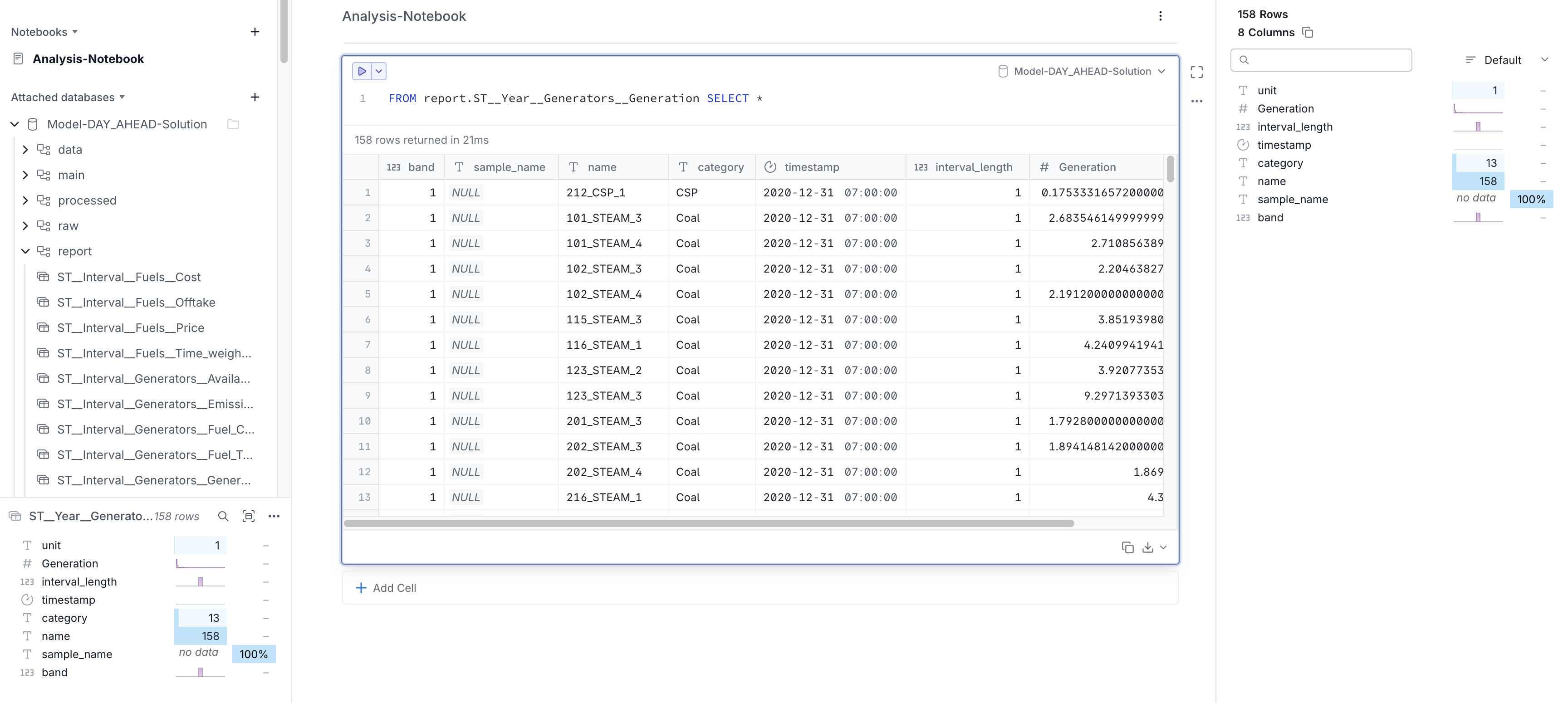
You may use any duckdb compatible database viewer to interactively explore the data with SQL:
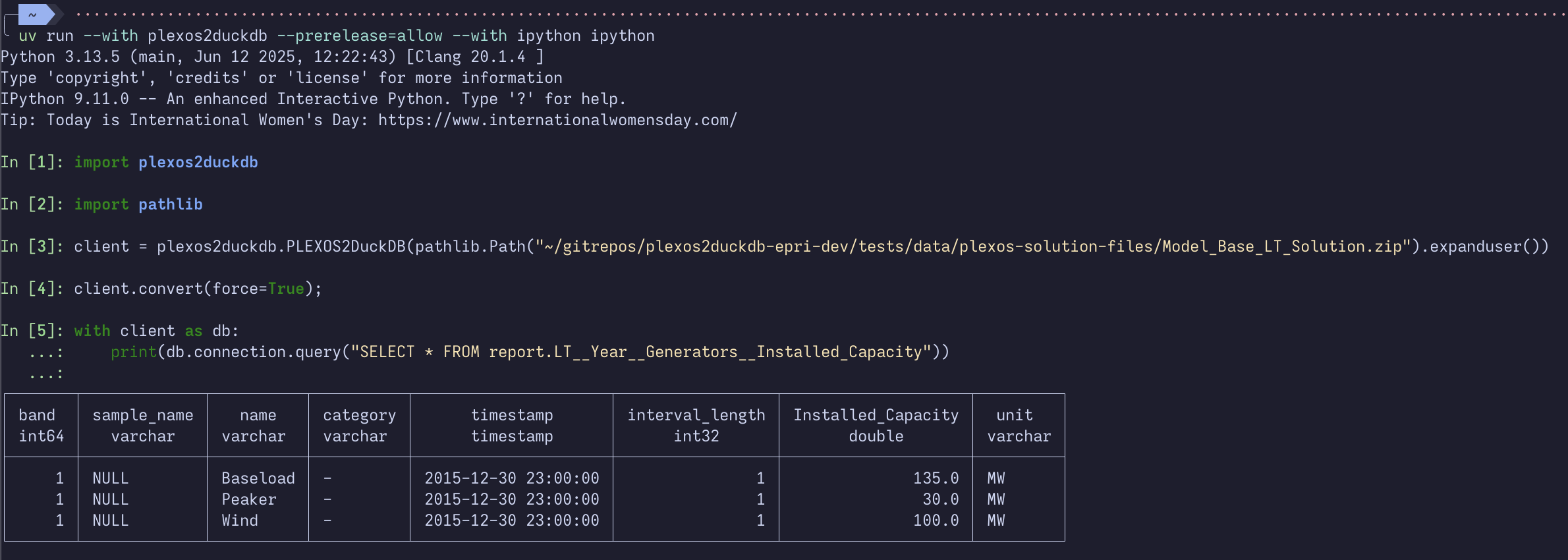
Python usage
Import the PLEXOS2DuckDB class from the plexos2duckdb package, create a client instance with the
path to your solution zip file, and call the convert() method to generate the DuckDB database.
You can also use the same client as a context manager to interact with the database connection directly.
from plexos2duckdb import PLEXOS2DuckDB

client = PLEXOS2DuckDB("./Model DAY_AHEAD Solution.zip")
output_path = client.convert() # "./Model DAY_AHEAD Solution.duckdb"

with client as db:
    # assumes output_path exists at "./Model DAY_AHEAD Solution.duckdb"
    print(db.connection.query("SELECT * FROM information_schema.tables"))
1 maintainer

Download files
Download the file for your platform. If you're not sure which to choose, learn more about installing packages.
Source Distribution
Built Distributions
Filter files by name, interpreter, ABI, and platform.
If you're not sure about the file name format, learn more about wheel file names.
Copy a direct link to the current filters
File details
Details for the file plexos2duckdb-0.1.0b12.tar.gz.
File metadata
- Download URL: plexos2duckdb-0.1.0b12.tar.gz
- Upload date:
- Size: 88.8 kB
- Tags: Source
- Uploaded using Trusted Publishing? Yes
- Uploaded via:
twine/7.0.0 CPython/3.13.14
File hashes
| Algorithm | Hash digest | |
|---|---|---|
| SHA256 |
ff2ba1ed53731883e7fe96d3edcdd8bb0d4255cca24850d27e3b4191c60cb1fa
|
|
| MD5 |
a3575ea36fd21b210497e5e7cd0fcd83
|
|
| BLAKE2b-256 |
98b41f0b90dcbf8e57c9450d0c7551aa71d3e2ee5d965a29b6a1218d55d0a681
|
Provenance
The following attestation bundles were made for plexos2duckdb-0.1.0b12.tar.gz:
Publisher:
cd.yml on kdheepak/plexos2duckdb
-
Statement:
-
Statement type:
https://in-toto.io/Statement/v1 -
Predicate type:
https://docs.pypi.org/attestations/publish/v1 -
Subject name:
plexos2duckdb-0.1.0b12.tar.gz -
Subject digest:
ff2ba1ed53731883e7fe96d3edcdd8bb0d4255cca24850d27e3b4191c60cb1fa - Sigstore transparency entry: 2306172510
- Sigstore integration time:
-
Permalink:
kdheepak/plexos2duckdb@a1e14a9cb5816fa19b7dbba73adc11f2dcff2fa0 -
Branch / Tag:
refs/heads/main - Owner: https://github.com/kdheepak
-
Access:
public
-
Token Issuer:
https://token.actions.githubusercontent.com -
Runner Environment:
github-hosted -
Publication workflow:
cd.yml@a1e14a9cb5816fa19b7dbba73adc11f2dcff2fa0 -
Trigger Event:
workflow_dispatch
-
Statement type:
File details
Details for the file plexos2duckdb-0.1.0b12-py3-none-win_amd64.whl.
File metadata
- Download URL: plexos2duckdb-0.1.0b12-py3-none-win_amd64.whl
- Upload date:
- Size: 12.7 MB
- Tags: Python 3, Windows x86-64
- Uploaded using Trusted Publishing? Yes
- Uploaded via:
twine/7.0.0 CPython/3.13.14
File hashes
| Algorithm | Hash digest | |
|---|---|---|
| SHA256 |
85c3f8f58d4e3ead37d68c876514a8dad0214000c2dfce9daddd6fd8dc3e7eaf
|
|
| MD5 |
56b4c5da6ebe1f767e0e29d96bc73f52
|
|
| BLAKE2b-256 |
7d5405ecac1b5845fcca225339817d2f3f00c8e0d4f5e69baa0695dcce8abf6f
|
Provenance
The following attestation bundles were made for plexos2duckdb-0.1.0b12-py3-none-win_amd64.whl:
Publisher:
cd.yml on kdheepak/plexos2duckdb
-
Statement:
-
Statement type:
https://in-toto.io/Statement/v1 -
Predicate type:
https://docs.pypi.org/attestations/publish/v1 -
Subject name:
plexos2duckdb-0.1.0b12-py3-none-win_amd64.whl -
Subject digest:
85c3f8f58d4e3ead37d68c876514a8dad0214000c2dfce9daddd6fd8dc3e7eaf - Sigstore transparency entry: 2306172608
- Sigstore integration time:
-
Permalink:
kdheepak/plexos2duckdb@a1e14a9cb5816fa19b7dbba73adc11f2dcff2fa0 -
Branch / Tag:
refs/heads/main - Owner: https://github.com/kdheepak
-
Access:
public
-
Token Issuer:
https://token.actions.githubusercontent.com -
Runner Environment:
github-hosted -
Publication workflow:
cd.yml@a1e14a9cb5816fa19b7dbba73adc11f2dcff2fa0 -
Trigger Event:
workflow_dispatch
-
Statement type:
File details
Details for the file plexos2duckdb-0.1.0b12-py3-none-manylinux_2_38_x86_64.whl.
File metadata
- Download URL: plexos2duckdb-0.1.0b12-py3-none-manylinux_2_38_x86_64.whl
- Upload date:
- Size: 17.7 MB
- Tags: Python 3, manylinux: glibc 2.38+ x86-64
- Uploaded using Trusted Publishing? Yes
- Uploaded via:
twine/7.0.0 CPython/3.13.14
File hashes
| Algorithm | Hash digest | |
|---|---|---|
| SHA256 |
8aecfdc0712d7040f9e322b48bf9e1d94539b5a351767a25e9b34c63b2b38d5d
|
|
| MD5 |
ebde5bddaceda821403c9df9fb93c0f6
|
|
| BLAKE2b-256 |
078e9f7e0d7a0d12a80b4d283628d5ac9fc2f1da2eb26fa8ddee8837a1024c63
|
Provenance
The following attestation bundles were made for plexos2duckdb-0.1.0b12-py3-none-manylinux_2_38_x86_64.whl:
Publisher:
cd.yml on kdheepak/plexos2duckdb
-
Statement:
-
Statement type:
https://in-toto.io/Statement/v1 -
Predicate type:
https://docs.pypi.org/attestations/publish/v1 -
Subject name:
plexos2duckdb-0.1.0b12-py3-none-manylinux_2_38_x86_64.whl -
Subject digest:
8aecfdc0712d7040f9e322b48bf9e1d94539b5a351767a25e9b34c63b2b38d5d - Sigstore transparency entry: 2306172669
- Sigstore integration time:
-
Permalink:
kdheepak/plexos2duckdb@a1e14a9cb5816fa19b7dbba73adc11f2dcff2fa0 -
Branch / Tag:
refs/heads/main - Owner: https://github.com/kdheepak
-
Access:
public
-
Token Issuer:
https://token.actions.githubusercontent.com -
Runner Environment:
github-hosted -
Publication workflow:
cd.yml@a1e14a9cb5816fa19b7dbba73adc11f2dcff2fa0 -
Trigger Event:
workflow_dispatch
-
Statement type:
File details
Details for the file plexos2duckdb-0.1.0b12-py3-none-macosx_11_0_arm64.whl.
File metadata
- Download URL: plexos2duckdb-0.1.0b12-py3-none-macosx_11_0_arm64.whl
- Upload date:
- Size: 13.8 MB
- Tags: Python 3, macOS 11.0+ ARM64
- Uploaded using Trusted Publishing? Yes
- Uploaded via:
twine/7.0.0 CPython/3.13.14
File hashes
| Algorithm | Hash digest | |
|---|---|---|
| SHA256 |
b60f8fd5aa6c5582f2d76ae360b4e7da04ac142b1c183bf10cd3731cbf47d6da
|
|
| MD5 |
95a54ea27372d5badce26c6e0bb23dd8
|
|
| BLAKE2b-256 |
4d43c16a1dc5ea14bd87e1cc32597bed033cac46921d0c008fee86ae5affef28
|
Provenance
The following attestation bundles were made for plexos2duckdb-0.1.0b12-py3-none-macosx_11_0_arm64.whl:
Publisher:
cd.yml on kdheepak/plexos2duckdb
-
Statement:
-
Statement type:
https://in-toto.io/Statement/v1 -
Predicate type:
https://docs.pypi.org/attestations/publish/v1 -
Subject name:
plexos2duckdb-0.1.0b12-py3-none-macosx_11_0_arm64.whl -
Subject digest:
b60f8fd5aa6c5582f2d76ae360b4e7da04ac142b1c183bf10cd3731cbf47d6da - Sigstore transparency entry: 2306172549
- Sigstore integration time:
-
Permalink:
kdheepak/plexos2duckdb@a1e14a9cb5816fa19b7dbba73adc11f2dcff2fa0 -
Branch / Tag:
refs/heads/main - Owner: https://github.com/kdheepak
-
Access:
public
-
Token Issuer:
https://token.actions.githubusercontent.com -
Runner Environment:
github-hosted -
Publication workflow:
cd.yml@a1e14a9cb5816fa19b7dbba73adc11f2dcff2fa0 -
Trigger Event:
workflow_dispatch
-
Statement type:







