
plit
plit is a Matplotlib wrapper that automates the
undifferentiated heavy-lifting of writing boilerplate code while maintaining
the power and feel of Matplotlib.




There are two components to plit:
- Wrappers around core chart types for standard line, scatter, histograms, and bar charts.
- Templates that are built from these primatives for specific analytic tasks.
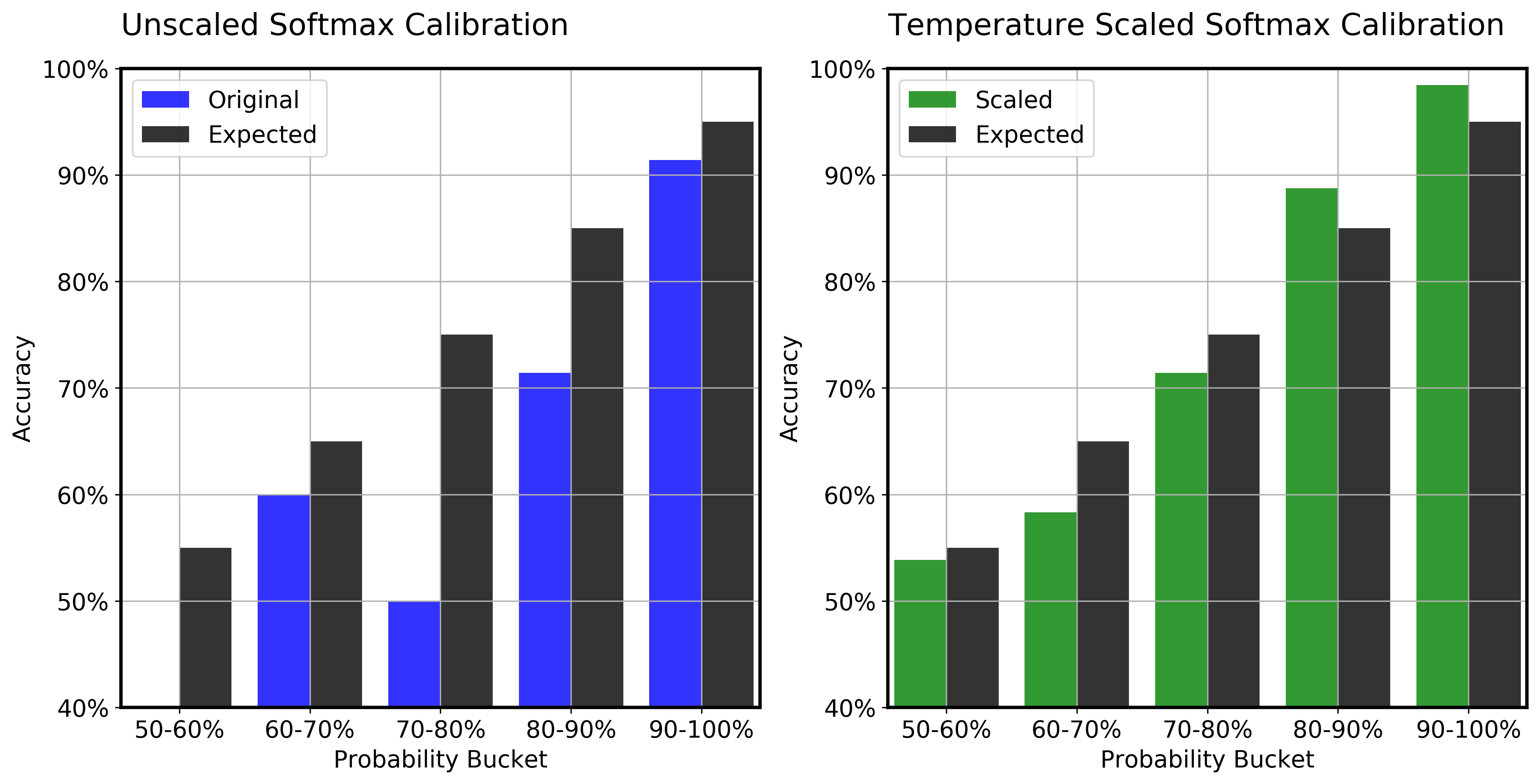
Here is an example chart created with plit:
See the PRFAQ for more information.
Install
pip install plitlib
Quick Start
The best place to get started is the wrappers. There are three main wrappers
included in plit. The naming is consistent with matplotlib. They work with
multi-series by default.
plot: for line and scatter charts.hist: for histograms.bar: for bar charts.
Create a line chart
Create a line and scatter chart using the plot function.
import numpy as np
x = [np.arange(10)]
y = [np.random.random(size=(10,1)) for _ in range(4)]

from plit import plot

plot(x, y, list("ABCD"), 'X', 'Y');
Create a scatter chart
By simply changing the marker_type='o' you switch from line to scatter chart.
from plit import plot

x = [np.random.random(size=(10,1)) for _ in range(4)]
plot(x, y, list("ABCD"), 'X', 'Y', marker_type='o')
Create a histogram
Create a histogram using the hist function.
from plit import hist

x = [np.random.normal(size=(100,1)), np.random.gamma(shape=1, size=(100,1)) - 2]
hist(x, list("AB"), 'X', title='Histogram', bins=20)
Create a bar chart
Create a grouped bar chart with the bar function.
from plit import bar

x = [f"Group {i+1}"for i in range(6)]
y = [np.random.random(size=(6)) for _ in range(2)]
bar(x, y, list("AB"),'X', 'Y', colors=list("kb"), title='Bar Chart')
Example notebooks
The best way to go deeper is to look at the examples notebooks:
- quick-start notebook gives an overview of core functionality including creating core chart types.
- plit-vs-matplotlib shows the difference between matplotlib and plit with a simple example.
- creating-templates-file demonstrates how to use partial functions to simplify and streamline your visualization workflow.
- accuracy-vs-coverage shows an illustrative example using a template created for visualizing accuracy and coverage.
- precision-vs-recall shows an illustrative example using a template created for choosing a threshold using precision and recall.
- softmax-calibration shows an illustrative example using a template created for evaluating the calibration for softmax output.
1 maintainer

Release files for plitlib 0.1.9
For a detailed explanation of source distributions (sdists) and built distributions (wheels), please see the package formats documentation.
Source distribution (sdist)
| File | Size | Uploaded | |
|---|---|---|---|
| plitlib-0.1.9.tar.gz | 22.5 kB | Details |
Built distribution (wheel)
| File | Interpreter | ABI | Platform | Reset |
|---|---|---|---|---|
| plitlib-0.1.9-py3-none-any.whl | Python 3 | none | any | Details |
Total release size: 34.0 kB
Release files / plitlib-0.1.9.tar.gz
| Download URL | plitlib-0.1.9.tar.gz |
|---|---|
| Size | 22.5 kB |
| Tags | Source |
|
SHA-256 checksum How to use checksums |
6a414c69913403aa0db8cca72822497512dbee3d21af83daf6d2b1df374264e8
|
|
BLAKE2b-256 checksum How to use checksums |
e64d6b5158e1bdd95b07a7ab8c6e1649631de9aee406240995903d7af3391228
|
| Upload date | |
|
Uploaded using Trusted Publishing? What is trusted publishing? |
No |
| Uploaded via |
twine/3.3.0 pkginfo/1.7.0 requests/2.25.1 setuptools/52.0.0.post20210125 requests-toolbelt/0.9.1 tqdm/4.58.0 CPython/3.7.10
|
Release files / plitlib-0.1.9-py3-none-any.whl
| Download URL | plitlib-0.1.9-py3-none-any.whl |
|---|---|
| Size | 11.5 kB |
| Tags | Python 3 |
|
SHA-256 checksum How to use checksums |
a39eb1a98e146e1d5e147728add951700f625df014cc15c1a712f6d2c95f84c1
|
|
BLAKE2b-256 checksum How to use checksums |
53f32bafaf869100676f51ff63f8253bb6c56639bd09af7b5dc7325183b38e5c
|
| Upload date | |
|
Uploaded using Trusted Publishing? What is trusted publishing? |
No |
| Uploaded via |
twine/3.3.0 pkginfo/1.7.0 requests/2.25.1 setuptools/52.0.0.post20210125 requests-toolbelt/0.9.1 tqdm/4.58.0 CPython/3.7.10
|














