
Protein chemical shift prediction based on Protein Language Model

Project description
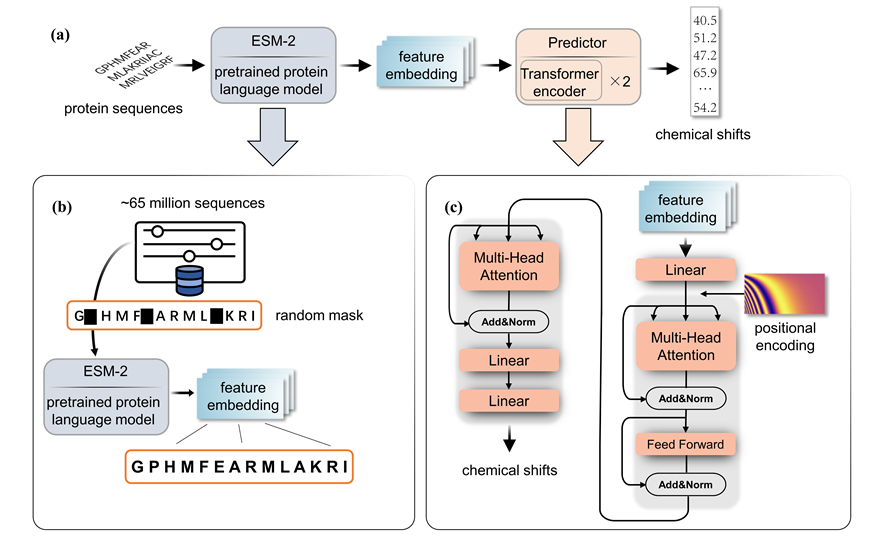
PLM-CS
Predict protein chemical shifts from sequence
The github repository address of the project: https://github.com/doorpro/predict-chemical-shifts-from-protein-sequence. If you have any comments or questions, email the author: 2260913071@qq.com
File introduction in the project
af_pdb deposit the protein structures in the solution_nmr test set
af_result_csv deposit the csv files of the protein in solution_nmr test set predicted by PLM-CS
dataset deposit all the dataset include the train set(RefDB) and two test set. The processed tensordataset are also included.
plm_cs Inside the folder are installable plm-cs python sdk.
result This folder is the default save path of prediction result.
esm_process is a tool we provide for preprocessing sequences.
model holds architecture of the model
requirement listed the relevant dependency libraries and version required for training and testing plm-cs.
setup if the local installation setup file for plm-cs.
train_your_model provided the code to completely reproduce the results in our paper.
train provides scripts for training the model if you want to train the model with your own data.
utils provides tools for extract protein sequences and chemical shifts from various types of file.
Use PLM-CS through python SDK
Requirement
'torch == 2.5.0',
'torchaudio == 2.5.0',
'torchvision == 0.20.0',
'fair-esm == 2.0.0',
'numpy == 2.1.2',
'biopython == 1.84',
'pandas == 2.2.3'
Install with pip
pip install plm-cs
Or install after git clone
After cloning the complete project file locally, run the following command in the folder containing setup.py
pip install .
Use plm-cs
Using commands similar to the one below, enter the Fasta file or protein sequence and the path to save the result to generate a csv file predicting the chemical shift at the specified location
plm-cs YOURSEQUENCE --result_file your_save_path.csv
plm-cs your_file.fasta --result_file your_save_path.csv
Note that the first time you use it, it takes a lot of time because you need to download the weights of the esm model.
You can simply check by: plm-cs AAAA
Train your model
If you want to train your own PLM-CS model, this repository provides all the tools and data.
Train with RefDB dataset
If you want to train with the data we provide and get the results in the paper, all the processes are already provided in the ipynb file train_your_model.
Training set
We provide the complete training set data in RefDB training dataset. Each file in this folder is in nmrstar format, and each file corresponds to a protein. All proteins contained in the SHIFTX test are removed from it.
Training parameters
Different atom types correspond to different optimizer strategies.You can modify the corresponding parameters in the train.py according to your trained model. The default number of steps for an iteration is 20,000, but you can change it to 5,000 to achieve very close performance while reducing training time
| parameters | Cα | Cβ | C | Hα | H | N |
|---|---|---|---|---|---|---|
| learning rate | 0.02 | 5e-4 | 0.002 | 0.01 | 5e-4 | 5e-4 |
| optimizer | SGD | Adam | Adam | SGD | Adam | Adam |
Train with your own dataset
Training set processing
For convenience, the reasoning process of the ESM model is separate from the training process of our regression model. Therefore, we first use ESM-650M to process the data. In esm_process.py we provide a transformation function for the esm model, you need to provide three parameters:protein sequence, chemical shifts, mask. The sequence representing the protein, the sequence specifying the chemical shift of the atom, and the mask sequence (if any of the tags for a particular sequence are missing). These three sequences should be of equal length. The function outputs four processed data, you need to concat multiple sequences of data in the batch size dimension and save them as the tensordataset in this manner.
dataset = TensorDataset(all_esm_vec, all_label, all_mask, all_padding_mask)
The final dimension of each parameter should be: b×512×1280, b×512×1, b×512×1, b×512×1
Train
Modify the path in the train.py to your own parh. Also, be aware that this can only train a model of one type of atom at a time.
Release history Release notifications | RSS feed


Download files
Download the file for your platform. If you're not sure which to choose, learn more about installing packages.
Source Distribution
Built Distribution
Filter files by name, interpreter, ABI, and platform.
If you're not sure about the file name format, learn more about wheel file names.
Copy a direct link to the current filters
File details
Details for the file plm_cs-2.4.tar.gz.
File metadata
- Download URL: plm_cs-2.4.tar.gz
- Upload date:
- Size: 8.9 kB
- Tags: Source
- Uploaded using Trusted Publishing? No
- Uploaded via: twine/6.0.1 CPython/3.10.14
File hashes
| Algorithm | Hash digest | |
|---|---|---|
| SHA256 |
262ff951a24790f8e53ff5337d37e84a727d5c955abab5a4a8c827573b2c2dc0
|
|
| MD5 |
cc42f97ed2b7a7d3f872fe515015b796
|
|
| BLAKE2b-256 |
dc186618c0cab796616546662e7913142a849be2ca4bd24ce271a65756dc9125
|
File details
Details for the file plm_cs-2.4-py3-none-any.whl.
File metadata
- Download URL: plm_cs-2.4-py3-none-any.whl
- Upload date:
- Size: 8.6 kB
- Tags: Python 3
- Uploaded using Trusted Publishing? No
- Uploaded via: twine/6.0.1 CPython/3.10.14
File hashes
| Algorithm | Hash digest | |
|---|---|---|
| SHA256 |
0d5c7315ed61e2e2e74971e63d86faec14891a258a6231ffa851e4526a8e9118
|
|
| MD5 |
13000a1bc010df05474be15543c9403c
|
|
| BLAKE2b-256 |
81e78e00750520f901197e8ee0bdd4b487c5596d3e077970973012119c566048
|






