
A framework to automatize your tests for data projects

Project description
Ploosh
Ploosh is yaml based framework used to automatized the testing process in data projects.
Get started
Go to the ploosh wiki to find the get started tutorial.
Steps
- Install ploosh package
- Run tests
- Analyse results
Install Ploosh
Install from PyPi package manager:
pip install ploosh
Run tests
ploosh --connections "connections.yml" --cases "test_cases" --export "JSON" --p_my_sql_server_password "mypassword"
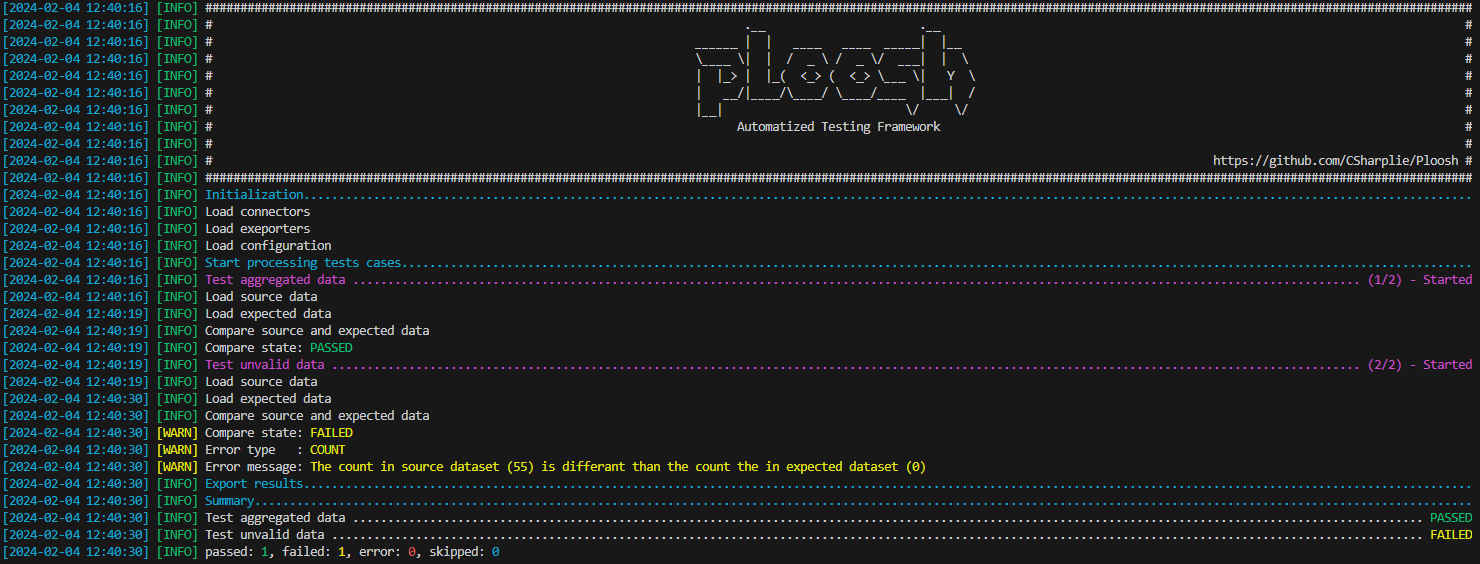
Test results
[
  {
    "name": "Test aggregated data",
    "state": "passed",
    "source": {
      "start": "2024-02-05T17:08:36Z",
      "end": "2024-02-05T17:08:36Z",
      "duration": 0.0032982
    },
    "expected": {
      "start": "2024-02-05T17:08:36Z",
      "end": "2024-02-05T17:08:36Z",
      "duration": 6.0933333333333335e-05
    },
    "compare": {
      "start": "2024-02-05T17:08:36Z",
      "end": "2024-02-05T17:08:36Z",
      "duration": 0.00046468333333333334
    }
  },
  {
    "name": "Test unvalid data",
    "state": "failed",
    "source": {
      "start": "2024-02-05T17:08:36Z",
      "end": "2024-02-05T17:08:36Z",
      "duration": 0.00178865
    },
    "expected": {
      "start": "2024-02-05T17:08:36Z",
      "end": "2024-02-05T17:08:36Z",
      "duration": 1.49e-05
    },
    "compare": {
      "start": "2024-02-05T17:08:36Z",
      "end": "2024-02-05T17:08:36Z",
      "duration": 1.8333333333333333e-07
    },
    "error": {
      "type": "count",
      "message": "The count in source dataset (55) is differant than the count the in expected dataset (0)"
    }
  }
]
Release history Release notifications | RSS feed


Download files
Download the file for your platform. If you're not sure which to choose, learn more about installing packages.
Source Distribution
ploosh_core-0.2.32.tar.gz
(22.6 kB
view details)
Built Distribution
Filter files by name, interpreter, ABI, and platform.
If you're not sure about the file name format, learn more about wheel file names.
Copy a direct link to the current filters
File details
Details for the file ploosh_core-0.2.32.tar.gz.
File metadata
- Download URL: ploosh_core-0.2.32.tar.gz
- Upload date:
- Size: 22.6 kB
- Tags: Source
- Uploaded using Trusted Publishing? No
- Uploaded via: twine/6.0.1 CPython/3.12.8
File hashes
| Algorithm | Hash digest | |
|---|---|---|
| SHA256 |
e531638b1c2bc82bf062636f2817b120d6c381f6ddeb5533498d61f0e10901c6
|
|
| MD5 |
ede858500fc6c462135823113d8f9723
|
|
| BLAKE2b-256 |
b79ec21234cf1d64357d5889c1c6b6b5e74aeaec5e3c8463ef23ddc6971d2172
|
File details
Details for the file ploosh_core-0.2.32-py3-none-any.whl.
File metadata
- Download URL: ploosh_core-0.2.32-py3-none-any.whl
- Upload date:
- Size: 34.8 kB
- Tags: Python 3
- Uploaded using Trusted Publishing? No
- Uploaded via: twine/6.0.1 CPython/3.12.8
File hashes
| Algorithm | Hash digest | |
|---|---|---|
| SHA256 |
cc41c8bdc6f0e036db1a4eb57d8b445f7d981f55a9b5c39c195ffea8f369799c
|
|
| MD5 |
c779cc1e4ad995a0e4215ab9826ddb5b
|
|
| BLAKE2b-256 |
1f044bb64208af4ef9365a7a6a58c3955ba7324dece59f4302bf58b2e70c8d67
|






