
plot_snp
plot_snp reads one or more S-parameter files with any number of ports (*.snp) and plots magnitude (dB) and phase of all selected parameters.
To run the inductor plot and analysis, specify the *.snp file(s) and the requested S-parameters as commandline parameter. Order does not matter. Default is S11.
example:
python plot_snp.py data.s2p S21

python plot_snp.py measured.s2p simulated.s2p S11 S21
With pip install plot_snp, the same works as the command plot_snp data.s2p S21.
The tool plots all files with the specified parameter(s)
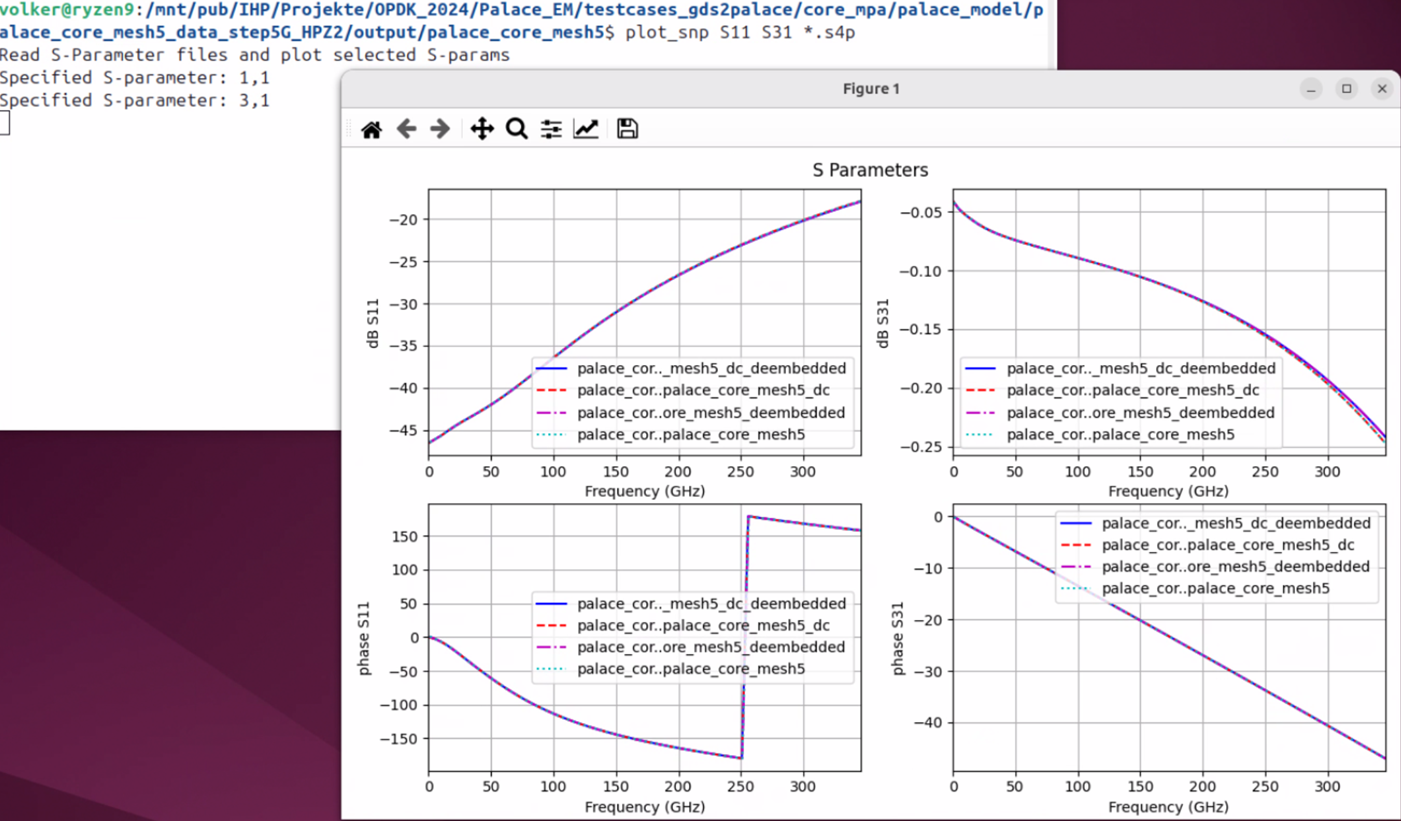
Add -smith to additionally plot reflection parameters (Snn, e.g. S11, S22) on a Smith chart, in a separate window. The dB/phase window still shows all selected parameters as before.
Add -zoom to also open a third window with a Smith chart zoomed in to |Γ| <= 0.5, with a denser labeled grid. -zoom can be used with or without -smith.
python plot_snp.py data.s2p S11 S21 -smith -zoom
Use from Python
The plots are also available as functions, for example to save them as PNG without a window:
import matplotlib
matplotlib.use("Agg")
import plot_snp

networks = [plot_snp.read_network("data.s2p")]
parameters = [plot_snp.parse_parameter(p) for p in ("S11", "S21")]
figures = plot_snp.plot_all(networks, parameters, smith=True)   # dB/phase, then Smith chart
figures[0].savefig("data_s11_s21.png")
Prerequisites
The code requires Python3 with the skitkit-rf library. https://scikit-rf.readthedocs.io/en/latest/tutorials/index.html
pip install plot_snp installs scikit-rf and matplotlib.
1 maintainer

Metadata
1 maintainer
Release files for plot-snp 0.1.0
For a detailed explanation of source distributions (sdists) and built distributions (wheels), please see the package formats documentation.
Source distribution (sdist)
| File | Size | Uploaded | Provenance | Actions |
|---|---|---|---|---|
| plot_snp-0.1.0.tar.gz | 9.1 kB | Without provenance | Details for plot_snp-0.1.0.tar.gz |
Built distribution (wheel)
| File | Interpreter | ABI | Platform | Actions Reset |
|---|---|---|---|---|
| plot_snp-0.1.0-py3-none-any.whl | Python 3 | none | any | Details for plot_snp-0.1.0-py3-none-any.whl |
Total release size: 18.7 kB
Release files / plot_snp-0.1.0.tar.gz
| Download URL | plot_snp-0.1.0.tar.gz |
|---|---|
| Size | 9.1 kB |
| Tags | Source |
|
SHA-256 checksum How to use checksums |
6a19438ed0f3451c0fa2bbdd755196733af852d683737bb098ca1984dbd1f7ef
|
|
BLAKE2b-256 checksum How to use checksums |
c1b932a67917caddeff1f910dec0b254354180da3edfbb0ac710cc4e7050041f
|
| Upload date | |
|
Uploaded using Trusted Publishing? What is trusted publishing? |
No |
| Uploaded via |
twine/7.0.0 CPython/3.13.14
|
Release files / plot_snp-0.1.0-py3-none-any.whl
| Download URL | plot_snp-0.1.0-py3-none-any.whl |
|---|---|
| Size | 9.6 kB |
| Tags | Python 3 |
|
SHA-256 checksum How to use checksums |
8ebdf5a4ee5bc8662dcdababa5a11bb788edc452d036025bf830d1a40cc2a522
|
|
BLAKE2b-256 checksum How to use checksums |
506cb60e5e0e61b356f110448e5a00d0be8771fe60a4b7eac4384b577d7e5e09
|
| Upload date | |
|
Uploaded using Trusted Publishing? What is trusted publishing? |
No |
| Uploaded via |
twine/7.0.0 CPython/3.13.14
|
Security for plot-snp 0.1.0
Provenance
Provenance describes where a file came from. On PyPI, provenance is shared via attestations, which provide a verifiable record of the build or publishing details. View details, limitations and caveats.
No provenance found
None of the files in this release were uploaded with provenance metadata.
A note on package security
PyPI is a repository for distributing packages, not a service for auditing them. While third-party security researchers and our staff do their best to detect and remove malicious packages, PyPI cannot guarantee the quality, security or suitability of any given package.
To learn more about protecting yourself from malicious actors, visit our package security documentation.













