
PlotAir


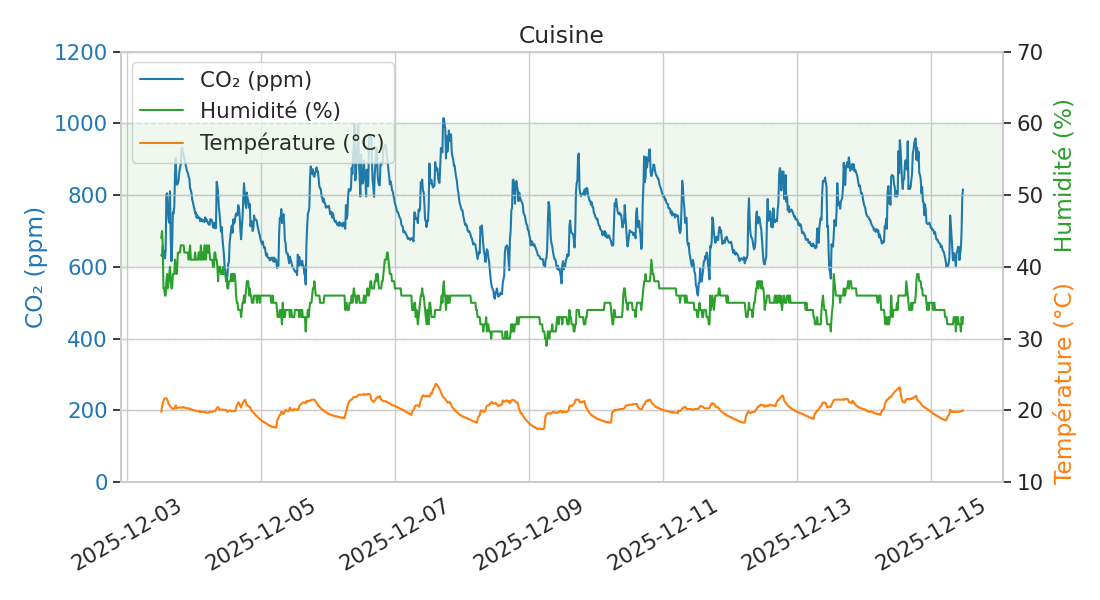
PlotAir is a Python script that processes one or more CSV files containing VisiblAir sensor data. For each file, it reads the data into a pandas DataFrame, ignores incorrectly formatted lines, keeps only the most recent data sequence, and generates a Seaborn plot saved as a PNG file with the same base name as the input CSV.
Dependencies
PlotAir requires the following external libraries:
These libraries and their sub-dependencies will be installed automatically when you install PlotAir.
Installation
It is recommended to install PlotAir within a virtual environment to avoid conflicts with system packages. Some Linux distributions enforce this. You can use pipx to handle the virtual environment automatically, or create one manually and use pip.
Installation with pipx
pipx installs PlotAir in an isolated environment and makes it available globally.
1. Install pipx:
-
Linux (Debian / Ubuntu / Mint):
sudo apt install pipx
pipx ensurepath
-
Linux (Other) / macOS:
python3 -m pip install --user pipx
python3 -m pipx ensurepath
-
Windows:
python -m pip install --user pipx
python -m pipx ensurepath
You may need to reopen your terminal for the PATH changes to take effect. If you encounter a problem, please refer to the official pipx documentation.
2. Install PlotAir:
pipx install plotair
Installation with pip
If you prefer to manage the virtual environment manually, you can create and activate it by following this tutorial. Then install PlotAir:
pip install plotair
Deployments
View all releases on:
Usage
Basic Usage
plotair [arguments] FILE [FILE ...]
Arguments
| Argument | Short Flag | Description |
|---|---|---|
--help |
-h |
Show help message |
--all-dates |
-a |
Plot all dates (otherwise only latest sequence) |
--boxplot |
-b |
Generate boxplots along with text stats |
--merge |
-m |
Merge field from file1 to file2, and output to file3 |
--filter-multiplier |
-M |
Multiplier for IQR outlier filtering (default: 1.5) |
--filter-outliers |
-o |
Filter out outliers from the plots |
--reset-config |
-r |
Reset configuration file to default |
--start-date |
-s |
Date at which to start the plot (YYYY-MM-DD) |
--stop-date |
-S |
Date at which to stop the plot (YYYY-MM-DD) |
--title |
-t |
Set the plot title |
--snapshots |
-T |
Generate a snapshots table from all files |
--version |
-v |
Show program's version number and exit |
Configuration
When you run PlotAir for the first time, a config.toml file is automatically created. Its location depends on your operating system (typical paths are listed below):
- Linux:
~/.config/plotair - macOS:
~/Library/Preferences/plotair - Windows:
C:/Users/YourUsername/AppData/Roaming/plotair
You can edit this file to customize various settings. Common customizations include translating plot labels into different languages or modifying the line colors.
License
Copyright (c) 2026 Monsieur Linux
This project is licensed under the MIT License. See the LICENSE file for details.
Acknowledgements
Thanks to the creators and contributors of the pandas and seaborn libraries, and to the developer of the great VisiblAir air quality monitors and CO₂ sensors. Thanks also to the founder of Bâtiments vivants for the idea of this script.
1 maintainer

Metadata
1 maintainer
Release files for plotair 0.4.1
For a detailed explanation of source distributions (sdists) and built distributions (wheels), please see the package formats documentation.
Source distribution (sdist)
| File | Size | Uploaded | |
|---|---|---|---|
| plotair-0.4.1.tar.gz | 12.6 kB | Details |
Built distribution (wheel)
| File | Interpreter | ABI | Platform | Reset |
|---|---|---|---|---|
| plotair-0.4.1-py3-none-any.whl | Python 3 | none | any | Details |
Total release size: 26.6 kB
Release files / plotair-0.4.1.tar.gz
| Download URL | plotair-0.4.1.tar.gz |
|---|---|
| Size | 12.6 kB |
| Tags | Source |
|
SHA-256 checksum How to use checksums |
daba9d61373fdbb73b78d6faa63fce5f29f07b5dbc648d37290fc86df5bf7b12
|
|
BLAKE2b-256 checksum How to use checksums |
968d685b1f530d89e1c7e870221b8f36452981dc5cd0446d22eff176a45b1886
|
| Upload date | |
|
Uploaded using Trusted Publishing? What is trusted publishing? |
No |
| Uploaded via |
twine/6.2.0 CPython/3.11.2
|
Release files / plotair-0.4.1-py3-none-any.whl
| Download URL | plotair-0.4.1-py3-none-any.whl |
|---|---|
| Size | 13.9 kB |
| Tags | Python 3 |
|
SHA-256 checksum How to use checksums |
53d130e75593337cd4ef5529afbce1d9c90181f52381def9035c2a0650a9ef62
|
|
BLAKE2b-256 checksum How to use checksums |
eadee5acc826c226fc422be3a179d7018572243317612e723bf798718f6dbfb0
|
| Upload date | |
|
Uploaded using Trusted Publishing? What is trusted publishing? |
No |
| Uploaded via |
twine/6.2.0 CPython/3.11.2
|














