
An open-source, interactive data visualization library for Python


Project description
plotly.py
| Latest Release |

|
| User forum |

|
| PyPI Downloads |

|
| License |

|
Data Science Workspaces
Our recommended IDE for Plotly’s Python graphing library is Dash Enterprise’s Data Science Workspaces, which has both Jupyter notebook and Python code file support.
Quickstart
pip install plotly==4.14.3
Inside Jupyter (installable with pip install "jupyterlab>=3" "ipywidgets>=7.6"):
import plotly.graph_objects as go
fig = go.Figure()
fig.add_trace(go.Scatter(y=[2, 1, 4, 3]))
fig.add_trace(go.Bar(y=[1, 4, 3, 2]))
fig.update_layout(title = 'Hello Figure')
fig.show()
See the Python documentation for more examples.
Read about what's new in plotly.py v4
Overview
plotly.py is an interactive, open-source, and browser-based graphing library for Python :sparkles:
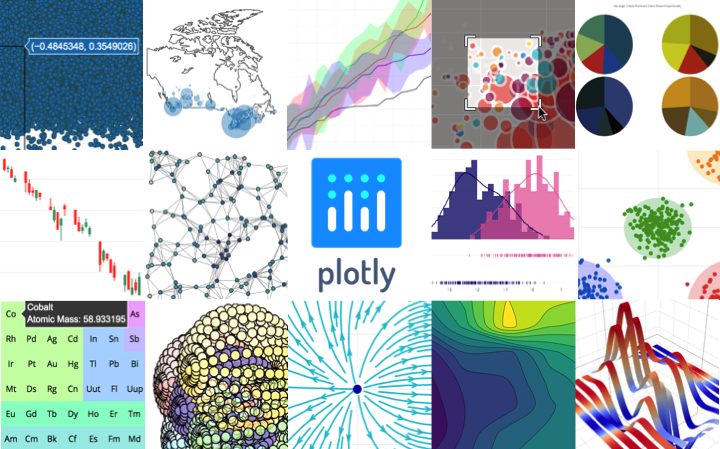
Built on top of plotly.js, plotly.py is a high-level, declarative charting library. plotly.js ships with over 30 chart types, including scientific charts, 3D graphs, statistical charts, SVG maps, financial charts, and more.
plotly.py is MIT Licensed. Plotly graphs can be viewed in Jupyter notebooks, standalone HTML files, or hosted online using Chart Studio Cloud.
Contact us for consulting, dashboard development, application integration, and feature additions.
- Online Documentation
- Contributing to plotly
- Changelog
- Code of Conduct
- Version 4 Migration Guide
- New! Announcing Dash 1.0
- Community forum
Installation
plotly.py may be installed using pip...
pip install plotly==4.14.3
or conda.
conda install -c plotly plotly=4.14.3
JupyterLab Support
For use in JupyterLab, install the jupyterlab and ipywidgets
packages using pip:
pip install jupyterlab>=3 "ipywidgets>=7.6"
or conda:
conda install jupyterlab>=3 "ipywidgets>=7.6"
For JupyterLab 2 or earlier, run the following commands to install the required JupyterLab extensions (note that this will require node to be installed):
# Basic JupyterLab renderer support
jupyter labextension install jupyterlab-plotly@4.14.3

# OPTIONAL: Jupyter widgets extension for FigureWidget support
jupyter labextension install @jupyter-widgets/jupyterlab-manager plotlywidget@4.14.3
Please check out our Troubleshooting guide if you run into any problems with JupyterLab.
Jupyter Notebook Support
For use in the Jupyter Notebook, install the notebook and ipywidgets
packages using pip:
pip install "notebook>=5.3" "ipywidgets>=7.5"
or conda:
conda install "notebook>=5.3" "ipywidgets>=7.5"
Static Image Export
plotly.py supports static image export,
using either the kaleido
package (recommended, supported as of plotly version 4.9) or the orca
command line utility (legacy as of plotly version 4.9).
Kaleido
The kaleido package has no dependencies and can be installed
using pip...
$ pip install -U kaleido
or conda.
$ conda install -c conda-forge python-kaleido
Orca
While Kaleido is now the recommended image export approach because it is easier to install
and more widely compatible, static image export
can also be supported
by the legacy orca command line utility and the
psutil Python package.
These dependencies can both be installed using conda:
conda install -c plotly plotly-orca==1.3.1 psutil
Or, psutil can be installed using pip...
pip install psutil
and orca can be installed according to the instructions in the orca README.
Extended Geo Support
Some plotly.py features rely on fairly large geographic shape files. The county
choropleth figure factory is one such example. These shape files are distributed as a
separate plotly-geo package. This package can be installed using pip...
pip install plotly-geo==1.0.0
or conda
conda install -c plotly plotly-geo=1.0.0
Chart Studio support
The chart-studio package can be used to upload plotly figures to Plotly's Chart
Studio Cloud or On-Prem service. This package can be installed using pip...
pip install chart-studio==1.1.0
or conda
conda install -c plotly chart-studio=1.1.0
Migration
If you're migrating from plotly.py v3 to v4, please check out the Version 4 migration guide
If you're migrating from plotly.py v2 to v3, please check out the Version 3 migration guide
Copyright and Licenses
Code and documentation copyright 2019 Plotly, Inc.
Code released under the MIT license.
Docs released under the Creative Commons license.
Release history Release notifications | RSS feed


Download files
Download the file for your platform. If you're not sure which to choose, learn more about installing packages.
Source Distribution
Built Distribution
Filter files by name, interpreter, ABI, and platform.
If you're not sure about the file name format, learn more about wheel file names.
Copy a direct link to the current filters
File details
Details for the file plotly-5.0.0rc2.tar.gz.
File metadata
- Download URL: plotly-5.0.0rc2.tar.gz
- Upload date:
- Size: 6.7 MB
- Tags: Source
- Uploaded using Trusted Publishing? No
- Uploaded via: twine/3.1.1 pkginfo/1.5.0.1 requests/2.23.0 setuptools/56.0.0 requests-toolbelt/0.9.1 tqdm/4.49.0 CPython/3.7.7
File hashes
| Algorithm | Hash digest | |
|---|---|---|
| SHA256 |
c12c94b592996a4d4de27488b970a66cf2d052ee3e9c586e6d4a55e456a6c500
|
|
| MD5 |
e6bc71222dfbf46c08f97e30cfca8fc2
|
|
| BLAKE2b-256 |
f2089d0674e4422d4f0badea1bbb39205cd3045eb58779a8c53cf73b3fa333f3
|
File details
Details for the file plotly-5.0.0rc2-py2.py3-none-any.whl.
File metadata
- Download URL: plotly-5.0.0rc2-py2.py3-none-any.whl
- Upload date:
- Size: 15.9 MB
- Tags: Python 2, Python 3
- Uploaded using Trusted Publishing? No
- Uploaded via: twine/3.1.1 pkginfo/1.5.0.1 requests/2.23.0 setuptools/56.0.0 requests-toolbelt/0.9.1 tqdm/4.49.0 CPython/3.7.7
File hashes
| Algorithm | Hash digest | |
|---|---|---|
| SHA256 |
e131caa315a23b28ec858eff0e5632595c0c7a8777a2289ec853bd0f53e38f83
|
|
| MD5 |
6af28cbd5e998f701dc6d3c1e19c2051
|
|
| BLAKE2b-256 |
0bacefc4aa7d674c8b907b1c0918afd48f36536f5fb765edce2e400c4fdba55b
|






