
Controller support for Plover

Project description
🎮 plover_controller
This plugin was designed for use with Open Steno Project's Plover. With only a video game controller, you can harness the power of machine stenography, a shorthand writing system that's been proven effective since its inception in 1879. To this day, stenography is trusted for use in live captioning and court reporting, due to its high speed and accuracy.
[!WARNING] plover_controller may not work on macOS. Only Windows and Linux have been tested successfully.
Table of Contents
Learning resources
To get started with controller steno, check out these fantastic learning resources on the Plover wiki! Need assistance or just want to chat about steno? Join the lively steno community on the Plover Discord
Installation
We recommend installation via Plover's built-in Plugins Manager. For manual installation, follow the step-by-step guide in the Plover documentation.
Usage
Stenography is a phonetic/mnemonic shorthand writing system. It is predominantly written based on sound in Plover theory.
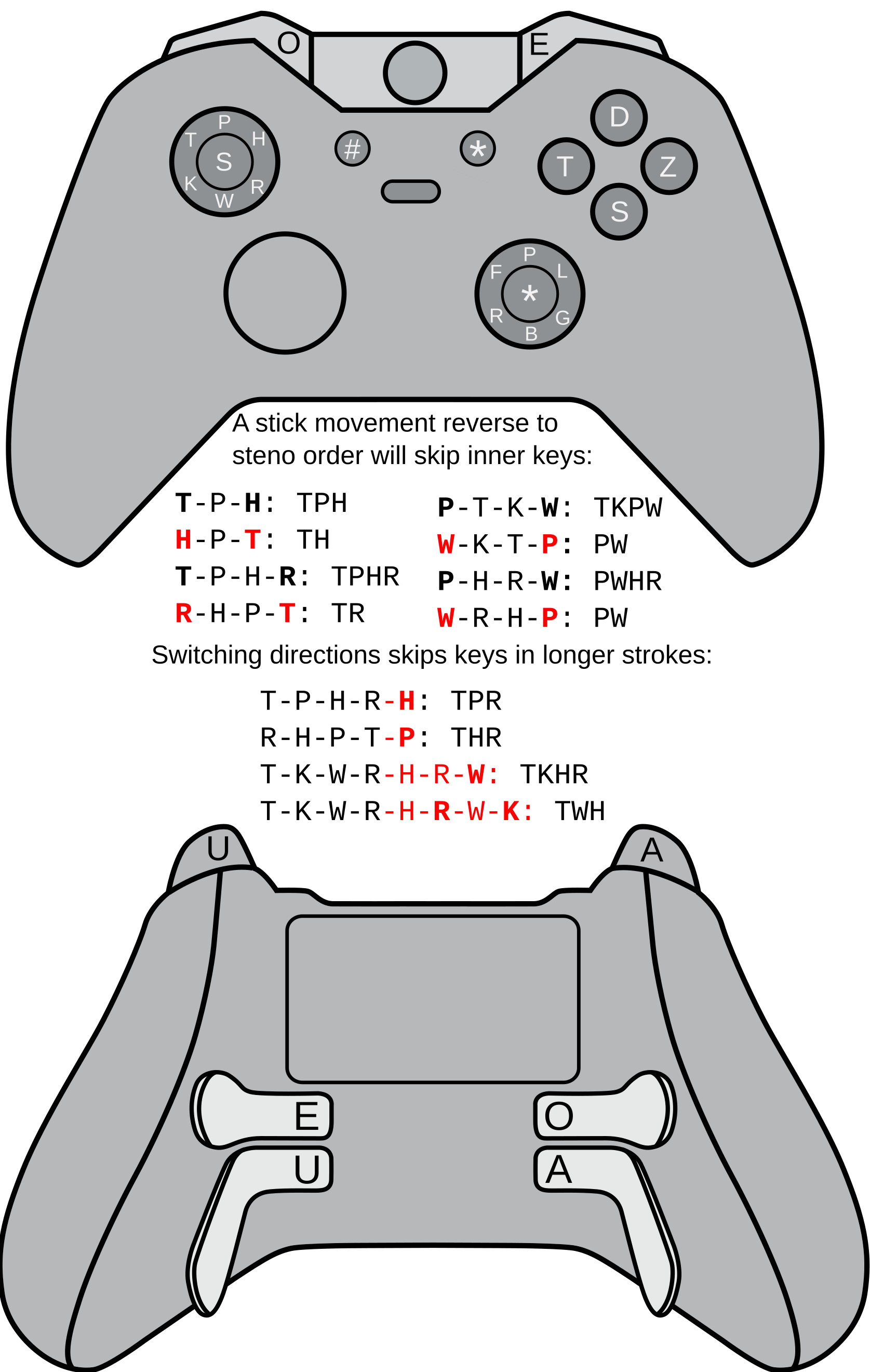
Plover processes the keys in the following order, known as "steno order":
STKPWHRAO*EUFRPBLGTSDZ.
In the default configuration:
- The left joystick handles the beginning consonants
STKPWHR- - The shoulder buttons and triggers handle the vowels
AOEU - The right joystick and ABXY buttons handle
*and the ending consonants-FRPBLGTSDZ.
To see which characters are being registered, open the Paper Tape window in Plover.
Examples
Let's say you wanted to write the word "cat".
In Plover theory, cat is written like KAT.
To write "cat" with your controller, do the following simultaneously:
- Move the left joystick down and to the left for the starting consonant
K- - Press the left trigger button for the vowel
A - Press the X button for the ending consonant
-T
Finally, release the joystick, trigger, and X button, which should output "cat".
Here's a slightly more difficult one, "straps". Do the following, keeping at least one button pressed or joystick moved before releasing to end the stroke:
- Press the left joystick for
S- - Move the left joystick up and to the left for
T- - Move the left stick to the bottom right for
R- - Press the left trigger for
A - Move the right joystick to the top for
-P - Press the A button (Xbox layout A) for
-S
Release to end the stroke, and you should get the output straps.
Setup
Once the plugin is installed and Plover has been restarted, Plover's Machine select box should now have a Controller option.
The settings for plover_controller can be found in the Plover Configuration under the Machine tab.
Mapping buttons
The default configuration was created for use with an Xbox Elite controller. If you are using any other controller, you will likely have to change the default key mapping in the Plover Machine settings.
Any problems will most likely be due to your button map. The best way to resolve these issues is to:
- Open the Plover Machine Configuration menu.
- Move the joystick or press the button causing problems
- Observe the text output in the Last axis event and Last other event fields at the bottom of the Options section, and compare it to the text in the Mapping field. Make changes as needed.
Default mapping
Left joystick
         -----------------
      /   \             /   \
     /     \    P-     /     \
    /       \         /       \
   /   T-    \_______/    H-   \
  /          /       \          \
 /          /         \          \
 +---------|     S-    |---------+
 \          \         /          /
  \          \       /          /
   \   K-     \_____/     R-   /
    \        /       \        /
     \      /    W-   \      /
      \    /           \   /
         -----------------
Right joystick
         -----------------
      /   \             /   \
     /     \    -P     /     \
    /       \         /       \
   /   -F    \_______/    -L   \
  /          /       \          \
 /          /         \          \
 +---------|     *     |---------+
 \          \         /          /
  \          \       /          /
   \   -R     \_____/     -G   /
    \        /       \        /
     \      /   -B    \      /
      \    /           \    /
         -----------------
Buttons
| Button (Xbox Labels) | Maps To |
|---|---|
| Left Trigger / Paddle 4 | A |
| Left Bumper / Paddle 3 | O |
| Right Bumper / Paddle 1 | E |
| Right Trigger / Paddle 2 | U |
| Select | * |
| Start | # |
| X Button | -T |
| A Button | -S |
| Y Button | -D |
| B Button | -Z |
Default mapping image
Release history Release notifications | RSS feed


Download files
Download the file for your platform. If you're not sure which to choose, learn more about installing packages.
Source Distribution
Built Distribution
Filter files by name, interpreter, ABI, and platform.
If you're not sure about the file name format, learn more about wheel file names.
Copy a direct link to the current filters
File details
Details for the file plover-controller-0.0.17.tar.gz.
File metadata
- Download URL: plover-controller-0.0.17.tar.gz
- Upload date:
- Size: 22.5 kB
- Tags: Source
- Uploaded using Trusted Publishing? No
- Uploaded via: twine/4.0.2 CPython/3.11.7
File hashes
| Algorithm | Hash digest | |
|---|---|---|
| SHA256 |
c263021c364ccacbf7ffc73200e98ca69ea13f11d3f75bf2b7b6ec6f83b13ce8
|
|
| MD5 |
cbfbe1a69f19ca179a954bf772e6ca28
|
|
| BLAKE2b-256 |
d7e0008b6565d458164b3f76e8efc5c9d504b74be721f67c3eb20206617a6932
|
File details
Details for the file plover_controller-0.0.17-py3-none-any.whl.
File metadata
- Download URL: plover_controller-0.0.17-py3-none-any.whl
- Upload date:
- Size: 21.5 kB
- Tags: Python 3
- Uploaded using Trusted Publishing? No
- Uploaded via: twine/4.0.2 CPython/3.11.7
File hashes
| Algorithm | Hash digest | |
|---|---|---|
| SHA256 |
be0f60982e5d1e229c9407481e672e3c7c09aecb5fb490c062903233f61f0157
|
|
| MD5 |
6ec782ff8170e6dbdd19eea8cd719e21
|
|
| BLAKE2b-256 |
907cc2b0b7797dcb3d1cc1d3606c3d2bca3682e5775c2328b66f77115cb67c8f
|






