
Plover plugin to install Lapwing dependencies and extras.

Project description
Plover Lapwing AIO



Lapwing AIO automatically installs all the necessary plugins and dictionaries for using Lapwing theory with Plover.
Installation
In Plover's main window, click on Tools → Plugins Manager. Scroll down until you see plover-lapwing-aio and select it. Press the Install/Update plugin and make sure to press Restart afterwards.
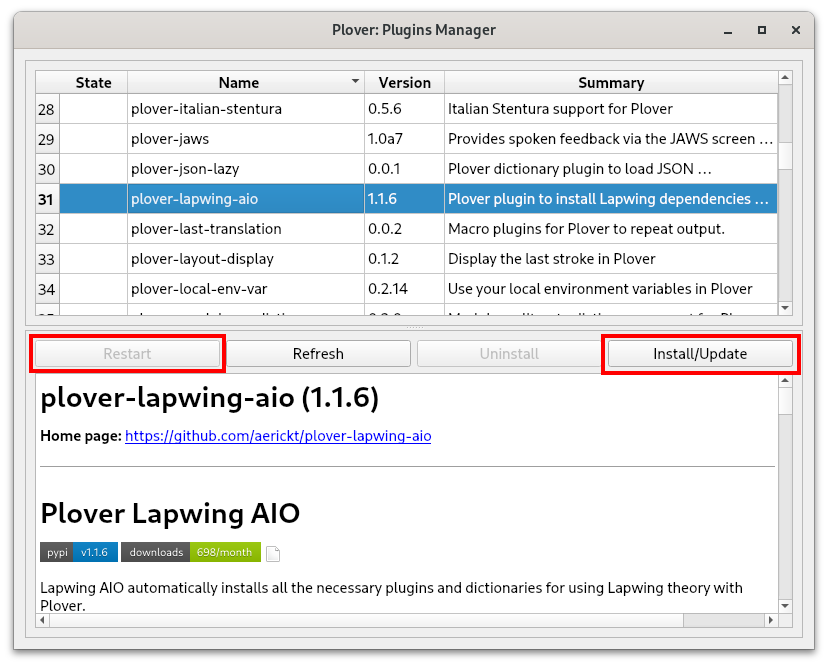
NOTE: just closing the main window is not sufficient to restart Plover. You will have to press the restart button or manually quit Plover by going to
File → Quit Ploverand opening Plover again.
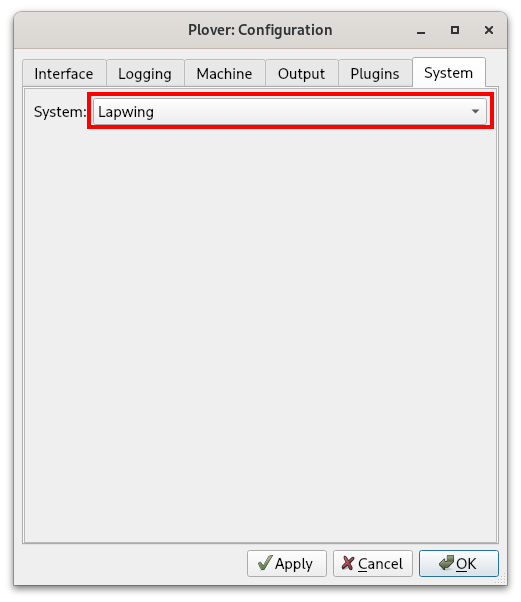
Once Plover has been restarted, in Plover's main window, click on Configure → System and change the system to Lapwing. Press Apply and OK—you should now be good to go!
Usage
Under Plover's configuration, change the system to "Lapwing" under the system tab. Note that your dictionary stack will be reset and you will have to re-add any dictionaries you've previously used.
For modal movement to work, you will also have to enable the modal dictionary extension. Go to Configure → Plugins and check the modal_update box. Please note that this plugin is somewhat hacky and may cause issues with other plugins such as plover-clippy2 and plover-tapey-tape when enabled.
How to learn Lapwing
Check out the Lapwing for Beginners wiki!
Features
Dictionaries
This plugin adds the following dictionaries by default:
- user.json
- This is the same dictionary used in the default English stenotype system
- If you have made additions to this dictionary, they will carry over to Lapwing
- jeff-phrasing.py
- Comprehensive phrasing system with automatic conjugation
- abby-left-hand-modifiers.py
- Python dictionary for one-hand shortcuts
- emily-modifiers.py
- Python dictionary for two-handed shortcuts
- emily-symbols.py
- Python dictionary for systematic symbols
- lapwing-movement.modal
- Modal dictionary for easy movement
- See chapter 26 of the Lapwing wiki for more details
- lapwing-commands.json
- Plover commands and common shortcuts
- lapwing-numbers.json
- Right hand numberpad system
- lapwing-uk-additions.json
- UK spellings
- lapwing-proper-nouns.json
- Proper nouns
- lapwing-base.json
- Main Lapwing dictionary
Plugins
The following plugins are included when you install plover-lapwing-aio:
- plover-dict-commands
- plover-last-translation
- plover-modal-dictionary
- plover-python-dictionary
- plover-stitching
Number key behaviour
With stock Plover, pressing the number key shifts several keys into numbers. Using the lookup tool, any entries with the number key in it would show up with numbers in the outline. However, with this plugin, the number key is simply just another key. In steno order, it is at the very beginning. This makes it much easier to read and add outlines with the number key.
Top S number key relocation
This plugin contains several keymaps which automatically remaps the top S key to the number key.
Contributing
Contributions are welcome. All changes to Lapwing (including dictionary edits) will be applied in this repository.
Previously the plover-lapwing-aio dictionaries were pulled using git-subrepo from the plover-lapwing-aio branch of my steno-dictionaries repo. This will not be the case moving forward. I am treating the steno-dictionaries repo as a collection of my personal dictionaries, while the official Lapwing dictionaries will reside here.
Dictionaries
The dictionaries are found in plover-lapwing-aio/plover_lapwing/dictionaries
Release history Release notifications | RSS feed


Download files
Download the file for your platform. If you're not sure which to choose, learn more about installing packages.
Source Distribution
Built Distribution
Filter files by name, interpreter, ABI, and platform.
If you're not sure about the file name format, learn more about wheel file names.
Copy a direct link to the current filters
File details
Details for the file plover_lapwing_aio-1.5.0.tar.gz.
File metadata
- Download URL: plover_lapwing_aio-1.5.0.tar.gz
- Upload date:
- Size: 2.0 MB
- Tags: Source
- Uploaded using Trusted Publishing? No
- Uploaded via: twine/6.2.0 CPython/3.9.25
File hashes
| Algorithm | Hash digest | |
|---|---|---|
| SHA256 |
8117b3281a79a96818bd8aeeba36d840ccf4d5f852c662e3286a73a83eb3853b
|
|
| MD5 |
cf390c578fb14f5d361f35947f4d4dde
|
|
| BLAKE2b-256 |
a899a11f1b70e581fe24550eae797a04656760b61027e077a7d159a1541b5b6b
|
File details
Details for the file plover_lapwing_aio-1.5.0-py3-none-any.whl.
File metadata
- Download URL: plover_lapwing_aio-1.5.0-py3-none-any.whl
- Upload date:
- Size: 2.0 MB
- Tags: Python 3
- Uploaded using Trusted Publishing? No
- Uploaded via: twine/6.2.0 CPython/3.9.25
File hashes
| Algorithm | Hash digest | |
|---|---|---|
| SHA256 |
3ad7b3b9329861f64793fd3694a018ce71e0d4b658098ac7ca7eb92e65478650
|
|
| MD5 |
604df41d33ad715be000798f4ee9a9bd
|
|
| BLAKE2b-256 |
9027b0f93c4f678fd753b43ee82ffc0823a9a28c2eccca9405a95b5e6fdc09a6
|






