
Automatic Word Lookup GUI Plugin for Plover

Project description
Next Stroke Suggestions for Plover


#DUMMY
This is a plugin that displays the possible options for the next few strokes.
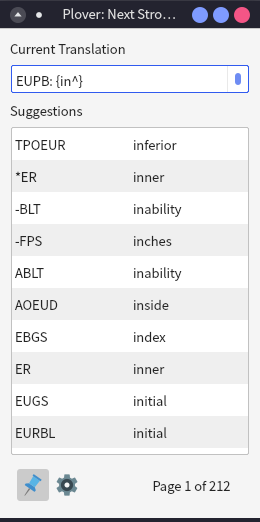
Installation
You can install this plugin using the built-in Plover Plugin Manager, under the name plover-next-stroke.
Usage Notes
Macro Strokes & Shortcuts
To make full use of the plugin, you'll have to define a few additional entries in your dictionary to navigate the menu (They won't be added automatically!). The recommended strokes are just what I use personally, so it's okay if you'd like to use something else.
| Action | Dictionary Definition | Recommended Stroke |
|---|---|---|
| Next Page | =ll_next_page |
#WR |
| Previous Page | =ll_prev_page |
1K |
| Reload Suggestions | =ll_reload |
1KWR |
Since the plugin keeps an internal copy of your dictionaries to load suggestions quicker, you'll have to manually reload this internal copy with a reload stroke whenever you add or delete entries to/from any of your dictionaries. You don't need to trigger a manual update if you're switching languages or activating/deactivating dictionaries.
Display Order Types
| Display Order | Explanation |
|---|---|
| Frequency | Order by lowest stroke count first, then when stroke counts are equal, order by most frequent first based on system orthography list (if available) |
| Frequency (Prioritize Numbers) | Same as Frequency, but strokes containing numbers are prioritized and ordered by numeric value. |
| Frequency (Prioritize Non-numberic) | Same as Frequency, but strokes containing numbers are pushed to the back. |
| Stroke Count | Order by lowest stroke count first, preserving original dictionary order. |
| Alphabetical | Order by translation alphabetically. |
| System Defined | Order defined by the system. The default English stenotype system doesn't have a defined display order. Defaults to Frequency. |
System-defined functions
If you're designing a language system for Plover and you'd like to customize the display order and format (for instance, converting certain strokes to numbers), you may do so by including these functions in your system file:
def LL_STROKE_FORMATTER(stroke: str) -> str:
    """Formats single strokes, such as STROEBG"""
    return ...

def LL_TRANSLATION_FORMATTER(translation: str) -> str:
    """Formats the translated string, such as 'stroke'"""
    return ...

def LL_SORTER(entry: Tuple[Tuple[str], str]) -> int:
    """
    Scores outline-translation pairs, such as (("TRAPBS", "HRAEUT"), "translate")

    Pairs are ordered from smallest to biggest;
    it need not be an int - anything that can be compared
    works, including strings or tuples of ints.
    """
    outline, translation = entry
    return ...
All next stroke suggestions will be run through the two formatters (if available) before being sorted. The sorter will only be used if the user changes their display order to "System Defined".
License & Credits
This plugin is licensed under the MIT license.
The icons used in this plugin are taken from Icons8 Flat Color Icons.


Download files
Download the file for your platform. If you're not sure which to choose, learn more about installing packages.
Source Distributions
Built Distribution
Filter files by name, interpreter, ABI, and platform.
If you're not sure about the file name format, learn more about wheel file names.
Copy a direct link to the current filters
File details
Details for the file plover_listening_lookup-0.1.0-py3-none-any.whl.
File metadata
- Download URL: plover_listening_lookup-0.1.0-py3-none-any.whl
- Upload date:
- Size: 13.4 kB
- Tags: Python 3
- Uploaded using Trusted Publishing? No
- Uploaded via: twine/6.0.1 CPython/3.10.16
File hashes
| Algorithm | Hash digest | |
|---|---|---|
| SHA256 |
a2973b91ef4a3bdbca7b7b7f1f726ebd94be0d6a351fc2f9b450cc149a1613f3
|
|
| MD5 |
fe386abc095ddce4cc4185a64cf22920
|
|
| BLAKE2b-256 |
461762ab0f48a3d78a5907e185af2bbcc4d9124f454436c2eb8d6246fd557ae0
|






