
Plover SVG Layout Display


Display the last stroke in Plover, but ✨ fancier ✨
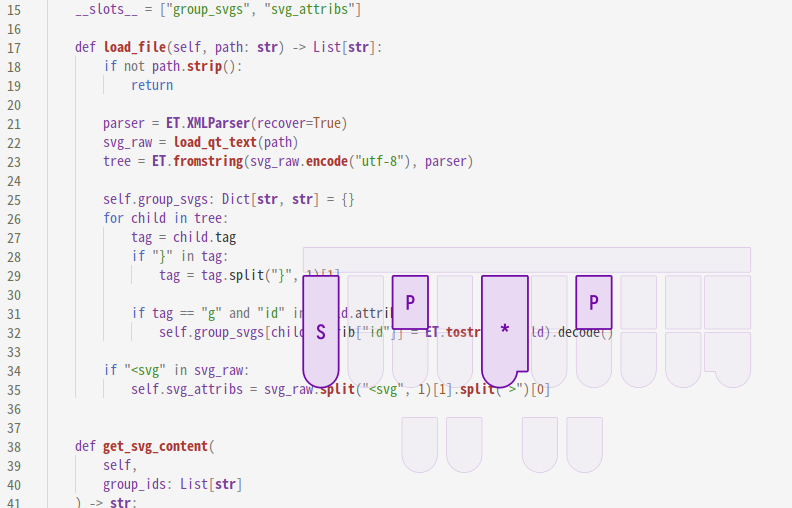
SVG Layout Display is based on the original Layout Display Plugin by @morinted; it was designed to be more customizable than the original plugin, allowing the user to use custom shapes, and to define the behavior of these shapes using a custom script. The widget floats above other windows without a window frame, and can be configured to be translucent, which means that users have full control over how the display looks like.
If the display window looks like a black rectangle to you, you may need to install a compositor such as picom for transparency to work.
Settings
To open the settings page, focus on the display window and press Ctrl + S (or Cmd + S on mac). System settings are different for each stenographic system and will be recorded independently for each system.
To use the default purple layout, use :/svgld/en_layout.svg as the layout path and :/svgld/en_convert.py as the script path.
Customization
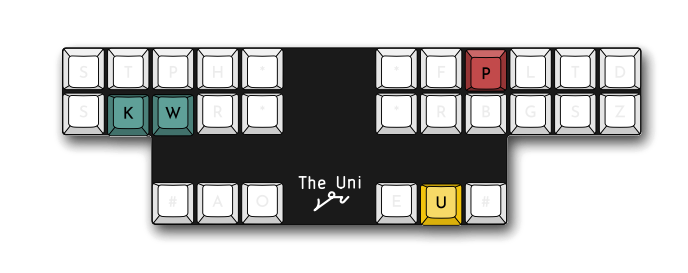
Layouts are defined by two separate files - the svg file, which defines all the shapes and their respective positions, and the py script, which defines which shapes are drawn based on the latest stroke and translation.
In the svg file, shapes are defined based on top-level <g> elements, identified by the id attribute. IDs should be unique between different groups, but there is no limit on the number of groups you can add in the svg file.
The python script should contain a convert_stroke, which takes a tuple of strokes and a translation, and outputs a list of shape IDs. The order of the IDs in the list matters, as they are drawn from the head of the list to the tail, and later shapes are drawn above earlier ones.
def convert_stroke(stroke: Tuple[str, ...], translation: str) -> List[str]:
    return ...
Note that the stroke parameter is a tuple of individual keys, such as ("K-", "W-", "-U", "-P")
Release files for plover-svg-layout-display 1.1.0
For a detailed explanation of source distributions (sdists) and built distributions (wheels), please see the package formats documentation.
Source distribution (sdist)
| File | Size | Uploaded | |
|---|---|---|---|
| plover_svg_layout_display-1.1.0.tar.gz | 18.6 kB | Details |
Built distribution (wheel)
| File | Interpreter | ABI | Platform | Reset |
|---|---|---|---|---|
| plover_svg_layout_display-1.1.0-py3-none-any.whl | Python 3 | none | any | Details |
Total release size: 41.8 kB
Release files / plover_svg_layout_display-1.1.0.tar.gz
| Download URL | plover_svg_layout_display-1.1.0.tar.gz |
|---|---|
| Size | 18.6 kB |
| Tags | Source |
|
SHA-256 checksum How to use checksums |
8800354468fcc75cf2842058877cd75590c759ed2305c9d34703312dd6513476
|
|
BLAKE2b-256 checksum How to use checksums |
061c0e14f5b7fdf6e1524915b13f01e8ede846f9f900994456ee278fc2c2a7e7
|
| Upload date | |
|
Uploaded using Trusted Publishing? What is trusted publishing? |
No |
| Uploaded via |
twine/7.0.0 CPython/3.13.3
|
Release files / plover_svg_layout_display-1.1.0-py3-none-any.whl
| Download URL | plover_svg_layout_display-1.1.0-py3-none-any.whl |
|---|---|
| Size | 23.2 kB |
| Tags | Python 3 |
|
SHA-256 checksum How to use checksums |
0c5f1e1951fc5a66ea17b6f04bcf3f6eafc03cb9fba17d700599216c513e1138
|
|
BLAKE2b-256 checksum How to use checksums |
29c8d8737b607ffd5ce126bed4419ca9193222034bb50fb3567c509e7e5f75dc
|
| Upload date | |
|
Uploaded using Trusted Publishing? What is trusted publishing? |
No |
| Uploaded via |
twine/7.0.0 CPython/3.13.3
|














