
pltfinance
A simple financial plotting library built on top of Plotly.
Installation
pip install pltfinance
Basic Usage
import pandas as pd
import pltfinance as pf

quotes = pd.read_csv("examples/data/AAPL-20241202-20251128.csv")
pf.plot(quotes)
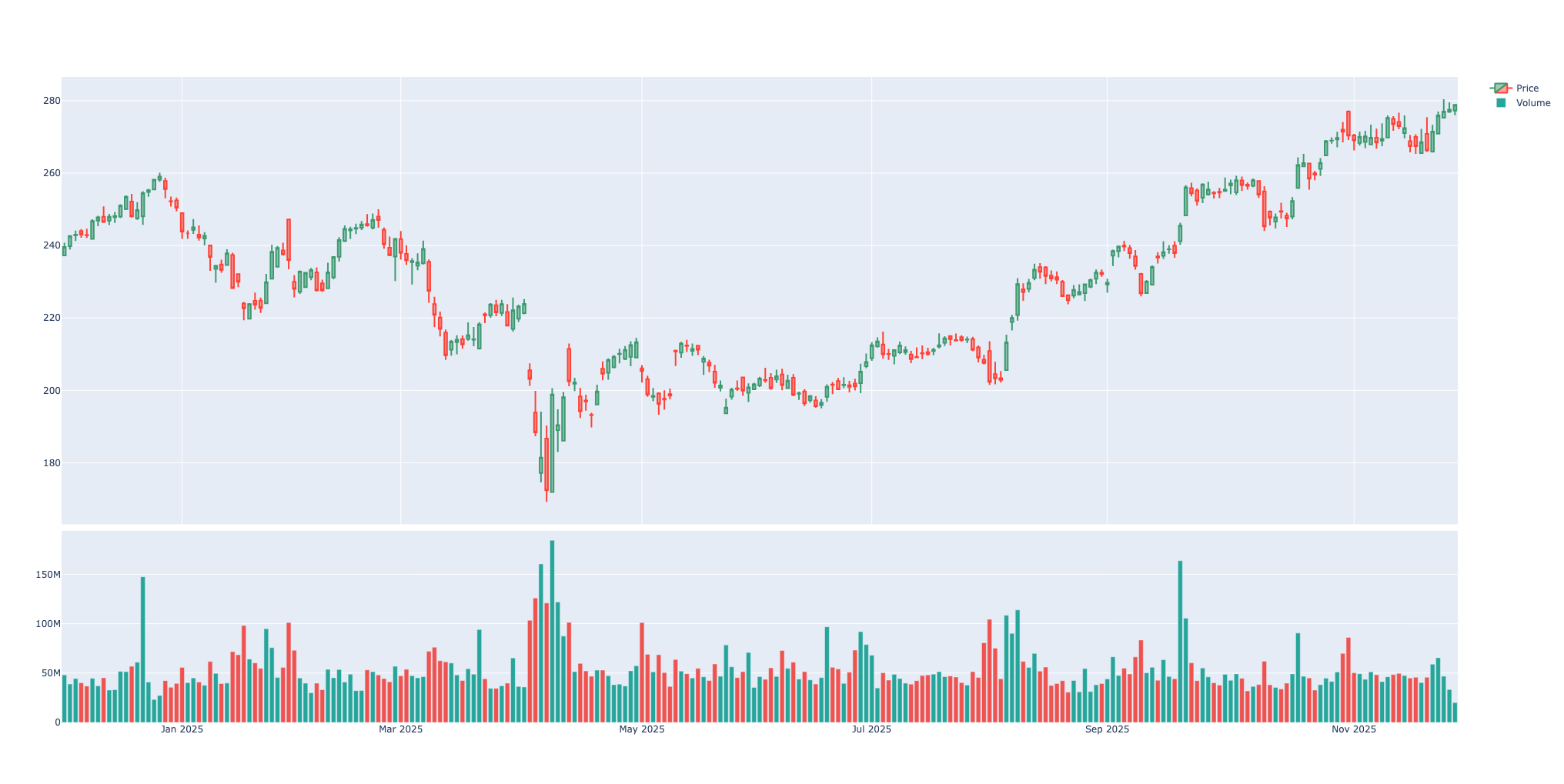
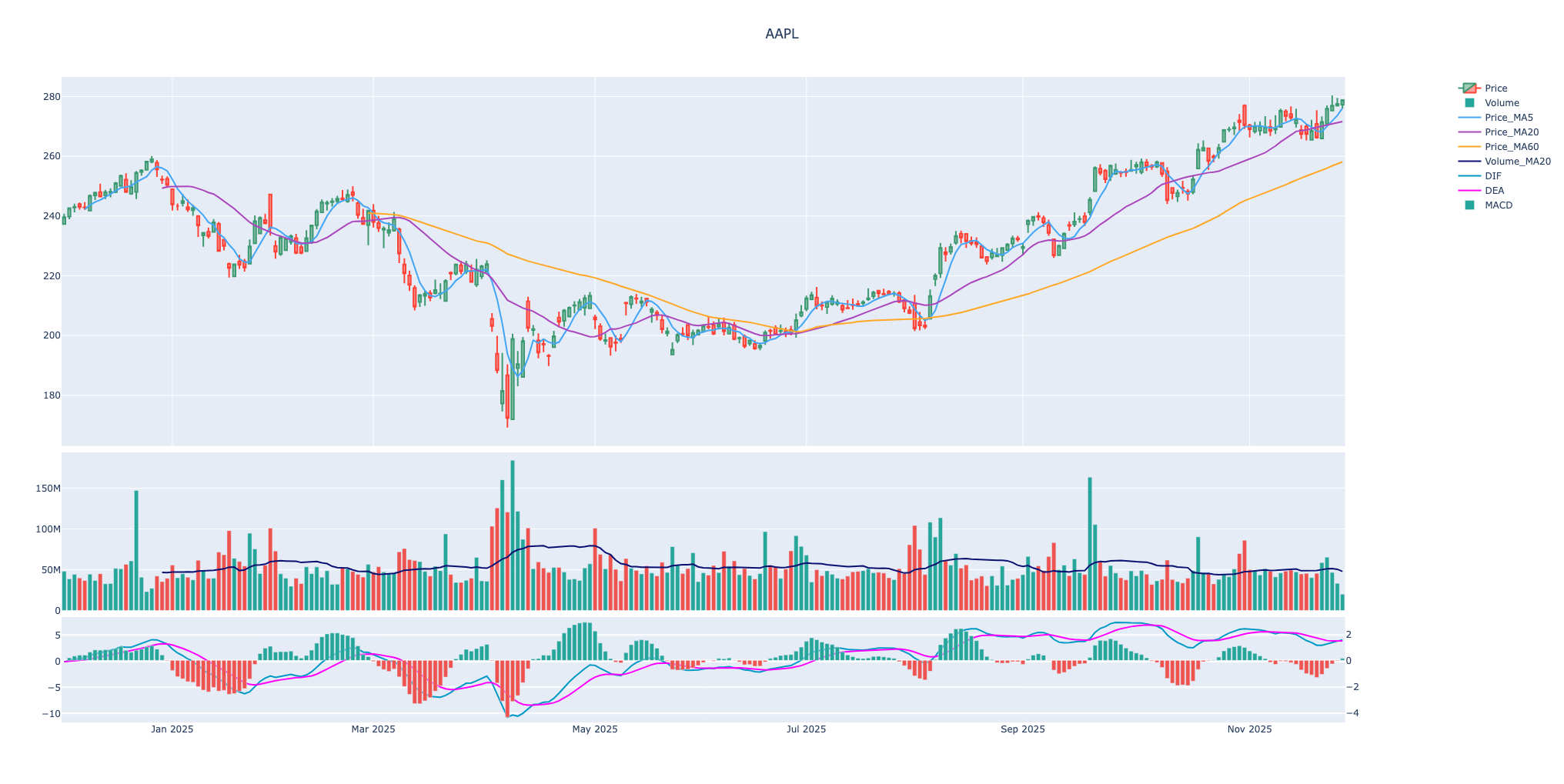
Plot Indicators with OHLCV
import pandas as pd
import pltfinance as pf

def compute_macd(close: pd.Series, fast: int = 12, slow: int = 26, signal: int = 9) -> pd.DataFrame:
    ema_fast = close.ewm(span=fast, adjust=False).mean()
    ema_slow = close.ewm(span=slow, adjust=False).mean()
    macd_line = ema_fast - ema_slow
    signal_line = macd_line.ewm(span=signal, adjust=False).mean()
    histogram = macd_line - signal_line

    return pd.DataFrame(
        {"DIF": macd_line, "DEA": signal_line, "MACD": histogram}, index=close.index
    )

quotes = pd.read_csv("examples/data/AAPL-20241202-20251128.csv")
ohlcv = pf.normalize_quotes(quotes)

price_ma5 = ohlcv["close"].rolling(5).mean()
price_ma20 = ohlcv["close"].rolling(20).mean()
price_ma60 = ohlcv["close"].rolling(60).mean()
volume_ma20 = ohlcv["volume"].rolling(20).mean()

macd = compute_macd(ohlcv["close"])

indicators = [
    pf.SeriesPlot(series=price_ma5, label="Price_MA5"),
    pf.SeriesPlot(series=price_ma20, label="Price_MA20"),
    pf.SeriesPlot(series=price_ma60, label="Price_MA60"),
    pf.SeriesPlot(series=volume_ma20, label="Volume_MA20", panel=1),
    pf.SeriesPlot(series=macd["DIF"], label="DIF", panel=2, color="#0099c6"),
    pf.SeriesPlot(series=macd["DEA"], label="DEA", panel=2, color=pf.Color.MAGENTA),
    pf.SeriesPlot(
        series=macd["MACD"],
        label="MACD",
        panel=2,
        type=pf.CharType.BAR,
        color=[pf.Color.GREEN if v >= 0 else pf.Color.RED for v in macd["MACD"]],
        secondary_y=True,
    ),
]

pf.plot(quotes, title="AAPL", indicators=indicators)
Copyright and Licenses
Code and documentation copyright 2026 dumbsmart.org.
Code released under the MIT license.
1 maintainer

Download files
Download the file for your platform. If you're not sure which to choose, learn more about installing packages.
Source Distribution
pltfinance-0.1.0.tar.gz
(5.2 kB
view details)
Built Distribution
Filter files by name, interpreter, ABI, and platform.
If you're not sure about the file name format, learn more about wheel file names.
Copy a direct link to the current filters
File details
Details for the file pltfinance-0.1.0.tar.gz.
File metadata
- Download URL: pltfinance-0.1.0.tar.gz
- Upload date:
- Size: 5.2 kB
- Tags: Source
- Uploaded using Trusted Publishing? No
- Uploaded via:
uv/0.9.13 {"installer":{"name":"uv","version":"0.9.13"},"python":null,"implementation":{"name":null,"version":null},"distro":{"name":"macOS","version":null,"id":null,"libc":null},"system":{"name":null,"release":null},"cpu":null,"openssl_version":null,"setuptools_version":null,"rustc_version":null,"ci":null}
File hashes
| Algorithm | Hash digest | |
|---|---|---|
| SHA256 |
1ce973011e675eb05c2d475afc268b0dc367cc6646f0bbecd652c43a6798ab7b
|
|
| MD5 |
47ef277b7463c83869d9cd6006778ed2
|
|
| BLAKE2b-256 |
54da043b56a95622368744b1374ef4be663509d3e678807964634eefc3a47a75
|
File details
Details for the file pltfinance-0.1.0-py3-none-any.whl.
File metadata
- Download URL: pltfinance-0.1.0-py3-none-any.whl
- Upload date:
- Size: 6.2 kB
- Tags: Python 3
- Uploaded using Trusted Publishing? No
- Uploaded via:
uv/0.9.13 {"installer":{"name":"uv","version":"0.9.13"},"python":null,"implementation":{"name":null,"version":null},"distro":{"name":"macOS","version":null,"id":null,"libc":null},"system":{"name":null,"release":null},"cpu":null,"openssl_version":null,"setuptools_version":null,"rustc_version":null,"ci":null}
File hashes
| Algorithm | Hash digest | |
|---|---|---|
| SHA256 |
27239bf1cae5423272137d366eaa0741b2f6175419199074905c818d220379d4
|
|
| MD5 |
fb55b017f1fd41801c2a076087b3b235
|
|
| BLAKE2b-256 |
914d763c2bdfd37363e5ed68c6610ea2b4a4fb04254b7405303a1736a7df7bb5
|













