
Pluk
Git-commit–aware symbol lookup & impact analysis engine
What is a "symbol"?
In Pluk, a symbol is any named entity in your codebase that can be referenced, defined, or impacted by changes. This includes functions, classes, methods, variables, and other identifiers that appear in your source code. Pluk tracks symbols across commits and repositories to enable powerful queries like "go to definition", "find all references", and "impact analysis".
Pluk gives developers “go-to-definition”, “find-all-references”, and “blast-radius” impact queries across one or more Git repositories. Heavy lifting (indexing, querying, storage) runs in Docker containers; a lightweight host shim (pluk) boots the stack and delegates commands into a thin CLI container (plukd) that talks to an internal API.
Features
- Search: classes, functions, and other symbols in your repo
- Define: list metadata about a specific symbol
- Impact: find references and usage contexts of a symbol
- Diff: compare definitions and references between commits
- Indexing: via universal-ctags and tree-sitter (one branch at a time)
- Containerized: runs with Docker Compose, no host setup needed
- Language support: Python, JavaScript (incl. JSX), TypeScript (incl. TSX), Go, Java, C, C++
Prerequisites
- Docker and Docker Compose
- Git repositories must be public or cloneable from inside the container
- Supported OS: Linux, macOS, Windows (with Docker Desktop)
Installation
pip install pluk
Usage
pluk start                        # launch services
pluk status                       # check if services are running
pluk cleanup                      # stop services

pluk init /path/to/repo           # queue full index of a repository
pluk search MyClass               # symbol lookup; symbol matches branch-wide
pluk define my_function           # show symbol definition
pluk impact computeFoo            # list symbol references with context
pluk diff symbol <ref1> <ref2>    # compare symbol changes between commits/aliases (e.g. head, main, or SHAs)
Start the Pluk services:
> pluk start
Pulling latest Docker images...
Starting Pluk services...
[+] Running 5/5
 ✔ Container pluk-redis-1     Healthy                                                                                                                                                                                                                                           7.5s
 ✔ Container pluk-postgres-1  Healthy                                                                                                                                                                                                                                           7.5s
 ✔ Container pluk-api-1       Started                                                                                                                                                                                                                                           7.0s
 ✔ Container pluk-worker-1    Started                                                                                                                                                                                                                                           8.0s
 ✔ Container pluk-cli-1       Started                                                                                                                                                                                                                                           7.4s
Pluk services are now running.
Initialize a repository:
> pluk init .
Initializing repository at .
[+] Repository initialized successfully.
Current repository:
    URL: https://github.com/jorstors/pluk-diff-sample
    Commit SHA: dd36847d0f55c5af6e70ee920837c782d09edbc2
Search for a symbol:
> pluk search find
Searching for symbol: find @ https://github.com/jorstors/pluk-diff-sample:dd36847d0f55c5af6e70ee920837c782d09edbc2

Found symbol: find_refs
 Located at: src/app.py:1
Define a symbol:
> pluk define find_refs
Defining symbol: find_refs

Symbol: find_refs
 Location: src/app.py:1-3
 Kind: function
 Language: Python
 Signature: (x)
 Scope: global (unknown)
Check symbol impact:
> pluk impact find_refs
Analyzing impact of symbol: find_refs

References found:
 other (function_definition) in src/app.py:13
Diff a symbol across commits:
> pluk diff find_refs caa599294066de31f01305a781ca8ff0bbe06aba dd36847d0f55c5af6e70ee920837c782d09edbc2
Showing differences for symbol: find_refs
 From commit: caa599294066de31f01305a781ca8ff0bbe06aba
 To commit: dd36847d0f55c5af6e70ee920837c782d09edbc2
Differences found:
 Definition:
 * file: No change
 * line: No change
 * end_line:
     - From: 2
     - To:   3
 * name: No change
 * kind: No change
 * language: No change
 * signature: No change
 * scope: No change
 * scope_kind: No change

 New references:
 * other (function_definition) in src/app.py:13

 Removed references:
 * use (function_definition) in src/app.py:6
If you want a full teardown (remove containers/network), use:
docker compose -f ~/.pluk/docker-compose.yml down -v
Data Flow
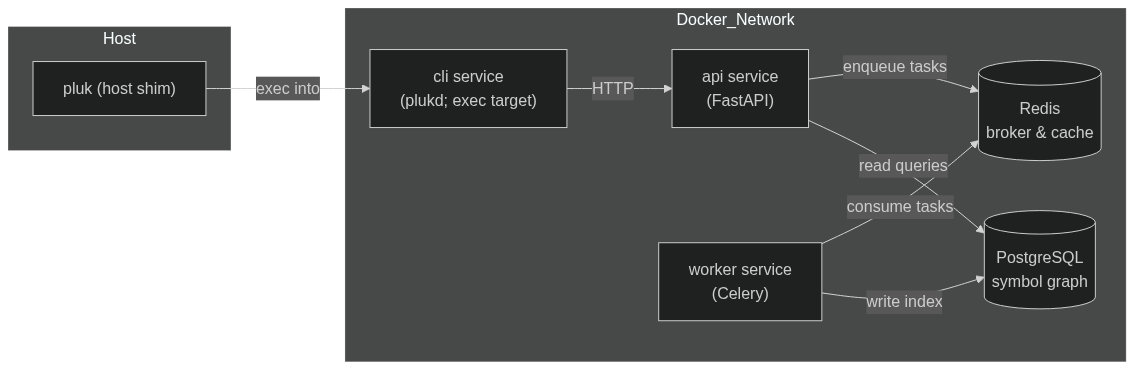
How it works
- Host shim (
pluk) writes the Compose file, pulls images, and runsdocker compose up. - CLI container (
plukd) is the exec target; it calls the API athttp://api:8000. - API (FastAPI) serves read endpoints (
/search,/define,/impact,/diff) and enqueues write jobs (/reindex) to Redis. - Worker (Celery) consumes jobs from Redis, clones/pulls repos into a volume (
/var/pluk/repos), parses it, and writes to Postgres.
Testing
pytest
License
MIT License
1 maintainer

Download files
Download the file for your platform. If you're not sure which to choose, learn more about installing packages.
Source Distribution
Built Distribution
Filter files by name, interpreter, ABI, and platform.
If you're not sure about the file name format, learn more about wheel file names.
Copy a direct link to the current filters
File details
Details for the file pluk-0.6.4.tar.gz.
File metadata
- Download URL: pluk-0.6.4.tar.gz
- Upload date:
- Size: 23.6 kB
- Tags: Source
- Uploaded using Trusted Publishing? No
- Uploaded via:
twine/6.2.0 CPython/3.13.5
File hashes
| Algorithm | Hash digest | |
|---|---|---|
| SHA256 |
9fa29cdf0b671d8865ac44cd37f2dc9b0934b8ea3e0081759f1294363ab02146
|
|
| MD5 |
c31bdd59871b5c07643f5a58cc6e050c
|
|
| BLAKE2b-256 |
1fb86a9dd35429cdb39795d0eb4bf8373680333673b62d92b9b43ac9f1c46630
|
File details
Details for the file pluk-0.6.4-py3-none-any.whl.
File metadata
- Download URL: pluk-0.6.4-py3-none-any.whl
- Upload date:
- Size: 20.8 kB
- Tags: Python 3
- Uploaded using Trusted Publishing? No
- Uploaded via:
twine/6.2.0 CPython/3.13.5
File hashes
| Algorithm | Hash digest | |
|---|---|---|
| SHA256 |
4d3adc0d707b8fc2cc6389cb09a4fa91609455348799d3e2391d4e3181c5313c
|
|
| MD5 |
dcc42c48b35d7e6ed17cdb097924f631
|
|
| BLAKE2b-256 |
00fbe2c0bba01129b78ade591228f89de8fbb812fb608649f7eaca32a775ef30
|














