
A dynamic code loading framework for building pluggable Python distributions


Project description
Plux




plux is the dynamic code loading framework used in LocalStack.
Overview
Plux builds a higher-level plugin mechanism around Python's entry point mechanism.
It provides tools to load plugins from entry points at run time, and to discover entry points from plugins at build time (so you don't have to declare entry points statically in your setup.py).
Core concepts
PluginSpec: describes aPlugin. Each plugin has a namespace, a unique name in that namespace, and aPluginFactory(something that createsPluginthe spec is describing. In the simplest case, that can just be the Plugin's class).Plugin: an object that exposes ashould_loadandloadmethod. Note that it does not function as a domain object (it does not hold the plugins lifecycle state, like initialized, loaded, etc..., or other metadata of the Plugin)PluginFinder: finds plugins, either at build time (by scanning the modules usingpkgutilandsetuptools) or at run time (reading entrypoints of the distribution using stevedore)PluginManager: manages the run time lifecycle of a Plugin, which has three states:- resolved: the entrypoint pointing to the PluginSpec was imported and the
PluginSpecinstance was created - init: the
PluginFactoryof thePluginSpecwas successfully invoked - loaded: the
loadmethod of thePluginwas successfully invoked
- resolved: the entrypoint pointing to the PluginSpec was imported and the
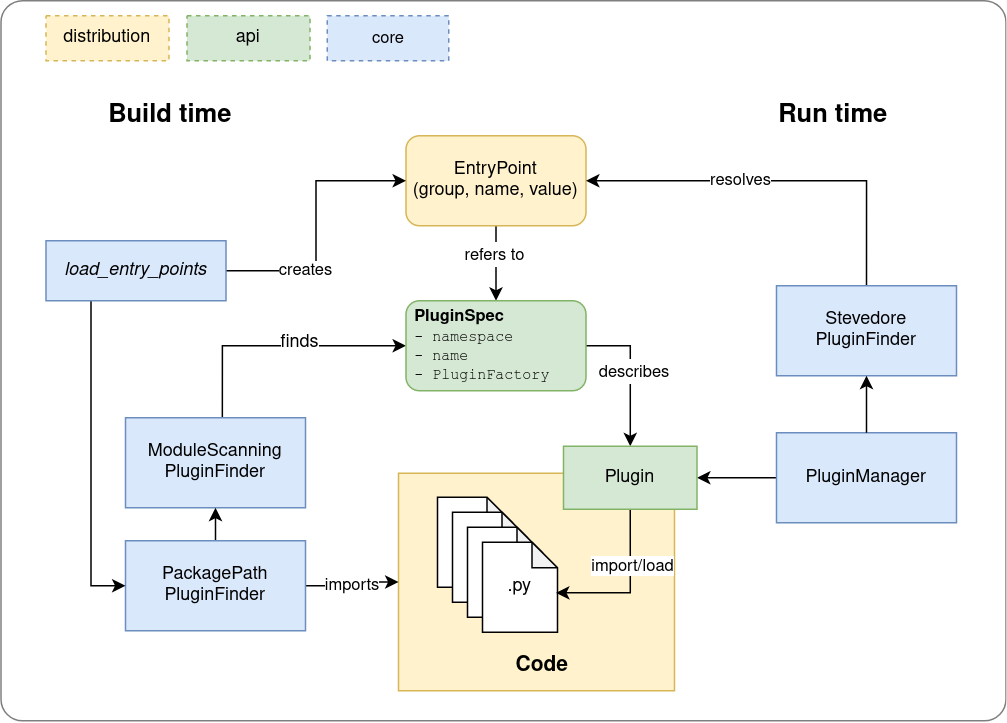
Loading Plugins
At run time, a PluginManager uses a PluginFinder that in turn uses stevedore to scan the available entrypoints for things that look like a PluginSpec.
With PluginManager.load(name: str) or PluginManager.load_all(), plugins within the namespace that are discoverable in entrypoints can be loaded.
If an error occurs at any state of the lifecycle, the PluginManager informs the PluginLifecycleListener about it, but continues operating.
Discovering entrypoints
To build a source distribution and a wheel of your code with your plugins as entrypoints, simply run python setup.py plugins sdist bdist_wheel.
If you don't have a setup.py, you can use the plux build frontend and run python -m plux entrypoints.
How it works:
For discovering plugins at build time, plux provides a custom setuptools command plugins, invoked via python setup.py plugins.
The command uses a special PluginFinder that collects from the codebase anything that can be interpreted as a PluginSpec, and creates from it a plugin index file plux.json, that is placed into the .egg-info distribution metadata directory.
When a setuptools command is used to create the distribution (e.g., python setup.py sdist/bdist_wheel/...), plux finds the plux.json plugin index and extends automatically the list of entry points (collected into .egg-info/entry_points.txt).
The plux.json file becomes a part of the distribution, s.t., the plugins do not have to be discovered every time your distribution is installed elsewhere.
Discovering at build time also works when using python -m build, since it calls registered setuptools scripts.
Examples
To build something using the plugin framework, you will first want to introduce a Plugin that does something when it is loaded.
And then, at runtime, you need a component that uses the PluginManager to get those plugins.
One class per plugin
This is the way we went with LocalstackCliPlugin. Every plugin class (e.g., ProCliPlugin) is essentially a singleton.
This is easy, as the classes are discoverable as plugins.
Simply create a Plugin class with a name and namespace and it will be discovered by the build time PluginFinder.
from plux import Plugin

# abstract case (not discovered at build time, missing name)
class CliPlugin(Plugin):
    namespace = "my.plugins.cli"

    def load(self, cli):
        self.attach(cli)

    def attach(self, cli):
        raise NotImplementedError

# discovered at build time (has a namespace, name, and is a Plugin)
class MyCliPlugin(CliPlugin):
    name = "my"

    def attach(self, cli):
        # ... attach commands to cli object
now we need a PluginManager (which has a generic type) to load the plugins for us:
cli = # ... needs to come from somewhere

manager: PluginManager[CliPlugin] = PluginManager("my.plugins.cli", load_args=(cli,))

plugins: List[CliPlugin] = manager.load_all()

# todo: do stuff with the plugins, if you want/need
#  in this example, we simply use the plugin mechanism to run a one-shot function (attach) on a load argument
Re-usable plugins
When you have lots of plugins that are structured in a similar way, we may not want to create a separate Plugin class
for each plugin. Instead we want to use the same Plugin class to do the same thing, but use several instances of it.
The PluginFactory, and the fact that PluginSpec instances defined at module level are discoverable (inpired
by pluggy), can be used to achieve that.
from plux import Plugin, PluginFactory, PluginSpec
import importlib

class ServicePlugin(Plugin):

    def __init__(self, service_name):
        self.service_name = service_name
        self.service = None

    def should_load(self):
        return self.service_name in config.SERVICES

    def load(self):
        module = importlib.import_module("localstack.services.%s" % self.service_name)
        # suppose we define a convention that each service module has a Service class, like moto's `Backend`
        self.service = module.Service()

def service_plugin_factory(name) -> PluginFactory:
    def create():
        return ServicePlugin(name)

    return create

# discoverable
s3 = PluginSpec("localstack.plugins.services", "s3", service_plugin_factory("s3"))

# discoverable
dynamodb = PluginSpec("localstack.plugins.services", "dynamodb", service_plugin_factory("dynamodb"))

# ... could be simplified with convenience framework code, but the principle will stay the same
Then we could use the PluginManager to build a Supervisor
from plux import PluginManager

class Supervisor:
    manager: PluginManager[ServicePlugin]

    def start(self, service_name):
        plugin = self.manager.load(service_name)
        service = plugin.service
        service.start()
Functions as plugins
with the @plugin decorator, you can expose functions as plugins. They will be wrapped by the framework
into FunctionPlugin instances, which satisfy both the contract of a Plugin, and that of the function.
from plugin import plugin

@plugin(namespace="localstack.configurators")
def configure_logging(runtime):
    logging.basicConfig(level=runtime.config.loglevel)


@plugin(namespace="localstack.configurators")
def configure_somethingelse(runtime):
    # do other stuff with the runtime object
    pass
With a PluginManager via load_all, you receive the FunctionPlugin instances, that you can call like the functions
runtime = LocalstackRuntime()

for configurator in PluginManager("localstack.configurators").load_all():
    configurator(runtime)
Configuring your distribution
If you are building a python distribution that exposes plugins discovered by plux, you need to configure your projects build system so other dependencies creates the entry_points.txt file when installing your distribution.
For a pyproject.toml template this involves adding the build-system section:
[build-system]
requires = ['setuptools', 'wheel', 'plux>=1.3.1']
build-backend = "setuptools.build_meta"

# ...
Install
pip install plux
Develop
Create the virtual environment, install dependencies, and run tests
make venv
make test
Run the code formatter
make format
Upload the pypi package using twine
make upload
Project details
Release history Release notifications | RSS feed


Download files
Download the file for your platform. If you're not sure which to choose, learn more about installing packages.
Source Distribution
Built Distribution
Filter files by name, interpreter, ABI, and platform.
If you're not sure about the file name format, learn more about wheel file names.
Copy a direct link to the current filters
File details
Details for the file plux-1.8.0.tar.gz.
File metadata
- Download URL: plux-1.8.0.tar.gz
- Upload date:
- Size: 24.9 kB
- Tags: Source
- Uploaded using Trusted Publishing? No
- Uploaded via: twine/5.0.0 CPython/3.11.6
File hashes
| Algorithm | Hash digest | |
|---|---|---|
| SHA256 |
8daf4fbb02533d6dc709d011115ceb34ac5ded13e58492a3d08958fcb7d7a695
|
|
| MD5 |
f6478c24f213f6ba658eb9e6bb289920
|
|
| BLAKE2b-256 |
cc3df73054372faa206ed37f8ed6acac46217655aa9b8f2566c44f4f0b539a2d
|
File details
Details for the file plux-1.8.0-py3-none-any.whl.
File metadata
- Download URL: plux-1.8.0-py3-none-any.whl
- Upload date:
- Size: 26.5 kB
- Tags: Python 3
- Uploaded using Trusted Publishing? No
- Uploaded via: twine/5.0.0 CPython/3.11.6
File hashes
| Algorithm | Hash digest | |
|---|---|---|
| SHA256 |
d1469bdf81cbf657b7cb7f61c9c7fe03c5403f5c1913a5f63bae10c9daa83604
|
|
| MD5 |
e608479b8624650578d796d39d6961fb
|
|
| BLAKE2b-256 |
2cb8e4dac22e1cac3b630dacea0845fa964a66f7117a08f3c422ae8395360fb3
|






