
pmd-pycore
Python interface for ElmorLabs PMD power measurement devices (PMD2, PMD2X, PMD-USB).
Supported devices
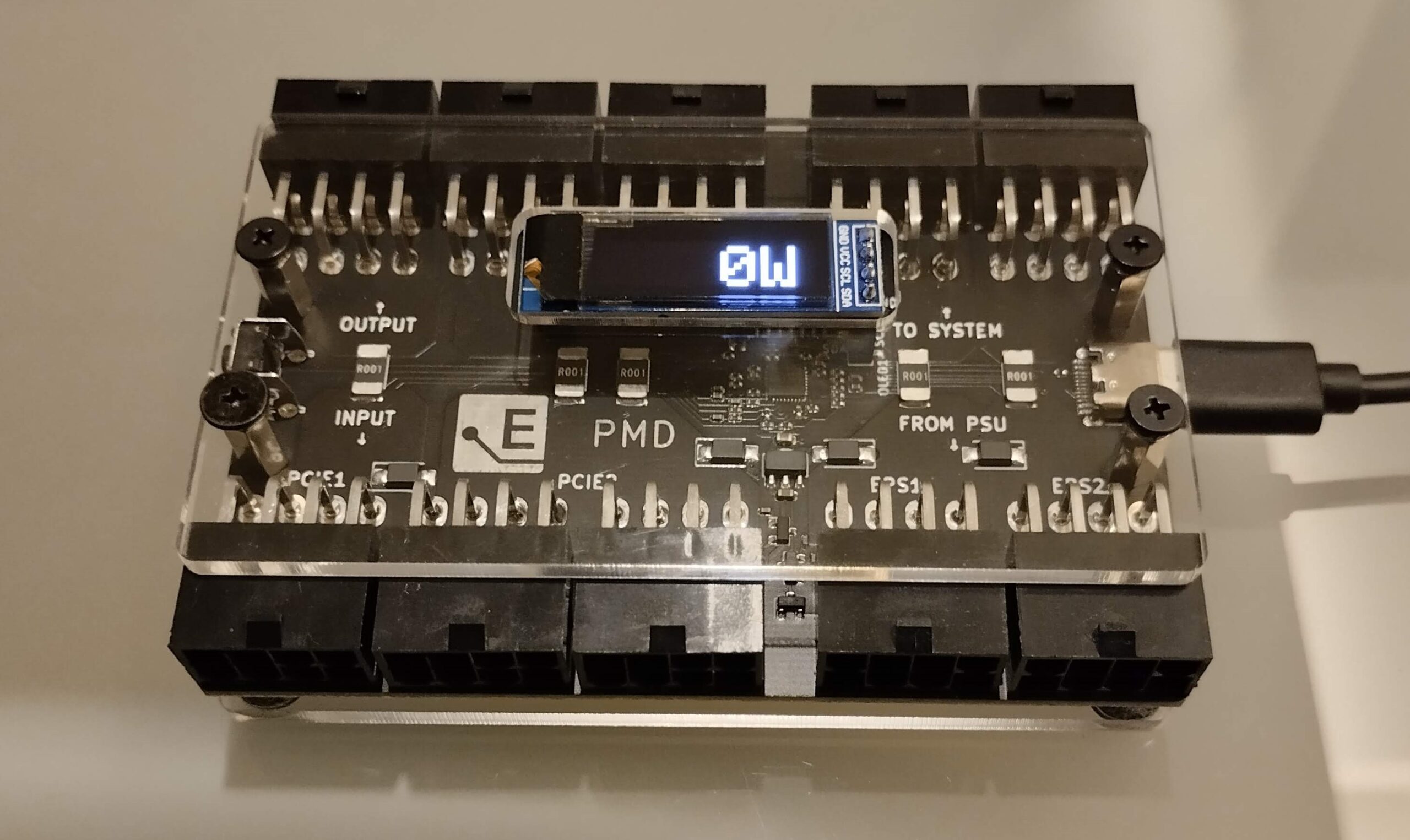
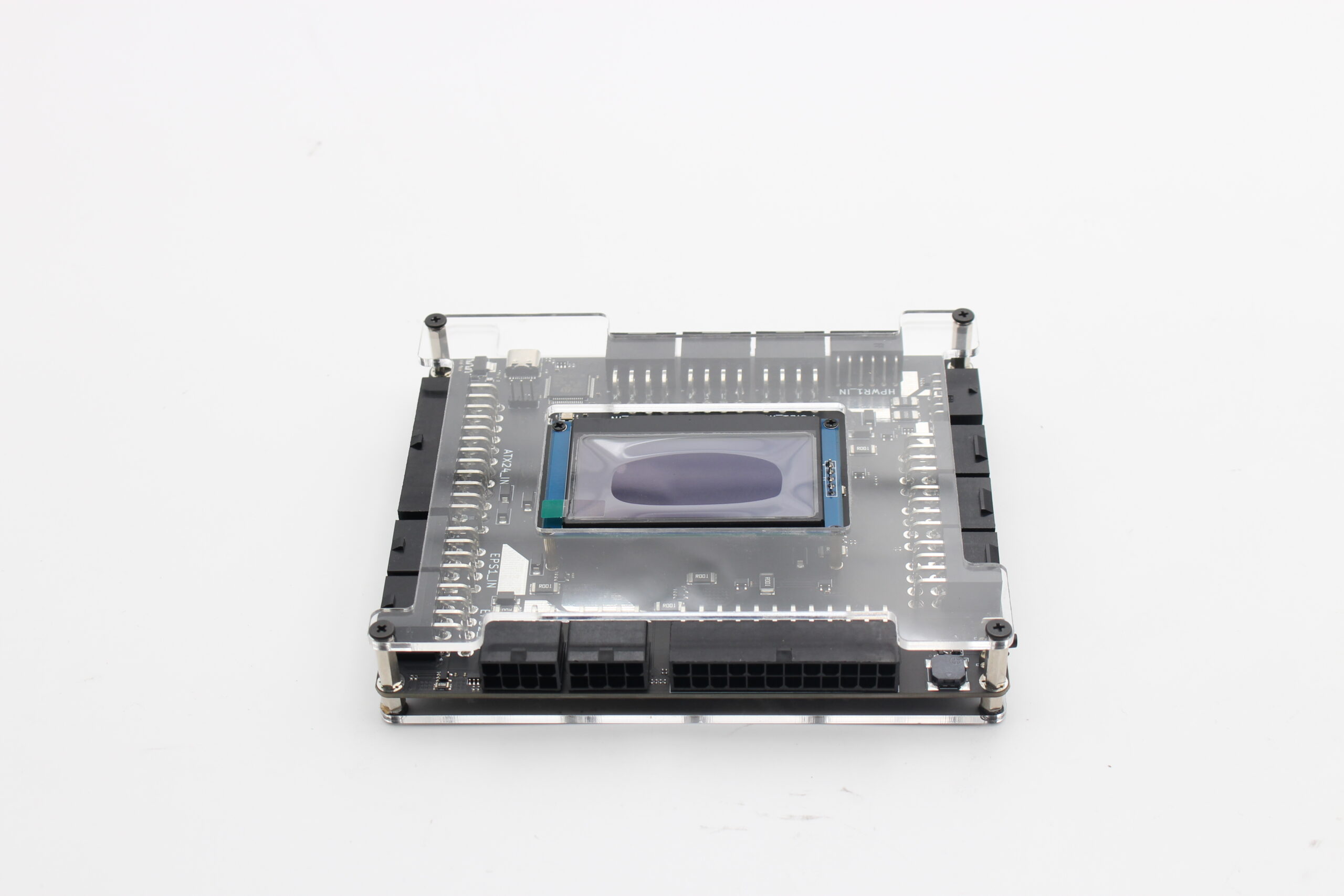
| PMD-USB (discontinued) | PMD2 (discontinued) | PMD2X (current) |
|---|---|---|
 |
 |
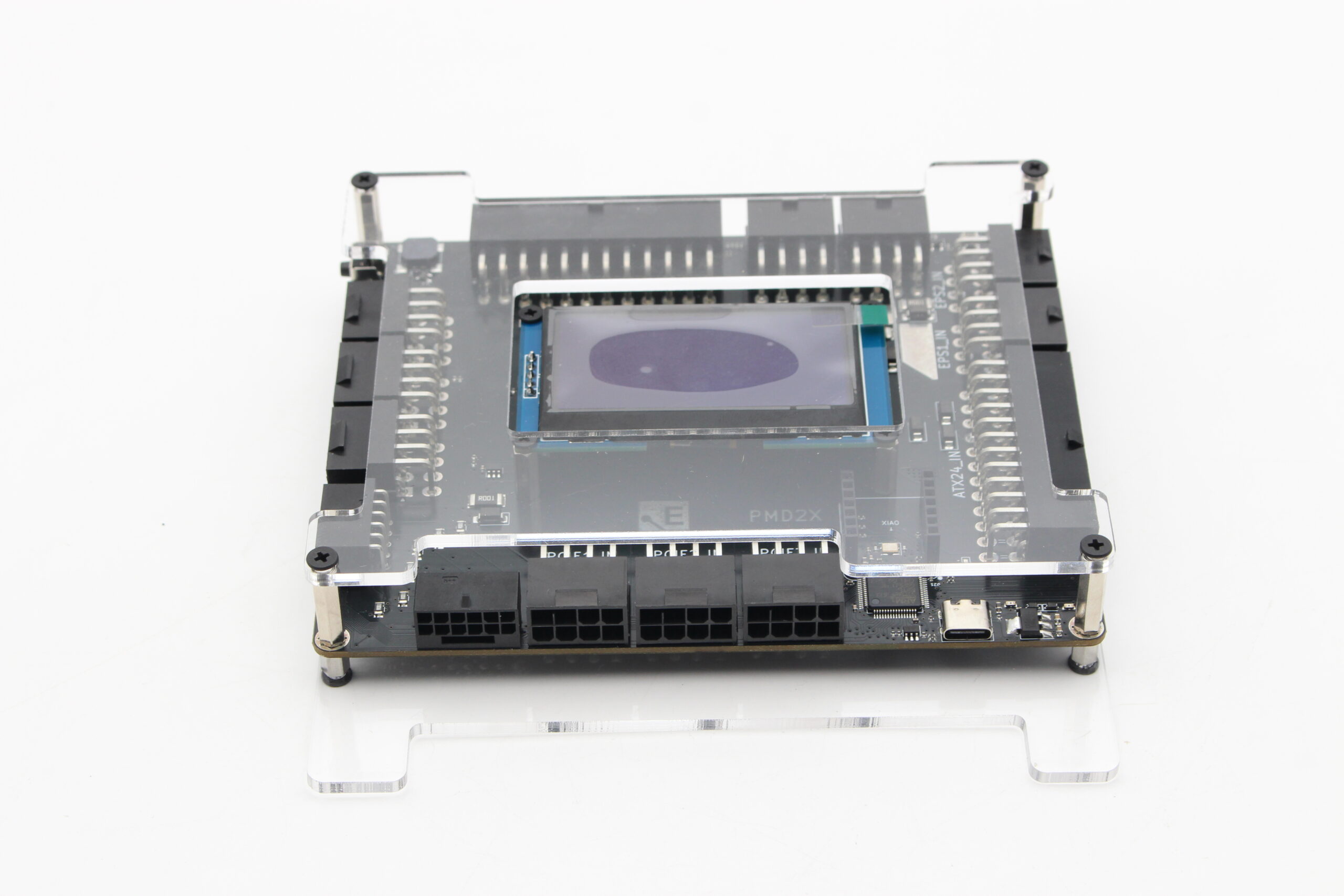 |
| 4 channels (PCIE1, PCIE2, EPS1, EPS2) over a CH340 USB-serial bridge. No ATX24/motherboard rail, no 12VHPWR. | 2x EPS, 3x PCIe, 1x ATX24, 1x 12VHPWR connector. STM32 USB-serial interface. Superseded by PMD2X. | Same rail set as PMD2, plus per-wire 12VHPWR monitoring and connector thermistors. |
PMD-USB was superseded by PMD2, which was in turn superseded by PMD2X -- the only one of the three still sold. All three measure voltage/current/power on CPU, GPU, and (PMD2/PMD2X only) motherboard power cables, with an OLED display and USB connection to a PC for logging.
Pre-requisites
- Python >= 3.11, with pyserial (and numpy for the example scripts)
- PMD-USB uses a CH340 USB-serial chip. Linux has an in-kernel driver for it (binds automatically, nothing to install). Windows does not ship one -- if the device shows up in Device Manager but never gets a COM port, install the CH340/CH341 driver from the chip manufacturer's site (wch-ic.com, search "CH340"/"CH341") and replug. PMD2/PMD2X use an STM32 VCP instead and don't need a separate driver on either OS.
Install
pip install pmd-pycore
Or from a checkout:
pip install -r requirements.txt
pip install -e .
This also installs the example scripts (see Examples below) as part of the package,
runnable with python -m pmd_pycore.examples.quickstart.
Usage
PMD2 / PMD2X
from pmd_pycore.core import (
    get_pmd2_ports,
    read_pmd2_welcome_string,
    read_pmd2_device,
    read_pmd2_uid,
    read_pmd2_sensors,
    translate_pmd2_sensor_struct,
)
import serial

port = get_pmd2_ports()[0]["port"]
ser = serial.Serial(port, 115200, timeout=1, rtscts=False, dsrdtr=False)

device_info = read_pmd2_device(ser)
sensors = read_pmd2_sensors(ser, device_info["ProductId"])
readings = translate_pmd2_sensor_struct(sensors, device_info["ProductId"])
print(readings["12V"])  # {'voltage': 12.0, 'current': 1.0, 'power': 12.0}
Currently implemented are the device's read-only commands:
CMD_WELCOME (read_pmd2_welcome_string), CMD_READ_VENDOR_DATA (read_pmd2_device),
CMD_READ_UID (read_pmd2_uid), and CMD_READ_SENSOR_VALUES (read_pmd2_sensors).
Writing/action commands (continuous TX, config read/write, reset, bootloader) are not
implemented.
See python -m pmd_pycore.examples.read_sensors (below) — a polling/averaging loop that mirrors
the original sample script.
PMD-USB
PMD-USB is a different device family -- a CH340 USB-serial bridge rather than PMD2/PMD2X's STM32 VCP, with its own command set and a simpler sensor set (PCIE1, PCIE2, EPS1, EPS2 only; no ATX24 rails, no 12VHPWR). There's no firmware source for it, so this was ported from and verified against the reference implementations linked below plus a real device.
from pmd_pycore.core import get_pmdusb_ports, read_pmdusb_id, read_pmdusb_sensors, translate_pmdusb_sensors
import serial

port = get_pmdusb_ports()[0]["port"]
ser = serial.Serial(port, 115200, timeout=1)

device_info = read_pmdusb_id(ser)
sensors = read_pmdusb_sensors(ser)
readings = translate_pmdusb_sensors(sensors)
print(readings["EPS1"])  # {'voltage': 12.0, 'current': 1.0, 'power': 12.0}
Implemented: CMD_WELCOME (read_pmdusb_welcome_string), CMD_READ_ID (read_pmdusb_id), and
CMD_READ_SENSOR_VALUES (read_pmdusb_sensors/translate_pmdusb_sensors). This command already
returns calibrated readings -- confirmed against the official PMD-USB GUI app's source, which
uses it directly with no client-side calibration math -- so CMD_READ_ADC's raw path isn't
needed. translate_pmdusb_aggregate_power adds GPU/CPU/Total power (PCIE1+PCIE2 / EPS1+EPS2 /
sum), computed client-side the same way the official app does; PMD-USB's firmware doesn't
compute these on-device the way PMD2/PMD2X's does.
Note: PMD-USB has no per-unit UID/serial number anywhere -- not in the UART protocol (no command for it), and not at the USB level (the CH340 chip's serial number field reads empty on the device tested here). If you have more than one, there's no way to tell them apart besides which COM port they land on.
See KNOWN_LIMITATIONS.md for what's deliberately out of scope and why.
Examples
Both examples ship as part of the installed package -- run them with python -m after
pip install pmd-pycore, no checkout needed.
python -m pmd_pycore.examples.quickstart— connect to the first device found, trying PMD2/PMD2X first and falling back to PMD-USB, print its identity, and read sensor values once (for PMD2/PMD2X: per-rail readings, firmware-computed aggregate power, chip health, and PMD2X's 12VHPWR connector temperatures).python -m pmd_pycore.examples.read_sensors— a polling/averaging loop, refreshing in place, for whichever device family is connected (same PMD2/PMD2X-first-then-PMD-USB detection asquickstart).
Status
This repository is under active development at
ElmorLabs-P1/pmd-pycore. It provides an installable
pmd_pycore package (serial discovery, UART command helpers, sensor structures, and
readable-unit translation for the supported devices), a test suite, and CI for tests and tagged
releases.
Tagged releases build an sdist/wheel and attach them to a GitHub Release. A PyPI-publish job is
wired into the release workflow but not yet active -- it needs PyPI Trusted Publishing configured
for this repo first (no credentials are stored in GitHub either way). Until that's set up,
install from the GitHub Release assets or pip install -e . from a checkout.
Related repositories
- PMDLogger — C# reference implementation for PMD-USB
(there's no public PMD-USB firmware source);
PMD_USB_Device.cshas the command set and sensor scaling used here. - PMD-USB — the official PMD-USB GUI app;
FormPMD.csconfirmedCMD_READ_SENSOR_VALUESis already calibrated and has theCMD_READ_CONFIGstruct layout. - pmd-usb-serial-interface-fast / elmorlabs-pmd-usb-serial-interface — Python sample scripts for PMD-USB, cross-checked against PMDLogger and a real device.
1 maintainer

Metadata
1 maintainer
Release files for pmd-pycore 0.2.4
For a detailed explanation of source distributions (sdists) and built distributions (wheels), please see the package formats documentation.
Source distribution (sdist)
| File | Size | Uploaded | Provenance | Actions |
|---|---|---|---|---|
| pmd_pycore-0.2.4.tar.gz | 19.0 kB | With provenance | Details for pmd_pycore-0.2.4.tar.gz |
Built distribution (wheel)
| File | Interpreter | ABI | Platform | Actions Reset |
|---|---|---|---|---|
| pmd_pycore-0.2.4-py3-none-any.whl | Python 3 | none | any | Details for pmd_pycore-0.2.4-py3-none-any.whl |
Total release size: 37.4 kB
Release files / pmd_pycore-0.2.4.tar.gz
| Download URL | pmd_pycore-0.2.4.tar.gz |
|---|---|
| Size | 19.0 kB |
| Tags | Source |
|
SHA-256 checksum How to use checksums |
2521d3b423996b7e0ff25f55a4898341b184b4c98ba84e64437c4ecdd975261c
|
|
BLAKE2b-256 checksum How to use checksums |
8c4cd447727ac00599d26d74e9a4459815eb4cf50c634200ddc20160f6a95934
|
| Upload date | |
|
Uploaded using Trusted Publishing? What is trusted publishing? |
Yes |
| Uploaded via |
twine/7.0.0 CPython/3.13.16
|
Provenance
Provenance describes where a file came from. On PyPI, provenance is shared via attestations, which provide a verifiable record of the build or publishing details. View details, limitations and caveats.


PyPI Publish Attestation
PyPI verified that this artifact, at this checksum, originated from the publisher listed below.
Signed by GitHub Actions, verified by PyPI on Nov 10, 2026.
Transparency logRelease files / pmd_pycore-0.2.4-py3-none-any.whl
| Download URL | pmd_pycore-0.2.4-py3-none-any.whl |
|---|---|
| Size | 18.3 kB |
| Tags | Python 3 |
|
SHA-256 checksum How to use checksums |
5b2afd562e787cef8aa33a9941467f9b27b3ecf5b625215bf675ed22317e6161
|
|
BLAKE2b-256 checksum How to use checksums |
569211952b8d48e21a99f52d5df3617295bf251f0d6d6d9a0f94641c75d81fe3
|
| Upload date | |
|
Uploaded using Trusted Publishing? What is trusted publishing? |
Yes |
| Uploaded via |
twine/7.0.0 CPython/3.13.16
|
Provenance
Provenance describes where a file came from. On PyPI, provenance is shared via attestations, which provide a verifiable record of the build or publishing details. View details, limitations and caveats.
PyPI Publish Attestation
PyPI verified that this artifact, at this checksum, originated from the publisher listed below.
Signed by GitHub Actions, verified by PyPI on Nov 10, 2026.
Transparency logSecurity for pmd-pycore 0.2.4
Provenance
Provenance describes where a file came from. On PyPI, provenance is shared via attestations, which provide a verifiable record of the build or publishing details. View details, limitations and caveats.
Full provenance
Both files in this release have been uploaded with provenance metadata.
Attestation for pmd_pycore-0.2.4.tar.gz
PyPI Publish Attestation
PyPI verified that this artifact, at this checksum, originated from the publisher listed below.
Signed by GitHub Actions, verified by PyPI on Nov 10, 2026.
Transparency logA note on package security
PyPI is a repository for distributing packages, not a service for auditing them. While third-party security researchers and our staff do their best to detect and remove malicious packages, PyPI cannot guarantee the quality, security or suitability of any given package.
To learn more about protecting yourself from malicious actors, visit our package security documentation.














