
Project management MCP server for Claude Code & Codex CLI — track tasks, visualize progress, and manage decisions across AI coding hosts
Verified details
These details have been verified by PyPIProject links
GitHub Statistics
Maintainers

Project description
PM Lens





PM Lens for Claude Code + Codex CLI — a project management MCP server that works across multiple AI coding assistants.
Track tasks, visualize progress, record decisions — through natural language in your Claude Code or Codex CLI session. One PM substrate, multiple hosts.
> 進捗は?
✓ Phase 1 "Backend API": 60% complete (12/20 tasks)
  - 3 tasks in progress, 1 blocked
  - Velocity: 8 tasks/week (↑ trending up)

> 次にやること
1. [P0] MYAPP-014: Add user authentication endpoint
2. [P1] MYAPP-015: Implement rate limiting
3. [P1] MYAPP-018: Write integration tests

> MYAPP-014 に着手
✓ MYAPP-014 → in_progress
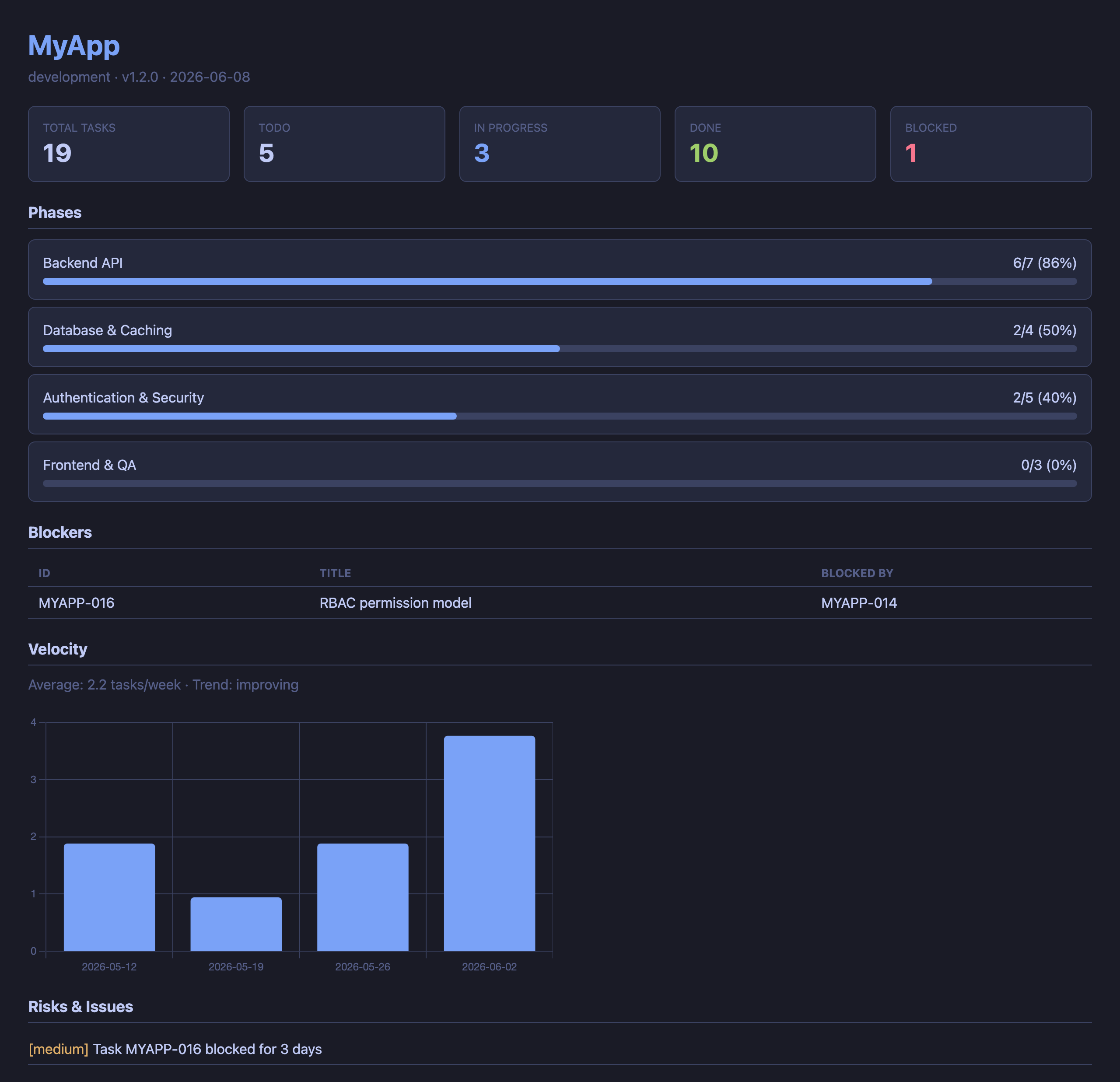
HTML dashboard (pm_dashboard) — phase progress, velocity, blockers, and risks at a glance:
Features
- 🔌 Multi-host first — registers in Claude Code AND Codex CLI with one command (
pmlens install --target=auto). Project rules sync to bothCLAUDE.mdandAGENTS.mdautomatically (ADR-008). Switch hosts mid-project without losing context — same.pm/data, same workflows - 42 MCP tools — task CRUD, child issues, status, blockers, velocity, dashboard, ADR, session memory, workflows, knowledge records, multi-host rules injection, cross-host outbox bridge, build-in-public X drafts, and more
- Workflow engine — template-based development workflows with loops, user gates, and chaining (Discovery → Development)
- Knowledge records — structured findings between casual memory and formal ADR (research, tradeoff, spec, etc.)
- Super Research skill — 3 parallel agents (Domain Expert, Critical Analyst, Lateral Thinker) + Depth Check (6 dimensions) + Fact Check + Cross-Check
- Session memory — SQLite + FTS5 full-text search. Memories persist across sessions and link to tasks/decisions
- Cross-project search — search memories across all projects via a global index
- Natural language — say "進捗は?" or "what's next?" instead of memorizing commands
- Zero configuration —
pip install+pmlens install, then just say "PM初期化して" - Multi-project — manage all your projects from a global registry with cross-project dashboards
- Git-friendly — plain YAML files in
.pm/directory, trackable withgit diff - Non-invasive — adds only a
.pm/directory to your project.rm -rf .pm/to remove completely
Quick Start
Install (once)
pip install pm-server
pmlens install          # Registers MCP server in Claude Code
# Restart Claude Code
Update
pip install --upgrade pm-server
# Restart Claude Code
Note:
pip install pm-serverwithout--upgradewill NOT update an existing installation. Always use--upgrade(or-U) to get the latest version.
After upgrading, the CLAUDE.md auto-action rules in each project are automatically updated:
- On the next session start,
pm_statusdetects the template version mismatch - Claude Code runs
pm_update_rulesto update the rules section (covers both CLAUDE.md and AGENTS.md when applicable) - New features (e.g., child issue workflow) become active immediately
You can also update manually:
> CLAUDE.md を更新して # or: pm_update_rules
The legacy
pm_update_claudemdtool is still available as a back-compat alias (CLAUDE.md only). It emits aDeprecationWarningsince v0.6.0 and is slated for removal in v1.0.0 (PMSERV-055).
Troubleshooting: MCP fails to connect after an update
If Claude Code reports an MCP connection failure (or pmlens: ENOENT) right
after pip install --upgrade, the usual cause is an interrupted install. If
pip is stopped mid-extraction (Ctrl-C, sleep, low disk), the package can be left
half-written: pip list still shows it as installed, but some modules and the
pmlens console script are missing — so the launcher can't be found.
Recover with a forced clean reinstall of the code package (pmlens):
pip install --force-reinstall --no-deps pmlens==<version>
pyenv rehash          # pyenv users only — regenerate the shim
pmlens --help         # verify → "PM Lens — ..."
MCP servers connect only at startup, so restart Claude Code afterward (a failed connection is not retried within a running session).
Initialize a project
# In Claude Code, cd to your project directory
> PM初期化して
✓ .pm/ created
✓ Registered in global registry
✓ Detected: name=my-app, version=1.2.0 (from package.json)
PM Lens automatically detects project info from package.json, pyproject.toml, Cargo.toml, .git/config, and README.md.
Use it
| You say | What happens |
|---|---|
進捗は? / status |
Show project progress summary |
次にやること / what's next |
Recommend next tasks by priority & dependencies |
タスク追加:○○を実装 |
Add a new task (auto-numbered) |
MYAPP-003 完了 |
Mark task as done |
MYAPP-003 に課題がある |
Add child issue to task (auto-inherits phase) |
ブロッカーある? |
List blocked tasks |
ダッシュボード見せて |
Generate HTML dashboard (Chart.js, dark theme) |
この設計にした理由を記録 |
Record an Architecture Decision Record (ADR) |
全プロジェクトの状態 |
Cross-project portfolio view |
Multi-Host Support (Claude Code + Codex CLI)
PM Lens v0.5.0 supports two MCP hosts — Claude Code (~/.claude/) and
Codex CLI (~/.codex/config.toml) — as registration targets. The two hosts
keep MCP configuration in completely separate stores, so a single install
must reach both when needed.
--target flag
pmlens install and pmlens uninstall accept a --target (alias -t)
flag. The default is conservative on purpose: existing scripts and
documentation that say pm-server install continue to register only
Claude Code, exactly as in v0.4.x.
--target |
Behavior |
|---|---|
claude-code |
(default) Register in Claude Code only. ~/.codex/config.toml is never opened. |
codex |
Register in Codex CLI only. ~/.claude/ is never touched. |
auto |
Detect via filesystem (~/.codex/config.toml exists?) — register in detected hosts only. |
all |
Force every known host. Creates ~/.codex/config.toml if absent. |
The companion command pmlens update-rules (introduced in v0.5.0 alongside
this feature) defaults to --target auto because it is a brand-new command
with no v0.4.x baseline to preserve.
Safety properties
- Idempotent: running
installtwice is a no-op on the second call. - Backed up:
~/.codex/config.tomlis copied to a timestamped backup before each write. (Claude Code usesclaude mcp add, which has its own internal handling.) - Comment-preserving: edits to
config.tomlgo throughtomlkit, so user-written comments, key order, and blank lines survive verbatim. - Dry-run:
--dry-runprints the planned actions per host without writing anything. The output prefixes each line with[dry-run]. - Per-host isolation: a failure in one host (e.g. Codex CLI not
installed when
--target=all) does not abort the other host; the outcome is reported per host with statusinstalled/already_registered/skipped/failed.
Quick examples
# Default (back-compat) — Claude Code only
pmlens install

# Add PM Lens to whichever host(s) are detected on this machine
pmlens install --target auto

# Force registration in both, creating ~/.codex/config.toml if needed
pmlens install --target all

# Preview what would happen, don't touch any files
pmlens install --target auto --dry-run

# Symmetric removal (same --target semantics)
pmlens uninstall --target auto
See docs/design.md §5.2 and ADR-007 for the detailed
rationale (detect-then-patch, backup, dry-run, absolute-path embedding).
Project rules injection (CLAUDE.md / AGENTS.md)
pm_init and pm_update_rules keep PM Lens's auto-action rules synced
into the appropriate per-host instruction file:
| Host | Instruction file |
|---|---|
| Claude Code | CLAUDE.md |
| Codex CLI | AGENTS.md |
The rules section is bracketed by <!-- pm-server:begin v=N --> /
<!-- pm-server:end --> markers and updated in place — user content
outside the markers is never touched.
pm_update_rules (and its CLI sibling pmlens update-rules) defaults
to --target auto: it detects which host(s) are present on this machine
and updates only those instruction files. Detection runs four signals
(filesystem, marker, CLAUDECODE env, fallback) — see ADR-008 amendment
A3 in docs/design.md §6.4.
| Action | Tool |
|---|---|
| MCP (in-session) | pm_update_rules(target="auto", dry_run=False) |
| CLI (this project) | pmlens update-rules --target auto |
| CLI (every registered project) | pmlens update-rules --target auto --all |
| Legacy CLAUDE.md only | pm_update_claudemd / pmlens update-claudemd |
AGENTS.md is backed up to AGENTS.md.bak.<timestamp> before each write.
CLAUDE.md backup symmetry is still pending in PMSERV-058 (originally targeted for v0.6.0).
See docs/design.md §6 and ADR-008 for the multi-host
rules-injection design (claudemd → rules module rename, marker convention,
dataclasses, atomic-write helpers).
MCP Tools (42 tools)
Project Management
| Tool | Description |
|---|---|
pm_init |
Create .pm/, register in global registry, auto-detect project info |
pm_status |
Phase progress, task summary, blockers, velocity, active tasks, hook auto-setup |
pm_tasks |
List tasks with filters (status / phase / priority / tag) |
pm_add_task |
Add task with auto-numbered ID (e.g., MYAPP-001) |
pm_update_task |
Update status, priority, notes, blocked_by |
pm_next |
Recommend next tasks (excludes blocked / unmet dependencies) |
pm_blockers |
List blocked tasks across projects |
pm_add_issue |
Add child issue to a task (phase auto-inherited, parent auto-reverted to review) |
Records
| Tool | Description |
|---|---|
pm_log |
Daily log entry with auto task linking (progress / decision / blocker / note / milestone) |
pm_add_decision |
Add ADR with context, decision, and consequences |
Analysis
| Tool | Description |
|---|---|
pm_velocity |
Weekly velocity + trend (up / down / flat) |
pm_risks |
Auto-detect risks: overdue, stale, long-blocked tasks |
Visualization
| Tool | Description |
|---|---|
pm_dashboard |
HTML dashboard with workflow progress + knowledge map (single project or portfolio) |
Discovery
| Tool | Description |
|---|---|
pm_discover |
Scan directories for .pm/ projects and auto-register |
pm_cleanup |
Remove invalid paths from registry |
pm_list |
List all registered projects |
Memory (Session Continuity)
| Tool | Description |
|---|---|
pm_remember |
Save a memory with auto task linking (observation / insight / lesson) |
pm_recall |
Recall memories — FTS5 search, by task, or cross-project |
pm_session_summary |
Save / get / list session summaries for continuity |
pm_memory_search |
Advanced search with type, tag, and task filters |
pm_memory_stats |
Memory DB statistics (total, by type, DB size) |
pm_memory_cleanup |
Clean up old memories (dry-run supported) |
Knowledge Records
| Tool | Description |
|---|---|
pm_record |
Record structured knowledge (research / market / spike / tradeoff / spec / api_design) |
pm_knowledge |
Query, filter, update, and summarize knowledge records |
pm_knowledge_query |
Read-only knowledge query — list / filter / summarize records (ADR-018) |
Workflow Engine
| Tool | Description |
|---|---|
pm_workflow_start |
Start a workflow from a template (development / discovery / super-research / brainstorming / content-pipeline) |
pm_workflow_status |
View current step, progress, and guidance for active workflow |
pm_workflow_advance |
Advance to next step with artifacts and notes; supports loops and skip |
pm_workflow_abandon |
Abandon a workflow (transition to ABANDONED, preserves step history) |
pm_workflow_list |
List all workflow instances with status filter |
pm_workflow_templates |
List available workflow templates (built-in + custom) |
X Content Pipeline (Build-in-Public, ADR-024)
| Tool | Description |
|---|---|
pm_draft_x |
Stage a build-in-public X draft from a .pm signal — raw content stays internal (PMSERV-113) |
pm_redact_draft |
Layer-1 deterministic redaction prefilter — scrubs hook + each body segment, count-only report |
pm_x_drafts_pending |
Review queue for staged drafts — exposes ONLY redacted / safe fields |
pm_reject_draft |
Discard a staged draft with a mandatory, auditable reason |
Outbox (Cross-Host Bridge)
| Tool | Description |
|---|---|
pm_outbox_remember |
Capture a memory / lesson from Claude Desktop into the cross-host outbox |
pm_outbox_log |
Capture a daily-log entry from Claude Desktop into the cross-host outbox |
pm_outbox_pending |
List pending entries in the Desktop outbox (~/.pm/desktop/desktop.db) |
pm_outbox_merge |
Promote pending outbox entries into the target project's main store |
pm_outbox_reject |
Reject pending outbox entries with an auditable reason |
Maintenance
| Tool | Description |
|---|---|
pm_update_rules |
Update PM Lens rules section in CLAUDE.md and/or AGENTS.md (multi-host, ADR-008). Default target=auto detects installed hosts |
pm_update_claudemd |
Legacy alias of pm_update_rules(target="claude-code") — deprecated since v0.6.0, removal in v1.0.0 |
Parallel Work Lines (Branch-Aware Continuity)
Running several streams of work in one repo — e.g. a mainline, a paper, and teaching material? PM Lens gives each line its own session-continuity context. Two topologies are supported (ADR-028).
Recommended: one git worktree per line (zero config)
PM Lens scopes everything — tasks, memories, and session summaries — to the directory that contains .pm/. Because .pm/memory.db is git-ignored, every git worktree gets its own independent store automatically:
git worktree add ../myproj-paper  paper   # 論文 line
git worktree add ../myproj-edu    edu     # 教材 line
# the original checkout stays the mainline (本流)
Now cd ../myproj-paper and pm_recall returns the paper line's last session — no flags, no schema, no branch detection. Three lines = three editor windows, no stash dance, no merge conflict on switch.
Alternative: one directory, branch-aware track
Prefer a single directory and git checkout between lines? Pass the branch as a track:
pm_recall(track="paper") # last session recorded while on the `paper` branch
- The branch is recorded automatically when
pm_session_summary(action="save")runs. It is read from.git/HEADas text — PM Lens never shells out togit, so a hostile.git/configcan't execute code (CVE-2026-45033 / git config-exec class). - Under the bundled plugin, the SessionStart hook surfaces the current branch so the model can pass
track=on its first recall; re-pass it after anygit checkout. - If a line has no recorded summary yet (e.g. an existing DB from before this feature),
pm_recall(track=...)gracefully falls back to the overall-latest and setstrack_matched: false— so it never breaks on day one.
Logical track labels (.pm/tracks.yaml)
A work line is a concept; branches are implementation detail that get renamed and split. Map a logical label to one or more branch globs so continuity follows the line, not the branch name:
# .pm/tracks.yaml
tracks:
  本流: [main]
  論文: [feat/p3-*, research/wave-scattering-*]
  教材: [edu/*]
pm_recall(track="論文") # latest session across ANY branch matching the 論文 globs
- Resolution is at query time, so renaming or adding a branch within a line never breaks history (rename-resistant).
trackaccepts a logical label OR a raw branch name — labels resolve first; anything else is matched as a raw branch.- Backward compatible: with no
tracks.yaml, everytrackis a raw branch (the v1 behavior). - When matched, the response includes
track_branch(which actual branch the context came from); a malformedtracks.yamldegrades to raw-branch matching and surfaces awarnings[]entry.
See ADR-028 (design) and ADR-035 on the SynapticLedger side (unified .pm/ + track=).
Data Structure
PM Lens stores task data as plain YAML and memories in SQLite:
your-project/
└── .pm/
    ├── project.yaml        # Project metadata
    ├── tasks.yaml          # Tasks with status, priority, dependencies
    ├── decisions.yaml      # Architecture Decision Records (ADR)
    ├── knowledge.yaml      # Structured knowledge records
    ├── workflows.yaml      # Workflow instances and state
    ├── milestones.yaml     # Milestone definitions
    ├── risks.yaml          # Risks and blockers
    ├── memory.db           # Session memories (SQLite + FTS5)
    ├── workflow_templates/  # Custom workflow templates (optional)
    └── daily/
        └── 2026-04-08.yaml # Auto-generated daily log

~/.pm/
├── registry.yaml           # Global project index
└── memory.db               # Cross-project memory index
YAML files are human-readable and hand-editable. Memory DB is the source of truth for session data; the global index at ~/.pm/memory.db enables cross-project search.
CLAUDE.md Integration
Add this to your project's CLAUDE.md for automatic PM behavior (or run pmlens update-rules):
## PM Lens 自動行動ルール(必ず従うこと)

### セッション開始時(最初の応答の前に必ず実行)
1. pm_status を MCP ツールとして実行し、現在の進捗を表示する
2. pm_next で次に着手すべきタスクを3件表示する
3. pm_recall で前回セッションの文脈を取得する
4. ブロッカーや期限超過があれば警告する
5. pm_status の claudemd.other_rule_sections に他のルールセクションが報告された場合、この CLAUDE.md 内の該当セクションのルールも全て実行する

### タスクに着手する前
1. 該当タスクを pm_update_task で in_progress に変更する

### 作業中に重要な発見・判断があった時
1. pm_remember で記憶を保存する(関連タスクIDがあれば task_id で紐付け)

### コンテキスト保全(Compaction / Clear 対策)
Claude Code はセッションが長くなるとコンテキストを自動圧縮(compaction)する。
圧縮のタイミングは予測できないため、重要な情報は随時保存すること。
1. 重要な発見・技術的判断は発生時点で即座に pm_remember で保存する(セッション終了を待たない)
2. 複雑な議論や設計検討の後は、結論を pm_remember でまとめて保存する
3. 3往復以上のやり取りで未記録の知見があれば、チェックポイントとして pm_remember で保存する
4. ユーザーが /clear する前は必ず pm_session_summary を実行する
5. Compaction 後にコンテキストが失われていると感じたら pm_recall で復元する

### タスク完了時(コードが動作確認できたら)
1. pm_update_task で done に変更する
2. all_issues_resolved フラグが返された場合、親タスクの完了もユーザーに提案する
3. pm_log に完了内容を記録する
4. 次の推薦タスクを pm_next で表示する
5. アトミックコミットを作成する

### タスク完了確認中にイシュー(課題)が見つかった時
1. pm_add_issue で親タスクに紐づくイシュー(子タスク)を作成する
   - phase は親タスクから自動継承される
   - 親タスクが done だった場合、自動で review に戻される
2. イシューを解消したら pm_update_task で done に変更する
3. 全イシューが解消されると all_issues_resolved フラグが返される
4. 親タスクの完了をユーザーに提案する

### 設計上の意思決定が発生した時
1. ユーザーに「ADRとして記録しますか?」と確認する
2. 承認されたら pm_add_decision で保存する

### コーディングセッション終了時
1. 進行中のタスクの状態を確認し、必要に応じて更新する
2. pm_log にセッションの成果を記録する
3. pm_session_summary で要約を保存する
4. 未コミットの変更があればコミットする
Tips: Getting the Most out of PM Lens
Recommended Workflow
1. Install & register      →  pip install pm-server && pmlens install
2. Start Claude Code       →  (restart after install)
3. Initialize project      →  "PM初期化して" or "Initialize PM"
4. Add tasks               →  "Add task: implement user auth"
5. Work on tasks            →  "Start MYAPP-001"
6. Complete tasks           →  "MYAPP-001 done"
7. Issues found in review   →  "MYAPP-001 has an issue: ..." (creates child issue)
8. End session              →  "Session wrap-up" (triggers summary + log)
Protecting Context from Compaction
Claude Code automatically compresses (compacts) conversation context when sessions get long. This means detailed information from earlier exchanges can be lost. PM Lens's memory tools protect against this:
| Situation | What to do |
|---|---|
| Made an important discovery | pm_remember immediately — don't wait for session end |
| Finished a design discussion | Summarize the conclusion with pm_remember |
About to run /clear |
Run pm_session_summary first |
| Resuming after compaction | pm_recall restores previous context |
| Starting a new session | pm_recall + pm_status (auto if CLAUDE.md rules are set) |
Key principle: Save early, save often. Compaction timing is unpredictable — if a finding is worth keeping, record it now.
Session Continuity
PM Lens's memory layer ensures nothing is lost between sessions:
Session 1                          Session 2
  │                                  │
  ├─ pm_remember (findings)          ├─ pm_recall ← restores context
  ├─ pm_remember (decisions)         ├─ pm_status ← current state
  ├─ pm_session_summary              │
  └─ (session ends)                  └─ (continues seamlessly)
Automatic Hooks (Lifecycle Enforcement)
PM Lens automatically installs Claude Code hooks at first session start (pm_status). After a git commit, a PostToolUse hook injects a reminder into the conversation, prompting Claude to call pm_log, pm_update_task, and pm_next.
- Hooks are installed globally in
~/.claude/settings.json - Existing user hooks are preserved (PM Lens hooks are appended, not replaced)
- No manual setup needed — hooks are auto-installed on upgrade
- To manage manually:
pmlens install-hooks/pmlens uninstall-hooks
Multi-Project Management
> "Discover projects under ~/projects"    # Auto-scan & register
> "Show all projects"                     # Portfolio overview
> "Search memories for 'auth' globally"   # Cross-project search
> "Show dashboard for all projects"       # Portfolio HTML dashboard
CLI Commands
pmlens install             # Register MCP server (default: Claude Code only — back-compat).
                           # Pass --target {auto,all,claude-code,codex} for multi-host.
                           # Pass --dry-run to preview without writing. See "Multi-Host Support" below.
pmlens uninstall           # Symmetric to install (same --target / --dry-run semantics).
pmlens serve               # Start MCP server (called by Claude Code automatically)
pmlens discover .          # Scan for projects with .pm/ directories
pmlens status              # Show project status from terminal
pmlens context-inject      # Print session context to stdout (for hook integration)
pmlens migrate             # Migrate from pm-agent (rename transition)
pmlens update-rules        # Inject PM Lens rules into CLAUDE.md and/or AGENTS.md (ADR-008).
                           # --target {auto,all,claude-code,codex} (default: auto)
                           # --dry-run / --all (apply to every registered project)
pmlens update-claudemd     # Legacy alias of `update-rules --target=claude-code`. Deprecated since v0.6.0.
pmlens install-hooks       # Manually install Claude Code hooks (auto-installed via pm_status)
pmlens uninstall-hooks     # Remove PM Lens hooks from Claude Code settings
Architecture
For a graphical overview (module map, MCP tool catalog with Lens RO_ALLOWLIST,
Lens mode flow, workflow state machines, task/issue lifecycle, data layout,
and distribution channels), see docs/architecture.html.
Open it directly in a browser — it is a single self-contained static file
(no external dependencies).
Claude Code Session
  │
  ├── CLAUDE.md auto-action rules
  ├── PostToolUse hooks (auto-installed)
  ├── Skills (super-research, etc.)
  │
  └── MCP Server (stdio)
        └── pmlens serve
              │
              ├── server.py    → 42 MCP tools (FastMCP)
              ├── models.py    → Pydantic v2 data models (17 models, 15 enums)
              ├── storage.py   → YAML read/write
              ├── workflow.py  → Workflow engine (state machine)
              ├── memory.py    → SQLite memory store + FTS5 search
              ├── recall.py    → Session context builder (token-budgeted)
              ├── hooks.py     → Claude Code hook handler + installer
              ├── context.py   → CLI context injection
              ├── velocity.py  → Velocity calculation & risk detection
              ├── dashboard.py → HTML/text dashboard (Jinja2) + workflow progress + knowledge map
              ├── discovery.py → Auto-detect project info
              └── installer.py → Multi-host MCP registration (ADR-007)
                                   ├─ install_claude_code() → claude mcp add (subprocess)
                                   ├─ install_codex()       → ~/.codex/config.toml (tomlkit)
                                   └─ install(target=...)   → orchestrator + InstallSummary

Data layer (operated on through pmlens serve):
  ├── project-A/.pm/ (YAML + workflows + knowledge + memory.db)
  ├── project-B/.pm/ (YAML + workflows + knowledge + memory.db)
  └── ~/.pm/registry.yaml + memory.db
Migrating from pm-agent
If you were using the earlier pm-agent package:
pip uninstall pm-agent
pip install pm-server
pmlens migrate          # Switches MCP registration from pm-agent to pmlens
# Restart Claude Code
The migrate command will:
- Remove the old
pm-agentMCP registration - Register
pmlensas the new MCP server - Verify
~/.pm/registry.yamlintegrity - Warn about any
CLAUDE.mdfiles that referencepm-agent
Your .pm/ data directories are unchanged — no data migration needed.
Requirements
- Python 3.11+
- Claude Code (with MCP support)
Dependencies
- FastMCP — MCP server framework
- Pydantic v2 — data validation
- PyYAML — data persistence
- Click — CLI framework
- Jinja2 — dashboard templates
Development
git clone https://github.com/flc-design/pmlens.git
cd pmlens
pip install -e ".[dev]"
pytest                  # 1,000+ tests
pytest --cov            # with coverage (branch coverage, show missing)
ruff check src/         # Lint
ruff format src/        # Format
Design Principles
- Zero Configuration —
pip install+ one command, done - Auto-everything — detection, registration, and inference are fully automatic
- Git-friendly — plain text YAML, trackable with
git diff - Human-readable — safe to hand-edit, won't break
- AI-native — formats that Claude Code can naturally read and write
- Non-invasive — only adds
.pm/, never modifies your project
Trademark notice
"PM Lens"™ is a trademark of FLC design Co., Ltd., used as the display name of
this project. The project is published on PyPI as pmlens; the Python import
name (pmlens), the console binary (pmlens), and the MCP tooling all use the
pmlens identifier. A compatibility wrapper distribution named pm-server is
retained on PyPI so existing pip install pm-server / uvx pm-server
invocations keep working during the transition to the PM Lens brand.
This project is not affiliated with, endorsed by, or sponsored by:
- Microsoft Project Server / Project Online / Project for the web (Microsoft Corporation)
- Percona Monitoring and Management (PMM Server) (Percona LLC)
- Apple Carbon Print Manager (
PMServeropaque type in the deprecated ApplicationServices framework) (Apple Inc.) - Informatica PowerCenter (
pmserver.exeIntegration Service daemon) (Informatica LLC) - Lens (the Kubernetes IDE) (Mirantis, Inc.)
- Any other product, vendor, or service that may use similar terminology.
All trademarks are the property of their respective owners.
License
MIT — Shinichi Nakazato / FLC design Co., Ltd.
Project details
Verified details
These details have been verified by PyPIProject links
GitHub Statistics
Maintainers
Release history Release notifications | RSS feed


Download files
Download the file for your platform. If you're not sure which to choose, learn more about installing packages.
Source Distribution
Built Distribution
Filter files by name, interpreter, ABI, and platform.
If you're not sure about the file name format, learn more about wheel file names.
Copy a direct link to the current filters
File details
Details for the file pmlens-0.12.0.tar.gz.
File metadata
- Download URL: pmlens-0.12.0.tar.gz
- Upload date:
- Size: 703.9 kB
- Tags: Source
- Uploaded using Trusted Publishing? Yes
- Uploaded via: twine/6.1.0 CPython/3.13.13
File hashes
| Algorithm | Hash digest | |
|---|---|---|
| SHA256 |
1bb0302a128df202bc13ee158193e03b3845135e59aee37c4e1872f40cc5bd4a
|
|
| MD5 |
61c1d61a61c1eb97862ef20e30d7f5aa
|
|
| BLAKE2b-256 |
f73e10dbb060661896a8a46dd15a4882bee746ed0e793b3d360a05a0346e231f
|
Provenance
The following attestation bundles were made for pmlens-0.12.0.tar.gz:
Publisher:
release.yml on flc-design/pmlens
-
Statement:
-
Statement type:
https://in-toto.io/Statement/v1 -
Predicate type:
https://docs.pypi.org/attestations/publish/v1 -
Subject name:
pmlens-0.12.0.tar.gz -
Subject digest:
1bb0302a128df202bc13ee158193e03b3845135e59aee37c4e1872f40cc5bd4a - Sigstore transparency entry: 2010110659
- Sigstore integration time:
-
Permalink:
flc-design/pmlens@2bb4c43279de5171f103e997b6328a23d6714b09 -
Branch / Tag:
refs/tags/v0.12.0 - Owner: https://github.com/flc-design
-
Access:
public
-
Token Issuer:
https://token.actions.githubusercontent.com -
Runner Environment:
github-hosted -
Publication workflow:
release.yml@2bb4c43279de5171f103e997b6328a23d6714b09 -
Trigger Event:
push
-
Statement type:
File details
Details for the file pmlens-0.12.0-py3-none-any.whl.
File metadata
- Download URL: pmlens-0.12.0-py3-none-any.whl
- Upload date:
- Size: 144.5 kB
- Tags: Python 3
- Uploaded using Trusted Publishing? Yes
- Uploaded via: twine/6.1.0 CPython/3.13.13
File hashes
| Algorithm | Hash digest | |
|---|---|---|
| SHA256 |
b07b8e813cd525142c7efacff263e37cf7578318d23103484bd630c2fba3e292
|
|
| MD5 |
6af945e61344ee20df0ffde8905705fc
|
|
| BLAKE2b-256 |
e53797364b8f92fb6bcc021e688e41285b40f123154079849e0667e41814fe29
|
Provenance
The following attestation bundles were made for pmlens-0.12.0-py3-none-any.whl:
Publisher:
release.yml on flc-design/pmlens
-
Statement:
-
Statement type:
https://in-toto.io/Statement/v1 -
Predicate type:
https://docs.pypi.org/attestations/publish/v1 -
Subject name:
pmlens-0.12.0-py3-none-any.whl -
Subject digest:
b07b8e813cd525142c7efacff263e37cf7578318d23103484bd630c2fba3e292 - Sigstore transparency entry: 2010110763
- Sigstore integration time:
-
Permalink:
flc-design/pmlens@2bb4c43279de5171f103e997b6328a23d6714b09 -
Branch / Tag:
refs/tags/v0.12.0 - Owner: https://github.com/flc-design
-
Access:
public
-
Token Issuer:
https://token.actions.githubusercontent.com -
Runner Environment:
github-hosted -
Publication workflow:
release.yml@2bb4c43279de5171f103e997b6328a23d6714b09 -
Trigger Event:
push
-
Statement type:






