
Python MVC Shell Framework Package
About the package
Python MVC Shell Framework Package (PMVCS) is a tiny framework for shell projects making in Python 3.10+.
Install with pip3
pip install pmvcs

or

pip3 install pmvcs
Settings from console in english
>>> python -m pmvcs.cli setup -l en
or
>>> python -m pmvcs.cli setup -language en
or
>>> pmvcs-cli setup -l en
or
>>> pmvcs-cli setup -language en
Settings from console in spanish
>>> python -m pmvcs.cli setup -l es
or
>>> python -m pmvcs.cli setup -language es
or
>>> pmvcs-cli setup -l es
or
>>> pmvcs-cli setup -language es
Setup, step by step:
Insert APP name (default: "MyApp", leaves blank):
>>> My Test App

Insert APP folder name (default: "app", leaves blank):
>>> app

Enable debug? (default: "No")
(Y) Yes - (N) No:
>>> Y

View project information on exit? (default: "Yes")
(Y) Yes - (N) No:
>>> Y

Enable Multi-Language support? (default: "Yes")
(Y) Yes - (N) No:
>>> Y

Define default Language (default: "(1)")
(1) English - (2) Español:
>>> 2

Installs example data, use menu for multiple modules or unique module?
(E) Example data
(M) Multiple modules
(S) Unique module

Option:
>>> E   -> Installs data examples, one module in menu with controller, model and view files.
>>> M   -> Installs multiple modules in menu with controller, model and view files each one.
>>> S   -> Installs a unique module in menu with controller file.

-------------------------------------------------
 >>> Configuration has finished
 >>> Thanks for choose PMVCS!
-------------------------------------------------

Press any key to continue . . .
Add a new Multiple modules
Installs new multiple modules in menu with controller, model and view files each one. For adding new modules in menu, run the following:
>>> python -m pmvcs.cli menu -l en
o
>>> python -m pmvcs.cli menu -language en
Current APP folder name:
>>> app01

Insert module name:
>>> example_two

Insert another module
(Y) Yes - (N) No:
>>> N

-------------------------------------------------
 >>> Configuration has finished
 >>> Thanks for choose PMVCS!
-------------------------------------------------

Press any key to continue . . .
PMVCS Helpers
You can load PMVCS Helpers, for example:
old_value = str('5')
print(type(old_value))
>>> <class 'str'>

filters = self.pmvcs_helper.load_helper('filters', True)
new_value = filters.data_type(old_value)

print(type(new_value))
>>> <class 'int'>
The helper "filters" returns an integer value from a string number.
Custom Helpers
You can load custom helpers, for example:
example = self.pmvcs_helper.load_helper('example')
example.my_func()
Path to save your helper: (app_folder)/helpers/
Format in helper's file:
from pmvcs.core.helpers.base_helper import BaseHelper


class ExampleHelper(BaseHelper):
    """ Class for Example Helper """

    def __init__(self, **kwargs) -> None:
        """
        Init PMVCS Example Helper requirements
        """
        super().__init__(**kwargs)

    def my_func(self):
        """
        Returns a float or int value
        """
        pass
Custom Helpers: Pass variables:
In init it should have:
def __init__(self, **kwargs) -> None:
	self.pmvcs_helper = kwargs['pmvcs_helper']
	self.kwargs = { 'pmvcs_cfg': kwargs['pmvcs_cfg'],
					'pmvcs_lang': kwargs['pmvcs_lang'],
					'pmvcs_helper': kwargs['pmvcs_helper']}
And in the function that calls the helper:
def to_string_table(self, data: dict) -> str:
	kwargs2 = { 'data': data,
				'file_name': 'temp_file'}
	kwargs2.update(self.kwargs)
	table_helper = self.pmvcs_helper.load_helper('table', **kwargs2)
	table_helper.record_file()
Finally in the helper we retrieve the values as:
def __init__(self, **kwargs) -> None:
	super().__init__(**kwargs)

	self._data = kwargs['data']
	self._file_name = f"{kwargs['file_name']}.{self._file_extension}"
Get configuration constants from config.ini:
Get a configuration constant in string type from "OPTIONS":
Code: >>> self.cfg.get("EXAMPLE_CONSTANT", "OPTIONS")
Returns: This is an example value from config file
Value Type: <class 'str'>
Get a configuration constant in string type from "DEFAULT":
Code: >>> self.cfg.get("DEFAULT_TITLE", "DEFAULT")
Returns: Example App
Value Type: <class 'str'>
Get a configuration constant in integer type:
Code: >>> self.cfg.get("EXAMPLE_INT", "OPTIONS", "int")
Returns: 8
Value Type: <class 'int'>
Get a configuration constant in float type:
Code: >>> self.cfg.get("EXAMPLE_FLOAT", "OPTIONS", "float")
Returns: 1.57
Value Type: <class 'float'>
Get a configuration constant in boolean type:
Code: >>> self.cfg.get("EXAMPLE_BOOLEAN", "OPTIONS", "boolean")
Returns: True
Value Type: <class 'bool'>
Get a configuration constant in a list:
Code: >>> self.cfg.get("EXAMPLE_LIST", "OPTIONS", "list")
Returns: ['1', '2']
Value Type: <class 'list'>
Get a configuration constant in a dictionary:
Code: >>> self.cfg.get("EXAMPLE_DICT", "OPTIONS", "dict")
Returns: {'value_one': '1', 'value_two': '2'}
Value Type: <class 'dict'>
Get language constants from languages/en.ini:
Get current language tag:
Code: >>> self.lang.tag
Returns: en
Value Type: <class 'str'>
Get a language constant:
Code: >>> self.lang.get("LANG_EXAMPLE_STRING")
Returns: This is an example string
Value Type: <class 'str'>
Get a language constant by passing a value in String-Print-Format. In the language file you will see for example: "The value here: "{}"
Code: >>> self.lang.sprintf("LANG_EXAMPLE_SPRINTF", "3")
Returns: String-Print-Format value here: "3"
Value Type: <class 'str'>
Get a language constant by passing many values in String-Print-Format. In the language file you will see: "One: "{}". Two: "{}". Three: "{}".
Code: >>> self.lang.sprintf("LANG_EXAMPLE_SPRINTF2", "1", "2", "3")
Returns: One: "1". Two: "2". Three: "3".
Value Type: <class 'str'>
Translating a string:
Code: >>> value = 'dictionary'
	  >>> self.lang.translate(value)
Returns: Dictionary
Value Type: <class 'str'>
Using PMVCS View functions
This shows the banner with the App's name:
Code: >>> self.pmvcs_view.get_intro()
This shows the exit message:
Code: >>> self.pmvcs_view.get_exit()
This inserts a line break without print():
Code: >>> self.pmvcs_view.line_brake()
This inserts a line break with print():
Code: >>> self.pmvcs_view.line_brake(True)
This inserts a pause to press ENTER to start:
Code: >>> self.pmvcs_view.input_start()
This inserts a pause to press ENTER to continue:
Code: >>> self.pmvcs_view.input_pause()
This inserts a select an option input():
Code: >>> self.pmvcs_view.input_options()
This inserts a select an input():
Code: >>> self.pmvcs_view.input_generic(text)
PMVCS captures
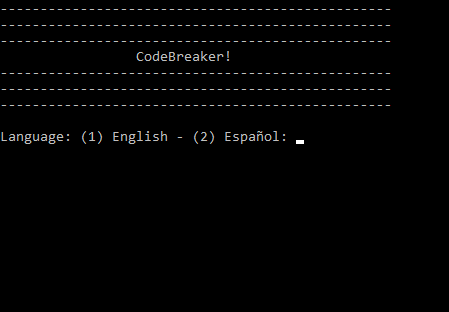
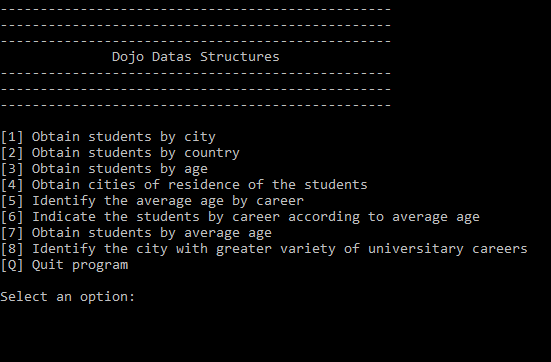
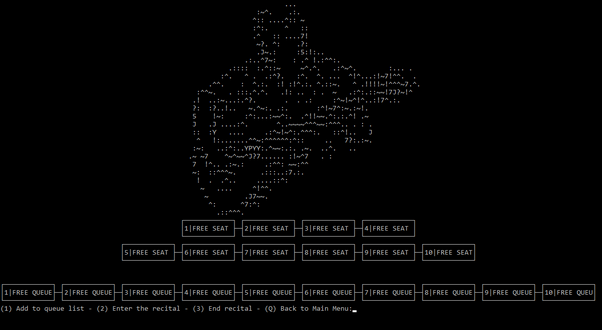
PMVCS implementation examples
Repository
1 maintainer

Download files
Download the file for your platform. If you're not sure which to choose, learn more about installing packages.
Source Distribution
Built Distribution
Filter files by name, interpreter, ABI, and platform.
If you're not sure about the file name format, learn more about wheel file names.
Copy a direct link to the current filters
File details
Details for the file pmvcs-1.0.4.tar.gz.
File metadata
- Download URL: pmvcs-1.0.4.tar.gz
- Upload date:
- Size: 70.3 kB
- Tags: Source
- Uploaded using Trusted Publishing? No
- Uploaded via:
twine/4.0.2 CPython/3.12.0
File hashes
| Algorithm | Hash digest | |
|---|---|---|
| SHA256 |
76798f44f51c45366b1e34c0dca49223030d679d458d1a587b048d50070ac974
|
|
| MD5 |
e8a06298918ca93ffea3b96ba866c1a0
|
|
| BLAKE2b-256 |
31457f9f972e958336780cdc291300969e0dc9b4c2f5a4f971cf177fd68a9798
|
File details
Details for the file pmvcs-1.0.4-py3-none-any.whl.
File metadata
- Download URL: pmvcs-1.0.4-py3-none-any.whl
- Upload date:
- Size: 132.5 kB
- Tags: Python 3
- Uploaded using Trusted Publishing? No
- Uploaded via:
twine/4.0.2 CPython/3.12.0
File hashes
| Algorithm | Hash digest | |
|---|---|---|
| SHA256 |
5bba313e0ebce5baf9cfbe3255a0154b4ef06cfa2f5b61a5e8694f6f5bbf74d8
|
|
| MD5 |
c2e72170da9a2ab616060d572fa1a80f
|
|
| BLAKE2b-256 |
2070db30b1dccbe827f1ef6a7eb1531d142d1ffa0234004f141a24adfe3e4e81
|














