
Pneuma



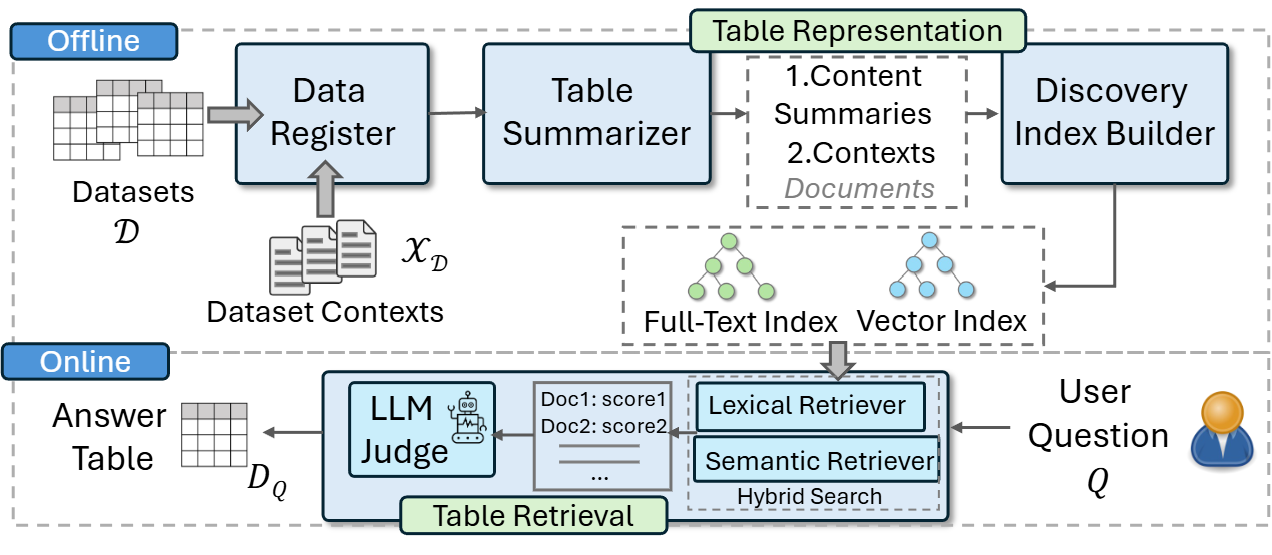
Pneuma is an LLM-powered data discovery system for tabular data. Given a natural language query,
Pneuma searches an indexed collection and retrieves the most relevant tables for the question. It performs this search by leveraging both content (columns and rows) and context (metadata) to match tables with questions.
Getting Started
If you would like to try Pneuma without installation, you can use our Colab notebook. For local installation, you may use an OpenAI API token or a local GPU with at least 20 GB of VRAM (to load and prompt both the LLM and embedding model).
To install the latest stable release from PyPI:
$ pip install pneuma
To install the most recent version from the repository:
$ git clone https://github.com/TheDataStation/Pneuma.git
$ cd Pneuma
$ pip install -r requirements.txt
Installation Note
To ensure smooth installation and usage, we strongly recommend installing Miniconda (follow this). Then, create a new environment and install the CUDA Toolkit:
$ conda create --name pneuma python=3.12.2 -y
$ conda activate pneuma
$ conda install -c nvidia cuda-toolkit -y
Quick Start
The simplest way to explore Pneuma is by running the quickstart Jupyter notebook. This notebook walks you through Pneuma's full workflow, from data registration to querying. For those eager to dive in, here’s a snippet showcasing its functionality:
from src.pneuma import Pneuma

# Initialize Pneuma
out_path = "out_demo/storage"
pneuma = Pneuma(
    out_path=out_path,
    llm_path="Qwen/Qwen2.5-7B-Instruct",
    embed_path="BAAI/bge-base-en-v1.5",
)
pneuma.setup()

# Register dataset & summarize it
data_path = "data_src/sample_data/csv"
pneuma.add_tables(path=data_path, creator="demo_user")
pneuma.summarize()

# Add context (metadata) if available
metadata_path = "data_src/sample_data/metadata.csv"
pneuma.add_metadata(metadata_path=metadata_path)

# Generate index
pneuma.generate_index(index_name="demo_index")

# Query the index
response = pneuma.query_index(
    index_name="demo_index",
    query="Which dataset contains climate issues?",
    k=1,
    n=5,
    alpha=0.5,
)
response = json.loads(response)
query = response["data"]["query"]
retrieved_tables = response["data"]["response"]
Pneuma's CLI
To use Pneuma via the command line, refer to the CLI reference documentation for detailed instructions.
1 maintainer

Download files
Download the file for your platform. If you're not sure which to choose, learn more about installing packages.
Source Distribution
Built Distribution
Filter files by name, interpreter, ABI, and platform.
If you're not sure about the file name format, learn more about wheel file names.
Copy a direct link to the current filters
File details
Details for the file pneuma-0.0.4.tar.gz.
File metadata
- Download URL: pneuma-0.0.4.tar.gz
- Upload date:
- Size: 28.0 kB
- Tags: Source
- Uploaded using Trusted Publishing? No
- Uploaded via:
twine/6.1.0 CPython/3.12.2
File hashes
| Algorithm | Hash digest | |
|---|---|---|
| SHA256 |
17d2752059b15dc125dc0b115c54ee0c61e67dc98f50ddc09a2c97d1f186ce2e
|
|
| MD5 |
ffa2f5a80f86549a8b791525e07bbd1a
|
|
| BLAKE2b-256 |
0163d8fc39b63a0a7ef2e673ecfe800ce2092d18a652fdc81bc69eca0f73fce2
|
File details
Details for the file pneuma-0.0.4-py3-none-any.whl.
File metadata
- Download URL: pneuma-0.0.4-py3-none-any.whl
- Upload date:
- Size: 32.2 kB
- Tags: Python 3
- Uploaded using Trusted Publishing? No
- Uploaded via:
twine/6.1.0 CPython/3.12.2
File hashes
| Algorithm | Hash digest | |
|---|---|---|
| SHA256 |
d24315aa2e32a9a4ac3279ad986a8bc944b5e2f852ff113179ab1f743c4450e2
|
|
| MD5 |
83de507d2b0649761e7a9c4ac4240d12
|
|
| BLAKE2b-256 |
49ca3b892b71d264be264d7dee143183c1c0dba213406e32f27fe0f3c0029979
|














