
This release has been yanked by its maintainers, and will be ignored by installers, except when explicitly specified.
Consider using release 20260526 instead.
PNNX
PyTorch Neural Network eXchange(PNNX) is an open standard for PyTorch model interoperability. PNNX provides an open model format for PyTorch. It defines computation graph as well as high level operators strictly matches PyTorch.
Rationale
PyTorch is currently one of the most popular machine learning frameworks. We need to deploy the trained AI model to various hardware and environments more conveniently and easily.
Before PNNX, we had the following methods:
- export to ONNX, and deploy with ONNX-runtime
- export to ONNX, and convert onnx to inference-framework specific format, and deploy with TensorRT/OpenVINO/ncnn/etc.
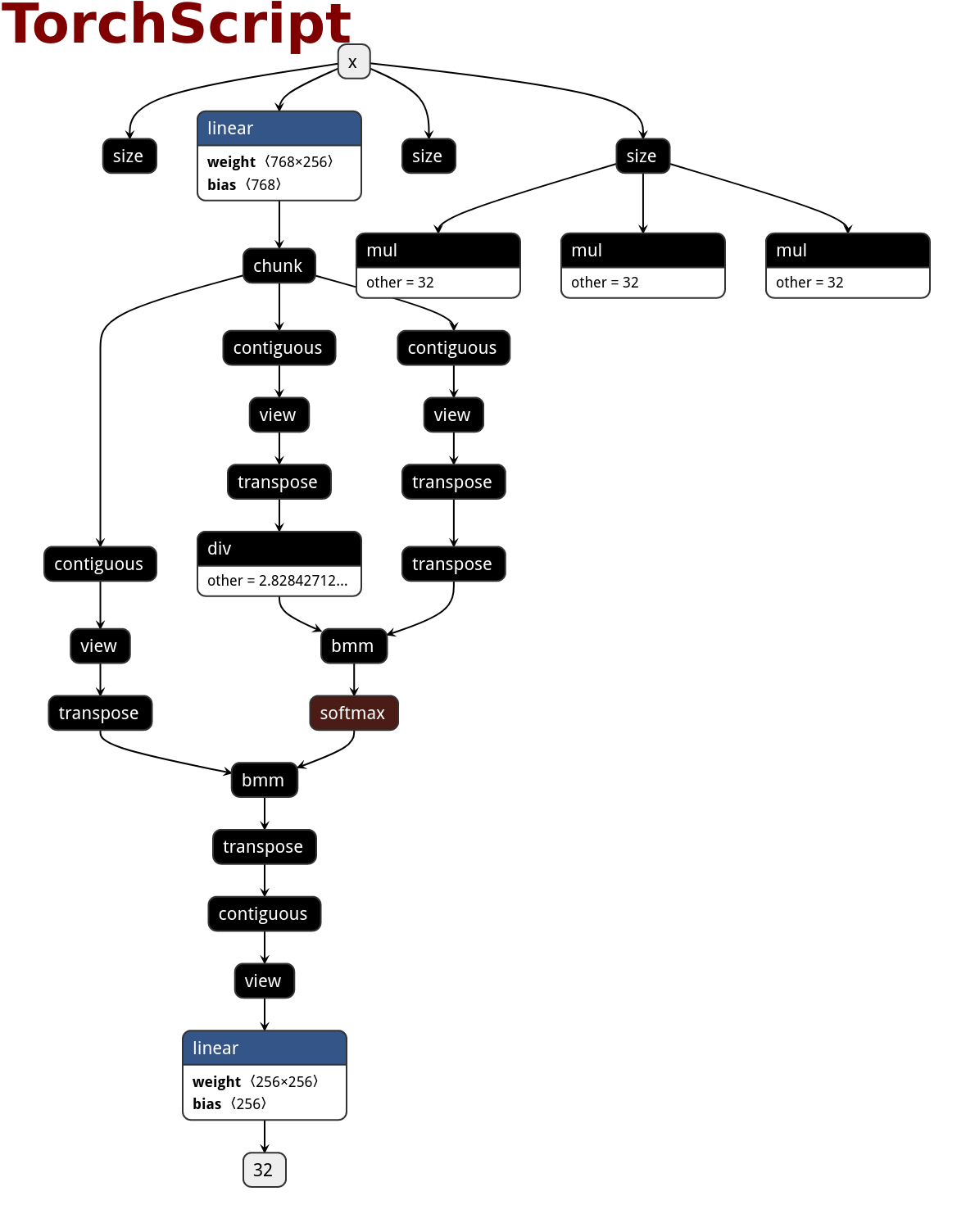
- export to TorchScript, and deploy with libtorch
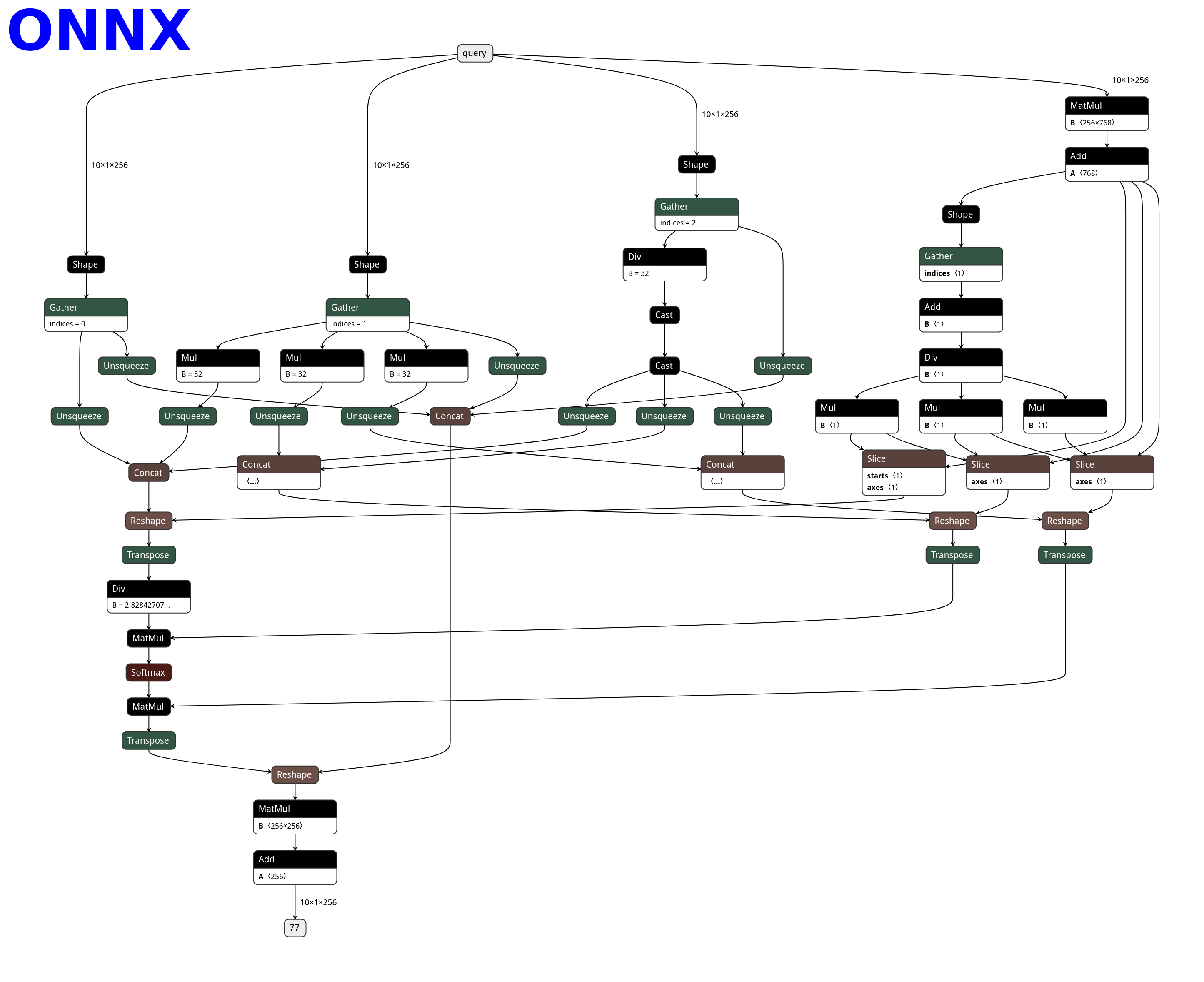
As far as we know, ONNX has the ability to express the PyTorch model and it is an open standard. People usually use ONNX as an intermediate representation between PyTorch and the inference platform. However, ONNX still has the following fatal problems, which makes the birth of PNNX necessary:
- ONNX does not have a human-readable and editable file representation, making it difficult for users to easily modify the computation graph or add custom operators.
- The operator definition of ONNX is not completely in accordance with PyTorch. When exporting some PyTorch operators, glue operators are often added passively by ONNX, which makes the computation graph inconsistent with PyTorch and may impact the inference efficiency.
- There are a large number of additional parameters designed to be compatible with various ML frameworks in the operator definition in ONNX. These parameters increase the burden of inference implementation on hardware and software.
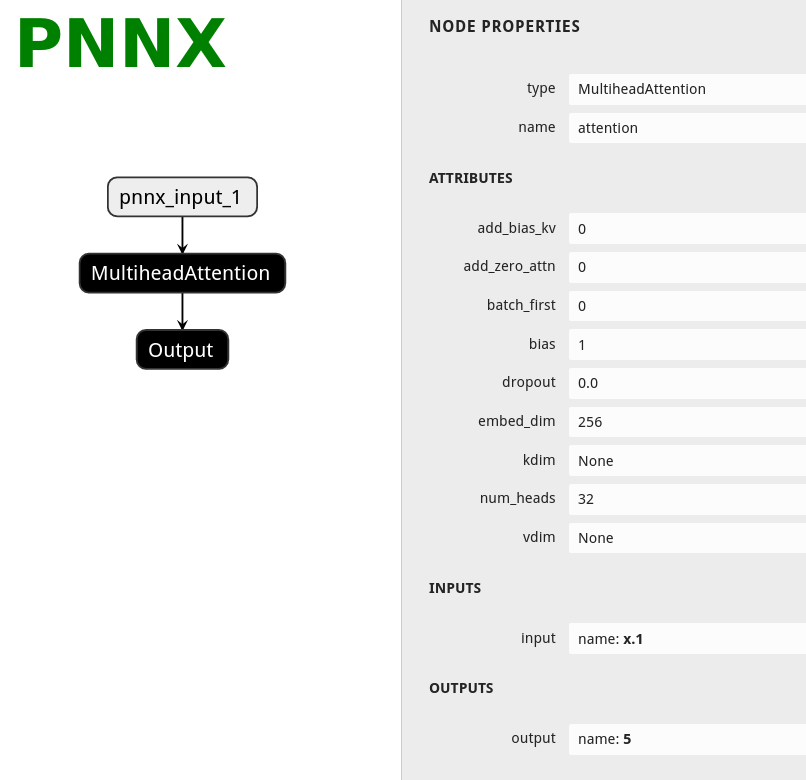
PNNX tries to define a set of operators and a simple and easy-to-use format that are completely contrasted with the python api of PyTorch, so that the conversion and interoperability of PyTorch models are more convenient.
Features
- Human readable and editable format
- Plain model binary in storage zip
- One-to-one mapping of PNNX operators and PyTorch python api
- Preserve math expression as one operator
- Preserve torch function as one operator
- Preserve miscellaneous module as one operator
- Inference via exported PyTorch python code
- Tensor shape propagation
- Model optimization
- Custom operator support
Build TorchScript to PNNX converter
- Install PyTorch and TorchVision c++ library
- Build PNNX with cmake
Usage
- Export your model to TorchScript
import torch
import torchvision.models as models

net = models.resnet18(pretrained=True)
net = net.eval()

x = torch.rand(1, 3, 224, 224)

# You could try disabling checking when tracing raises error
# mod = torch.jit.trace(net, x, check_trace=False)
mod = torch.jit.trace(net, x)

mod.save("resnet18.pt")
- Convert TorchScript to PNNX
pnnx resnet18.pt inputshape=[1,3,224,224]
Normally, you will get seven files
resnet18.pnnx.param PNNX graph definition
resnet18.pnnx.bin PNNX model weight
resnet18_pnnx.py PyTorch script for inference, the python code for model construction and weight initialization
resnet18.pnnx.onnx PNNX model in onnx format
resnet18.ncnn.param ncnn graph definition
resnet18.ncnn.bin ncnn model weight
resnet18_ncnn.py pyncnn script for inference
- Visualize PNNX with Netron
Open https://netron.app/ in browser, and drag resnet18.pnnx.param into it.
- PNNX command line options
Usage: pnnx [model.pt] [(key=value)...]
  pnnxparam=model.pnnx.param
  pnnxbin=model.pnnx.bin
  pnnxpy=model_pnnx.py
  pnnxonnx=model.pnnx.onnx
  ncnnparam=model.ncnn.param
  ncnnbin=model.ncnn.bin
  ncnnpy=model_ncnn.py
  fp16=1
  optlevel=2
  device=cpu/gpu
  inputshape=[1,3,224,224],...
  inputshape2=[1,3,320,320],...
  customop=/home/nihui/.cache/torch_extensions/fused/fused.so,...
  moduleop=models.common.Focus,models.yolo.Detect,...
Sample usage: pnnx mobilenet_v2.pt inputshape=[1,3,224,224]
              pnnx yolov5s.pt inputshape=[1,3,640,640] inputshape2=[1,3,320,320] device=gpu moduleop=models.common.Focus,models.yolo.Detect
Parameters:
pnnxparam (default="*.pnnx.param", * is the model name): PNNX graph definition file
pnnxbin (default="*.pnnx.bin"): PNNX model weight
pnnxpy (default="*_pnnx.py"): PyTorch script for inference, including model construction and weight initialization code
pnnxonnx (default="*.pnnx.onnx"): PNNX model in onnx format
ncnnparam (default="*.ncnn.param"): ncnn graph definition
ncnnbin (default="*.ncnn.bin"): ncnn model weight
ncnnpy (default="*_ncnn.py"): pyncnn script for inference
fp16 (default=1): save ncnn weight and onnx in fp16 data type
optlevel (default=2): graph optimization level
| Option | Optimization level |
|---|---|
| 0 | do not apply optimization |
| 1 | optimization for inference |
| 2 | optimization more for inference |
device (default="cpu"): device type for the input in TorchScript model, cpu or gpu
inputshape (Optional): shapes of model inputs. It is used to resolve tensor shapes in model graph. for example, [1,3,224,224] for the model with only 1 input, [1,3,224,224],[1,3,224,224] for the model that have 2 inputs.
inputshape2 (Optional): shapes of alternative model inputs, the format is identical to inputshape. Usually, it is used with inputshape to resolve dynamic shape (-1) in model graph.
customop (Optional): list of Torch extensions (dynamic library) for custom operators, separated by ",". For example, /home/nihui/.cache/torch_extensions/fused/fused.so,...
moduleop (Optional): list of modules to keep as one big operator, separated by ",". for example, models.common.Focus,models.yolo.Detect
The pnnx.param format
example
7767517
4 3
pnnx.Input      input       0 1 0
nn.Conv2d       conv_0      1 1 0 1 bias=1 dilation=(1,1) groups=1 in_channels=12 kernel_size=(3,3) out_channels=16 padding=(0,0) stride=(1,1) @bias=(16)f32 @weight=(16,12,3,3)f32
nn.Conv2d       conv_1      1 1 1 2 bias=1 dilation=(1,1) groups=1 in_channels=16 kernel_size=(2,2) out_channels=20 padding=(2,2) stride=(2,2) @bias=(20)f32 @weight=(20,16,2,2)f32
pnnx.Output     output      1 0 2
overview
[magic]
- magic number : 7767517
[operator count] [operand count]
- operator count : count of the operator line follows
- operand count : count of all operands
operator line
[type] [name] [input count] [output count] [input operands] [output operands] [operator params]
- type : type name, such as Conv2d ReLU etc
- name : name of this operator
- input count : count of the operands this operator needs as input
- output count : count of the operands this operator produces as output
- input operands : name list of all the input blob names, separated by space
- output operands : name list of all the output blob names, separated by space
- operator params : key=value pair list, separated by space, operator weights are prefixed by
@symbol, tensor shapes are prefixed by#symbol, input parameter keys are prefixed by$
The pnnx.bin format
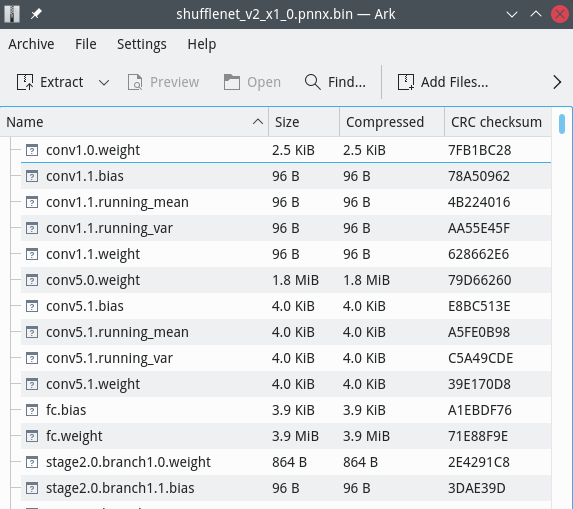
pnnx.bin file is a zip file with store-only mode(no compression)
weight binary file has its name composed by operator name and weight name
For example, nn.Conv2d conv_0 1 1 0 1 bias=1 dilation=(1,1) groups=1 in_channels=12 kernel_size=(3,3) out_channels=16 padding=(0,0) stride=(1,1) @bias=(16) @weight=(16,12,3,3) would pull conv_0.weight and conv_0.bias into pnnx.bin zip archive.
weight binaries can be listed or modified with any archive application eg. 7zip
PNNX operator
PNNX always preserve operators from what PyTorch python api provides.
Here is the netron visualization comparison among ONNX, TorchScript and PNNX with the original PyTorch python code shown.
import torch
import torch.nn as nn

class Model(nn.Module):
    def __init__(self):
        super(Model, self).__init__()

        self.attention = nn.MultiheadAttention(embed_dim=256, num_heads=32)

    def forward(self, x):
        x, _ = self.attention(x, x, x)
        return x
| ONNX | TorchScript | PNNX |
|---|---|---|
 |
 |
 |
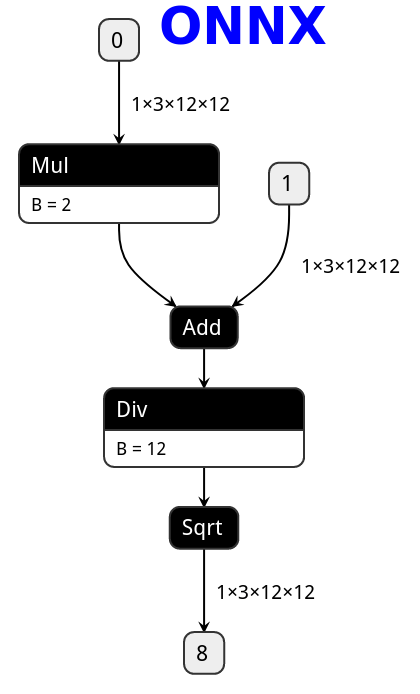
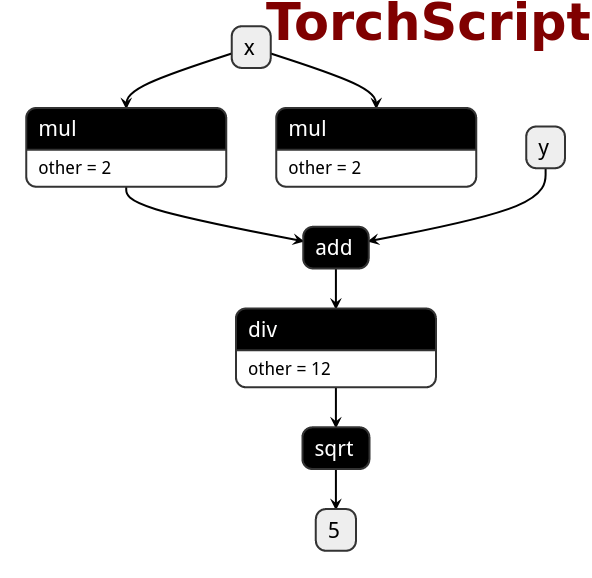
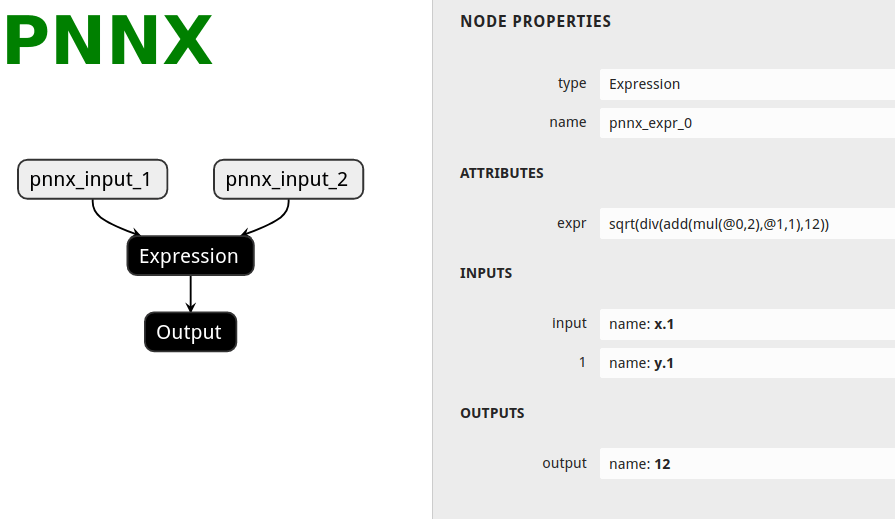
PNNX expression operator
PNNX trys to preserve expression from what PyTorch python code writes.
Here is the netron visualization comparison among ONNX, TorchScript and PNNX with the original PyTorch python code shown.
import torch

def foo(x, y):
    return torch.sqrt((2 * x + y) / 12)
| ONNX | TorchScript | PNNX |
|---|---|---|
 |
 |
 |
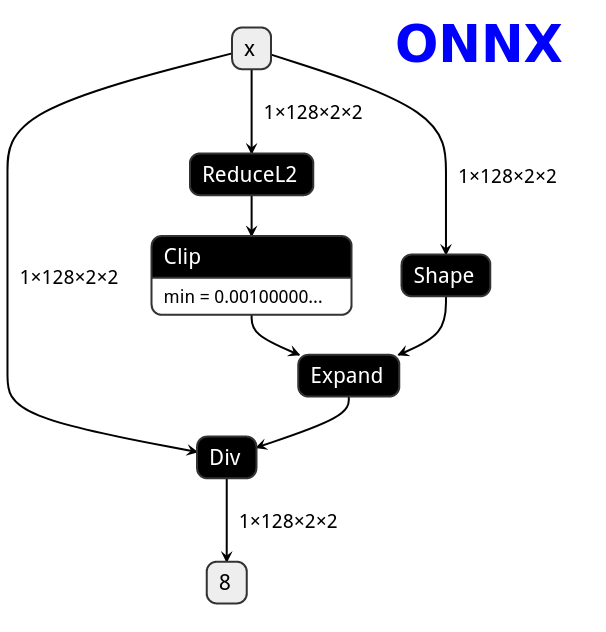
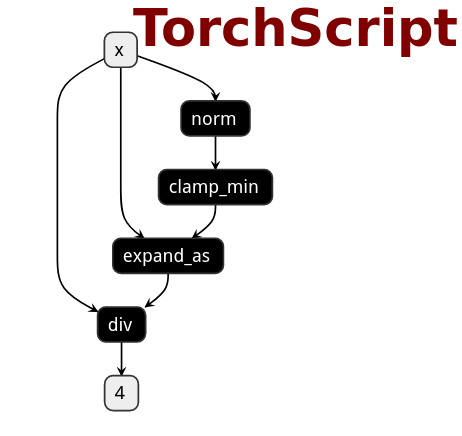
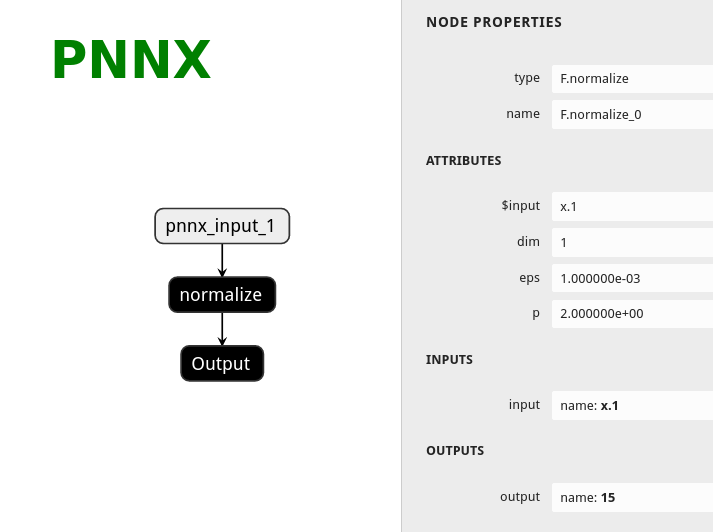
PNNX torch function operator
PNNX trys to preserve torch functions and Tensor member functions as one operator from what PyTorch python api provides.
Here is the netron visualization comparison among ONNX, TorchScript and PNNX with the original PyTorch python code shown.
import torch
import torch.nn.functional as F

class Model(nn.Module):
    def __init__(self):
        super(Model, self).__init__()

    def forward(self, x):
        x = F.normalize(x, eps=1e-3)
        return x
| ONNX | TorchScript | PNNX |
|---|---|---|
 |
 |
 |
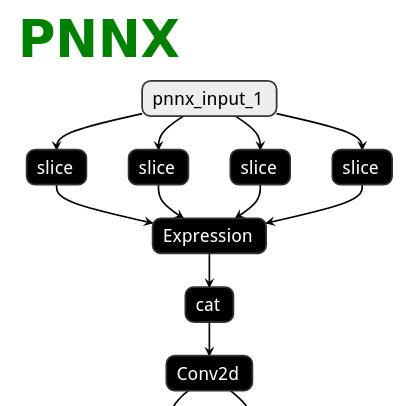
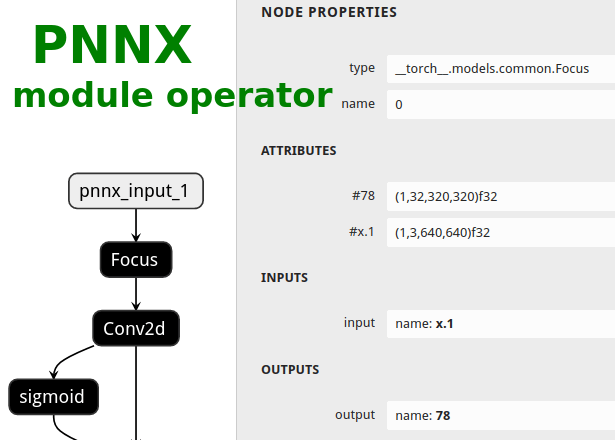
PNNX module operator
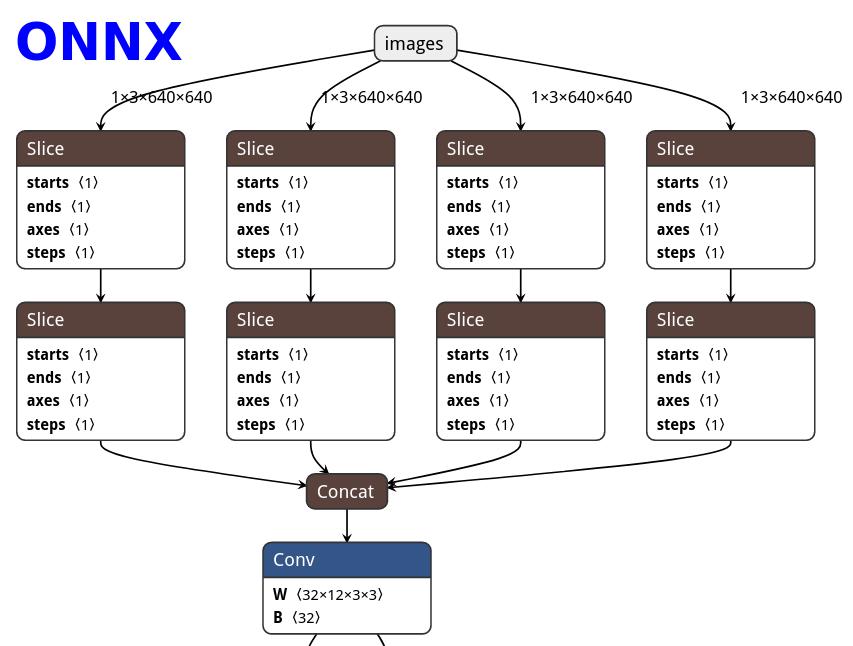
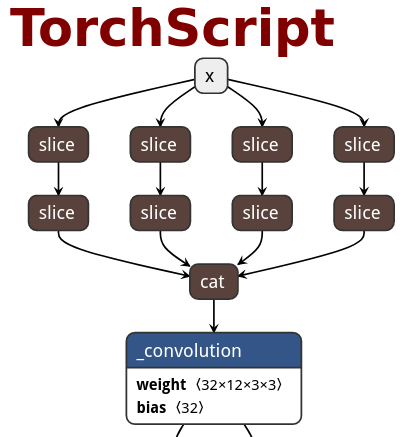
Users could ask PNNX to keep module as one big operator when it has complex logic.
The process is optional and could be enabled via moduleop command line option.
After pass_level0, all modules will be presented in terminal output, then you can pick the interesting ones as module operators.
############# pass_level0
inline module = models.common.Bottleneck
inline module = models.common.C3
inline module = models.common.Concat
inline module = models.common.Conv
inline module = models.common.Focus
inline module = models.common.SPP
inline module = models.yolo.Detect
inline module = utils.activations.SiLU
pnnx yolov5s.pt inputshape=[1,3,640,640] moduleop=models.common.Focus,models.yolo.Detect
Here is the netron visualization comparison among ONNX, TorchScript and PNNX with the original PyTorch python code shown.
import torch
import torch.nn as nn

class Focus(nn.Module):
    # Focus wh information into c-space
    def __init__(self, c1, c2, k=1, s=1, p=None, g=1, act=True):  # ch_in, ch_out, kernel, stride, padding, groups
        super().__init__()
        self.conv = Conv(c1 * 4, c2, k, s, p, g, act)

    def forward(self, x):  # x(b,c,w,h) -> y(b,4c,w/2,h/2)
        return self.conv(torch.cat([x[..., ::2, ::2], x[..., 1::2, ::2], x[..., ::2, 1::2], x[..., 1::2, 1::2]], 1))
| ONNX | TorchScript | PNNX | PNNX with module operator |
|---|---|---|---|
 |
 |
 |
 |
PNNX python inference
A python script will be generated by default when converting TorchScript to pnnx.
This script is the python code representation of PNNX and can be used for model inference.
There are some utility functions for loading weight binary from pnnx.bin.
You can even export the model TorchScript AGAIN from this generated code!
import torch
import torch.nn as nn
import torch.nn.functional as F

class Model(nn.Module):
    def __init__(self):
        super(Model, self).__init__()

        self.linear_0 = nn.Linear(in_features=128, out_features=256, bias=True)
        self.linear_1 = nn.Linear(in_features=256, out_features=4, bias=True)

    def forward(self, x):
        x = self.linear_0(x)
        x = F.leaky_relu(x, 0.15)
        x = self.linear_1(x)
        return x
import os
import numpy as np
import tempfile, zipfile
import torch
import torch.nn as nn
import torch.nn.functional as F

class Model(nn.Module):
    def __init__(self):
        super(Model, self).__init__()

        self.linear_0 = nn.Linear(bias=True, in_features=128, out_features=256)
        self.linear_1 = nn.Linear(bias=True, in_features=256, out_features=4)

        archive = zipfile.ZipFile('../../function.pnnx.bin', 'r')
        self.linear_0.bias = self.load_pnnx_bin_as_parameter(archive, 'linear_0.bias', (256), 'float32')
        self.linear_0.weight = self.load_pnnx_bin_as_parameter(archive, 'linear_0.weight', (256,128), 'float32')
        self.linear_1.bias = self.load_pnnx_bin_as_parameter(archive, 'linear_1.bias', (4), 'float32')
        self.linear_1.weight = self.load_pnnx_bin_as_parameter(archive, 'linear_1.weight', (4,256), 'float32')
        archive.close()

    def load_pnnx_bin_as_parameter(self, archive, key, shape, dtype):
        return nn.Parameter(self.load_pnnx_bin_as_tensor(archive, key, shape, dtype))

    def load_pnnx_bin_as_tensor(self, archive, key, shape, dtype):
        fd, tmppath = tempfile.mkstemp()
        with os.fdopen(fd, 'wb') as tmpf, archive.open(key) as keyfile:
            tmpf.write(keyfile.read())
        m = np.memmap(tmppath, dtype=dtype, mode='r', shape=shape).copy()
        os.remove(tmppath)
        return torch.from_numpy(m)

    def forward(self, v_x_1):
        v_7 = self.linear_0(v_x_1)
        v_input_1 = F.leaky_relu(input=v_7, negative_slope=0.150000)
        v_12 = self.linear_1(v_input_1)
        return v_12
PNNX shape propagation
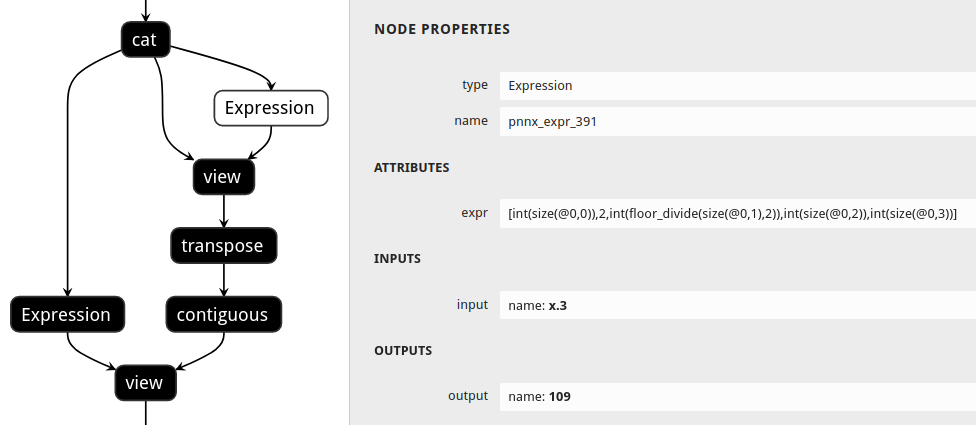
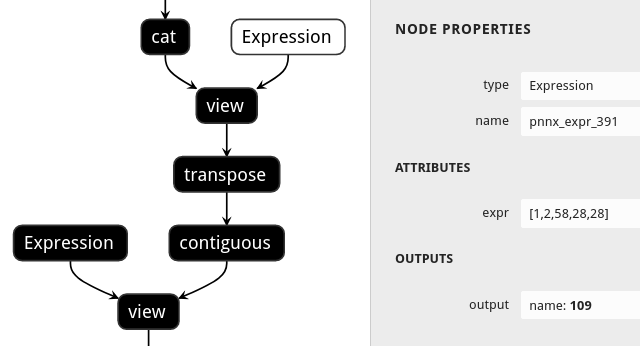
Users could ask PNNX to resolve all tensor shapes in model graph and constify some common expressions involved when tensor shapes are known.
The process is optional and could be enabled via inputshape command line option.
pnnx shufflenet_v2_x1_0.pt inputshape=[1,3,224,224]
def channel_shuffle(x: Tensor, groups: int) -> Tensor:
    batchsize, num_channels, height, width = x.size()
    channels_per_group = num_channels // groups

    # reshape
    x = x.view(batchsize, groups, channels_per_group, height, width)

    x = torch.transpose(x, 1, 2).contiguous()

    # flatten
    x = x.view(batchsize, -1, height, width)

    return x
| without shape propagation | with shape propagation |
|---|---|
 |
 |
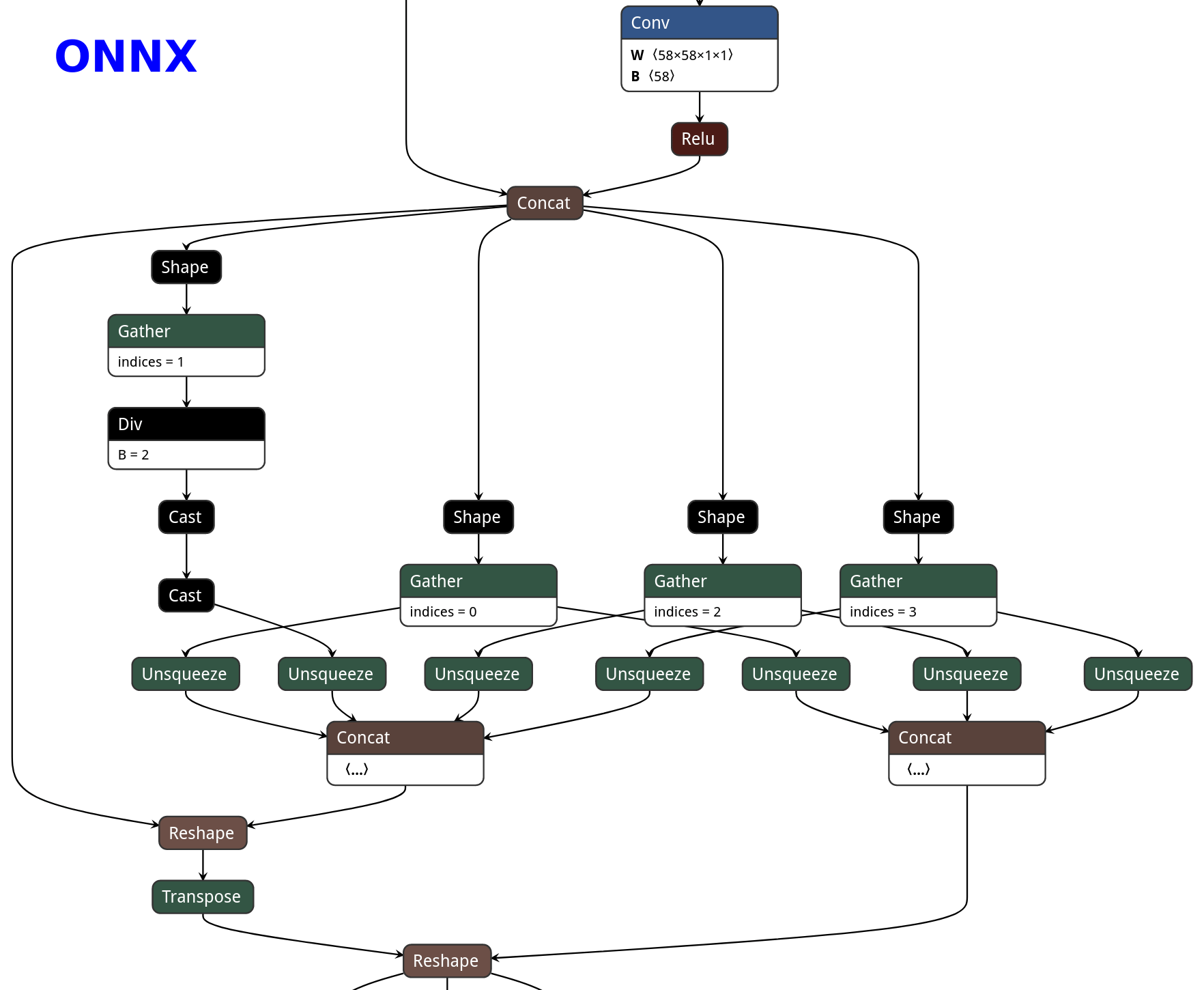
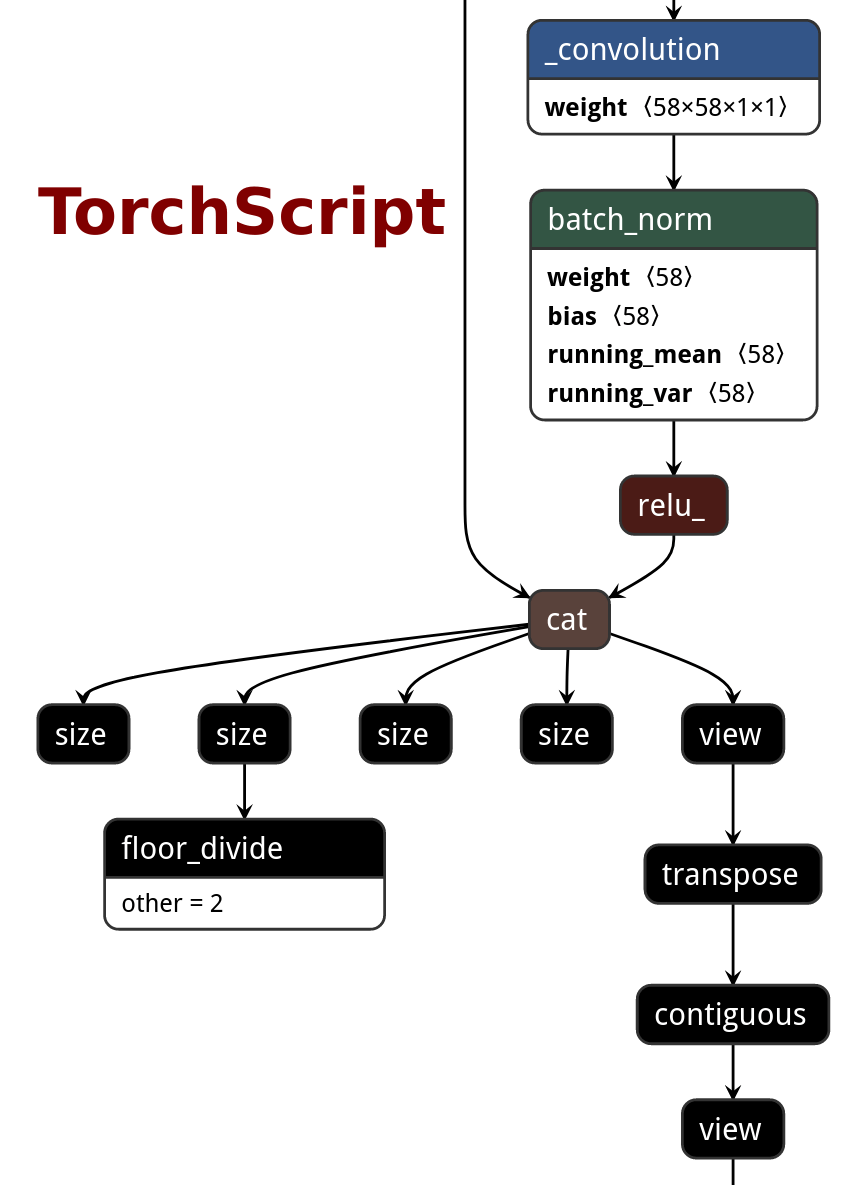
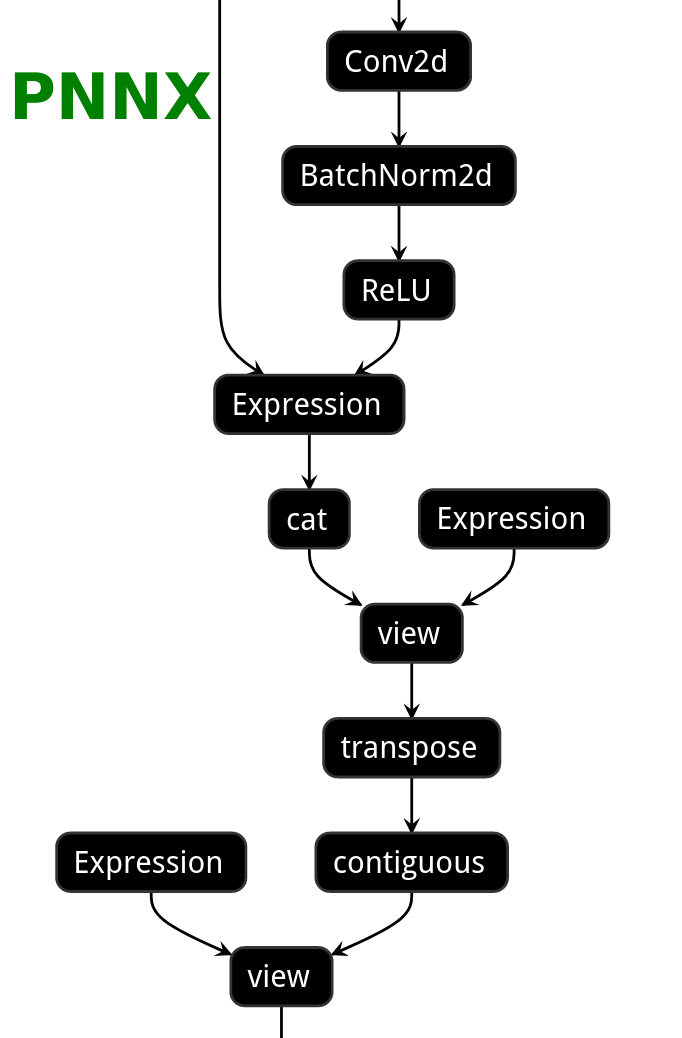
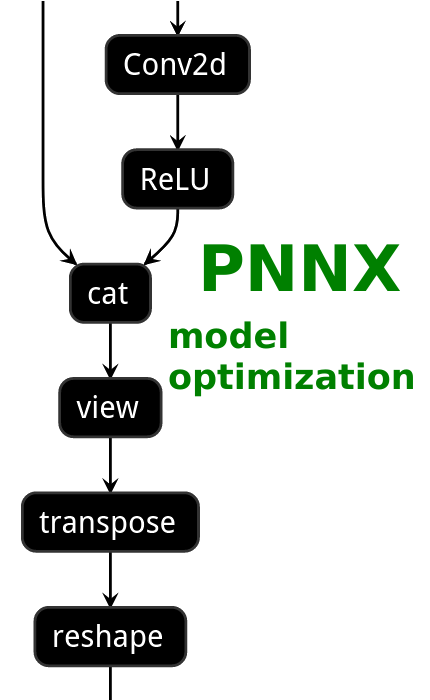
PNNX model optimization
| ONNX | TorchScript | PNNX without optimization | PNNX with optimization |
|---|---|---|---|
 |
 |
 |
 |
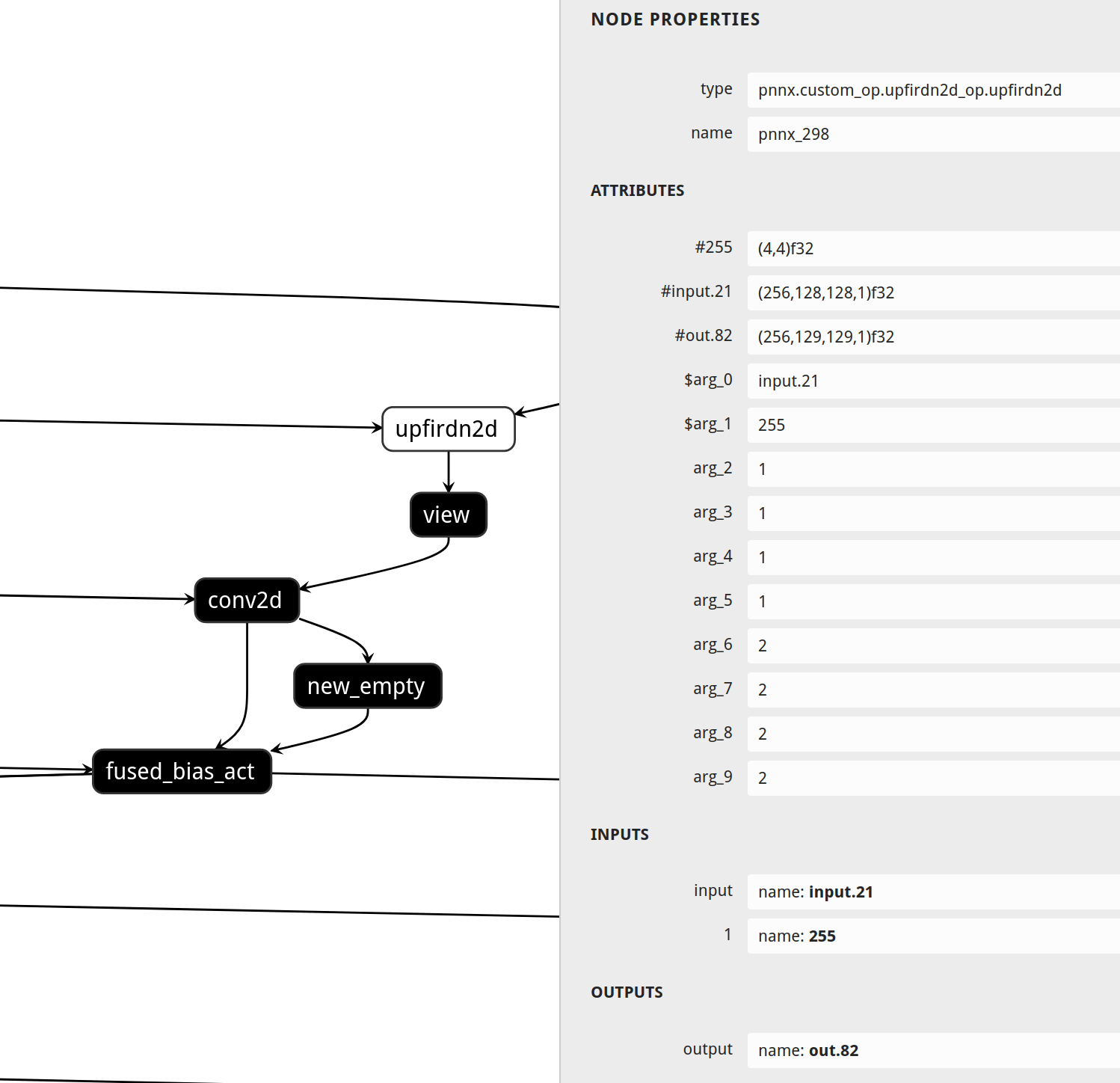
PNNX custom operator
import os

import torch
from torch.autograd import Function
from torch.utils.cpp_extension import load, _import_module_from_library

module_path = os.path.dirname(__file__)
upfirdn2d_op = load(
    'upfirdn2d',
    sources=[
        os.path.join(module_path, 'upfirdn2d.cpp'),
        os.path.join(module_path, 'upfirdn2d_kernel.cu'),
    ],
    is_python_module=False
)

def upfirdn2d(input, kernel, up=1, down=1, pad=(0, 0)):
    pad_x0 = pad[0]
    pad_x1 = pad[1]
    pad_y0 = pad[0]
    pad_y1 = pad[1]

    kernel_h, kernel_w = kernel.shape
    batch, channel, in_h, in_w = input.shape

    input = input.reshape(-1, in_h, in_w, 1)

    out_h = (in_h * up + pad_y0 + pad_y1 - kernel_h) // down + 1
    out_w = (in_w * up + pad_x0 + pad_x1 - kernel_w) // down + 1

    out = torch.ops.upfirdn2d_op.upfirdn2d(input, kernel, up, up, down, down, pad_x0, pad_x1, pad_y0, pad_y1)

    out = out.view(-1, channel, out_h, out_w)

    return out
#include <torch/extension.h>

torch::Tensor upfirdn2d(const torch::Tensor& input, const torch::Tensor& kernel,
                        int64_t up_x, int64_t up_y, int64_t down_x, int64_t down_y,
                        int64_t pad_x0, int64_t pad_x1, int64_t pad_y0, int64_t pad_y1) {
    // operator body
}

TORCH_LIBRARY(upfirdn2d_op, m) {
    m.def("upfirdn2d", upfirdn2d);
}
Supported PyTorch operator status
| torch.nn | Is Supported | Export to ncnn |
|---|---|---|
| nn.AdaptiveAvgPool1d | ✔️ | ✔️ |
| nn.AdaptiveAvgPool2d | ✔️ | ✔️ |
| nn.AdaptiveAvgPool3d | ✔️ | ✔️ |
| nn.AdaptiveMaxPool1d | ✔️ | ✔️ |
| nn.AdaptiveMaxPool2d | ✔️ | ✔️ |
| nn.AdaptiveMaxPool3d | ✔️ | ✔️ |
| nn.AlphaDropout | ✔️ | ✔️ |
| nn.AvgPool1d | ✔️ | ✔️* |
| nn.AvgPool2d | ✔️ | ✔️* |
| nn.AvgPool3d | ✔️ | ✔️* |
| nn.BatchNorm1d | ✔️ | ✔️ |
| nn.BatchNorm2d | ✔️ | ✔️ |
| nn.BatchNorm3d | ✔️ | ✔️ |
| nn.Bilinear | ||
| nn.CELU | ✔️ | ✔️ |
| nn.ChannelShuffle | ✔️ | ✔️ |
| nn.ConstantPad1d | ✔️ | ✔️ |
| nn.ConstantPad2d | ✔️ | ✔️ |
| nn.ConstantPad3d | ✔️ | ✔️ |
| nn.Conv1d | ✔️ | ✔️ |
| nn.Conv2d | ✔️ | ✔️ |
| nn.Conv3d | ✔️ | ✔️ |
| nn.ConvTranspose1d | ✔️ | ✔️ |
| nn.ConvTranspose2d | ✔️ | ✔️ |
| nn.ConvTranspose3d | ✔️ | ✔️ |
| nn.CosineSimilarity | ||
| nn.Dropout | ✔️ | ✔️ |
| nn.Dropout2d | ✔️ | ✔️ |
| nn.Dropout3d | ✔️ | ✔️ |
| nn.ELU | ✔️ | ✔️ |
| nn.Embedding | ✔️ | ✔️ |
| nn.EmbeddingBag | ||
| nn.Flatten | ✔️ | |
| nn.Fold | ✔️ | ✔️ |
| nn.FractionalMaxPool2d | ||
| nn.FractionalMaxPool3d | ||
| nn.GELU | ✔️ | ✔️ |
| nn.GLU | ✔️ | ✔️ |
| nn.GroupNorm | ✔️ | ✔️ |
| nn.GRU | ✔️ | ✔️ |
| nn.GRUCell | ||
| nn.Hardshrink | ✔️ | |
| nn.Hardsigmoid | ✔️ | ✔️ |
| nn.Hardswish | ✔️ | ✔️ |
| nn.Hardtanh | ✔️ | ✔️ |
| nn.Identity | ||
| nn.InstanceNorm1d | ✔️ | |
| nn.InstanceNorm2d | ✔️ | ✔️ |
| nn.InstanceNorm3d | ✔️ | |
| nn.LayerNorm | ✔️ | ✔️ |
| nn.LazyBatchNorm1d | ||
| nn.LazyBatchNorm2d | ||
| nn.LazyBatchNorm3d | ||
| nn.LazyConv1d | ||
| nn.LazyConv2d | ||
| nn.LazyConv3d | ||
| nn.LazyConvTranspose1d | ||
| nn.LazyConvTranspose2d | ||
| nn.LazyConvTranspose3d | ||
| nn.LazyLinear | ||
| nn.LeakyReLU | ✔️ | ✔️ |
| nn.Linear | ✔️ | ✔️ |
| nn.LocalResponseNorm | ✔️ | ✔️ |
| nn.LogSigmoid | ✔️ | ✔️ |
| nn.LogSoftmax | ✔️ | ✔️ |
| nn.LPPool1d | ✔️ | |
| nn.LPPool2d | ✔️ | |
| nn.LSTM | ✔️ | ✔️ |
| nn.LSTMCell | ||
| nn.MaxPool1d | ✔️ | ✔️ |
| nn.MaxPool2d | ✔️ | ✔️ |
| nn.MaxPool3d | ✔️ | ✔️ |
| nn.MaxUnpool1d | ||
| nn.MaxUnpool2d | ||
| nn.MaxUnpool3d | ||
| nn.Mish | ✔️ | ✔️ |
| nn.MultiheadAttention | ✔️ | ✔️* |
| nn.PairwiseDistance | ||
| nn.PixelShuffle | ✔️ | ✔️ |
| nn.PixelUnshuffle | ✔️ | ✔️ |
| nn.PReLU | ✔️ | ✔️ |
| nn.ReflectionPad1d | ✔️ | ✔️ |
| nn.ReflectionPad2d | ✔️ | ✔️ |
| nn.ReLU | ✔️ | ✔️ |
| nn.ReLU6 | ✔️ | ✔️ |
| nn.ReplicationPad1d | ✔️ | ✔️ |
| nn.ReplicationPad2d | ✔️ | ✔️ |
| nn.ReplicationPad3d | ✔️ | |
| nn.RNN | ✔️ | ✔️* |
| nn.RNNBase | ||
| nn.RNNCell | ||
| nn.RReLU | ✔️ | |
| nn.SELU | ✔️ | ✔️ |
| nn.Sigmoid | ✔️ | ✔️ |
| nn.SiLU | ✔️ | ✔️ |
| nn.Softmax | ✔️ | ✔️ |
| nn.Softmax2d | ✔️ | ✔️ |
| nn.Softmin | ✔️ | |
| nn.Softplus | ✔️ | |
| nn.Softshrink | ✔️ | |
| nn.Softsign | ✔️ | |
| nn.SyncBatchNorm | ||
| nn.Tanh | ✔️ | ✔️ |
| nn.Tanhshrink | ✔️ | |
| nn.Threshold | ✔️ | |
| nn.Transformer | ||
| nn.TransformerDecoder | ||
| nn.TransformerDecoderLayer | ||
| nn.TransformerEncoder | ||
| nn.TransformerEncoderLayer | ||
| nn.Unflatten | ||
| nn.Unfold | ✔️ | ✔️ |
| nn.Upsample | ✔️ | ✔️ |
| nn.UpsamplingBilinear2d | ✔️ | ✔️ |
| nn.UpsamplingNearest2d | ✔️ | ✔️ |
| nn.ZeroPad2d | ✔️ | ✔️ |
| torch.nn.functional | Is Supported | Export to ncnn |
|---|---|---|
| F.adaptive_avg_pool1d | ✔️ | ✔️ |
| F.adaptive_avg_pool2d | ✔️ | ✔️ |
| F.adaptive_avg_pool3d | ✔️ | ✔️ |
| F.adaptive_max_pool1d | ✔️ | ✔️ |
| F.adaptive_max_pool2d | ✔️ | ✔️ |
| F.adaptive_max_pool3d | ✔️ | ✔️ |
| F.affine_grid | ✔️ | |
| F.alpha_dropout | ✔️ | ✔️ |
| F.avg_pool1d | ✔️ | ✔️* |
| F.avg_pool2d | ✔️ | ✔️* |
| F.avg_pool3d | ✔️ | ✔️* |
| F.batch_norm | ✔️ | ✔️ |
| F.bilinear | ||
| F.celu | ✔️ | |
| F.conv1d | ✔️ | ✔️ |
| F.conv2d | ✔️ | ✔️ |
| F.conv3d | ✔️ | ✔️ |
| F.conv_transpose1d | ✔️ | ✔️ |
| F.conv_transpose2d | ✔️ | ✔️ |
| F.conv_transpose3d | ✔️ | ✔️ |
| F.cosine_similarity | ||
| F.dropout | ✔️ | ✔️ |
| F.dropout2d | ✔️ | ✔️ |
| F.dropout3d | ✔️ | ✔️ |
| F.elu | ✔️ | ✔️ |
| F.elu_ | ✔️ | ✔️ |
| F.embedding | ✔️ | ✔️ |
| F.embedding_bag | ||
| F.feature_alpha_dropout | ✔️ | ✔️ |
| F.fold | ✔️ | ✔️ |
| F.fractional_max_pool2d | ||
| F.fractional_max_pool3d | ||
| F.gelu | ✔️ | ✔️ |
| F.glu | ✔️ | ✔️ |
| F.grid_sample | ✔️ | ✔️ |
| F.group_norm | ✔️ | ✔️ |
| F.gumbel_softmax | ||
| F.hardshrink | ✔️ | |
| F.hardsigmoid | ✔️ | ✔️ |
| F.hardswish | ✔️ | ✔️ |
| F.hardtanh | ✔️ | ✔️ |
| F.hardtanh_ | ✔️ | ✔️ |
| F.instance_norm | ✔️ | ✔️ |
| F.interpolate | ✔️ | ✔️ |
| F.layer_norm | ✔️ | ✔️ |
| F.leaky_relu | ✔️ | ✔️ |
| F.leaky_relu_ | ✔️ | ✔️ |
| F.linear | ✔️ | ✔️* |
| F.local_response_norm | ✔️ | ✔️ |
| F.logsigmoid | ✔️ | ✔️ |
| F.log_softmax | ✔️ | ✔️ |
| F.lp_pool1d | ✔️ | |
| F.lp_pool2d | ✔️ | |
| F.max_pool1d | ✔️ | ✔️ |
| F.max_pool2d | ✔️ | ✔️ |
| F.max_pool3d | ✔️ | ✔️ |
| F.max_unpool1d | ||
| F.max_unpool2d | ||
| F.max_unpool3d | ||
| F.mish | ✔️ | ✔️ |
| F.normalize | ✔️ | ✔️ |
| F.one_hot | ||
| F.pad | ✔️ | ✔️ |
| F.pairwise_distance | ||
| F.pdist | ||
| F.pixel_shuffle | ✔️ | ✔️ |
| F.pixel_unshuffle | ✔️ | ✔️ |
| F.prelu | ✔️ | ✔️ |
| F.relu | ✔️ | ✔️ |
| F.relu_ | ✔️ | ✔️ |
| F.relu6 | ✔️ | ✔️ |
| F.rrelu | ✔️ | |
| F.rrelu_ | ✔️ | |
| F.scaled_dot_product_attention | ✔️ | |
| F.selu | ✔️ | ✔️ |
| F.sigmoid | ✔️ | ✔️ |
| F.silu | ✔️ | ✔️ |
| F.softmax | ✔️ | ✔️ |
| F.softmin | ✔️ | |
| F.softplus | ✔️ | |
| F.softshrink | ✔️ | |
| F.softsign | ✔️ | |
| F.tanh | ✔️ | ✔️ |
| F.tanhshrink | ✔️ | |
| F.threshold | ✔️ | |
| F.threshold_ | ✔️ | |
| F.unfold | ✔️ | ✔️ |
| F.upsample | ✔️ | ✔️ |
| F.upsample_bilinear | ✔️ | ✔️ |
| F.upsample_nearest | ✔️ | ✔️ |


Release files for pnnx 20231211
For a detailed explanation of source distributions (sdists) and built distributions (wheels), please see the package formats documentation.
Built distributions (wheels)
Total release size: 251.6 MB
Release files / pnnx-20231211-cp311-cp311-win_amd64.whl
| Download URL | pnnx-20231211-cp311-cp311-win_amd64.whl |
|---|---|
| Size | 12.9 MB |
| Tags | CPython 3.11 Windows x86-64 |
|
SHA-256 checksum How to use checksums |
db073a0d9377ce02664b8fdd41cdaa72bb3616a32fd2e24e3f8822d932ebe8d4
|
|
BLAKE2b-256 checksum How to use checksums |
c5fbb0635a1a68ca500db4d811ad61eb0422883732832f112357311222334b7b
|
| Upload date | |
|
Uploaded using Trusted Publishing? What is trusted publishing? |
No |
| Uploaded via |
twine/4.0.2 CPython/3.11.7
|
Release files / pnnx-20231211-cp311-cp311-manylinux_2_17_x86_64.manylinux2014_x86_64.whl
| Download URL | pnnx-20231211-cp311-cp311-manylinux_2_17_x86_64.manylinux2014_x86_64.whl |
|---|---|
| Size | 17.7 MB |
| Tags | CPython 3.11 Linux glibc 2.17+ x86-64 |
|
SHA-256 checksum How to use checksums |
558d2ae0646f77ddb9d5e6c26c8385865d500cb465603d7b482d572c24fdeb4d
|
|
BLAKE2b-256 checksum How to use checksums |
ed088bae3cdd1d67336469c80f90b37a576f2ccbf0e4f6900e851cb624949336
|
| Upload date | |
|
Uploaded using Trusted Publishing? What is trusted publishing? |
No |
| Uploaded via |
twine/4.0.2 CPython/3.11.7
|
Release files / pnnx-20231211-cp311-cp311-macosx_10_9_x86_64.whl
| Download URL | pnnx-20231211-cp311-cp311-macosx_10_9_x86_64.whl |
|---|---|
| Size | 19.7 MB |
| Tags | CPython 3.11 macOS 10.9+ x86-64 |
|
SHA-256 checksum How to use checksums |
40035b71d67edef53b3a25a8fbbef57abfb8f059fbe62e00c1934079afaa2e23
|
|
BLAKE2b-256 checksum How to use checksums |
e1960f28a6674fadae37d8fb03817ba75ab8062a28b89757ec6854895c974e50
|
| Upload date | |
|
Uploaded using Trusted Publishing? What is trusted publishing? |
No |
| Uploaded via |
twine/4.0.2 CPython/3.11.7
|
Release files / pnnx-20231211-cp310-cp310-win_amd64.whl
| Download URL | pnnx-20231211-cp310-cp310-win_amd64.whl |
|---|---|
| Size | 12.9 MB |
| Tags | CPython 3.10 Windows x86-64 |
|
SHA-256 checksum How to use checksums |
4154967b40b80299f8b2ec9927beccc65cc52fb4cbd97d0e9194bba9833fc60a
|
|
BLAKE2b-256 checksum How to use checksums |
52b3785d67177c9ae7f74bc72a3b90e6abdfa4a26554b031c394986f65025415
|
| Upload date | |
|
Uploaded using Trusted Publishing? What is trusted publishing? |
No |
| Uploaded via |
twine/4.0.2 CPython/3.11.7
|
Release files / pnnx-20231211-cp310-cp310-manylinux_2_17_x86_64.manylinux2014_x86_64.whl
| Download URL | pnnx-20231211-cp310-cp310-manylinux_2_17_x86_64.manylinux2014_x86_64.whl |
|---|---|
| Size | 17.7 MB |
| Tags | CPython 3.10 Linux glibc 2.17+ x86-64 |
|
SHA-256 checksum How to use checksums |
3b3b2b85515733f1b96bcf5b8a4f7bc4b2db202249aff5298569cb8e2eb82226
|
|
BLAKE2b-256 checksum How to use checksums |
e2deec1540705dcca6e800109dfa77d113ba314eecf68b437325642decd200b0
|
| Upload date | |
|
Uploaded using Trusted Publishing? What is trusted publishing? |
No |
| Uploaded via |
twine/4.0.2 CPython/3.11.7
|
Release files / pnnx-20231211-cp310-cp310-macosx_10_9_x86_64.whl
| Download URL | pnnx-20231211-cp310-cp310-macosx_10_9_x86_64.whl |
|---|---|
| Size | 19.7 MB |
| Tags | CPython 3.10 macOS 10.9+ x86-64 |
|
SHA-256 checksum How to use checksums |
c446619fd599a004ecdb183b6bb309c28d5ad67c84a9dc4578fc1a0fbb867afb
|
|
BLAKE2b-256 checksum How to use checksums |
acda941ef06eff29017b3741ef15c390463c2fa62b5be216a2b070e7173bc51d
|
| Upload date | |
|
Uploaded using Trusted Publishing? What is trusted publishing? |
No |
| Uploaded via |
twine/4.0.2 CPython/3.11.7
|
Release files / pnnx-20231211-cp39-cp39-win_amd64.whl
| Download URL | pnnx-20231211-cp39-cp39-win_amd64.whl |
|---|---|
| Size | 12.9 MB |
| Tags | CPython 3.9 Windows x86-64 |
|
SHA-256 checksum How to use checksums |
40543d9cc7cb2c991595bf6f25c21a7ece5eb552109be7ad453d2d7bb4979abd
|
|
BLAKE2b-256 checksum How to use checksums |
de70ae8dc2d09cf916f4493961087a7d7e50f4d7b0b7eeec38183bbbd3f7cba4
|
| Upload date | |
|
Uploaded using Trusted Publishing? What is trusted publishing? |
No |
| Uploaded via |
twine/4.0.2 CPython/3.11.7
|
Release files / pnnx-20231211-cp39-cp39-manylinux_2_17_x86_64.manylinux2014_x86_64.whl
| Download URL | pnnx-20231211-cp39-cp39-manylinux_2_17_x86_64.manylinux2014_x86_64.whl |
|---|---|
| Size | 17.7 MB |
| Tags | CPython 3.9 Linux glibc 2.17+ x86-64 |
|
SHA-256 checksum How to use checksums |
8087d1f83fd3bf16b8bc7f65a01d24853c5f9bd4067e002b068b95b8c2489d19
|
|
BLAKE2b-256 checksum How to use checksums |
eecde393be1e343a9a72219471d390186d5e5d5a2186bb4b5e7e997921b3530e
|
| Upload date | |
|
Uploaded using Trusted Publishing? What is trusted publishing? |
No |
| Uploaded via |
twine/4.0.2 CPython/3.11.7
|
Release files / pnnx-20231211-cp39-cp39-macosx_10_9_x86_64.whl
| Download URL | pnnx-20231211-cp39-cp39-macosx_10_9_x86_64.whl |
|---|---|
| Size | 19.7 MB |
| Tags | CPython 3.9 macOS 10.9+ x86-64 |
|
SHA-256 checksum How to use checksums |
a5786e28366a88720d0b405198f400144d0cf44dd6a718f072db5a16055526d4
|
|
BLAKE2b-256 checksum How to use checksums |
8fe94a14e4977fd0b24d88d9839dd719d62206931b82be1ce89fd49e2471f042
|
| Upload date | |
|
Uploaded using Trusted Publishing? What is trusted publishing? |
No |
| Uploaded via |
twine/4.0.2 CPython/3.11.7
|
Release files / pnnx-20231211-cp38-cp38-win_amd64.whl
| Download URL | pnnx-20231211-cp38-cp38-win_amd64.whl |
|---|---|
| Size | 12.9 MB |
| Tags | CPython 3.8 Windows x86-64 |
|
SHA-256 checksum How to use checksums |
75795c644db522810d368a81d8e77d55599ba0c4a03c91415ef2d061e725ef1b
|
|
BLAKE2b-256 checksum How to use checksums |
792b8d66a5c0418c01ae36a66f07b4cba18dd6492226e683f2782938b2591fa4
|
| Upload date | |
|
Uploaded using Trusted Publishing? What is trusted publishing? |
No |
| Uploaded via |
twine/4.0.2 CPython/3.11.7
|
Release files / pnnx-20231211-cp38-cp38-manylinux_2_17_x86_64.manylinux2014_x86_64.whl
| Download URL | pnnx-20231211-cp38-cp38-manylinux_2_17_x86_64.manylinux2014_x86_64.whl |
|---|---|
| Size | 17.7 MB |
| Tags | CPython 3.8 Linux glibc 2.17+ x86-64 |
|
SHA-256 checksum How to use checksums |
6c7522c50feb9bf7fe731218a276f2e03da0bfd6bb1cc791b5df0a82c0fcdf2b
|
|
BLAKE2b-256 checksum How to use checksums |
556a3d40f55e8dbce597cfef962778ef508b0444e723f1f1a3a9aab88d6a8c22
|
| Upload date | |
|
Uploaded using Trusted Publishing? What is trusted publishing? |
No |
| Uploaded via |
twine/4.0.2 CPython/3.11.7
|
Release files / pnnx-20231211-cp38-cp38-macosx_10_9_x86_64.whl
| Download URL | pnnx-20231211-cp38-cp38-macosx_10_9_x86_64.whl |
|---|---|
| Size | 19.7 MB |
| Tags | CPython 3.8 macOS 10.9+ x86-64 |
|
SHA-256 checksum How to use checksums |
b5d27e194bded91fb2a25e30f9c5834912c82cd568656aa023ed38e1c605d67e
|
|
BLAKE2b-256 checksum How to use checksums |
f9ec14da852e195dc350827233227d51d53e6a16c62ddf50bc02f3965d321616
|
| Upload date | |
|
Uploaded using Trusted Publishing? What is trusted publishing? |
No |
| Uploaded via |
twine/4.0.2 CPython/3.11.7
|
Release files / pnnx-20231211-cp37-cp37m-win_amd64.whl
| Download URL | pnnx-20231211-cp37-cp37m-win_amd64.whl |
|---|---|
| Size | 12.9 MB |
| Tags | CPython 3.7 CPython 3.7 pymalloc Windows x86-64 |
|
SHA-256 checksum How to use checksums |
230830883ccbfaa30be8756f61fd3ad446443ba5de4ce1af71c6f96378da8d1b
|
|
BLAKE2b-256 checksum How to use checksums |
b509e4e6bb7eaa4c402af9ad5dd06f7c2450396b07036207d5e45b01253d3a0e
|
| Upload date | |
|
Uploaded using Trusted Publishing? What is trusted publishing? |
No |
| Uploaded via |
twine/4.0.2 CPython/3.11.7
|
Release files / pnnx-20231211-cp37-cp37m-manylinux_2_17_x86_64.manylinux2014_x86_64.whl
| Download URL | pnnx-20231211-cp37-cp37m-manylinux_2_17_x86_64.manylinux2014_x86_64.whl |
|---|---|
| Size | 17.7 MB |
| Tags | CPython 3.7 CPython 3.7 pymalloc Linux glibc 2.17+ x86-64 |
|
SHA-256 checksum How to use checksums |
f665149d32e28923e09fe26fdd95d024216028afd488e51b36f2c7e53bebc684
|
|
BLAKE2b-256 checksum How to use checksums |
853d6bb79db00deb49956ce297dc8c48a65105bcbbfe3947883763e433bcc2a7
|
| Upload date | |
|
Uploaded using Trusted Publishing? What is trusted publishing? |
No |
| Uploaded via |
twine/4.0.2 CPython/3.11.7
|
Release files / pnnx-20231211-cp37-cp37m-macosx_10_9_x86_64.whl
| Download URL | pnnx-20231211-cp37-cp37m-macosx_10_9_x86_64.whl |
|---|---|
| Size | 19.7 MB |
| Tags | CPython 3.7 CPython 3.7 pymalloc macOS 10.9+ x86-64 |
|
SHA-256 checksum How to use checksums |
aeb3849878c8d0b2ac544fac172c80ba9149155558a499934960fb07ccc12e63
|
|
BLAKE2b-256 checksum How to use checksums |
83d1242da8fdc357cb10a7b953cf493ff17e583df418cbd0010aea432635ffab
|
| Upload date | |
|
Uploaded using Trusted Publishing? What is trusted publishing? |
No |
| Uploaded via |
twine/4.0.2 CPython/3.11.7
|














