
Pobshell
A Bash‑like shell for live Python objects.
Think cd, ls, cat, and find — but for Python objects instead of files. Stroll around your code, runtime state, and data structures. Inspect everything: modules, classes, live objects. It's pick‑up‑and‑play: familiar commands plus optional new tricks. A fun and genuinely useful way to explore a Python app, package, or Python itself.
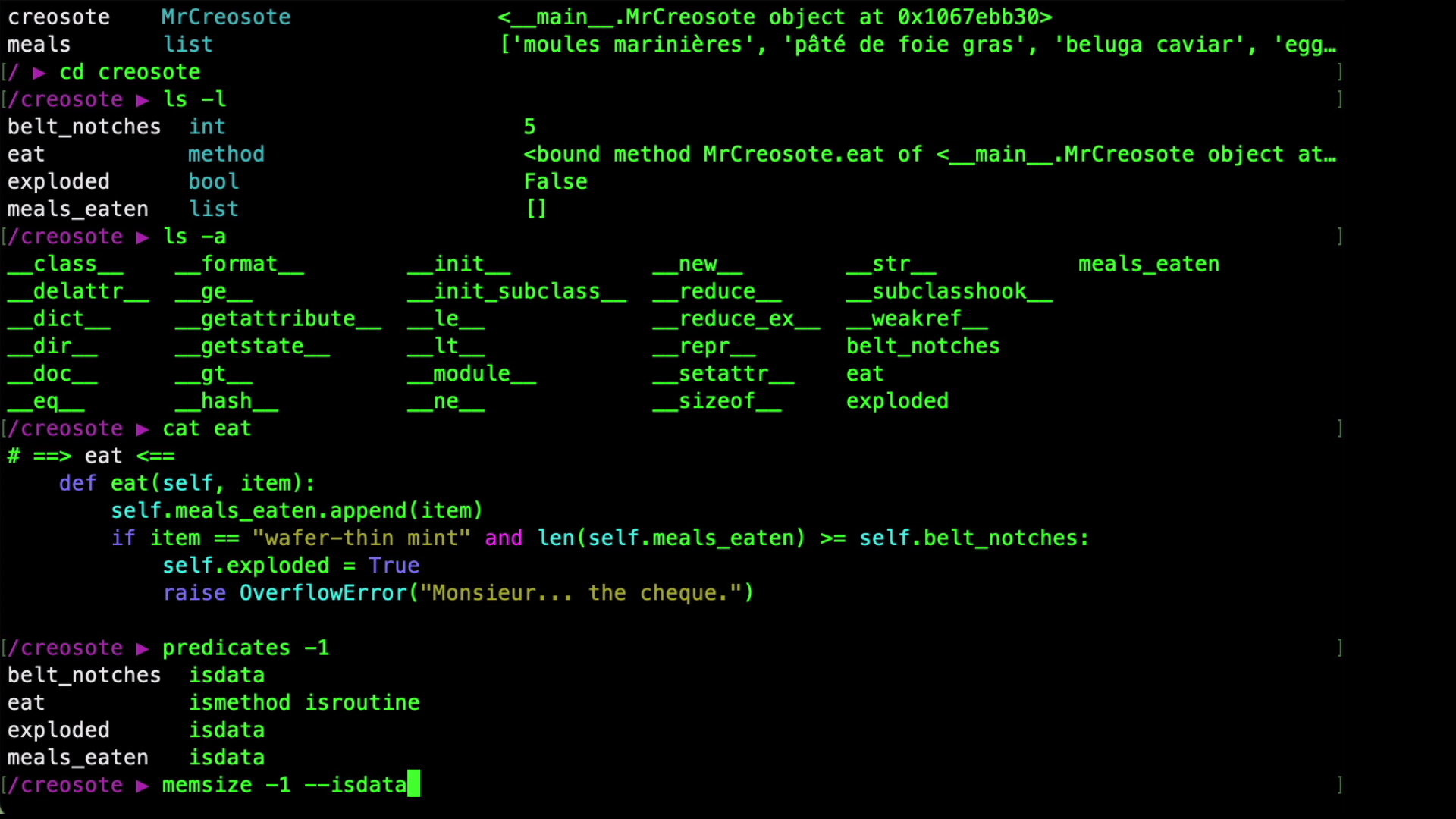
https://github.com/user-attachments/assets/d3dc69dd-5195-4b51-81eb-be29637b43a6
What Is Pobshell For?
- Exploratory debugging – Inspect live object state on the fly
- Understanding APIs – Examine code, docstrings, class trees
- Shell integration – Pipe object state or code snippets to LLMs or OS tools
- Code and data search – Recursive search for object state or source without file paths
- REPL & paused scripts – Explore runtime environments dynamically
- Teaching & demos – Make Python internals visible and walkable
How It Works
Pobshell maps Python objects to Linux‑style paths:
- Each object is a "directory"
- Each attribute or member is a child in that directory
- Navigate using Bash-style commands
Start Pobshell
import json  # Something to explore

import pobshell
pobshell.shell()
Gives you a prompt with your variables in the root directory
/ ▶ ls
json
/ ▶ cd json
/json ▶ ls
JSONDecodeError  JSONEncoder  decoder          dump   encoder  loads
JSONDecoder      codecs       detect_encoding  dumps  load     scanner
/json ▶ doc -1
JSONDecodeError  Subclass of ValueError with the following additional properties:
JSONDecoder      Simple JSON <https://json.org> decoder
JSONEncoder      Extensible JSON <https://json.org> encoder for Python data structures.
codecs           codecs -- Python Codec Registry, API and helpers.
decoder          Implementation of JSONDecoder
dump             Serialize ``obj`` as a JSON formatted stream to ``fp`` (a
dumps            Serialize ``obj`` to a JSON formatted ``str``.
encoder          Implementation of JSONEncoder
load             Deserialize ``fp`` (a ``.read()``-supporting file-like object containing
loads            Deserialize ``s`` (a ``str``, ``bytes`` or ``bytearray`` instance
scanner          JSON token scanner
Core Commands
Pobshell inspection commands are built on Python’s inspect module (mostly).
| Command | Description |
|---|---|
ls -l |
Long listing: names, types, values |
ls -x |
Extra long listing: ls -l, cat -1, doc -1,... |
cat |
Show syntax‑highlighted source code |
doc |
Print docstrings |
predicates |
Inspect predicates (e.g. isclass) |
memsize |
Total memory size of object and members |
tree |
Diagram object structure |
find |
Recursive search |
…more commands
| Command | Description |
|---|---|
filepath |
File where the object was defined |
id |
Unique identifier of the object |
module |
Module that defines the object |
mro |
Method resolution order |
abcs |
Show abstract base classes |
pprint |
Pretty-printed object value |
pydoc |
Auto-generated documentation |
repr |
saferepr() representation of object value |
signature |
Function signature |
str |
str() representation of object value |
type |
Type of the object |
ls |
List object members |
typename |
Name of the object’s type (type.name) |
which |
Defining class for a method or descriptor |
Command targets
command [TARGET]
- Omit target — inspect all members of the current object. Use
-ato include private attributes & dunders.
E.g./json/JSONDecodeError ▶ ls -la *pattern*— inspect members with matching names.
E.g./json ▶ ls -l *Decode*/path(no trailing slash) — inspect a specific target object. E.g./ ▶ ls -l /json/JSONDecodeError/path/(trailing slash) — inspect members of target object.
E.g./ ▶ ls -l /json/JSONDecodeError/
Filters
Use filters to control which members inspection commands report — filter by type, docstring, source, string representation, Python expression, and more.
N.B. Use same syntax for recursive search with find command.
-
Filter by inspect predicate
--isfunction,--ismodule,--isclass, etc.
E.g.
/path ▶ doc -1 --ismodule
/path ▶ find . --ismodule
-
Filter by Pobshell inspection command
-
--doc PATTERNor--cat PATTERN
E.g.
/path ▶ cat -n 4 --doc *Encoding*
/path ▶ doc --cat "class\\s+oyster" -ir
/path ▶ find . --cat *TODO* -i -
--str PATTERN,--mro PATTERN,--abcs PATTERN
E.g.
/iris/data ▶ ls -l --str *6.3*
-
-
Filter by Python expression
--matchpy PYTHON_EXPR
E.g.
/path ▶ find --matchpy "isinstance(self, Cafe)"
OS Shell Integration
- Pipes and redirection
E.g./path ▶ ls -lu | sort -k 2 - Run OS commands with
!— prefix a shell command with!; wrap any Pobshell command in"""..."""to execute it first and substitute its output via a temporary file. E.g./json ▶ !diff """cat dump""" """cat dumps"""
E.g./path ▶ !aichat -f """cat ns_path_complete""" Explain how this code works
Exploring Data Structures
Pobshell lets you remap what you see when you cd into an object. Use the map command to switch modes:
- attributes — show only the object’s attributes (default)
- contents — show only collection items (
list,dict, …) - everything — show attributes and collection items together
- static — read raw
__dict__values, so no descriptor or__getattr__code is executed
When working with contents, use backticks around any "name" not valid as a Python identifier:
/path ▶ ls /mylist/`0`                    # list index
/path ▶ cd /mydict/`'0'`                  # string key
/path ▶ predicates /sympy/.../`exp`       # symbolic key
/path ▶ ls -x "/mydict/`foo bar`"         # space in key
Python expressions
Use Python expressions in filters and commands:
/path ▶ ls -x --matchpy "isinstance(self, Cafe)"
/path ▶ find --typename list --printpy "self[-1]"
/path ▶ printpy "sum(self)" /iris/data
/path ▶ ::import inspect    # add inspect module to root
/path ▶ ::x = 42            # assign x in root
Features
- Tab completion & history
- Syntax coloring and pagination
- Shortcuts, macros, aliases, scripting
- Supports light and dark themes
- Built in
helpandmanpages full of examples
Safety & Stability
- Pobshell is in alpha release
- Read‑only by default. Commands such as
ls,doc, andcatsimply inspect live objects — like pausing in a debugger. - When can things change? Only if you run Python code (
printpy,matchpy,:or::) or if a property fires. - Need zero‑side‑effects? Switch to
map staticto fetch raw__dict__values without executing descriptors or__getattr__logic. - Sandboxing. Adding or removing names under the root path
/is local to Pobshell. Edits you make to existing mutable objects (lists, dicts, class attrs) will reflect in your program, just like in a REPL.
Installation
Pobshell supports Python 3.11 and 3.12. It has minimal dependencies.
$ pip install pobshell
Platform Compatibility (tested)
| Platform | Python | Basic func. | Tab completion | Unit tests |
|---|---|---|---|---|
| macOS | 3.11 | Yes | Yes | Yes |
| macOS | 3.12 | Yes | Yes | Yes |
| Linux | 3.12 | Yes | Yes | Yes |
| Win 10 WSL | 3.13 | Yes | Yes | Yes |
| Win 10 Native | 3.12 | Yes | Yes | Yes |
| Win 10 Native | 3.13 | Yes | No | No |
Quickstart
>>> import pobshell; pobshell.shell()
/ ▶ ls -l
shell() creates a Pobshell virtual filesystem, populates root with globals and locals of the calling frame, and starts a Pobshell command loop. You get a prompt at root for entering Pobshell commands. Use quit to exit.
Learn more
YouTube demos: https://www.youtube.com/@Pobshell
Contribute
GitHub: https://github.com/pdalloz/pobshell
Bug reports, feature ideas, and pull requests welcome!
About the Author
Developed and maintained by Peter Dalloz, data lead and Python engineer.
If you're looking for help with a data or AI project, or any Python codebase, feel free to reach out via LinkedIn. I'm open to permanent onsite roles in the UK (citizen) or Spain (resident), and remote or contract work globally. LinkedIn: https://www.linkedin.com/in/pdalloz
1 maintainer

Metadata
1 maintainer
Release files for pobshell 0.2.0
For a detailed explanation of source distributions (sdists) and built distributions (wheels), please see the package formats documentation.
Source distribution (sdist)
| File | Size | Uploaded | |
|---|---|---|---|
| pobshell-0.2.0.tar.gz | 136.1 kB | Details |
Built distribution (wheel)
| File | Interpreter | ABI | Platform | Reset |
|---|---|---|---|---|
| pobshell-0.2.0-py3-none-any.whl | Python 3 | none | any | Details |
Total release size: 291.2 kB
Release files / pobshell-0.2.0.tar.gz
| Download URL | pobshell-0.2.0.tar.gz |
|---|---|
| Size | 136.1 kB |
| Tags | Source |
|
SHA-256 checksum How to use checksums |
b707c7e018c35267d6323de8a92c17234029dfc93867a69be7b6fca5b64d9b55
|
|
BLAKE2b-256 checksum How to use checksums |
374a017a1123933a11fec7af66109d2a53d2fda01a3a5a2af38167a3e2da9b55
|
| Upload date | |
|
Uploaded using Trusted Publishing? What is trusted publishing? |
No |
| Uploaded via |
twine/6.1.0 CPython/3.12.8
|
Release files / pobshell-0.2.0-py3-none-any.whl
| Download URL | pobshell-0.2.0-py3-none-any.whl |
|---|---|
| Size | 155.2 kB |
| Tags | Python 3 |
|
SHA-256 checksum How to use checksums |
82d925d461edd5e29270ece58c7d552580c85366323f671f493f04d606390566
|
|
BLAKE2b-256 checksum How to use checksums |
04c994dd16ee2f1d72086367680894d86ff97224bbf00c6f631b025d3fb740d5
|
| Upload date | |
|
Uploaded using Trusted Publishing? What is trusted publishing? |
No |
| Uploaded via |
twine/6.1.0 CPython/3.12.8
|














