
RAD-style visual designer scaffold for PocketFlow LLM workflows
Verified details
These details have been verified by PyPIProject links
GitHub Statistics
Maintainers

Project description
PocketFlow Creator






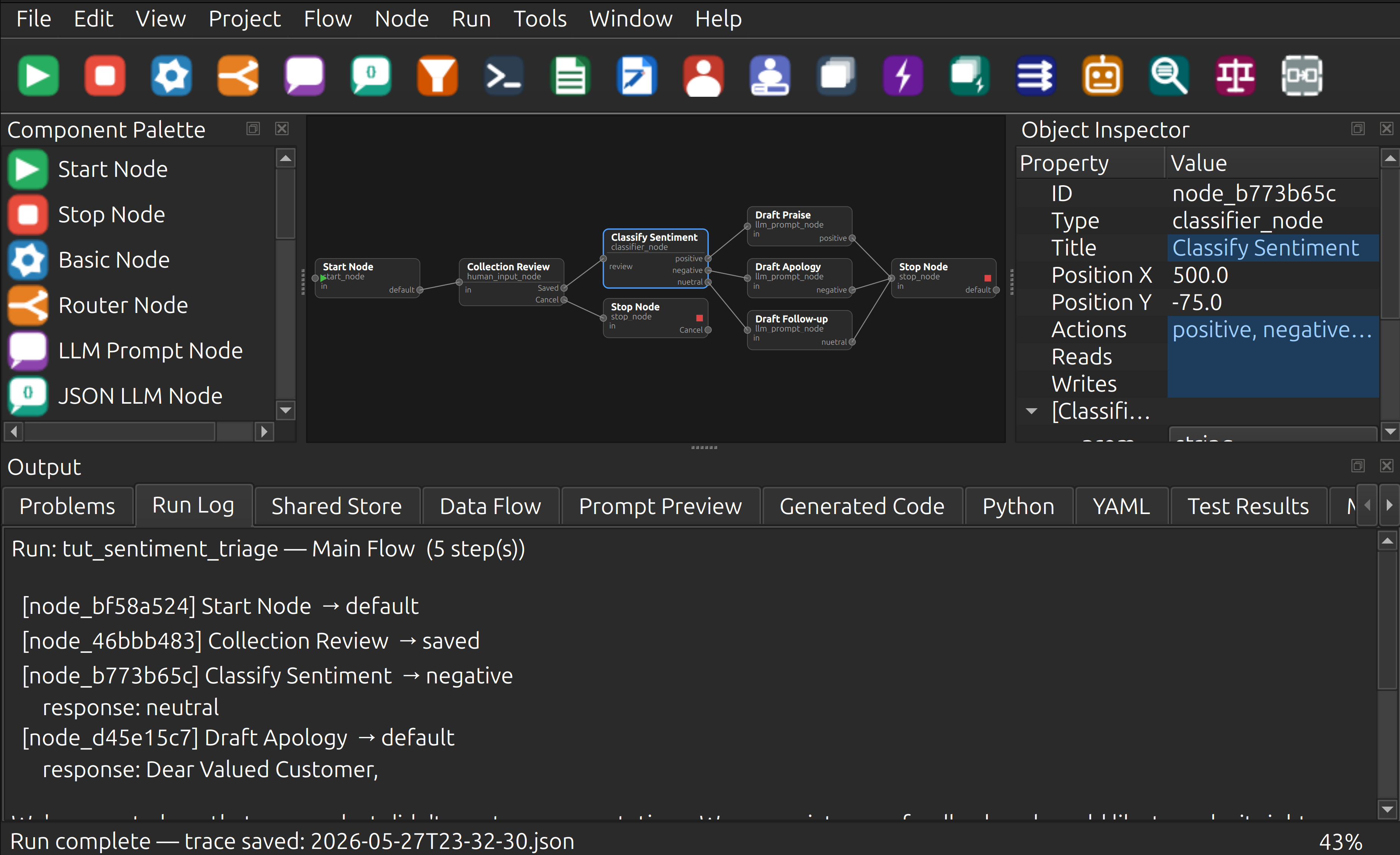
A RAD-style visual designer for building PocketFlow LLM workflows and agentic applications. Design flows on a live canvas, run them against Ollama or a mock provider, inspect shared-store state step-by-step, and export a runnable Python package — all from one IDE-like GUI built on PySide6.
Note: PocketFlow Creator is not an official PocketFlow project and is not affiliated with, endorsed by, or maintained by the PocketFlow project.
Status — v0.3.0 (comprehensive standalone support)
Milestones M0–M17 complete. 178 tests, all passing. NEW: 76 node types with full standalone Python script generation. Export graphs as self-contained scripts with embedded providers and zero external dependencies.
Features
Visual Graph Designer
- Drag nodes from the Component Palette onto the canvas
- Wire action ports to create directed edges between nodes
- 90+ built-in node types with purpose-drawn icons across 20 categories:
- Flow Control: Start, Stop, Basic, Router, Subflow
- LLM / AI: LLM Prompt, JSON LLM, Classifier, Agent, RAG, Judge
- AI / Reasoning: Chain of Thought, Majority Vote, Supervisor, Debate Advocate, Debate Judge
- Web / Search: Web Search, Web Scrape, API Call
- Data / Vector: Text Chunk, Embed, Vector Index, Vector Retrieve
- Database / SQL: DB Schema, NL to SQL, SQL Execute
- Voice / Audio: Speech to Text, Text to Speech
- Hardware I/O: USB Serial In/Out, Audio Input/Output, Video Input/Output, Webcam
- Document / Vision: PDF Extract, Image Vision, Data Validate
- Code / Execution: Code Gen, Code Exec, Test Gen
- Data Processing: Map, Reduce, Condition, Loop Counter, Transform, Merge
- Calendar: Calendar Read, Calendar Write
- MCP / Agent Protocol: MCP Tool, A2A Send, A2A Receive
- Observability / Utility: Log, Timer, Cache, Trace
- Data Structures / Memory: Registry, Stack Push/Pop, Queue Enqueue/Dequeue, Local Memory
- Security: Secret (env/dotenv/AWS/Vault)
- Human-in-the-Loop: Human Review, Human Input
- Batch / Async: Batch, Async, Async Batch, Async Parallel Batch, Shell Command
- I/O: File Reader, File Writer, Python Tool
- System / Shell: TTY Serial, Spreadsheet (CSV/TSV/Excel)
- Networking: Socket (TCP/UDP), WebSocket, Webhook Trigger
- AI / LLM Utilities: Context Compact (5 strategies), Conversation History
- Text / Data Processing: Regex, Template Render, JSON Parse, List Operations, String Operations
- Resilience: Retry (exponential backoff), Rate Limiter
- Messaging: Email Send, Email Read, Notification (Slack/Discord/Teams/Telegram)
- Security: Secret (env/dotenv/AWS/Vault)
- Multi-action output ports — one port per action, node height grows dynamically
- Input port label shows
input_keyproperty; action labels rendered inside the node body
Auto Arrange (Ctrl+Shift+L)
- Three layout algorithms: Layered BFS, Grid, Row×Column, Force-directed spring-embedder
- Three connector styles: Straight, Curved (quadratic Bezier), Orthogonal (right-angle)
- Settings dialog before each run; settings persisted per-project in
.pfcproj.yaml - Operation is fully undoable
Undo / Redo (Ctrl+Z / Ctrl+Y)
Snapshot-based — covers add node, delete node/edge, add edge, edit property, change edge action, move node, and Auto Arrange.
Object Inspector
Live property grid for selected nodes and edges. Edits sync back to the model immediately and trigger re-validation.
Validation
GraphValidator checks: unique IDs, start node present, edge endpoints valid, actions declared.
Error badges appear on canvas nodes. Problems tab lists all issues with error codes.
Editors
- Python editor with syntax highlighting and
# NODE_START/# NODE_ENDmarkers for bidirectional canvas ↔ code sync - Markdown editor with live preview
- YAML editor with schema-driven validation feedback
- Shared Store Designer — key/type/default table, serializes to project YAML
Run and Debug
- Run Active Flow — executes the active graph with MockProvider or OllamaProvider; populates Run Log and Shared Store tabs; saves a timestamped JSON trace
- Debug Active Flow — step-through debugger with breakpoints (F9), pause/resume/stop
- Run Tests — runs
pytestas a subprocess and populates Test Results tab - Prompt Preview tab shows the resolved prompt for any selected LLM node
Code Generation and Export
- Ctrl+G: Generate Code — creates standalone Python scripts in
generated_scripts/folder (or temp directory if no project). Ready to run immediately. - Standalone Python script generation — export graphs as self-contained
.pyfiles:- Embedded provider implementations (Ollama, OpenAI, Anthropic, Gemini, DeepSeek)
- Complete node dispatch logic with type-based execution
- Zero external dependencies beyond Python stdlib (optional libs detected at runtime)
- Environment variable support for API keys and secrets
- One
.pyfile runs the entire flow independently - Text I/O for interactive nodes — stdin/stdout/stderr for Human Input/Review nodes
- Works in CI/CD pipelines, shell scripts, and piped environments
- Graceful EOF handling for non-interactive execution
- File > Export PocketFlow Project — writes a full runnable Python package:
generated/,custom/(never overwritten on re-export),tests/,standalone/,main.py - File > Export Standalone Archive — creates a complete, ready-to-share package:
- All generated scripts in
scripts/directory requirements.txtwith pip dependencies and pinned versionssetup.sh/setup.bat— auto-create.venvand install dependenciesrun.sh/run.bat— execute scripts with venv pre-activatedREADME.md— usage guide, I/O redirection, environment variables, troubleshooting- Everything packed in a
.zipfile, no unpacking needed on most systems
- All generated scripts in
- Project > Export Graph Image — PNG or SVG render of the canvas scene
- Project > Export Project Report — Markdown summary of nodes, edges, validation status
- Project > Data Flow Report — per-node reads/writes and shared-store key lifecycle
Custom Node Types
- Node > New Custom Node Type — wizard with three tabs (Definition, Actions, Properties) writes a YAML definition + Python skeleton
- Node Type Library Manager — list, import, and version custom node packages
- Inspector shows inherited properties from the type definition
Help System
- Help > PocketFlow Creator Help (F1) — integrated
HelpBrowserwith 21 Markdown pages, back/forward/home navigation - Context-sensitive
?buttons in every dialog - Help pages: getting started, first flow, about PocketFlow, about Creator, tutorials (4 parts), 11 context pages (canvas, inspector, palette, explorer, options, …)
Internationalisation
Language selector in Tools > Options; English, Spanish, French, German, Chinese, Japanese
.qm files included.
Prerequisites
| Requirement | Version |
|---|---|
| Python | ≥ 3.10 |
| PySide6 | ≥ 6.6 |
| PyYAML | ≥ 6.0 |
| jsonschema | ≥ 4.20 |
| markdown | ≥ 3.5 |
| jinja2 | ≥ 3.1 |
Optional for running LLM flows: Ollama running locally on port 11434.
Quick Start
Linux / macOS
cd PocketFlowCreator
./scripts/setup-prj.sh     # create venv, install deps
./scripts/run_app.sh       # launch the GUI
Windows (PowerShell)
cd PocketFlowCreator
.\scripts\setup-prj.ps1
.\scripts\run_app.ps1
Or directly with pip
python -m venv .venv
source .venv/bin/activate   # Windows: .venv\Scripts\activate
pip install -e ".[dev]"
pocketflow-creator          # or: python -m pocketflow_creator
Provider Setup
PocketFlow Creator supports multiple LLM providers. Configure them via Tools → Provider Manager.
Quick Setup
To use Ollama locally (recommended for getting started):
- Install Ollama from ollama.ai
- Start Ollama:
ollama serve - Pull a model:
ollama pull qwen2.5-coder:14b - In PocketFlow Creator: Tools → Provider Manager → + Add
- Name: "Local Ollama"
- Type: "Ollama (local)"
- Base URL:
http://localhost:11434(auto-filled) - Model:
qwen2.5-coder:14b(auto-filled)
- Test: Click "Test Connection" → should show ✓ Connection successful
To use cloud providers (OpenAI, Claude, etc.):
- Generate an API key from your provider
- In PocketFlow Creator: Tools → Provider Manager → + Add
- Name: e.g., "OpenAI Production"
- Type: Select your provider
- Enter your API Key
- Test: Click "Test Connection"
For detailed setup instructions for all providers, custom ports, environment variables, and troubleshooting, see docs/13_provider_setup.md.
Running Tests
python -m pytest            # all 178 tests
./scripts/test.sh           # same, via script
Tests run headless (no display required) using QT_QPA_PLATFORM=offscreen.
GitHub Actions tests run on Ubuntu across Python 3.10–3.13. To test locally on macOS or Windows:
python -m pytest -v         # run full test suite
source .venv/bin/activate   # activate venv (Windows: .venv\Scripts\activate)
pocketflow-creator          # launch app
Project Layout
PocketFlowCreator/
├─ src/pocketflow_creator/
│   ├─ app/
│   │   ├─ main.py              MainWindow + AutoArrangeDialog + all inline dialogs
│   │   ├─ canvas.py            NodeItem, EdgeItem, GraphScene, GraphView, PaletteWidget
│   │   ├─ commands.py          GraphSnapshotCommand (undo/redo)
│   │   ├─ editors.py           PythonHighlighter, YamlHighlighter
│   │   ├─ node_type_wizard.py  NodeTypeWizard (3-tab dialog)
│   │   ├─ help_browser.py      HelpBrowser, open_help()
│   │   └─ code_manager.py      canvas ↔ .py file sync
│   ├─ model/
│   │   ├─ graph_model.py       GraphModel, NodeModel, EdgeModel
│   │   ├─ node_type.py         NodeTypeDefinition
│   │   └─ project.py           ProjectModel (includes auto_arrange field)
│   ├─ generation/
│   │   ├─ python_generator.py  Jinja2 template-based code generator
│   │   ├─ exporter.py          Full package export with custom/ guard
│   │   ├─ report.py            Markdown project report
│   │   └─ dataflow_report.py   Shared-store data-flow analysis
│   ├─ runtime/
│   │   ├─ providers.py         LLMProvider, MockProvider, OllamaProvider
│   │   └─ runner.py            FlowRunner, RunTrace, StepController
│   ├─ validation/
│   │   └─ graph_validator.py   GraphValidator (PFCE error codes)
│   ├─ graph_io.py              GraphLoader, GraphSaver
│   ├─ project_io.py            ProjectLoader, ProjectSaver
│   ├─ templates/               Jinja2 .j2 templates for code generation
│   ├─ help/                    21 Markdown help pages + context/ + tutorials/
│   └─ translations/            .ts and .qm files (en, es, fr, de, zh, ja)
├─ tests/                       177 tests (all passing)
├─ examples/document_summarizer/ Example PocketFlow project
├─ docs/                        13 design/spec documents
├─ scripts/                     setup, run, test, lint, format, package scripts
├─ pyproject.toml
└─ CHANGELOG.md
Keyboard Shortcuts
| Shortcut | Action |
|---|---|
| Ctrl+N | New Project |
| Ctrl+O | Open Project |
| Ctrl+S | Save |
| Ctrl+Shift+S | Save All |
| Ctrl+Z | Undo |
| Ctrl+Y | Redo |
| Ctrl+G | Generate Code |
| Ctrl+Shift+V | Validate Project |
| Ctrl+Shift+L | Auto Arrange… |
| Ctrl+0 | Zoom to Fit |
| Ctrl++ | Zoom In |
| Ctrl+- | Zoom Out |
| Ctrl+Shift+Z | Zoom to Selected Node |
| Ctrl+Scroll | Canvas zoom |
| Middle-drag / Space-drag | Canvas pan |
| Delete | Delete selected node/edge |
| F9 | Toggle Breakpoint |
| F1 | Help |
Development
./scripts/lint.sh            # ruff + mypy
./scripts/format.sh          # ruff format
./scripts/package.sh         # PyInstaller standalone binary
Lint policy: 0 ruff errors, 0 mypy errors. Pyright "possibly unbound" warnings in
try/except import blocks are expected false positives — not real errors.
License
MIT — see LICENSE.
Project details
Verified details
These details have been verified by PyPIProject links
GitHub Statistics
Maintainers


Download files
Download the file for your platform. If you're not sure which to choose, learn more about installing packages.
Source Distribution
Built Distribution
Filter files by name, interpreter, ABI, and platform.
If you're not sure about the file name format, learn more about wheel file names.
Copy a direct link to the current filters
File details
Details for the file pocketflow_creator-0.3.0.tar.gz.
File metadata
- Download URL: pocketflow_creator-0.3.0.tar.gz
- Upload date:
- Size: 3.3 MB
- Tags: Source
- Uploaded using Trusted Publishing? Yes
- Uploaded via: twine/6.1.0 CPython/3.13.12
File hashes
| Algorithm | Hash digest | |
|---|---|---|
| SHA256 |
2b736ae2b150a60dca342c96a9f5288f1c6dbc811eb0a6ccc60b82639b857b4a
|
|
| MD5 |
b91fd07fec6842d1005e060d85570002
|
|
| BLAKE2b-256 |
c094f379fc6aec46c8c00ed6f9af11b8979a38a2e44c2b691d80f6a162e78947
|
Provenance
The following attestation bundles were made for pocketflow_creator-0.3.0.tar.gz:
Publisher:
release.yml on Monotoba/PocketFlowCreator
-
Statement:
-
Statement type:
https://in-toto.io/Statement/v1 -
Predicate type:
https://docs.pypi.org/attestations/publish/v1 -
Subject name:
pocketflow_creator-0.3.0.tar.gz -
Subject digest:
2b736ae2b150a60dca342c96a9f5288f1c6dbc811eb0a6ccc60b82639b857b4a - Sigstore transparency entry: 1720510837
- Sigstore integration time:
-
Permalink:
Monotoba/PocketFlowCreator@ab1f0e2fc4635eeb10483cbe63249b41766911a1 -
Branch / Tag:
refs/tags/v0.3.0 - Owner: https://github.com/Monotoba
-
Access:
public
-
Token Issuer:
https://token.actions.githubusercontent.com -
Runner Environment:
github-hosted -
Publication workflow:
release.yml@ab1f0e2fc4635eeb10483cbe63249b41766911a1 -
Trigger Event:
release
-
Statement type:
File details
Details for the file pocketflow_creator-0.3.0-py3-none-any.whl.
File metadata
- Download URL: pocketflow_creator-0.3.0-py3-none-any.whl
- Upload date:
- Size: 3.3 MB
- Tags: Python 3
- Uploaded using Trusted Publishing? Yes
- Uploaded via: twine/6.1.0 CPython/3.13.12
File hashes
| Algorithm | Hash digest | |
|---|---|---|
| SHA256 |
b9785a87b03d9afa8ac27c81ebc3186ee55588878a623a791b3d8fdd21215644
|
|
| MD5 |
c78fae5f8bb2a5473f8b3337a106c10a
|
|
| BLAKE2b-256 |
45ae78e2bf5f40865fd71f493a9297f6e5d90fa8abb51f2d7db535938151899a
|
Provenance
The following attestation bundles were made for pocketflow_creator-0.3.0-py3-none-any.whl:
Publisher:
release.yml on Monotoba/PocketFlowCreator
-
Statement:
-
Statement type:
https://in-toto.io/Statement/v1 -
Predicate type:
https://docs.pypi.org/attestations/publish/v1 -
Subject name:
pocketflow_creator-0.3.0-py3-none-any.whl -
Subject digest:
b9785a87b03d9afa8ac27c81ebc3186ee55588878a623a791b3d8fdd21215644 - Sigstore transparency entry: 1720510987
- Sigstore integration time:
-
Permalink:
Monotoba/PocketFlowCreator@ab1f0e2fc4635eeb10483cbe63249b41766911a1 -
Branch / Tag:
refs/tags/v0.3.0 - Owner: https://github.com/Monotoba
-
Access:
public
-
Token Issuer:
https://token.actions.githubusercontent.com -
Runner Environment:
github-hosted -
Publication workflow:
release.yml@ab1f0e2fc4635eeb10483cbe63249b41766911a1 -
Trigger Event:
release
-
Statement type:






