
podcast_generator
Converts markdown podcast scripts into spoken-word audio files, using
voxport's KokoroDirectTTS for
local, offline-capable text-to-speech. No API key, no per-use cost, and
your scripts never leave your machine.
podcast-generator: converts scripts from the command line.- Drop-folder mode: a Windows scheduled task converts whatever lands in
an inputs folder (cloud-synced, if you like), controlled from the small
Podcast Watch app (
podcast-watch). podcast-generator-mcp: an MCP server, so Claude Desktop or another MCP client can write, queue and convert podcasts for you.
This README is a quick start. See MANUAL.md for the full guide: script-writing conventions, complete CLI reference, the voice catalog, and troubleshooting.
Installation
Requires Python 3.10+. The command line works anywhere Kokoro does; the Podcast Watch app and scheduled drop-folder mode are Windows-only.
pip install podcast-generator             # command line and Podcast Watch
pip install "podcast-generator[mcp]"      # plus the MCP server
A virtual environment is recommended. This pulls in Kokoro and torch
(about 2 GB) through voxport[kokoro]. Check the install:
podcast-generator --version
Not installed for you:
- ffmpeg: needed for MP3 output unless your
soundfile/libsndfile build has native MP3 support. Put it onPATH. WAV output needs neither. - Kokoro model weights and spaCy's
en_core_web_sm: downloaded automatically on the first run. On a firewalled machine, see "Offline use" in the manual.
From a source checkout
git clone https://github.com/brienalkire/podcast_generator.git
cd podcast_generator
python -m venv .venv
.venv\Scripts\activate          # Windows (bash: source .venv/bin/activate)
pip install -e ".[mcp]" pytest
Working on voxport at the same time? Clone it next to this repo and run
pip install -e "../voxport[kokoro]" afterwards.
Where things live
Settings and the default folders live in one home folder:
| Install | Home folder |
|---|---|
pip install |
podcast_generator in your Documents folder |
| Source checkout | the repo folder |
| Either | PODCAST_GENERATOR_HOME, if you set that environment variable |
It holds .env (settings), inputs/ (scripts waiting to be converted),
outputs/ (finished audio), script_archive/ (converted scripts, and
failed/ for ones that didn't convert), and generator.log.
The three folders can point anywhere. Use the Podcast Watch app, or set
PODCAST_INPUTS_DIR, PODCAST_OUTPUTS_DIR and PODCAST_ARCHIVE_DIR in
.env (see
.env.example).
Pointing them at a cloud-synced folder (Sync.com, Dropbox, OneDrive) lets
you drop a script in from any device and get the audio back the same way.
Usage
Writing a script
A script is a markdown file. Plain paragraphs are spoken. Headers,
**Key:** value metadata lines, horizontal rules, and italic-only lines
are stripped, so you can label sections and add notes without them being
read aloud:
# My Episode Title

**Voice:** af_heart

## OPENING

Welcome back to the show. Today we're talking about...

## CLOSING

That's all for this episode. Thanks for listening.

---

*Source: some-article.com, September 2026.*
Only the two paragraphs are spoken. An italic-only line after the prose starts ends the script, and everything after it is dropped. Keep those lines for trailing notes. See the manual for the full rules.
Running it
podcast-generator                                  # batch: every script in inputs/
podcast-generator --voice af_heart --speed 1.1     # batch, overriding voice and speed
podcast-generator my-script.md --format wav --output episode01.wav   # one file
Batch mode (no file argument) converts every .md script in the inputs
folder and writes <script-name>.mp3 to the outputs folder. The first run
creates the inputs folder if it doesn't exist. Each script that converts
successfully moves into the archive folder, so re-running doesn't
reprocess it. A script that fails moves to <archive folder>/failed/ with
a .error.txt note, so it isn't retried forever.
Single-file mode converts just the named file. --output only applies
here.
| Option | Meaning |
|---|---|
--voice VOICE |
Kokoro voice for the whole run. Overrides a script's **Voice:** line. Default af_heart. |
--speed FLOAT |
Speaking rate (default 1.0; 0.9 slower, 1.1 faster). |
--format {mp3,wav} |
Output format (default mp3). |
--output PATH |
Output file (single-file mode only). |
--lang CODE |
Accent override; normally inferred from the voice name. |
--version |
Print the version and exit. |
Voice precedence: --voice, then the script's **Voice:** line, then
af_heart.
Drop-folder mode and the Podcast Watch app (Windows)
Running podcast-generator with no arguments on a schedule is watch
mode: each run converts whatever is new in the inputs folder and archives
it. A run with nothing to do exits almost immediately, and only one
conversion runs at a time.
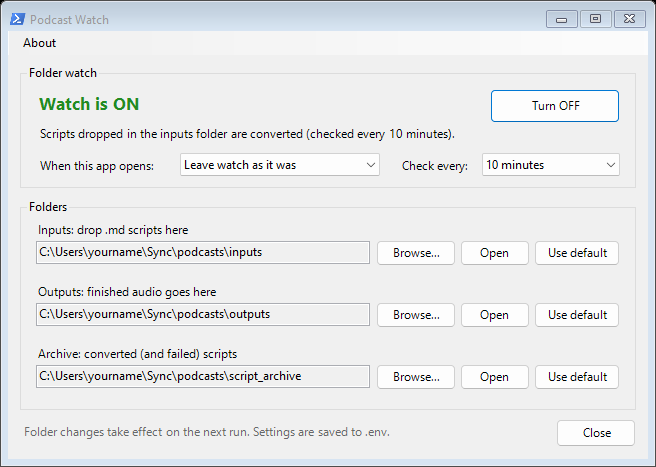
The Podcast Watch app sets this up and controls it:
podcast-watch               # open the app
podcast-watch --shortcut    # add a "Podcast Watch" shortcut to your desktop
- Set up watch registers a Windows scheduled task,
PodcastGeneratorWatch, for your user (no admin rights). It runs the converter withpythonw.exe, so no window flashes up; output goes togenerator.login the home folder. - Turn ON / Turn OFF enables or disables it; Check every sets the interval (5 to 60 minutes).
- When this app opens can always turn the watch on or off when you open the window.
- Folders picks the inputs, outputs and archive folders.
To remove the task: Unregister-ScheduledTask -TaskName PodcastGeneratorWatch
in PowerShell. On macOS or Linux, schedule podcast-generator with cron or
a similar tool instead.
Using it from Claude Desktop (MCP)
podcast-generator-mcp is an MCP server,
so an AI app such as Claude Desktop can make podcasts directly: write a
script, queue it, convert it, and check on it, all from the chat. It runs
locally and uses the same folders and .env as everything else. Install
with the [mcp] extra, then add it to Claude Desktop's config (Settings →
Developer → Edit Config) and restart Claude Desktop:
{
  "mcpServers": {
    "podcast-generator": {
      "command": "C:\\path\\to\\.venv\\Scripts\\podcast-generator-mcp.exe"
    }
  }
}
Use the full path to the command in your environment, as above, since
Claude Desktop doesn't see your virtual environment's PATH. See the
manual
for the tools and an example conversation.
License
MIT. See LICENSE.
1 maintainer

Metadata
1 maintainer
Release files for podcast-generator 0.3.0
For a detailed explanation of source distributions (sdists) and built distributions (wheels), please see the package formats documentation.
Source distribution (sdist)
| File | Size | Uploaded | Provenance | Actions |
|---|---|---|---|---|
| podcast_generator-0.3.0.tar.gz | 39.0 kB | With provenance | Details for podcast_generator-0.3.0.tar.gz |
Built distribution (wheel)
| File | Interpreter | ABI | Platform | Actions Reset |
|---|---|---|---|---|
| podcast_generator-0.3.0-py3-none-any.whl | Python 3 | none | any | Details for podcast_generator-0.3.0-py3-none-any.whl |
Total release size: 67.2 kB
Release files / podcast_generator-0.3.0.tar.gz
| Download URL | podcast_generator-0.3.0.tar.gz |
|---|---|
| Size | 39.0 kB |
| Tags | Source |
|
SHA-256 checksum How to use checksums |
da77feddec332ab6a607a56901431c8f8a62f1381389ddb129416de39037a1e9
|
|
BLAKE2b-256 checksum How to use checksums |
690c0a71cfe3e616a9229bdbdbc02fbafeba4cb341866daed18b191f7be72079
|
| Upload date | |
|
Uploaded using Trusted Publishing? What is trusted publishing? |
Yes |
| Uploaded via |
twine/7.0.0 CPython/3.13.16
|
Provenance
Provenance describes where a file came from. On PyPI, provenance is shared via attestations, which provide a verifiable record of the build or publishing details. View details, limitations and caveats.


PyPI Publish Attestation
PyPI verified that this artifact, at this checksum, originated from the publisher listed below.
Signed by GitHub Actions, verified by PyPI on Nov 3, 2026.
Transparency logRelease files / podcast_generator-0.3.0-py3-none-any.whl
| Download URL | podcast_generator-0.3.0-py3-none-any.whl |
|---|---|
| Size | 28.2 kB |
| Tags | Python 3 |
|
SHA-256 checksum How to use checksums |
169e17fa0c86f238aa7c5d5aec3ea2102a15af261b7094eabff1547aa91cd39d
|
|
BLAKE2b-256 checksum How to use checksums |
6ba3e9a4df9da1ee564694000dd62e70b07b8ed3dfe8cb50ff74cc1a6a251437
|
| Upload date | |
|
Uploaded using Trusted Publishing? What is trusted publishing? |
Yes |
| Uploaded via |
twine/7.0.0 CPython/3.13.16
|
Provenance
Provenance describes where a file came from. On PyPI, provenance is shared via attestations, which provide a verifiable record of the build or publishing details. View details, limitations and caveats.
PyPI Publish Attestation
PyPI verified that this artifact, at this checksum, originated from the publisher listed below.
Signed by GitHub Actions, verified by PyPI on Nov 3, 2026.
Transparency logSecurity for podcast-generator 0.3.0
Provenance
Provenance describes where a file came from. On PyPI, provenance is shared via attestations, which provide a verifiable record of the build or publishing details. View details, limitations and caveats.
Full provenance
Both files in this release have been uploaded with provenance metadata.
Attestation for podcast_generator-0.3.0.tar.gz
PyPI Publish Attestation
PyPI verified that this artifact, at this checksum, originated from the publisher listed below.
Signed by GitHub Actions, verified by PyPI on Nov 3, 2026.
Transparency logA note on package security
PyPI is a repository for distributing packages, not a service for auditing them. While third-party security researchers and our staff do their best to detect and remove malicious packages, PyPI cannot guarantee the quality, security or suitability of any given package.
To learn more about protecting yourself from malicious actors, visit our package security documentation.














