
Podcast Helper




Podcast Helper belongs to a collection of libraries called AI Helpers developed for building Artificial Intelligence.
The Promise
Local-first by design. podcast-helper runs entirely on your machine: it fetches only the episodes and feeds you ask for and processes them locally. Your data is never uploaded to a third-party service, there is no telemetry, no account, no cloud lock-in. Part of the AI Helpers suite: sovereignty over your data through local-first open source.
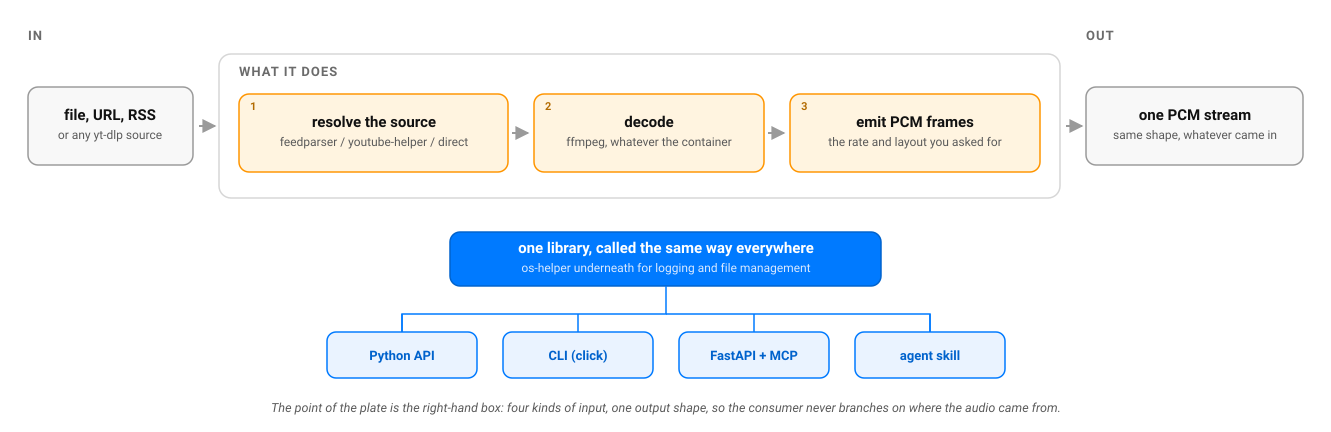
Universal audio stream consumer for podcasts and any audio-bearing URL: URL in, PCM out.
PCM — pulse-code modulation — is the raw stream of uncompressed audio samples that speech-recognition and audio-analysis models expect as input, as opposed to a compressed file like an MP3.
Four families of source go in:
| Source | Examples |
|---|---|
| Local file | a path on disk |
| Direct audio URL | RSS enclosure MP3, M4A, Opus, WAV, HLS m3u8 |
| RSS or Atom feed | the latest episode is picked automatically |
Anything yt-dlp supports |
YouTube, Vimeo, SoundCloud, Twitch VOD or live, and more |
Two are refused upfront, with a clear hint rather than an obscure failure: Spotify (DRM-gated) and Apple Podcasts (a catalogue page). The way round both is the show's RSS feed.

Documentation
Battle-tested
podcast-helper ships on PyPI under semantic-versioned tags (currently v1.6.2), so a pinned range such as podcast-helper>=1.6.0,<2 stays stable under you. Continuous integration is green on main: pytest and ruff check both have to pass before anything merges.
Two siblings from the same AI Helpers suite are declared dependencies:
- os-helper — called directly for logging and filesystem checks;
- youtube-helper — what brings the
yt-dlp+ ffmpeg chain into the environment. Note that the URL-resolution code importsyt_dlpitself rather than going through youtube-helper's API.
In the other direction, vocal-helper (transcription with speaker labelling) depends on podcast-helper through its [stream] extra, where sources.from_url wraps extract_audio_stream for every URL it ingests.
Why it exists
Podcast pipelines usually start with the same request, whatever the downstream step is:
"give me a stream of PCM frames from this URL, never mind whether it's a
.mp3link, a feed, a YouTube video, or a podcast hosted on a CDN I've never heard of."
That downstream step is typically one of:
- automatic speech recognition (ASR) — turning the speech into text;
- diarization — labelling which speaker is talking when;
- voice activity detection (VAD) — deciding which stretches have speech at all, before the heavier models run on them;
- summarisation, or search indexing.
This library is that one request, answered: extract_audio_stream, plus the small extras around it (feed, latest_episode) that make RSS sources friendly to work with.
How it works
Installation
Prerequisites: Python 3.10-3.13, git, and ffmpeg, cross-platform:
- 🍎 macOS (Homebrew):
brew install python git ffmpeg - 🐧 Ubuntu/Debian:
sudo apt update && sudo apt install -y python3 python3-pip git ffmpeg - 🪟 Windows (PowerShell):
winget install Python.Python.3.12 Git.Git Gyan.FFmpeg
We recommend using Python environments. Check this link if you're unfamiliar with setting one up: 🥸 Tech tips.
From PyPI (recommended)
# Core library
pip install podcast-helper

# Optional surfaces (the command line ships with the core)
pip install "podcast-helper[api]"
pip install "podcast-helper[mcp]"
This pulls in youtube-helper (and transitively yt-dlp, os-helper, audio-helper, video-helper), plus feedparser and podcastparser for RSS.
From source (no PyPI)
git clone https://github.com/warith-harchaoui/podcast-helper.git
cd podcast-helper
pip install -e .

# Optional surfaces (the command line ships with the core)
pip install -e ".[api]"
pip install -e ".[mcp]"
Quick start
import asyncio

import numpy as np
import podcast_helper as ph


async def main():
    # Pass *any* URL: file, direct mp3, RSS feed, YouTube, SoundCloud, Twitch VOD.
    async for frame in ph.extract_audio_stream(
        "https://feeds.npr.org/510289/podcast.xml",  # ← RSS, auto-pick latest episode
        target_sample_rate=16000,
        to_mono=True,
        frame_ms=20,
    ):
        # frame["pcm"]: np.float32 (320,) for 20ms @ 16kHz
        # frame["t_abs_s"]: 0.0, 0.02, 0.04, ...
        level = float(np.sqrt(np.mean(frame["pcm"] ** 2)))
        print(f"{frame['t_abs_s']:6.2f}s  rms={level:.3f}")


asyncio.run(main())
Replace the print with a call into your own ASR, VAD or diarization
stage and nothing else about the loop changes.
For the full catalog of recipes (RSS, yt-dlp sources, live streams, stereo / multichannel, anti-aliasing, downstream ASR / VAD / summarization pipelines), see 📋 EXAMPLES.md.
What URLs are accepted
| Source | Detection | What happens |
|---|---|---|
Local file / file:// |
path exists on disk OR file:// scheme |
ffmpeg opens it directly. |
Direct audio URL (.mp3, .m4a, .opus, .wav, .m3u8, …) |
URL extension is a known audio container | ffmpeg opens it directly with your headers= if any. |
RSS / Atom feed (.xml, .rss, .atom) |
URL extension is a known feed container | podcastparser (fallback: feedparser) parses it; latest episode's enclosure is fetched. |
| YouTube / Vimeo / SoundCloud / Twitch VOD / Twitch live / … | yt-dlp's extractor identifies it | yt-dlp picks bestaudio*, hands the direct URL + headers to ffmpeg. |
| Generic web URL (anything else) | yt-dlp's generic extractor |
URL used as-is. |
| Spotify (open.spotify.com) | hostname match | NotImplementedError: Spotify audio is DRM-gated. Use the show's RSS feed if it exists. |
| Apple Podcasts (podcasts.apple.com) | hostname match | NotImplementedError: Apple URLs point to the catalog, not the audio. Use the show's RSS feed (linked on the show's site, or via getrssfeed.com / Podcast Index). |
Signal-processing correctness
When target_sample_rate differs from the source rate, the conversion is performed by ffmpeg's libswresample (default) or libsoxr (resample_quality="high").
Both apply an anti-aliasing low-pass filter at the new Nyquist frequency before decimation. That frequency is target_sample_rate / 2 — the sampling theorem's ceiling on the highest frequency a given rate can represent.
Why the filter has to come first: any content above that ceiling is removed before the rate drops, because if it were kept it would fold back down into the audible range as spurious noise. That artifact is called aliasing.
Naïve subsampling — dropping samples without this filter — skips that step and lets the aliasing through. It is never used here.
Channel handling has exactly two modes; there is no synthetic upmix:
to_mono |
Output shape | What ffmpeg does |
|---|---|---|
True (default) |
(n_samples,) |
Standard downmix (stereo → L+R with -3 dB, 5.1 → ITU mix) |
False |
(n_samples, n_channels) interleaved |
Preserves the source's native channel count |
Working with RSS feeds explicitly
If you want to inspect or select episodes yourself:
import podcast_helper as ph

# Full episode list, most-recent first
episodes = ph.feed("https://feeds.npr.org/510289/podcast.xml", max_episodes=20)
for ep in episodes:
    print(ep["published_at"], "|", ep["title"], "|", ep["duration_seconds"], "s")

# Or just the latest one
ep = ph.latest_episode("https://feeds.npr.org/510289/podcast.xml")
print(ep["title"], "→", ep["enclosure_url"])

# Then stream its audio
import asyncio


async def main():
    async for frame in ph.extract_audio_stream(ep["enclosure_url"]):
        ...


asyncio.run(main())
Each Episode dict has a normalized schema regardless of feed flavor:
{guid, title, description, link, published_at (ISO UTC),
 duration_seconds, enclosure_url, enclosure_type, enclosure_size_bytes,
 image_url}
Multi-surface exposure
podcast-helper exposes the same public functions through five
interchangeable surfaces; pick the one that fits the caller.
| Surface | Entry point | Extra | Best for |
|---|---|---|---|
| Library (async iterator) | import podcast_helper as ph |
none | Python code, notebooks, downstream ASR / VAD / summarization |
| CLI | podcast-helper |
none | shell scripts, CI, ffmpeg pipelines; bash / zsh completion, colored help |
| FastAPI HTTP | uvicorn podcast_helper.api:app |
[api] |
HTTP microservices, cross-language callers |
| Browser GUI | GET /gui (served by the API) |
[api] |
drop-a-URL episode browser: list · preview · archive, no terminal |
| MCP | podcast-helper-mcp |
[mcp] |
any MCP-aware agent host (calls the same endpoints as tools) |
Install any combination of extras:
pip install podcast-helper                 # library + CLI
pip install 'podcast-helper[api]'          # + FastAPI HTTP surface
pip install 'podcast-helper[mcp]'          # + MCP tools (needs [api] too, pulled in automatically)
pip install 'podcast-helper[api,mcp]'      # everything
Every surface publishes the same verbs, feed, latest, stream,
record, probe, with identical argument names, so switching
between them is a copy-paste. The Dockerfile in this repo ships the
FastAPI surface on port 8000 out of the box (docker build -t podcast-helper . && docker run --rm -p 8000:8000 podcast-helper).
Browser GUI: the episode browser (GET /gui)
With the [api] extra, the FastAPI app serves a self-contained
single-page episode browser (Tailwind via CDN + vanilla JS, no
build step) that drives the very same endpoints:
pip install 'podcast-helper[api]'
uvicorn podcast_helper.api:app --port 8000
# open http://localhost:8000/gui  (or just http://localhost:8000/)
Paste a feed / RSS / audio / yt-dlp URL → List episodes (calls
/feed) → click an episode to see its metadata and play the enclosure
inline → Record to file (calls /record) to download a compressed
archive. Probe classifies any URL. Nothing is uploaded: playback
streams the enclosure straight to your browser, and archiving runs
ffmpeg on your own machine.
The page speaks French and English. GET /gui?lang=fr|en picks one, a flag
in the header toggles between them, and a code the locale file does not carry
falls back to the default rather than failing. Every string lives in
podcast_helper/locales/fr/LC_MESSAGES/podcast_helper.po,
a standard gettext catalogue read through os_helper.Catalog — the loader
shared across the suite — so
translating the page never means opening a Python file.
For the exhaustive catalog of triggers, phrasings, accepted URLs and
when not to reach for podcast-helper, see
TRIGGERS.md.
For an ambitious visual product on top, see GUI.md.
Use it as an agent skill
skills/podcast-helper/ packages podcast-helper as a Claude Skill and an OpenCode
skill, so an agent can reach for it on your behalf. See
skills/README.md to install it (symlink into
~/.claude/skills/ and ~/.opencode/skills/), and
TRIGGERS.md for the exhaustive trigger catalogue —
scripts/check_triggers.py keeps the skill's description in sync with it, and
the test suite fails if a capability stops being named.
Live streams
For YouTube / Twitch live URLs, the resolved direct URL is typically an HLS (HTTP Live Streaming, a protocol that serves audio or video as a sequence of small segment files listed in a .m3u8 playlist) manifest. extract_audio_stream detects this (is_live=True) and automatically disables -re real-time pacing (the source paces itself). The async iterator runs indefinitely until the live stream ends; callers should break when they're done.
speed != 1.0 for live streams raises ValueError: you can't fast-forward beyond the live edge. Use speed=... on VOD only.
When a stream stalls
ffmpeg applies no I/O timeout unless asked, so a connection the remote has
half-closed is waited on forever: ffmpeg sits at 0 % CPU holding a socket that
will never deliver another byte, and the consumer waits on a pipe that will
never close. Network sources are therefore read with -rw_timeout (60 s by
default), so a dead connection raises instead of hanging:
export PODCAST_HELPER_RW_TIMEOUT=120 # seconds; 0 disables the bound
Local files are never given a timeout — a path on disk cannot stall on a socket.
This bounds the read; it does not make a stall impossible. A run was
observed hanging for over four hours on a googlevideo.com URL with
-rw_timeout 60000000 on its command line, so the option does not cover every
way a CDN can go quiet. If your job must finish, give it a bound it owns —
a supervisor timeout, a watchdog — rather than relying on this one.
Not built yet
start_instant/end_instantfor VOD seek.apple_podcasts_to_rss(url), resolving an Apple Podcasts catalog URL to its RSS feed via the iTunes Search API.- Podcast Index API integration.
- Chapters (ID3 CTOC/CHAP, Podcasting 2.0
<podcast:chapters>) and transcripts. - OPML import/export.
See CHANGELOG.md for what has already shipped.
Rust rewrite
A companion crate, podcast-helper-rs, rewrites the same "URL in, PCM out" promise in Rust: local files, direct audio URLs and RSS/Atom feeds decoded via ffmpeg, with YouTube/Vimeo/SoundCloud/Twitch delegated to youtube-helper-rs.
The interest is a single static binary with no Python interpreter to install — useful when podcast ingestion has to run as part of a larger Rust pipeline, feeding a Rust speech-recognition or diarization service, rather than a Python one.
It is a smaller v0.1 surface, not a full replacement: no async frame iterator yet, no itunes:duration parsing. Its README lists the exact deliberate differences.
Author
Acknowledgements
Special thanks to Mohamed Chelali and Bachir Zerroug for fruitful discussions.
License
This project is licensed under the BSD-3-Clause License. See the LICENSE file for details.
1 maintainer

Metadata
1 maintainer
Release files for podcast-helper 1.6.2
For a detailed explanation of source distributions (sdists) and built distributions (wheels), please see the package formats documentation.
Source distribution (sdist)
| File | Size | Uploaded | Provenance | Actions |
|---|---|---|---|---|
| podcast_helper-1.6.2.tar.gz | 78.3 kB | Without provenance | Details for podcast_helper-1.6.2.tar.gz |
Built distribution (wheel)
| File | Interpreter | ABI | Platform | Actions Reset |
|---|---|---|---|---|
| podcast_helper-1.6.2-py3-none-any.whl | Python 3 | none | any | Details for podcast_helper-1.6.2-py3-none-any.whl |
Total release size: 129.4 kB
Release files / podcast_helper-1.6.2.tar.gz
| Download URL | podcast_helper-1.6.2.tar.gz |
|---|---|
| Size | 78.3 kB |
| Tags | Source |
|
SHA-256 checksum How to use checksums |
adda01fba78844e2bd2bdbd6b209d982ec403803f8cbc496e001d79a71783e93
|
|
BLAKE2b-256 checksum How to use checksums |
1b717f8574dd5d9aec7607d777963b4c4defa8d3b0790431d580e1575dac3522
|
| Upload date | |
|
Uploaded using Trusted Publishing? What is trusted publishing? |
No |
| Uploaded via |
twine/7.0.0 CPython/3.13.13
|
Release files / podcast_helper-1.6.2-py3-none-any.whl
| Download URL | podcast_helper-1.6.2-py3-none-any.whl |
|---|---|
| Size | 51.1 kB |
| Tags | Python 3 |
|
SHA-256 checksum How to use checksums |
2d7d23013d4c73b2eda07f3c463f5b4aec455700e7f111e4eeca458f4ab28ea5
|
|
BLAKE2b-256 checksum How to use checksums |
c9e62434d55d7b466228ff561c7798c8cde522fcabf620a82a9a96cde3d7088f
|
| Upload date | |
|
Uploaded using Trusted Publishing? What is trusted publishing? |
No |
| Uploaded via |
twine/7.0.0 CPython/3.13.13
|
Security for podcast-helper 1.6.2
Provenance
Provenance describes where a file came from. On PyPI, provenance is shared via attestations, which provide a verifiable record of the build or publishing details. View details, limitations and caveats.
No provenance found
None of the files in this release were uploaded with provenance metadata.
A note on package security
PyPI is a repository for distributing packages, not a service for auditing them. While third-party security researchers and our staff do their best to detect and remove malicious packages, PyPI cannot guarantee the quality, security or suitability of any given package.
To learn more about protecting yourself from malicious actors, visit our package security documentation.














