
An intelligent system that automatically generates engaging podcast conversations using LLMs and text-to-speech technology.

Project description
Podcast-LLM: AI-Powered Podcast Generation





An intelligent system that automatically generates engaging podcast conversations using LLMs and text-to-speech technology.
Features
- Two modes of operation:
- Research mode: Automated research and content gathering using Tavily search
- Context mode: Generate podcasts from provided source materials (URLs and files)
- Dynamic podcast outline generation
- Natural conversational script writing with multiple Q&A rounds
- High-quality text-to-speech synthesis using Google Cloud or ElevenLabs
- Checkpoint system to save progress and resume generation
- Configurable voices and audio settings
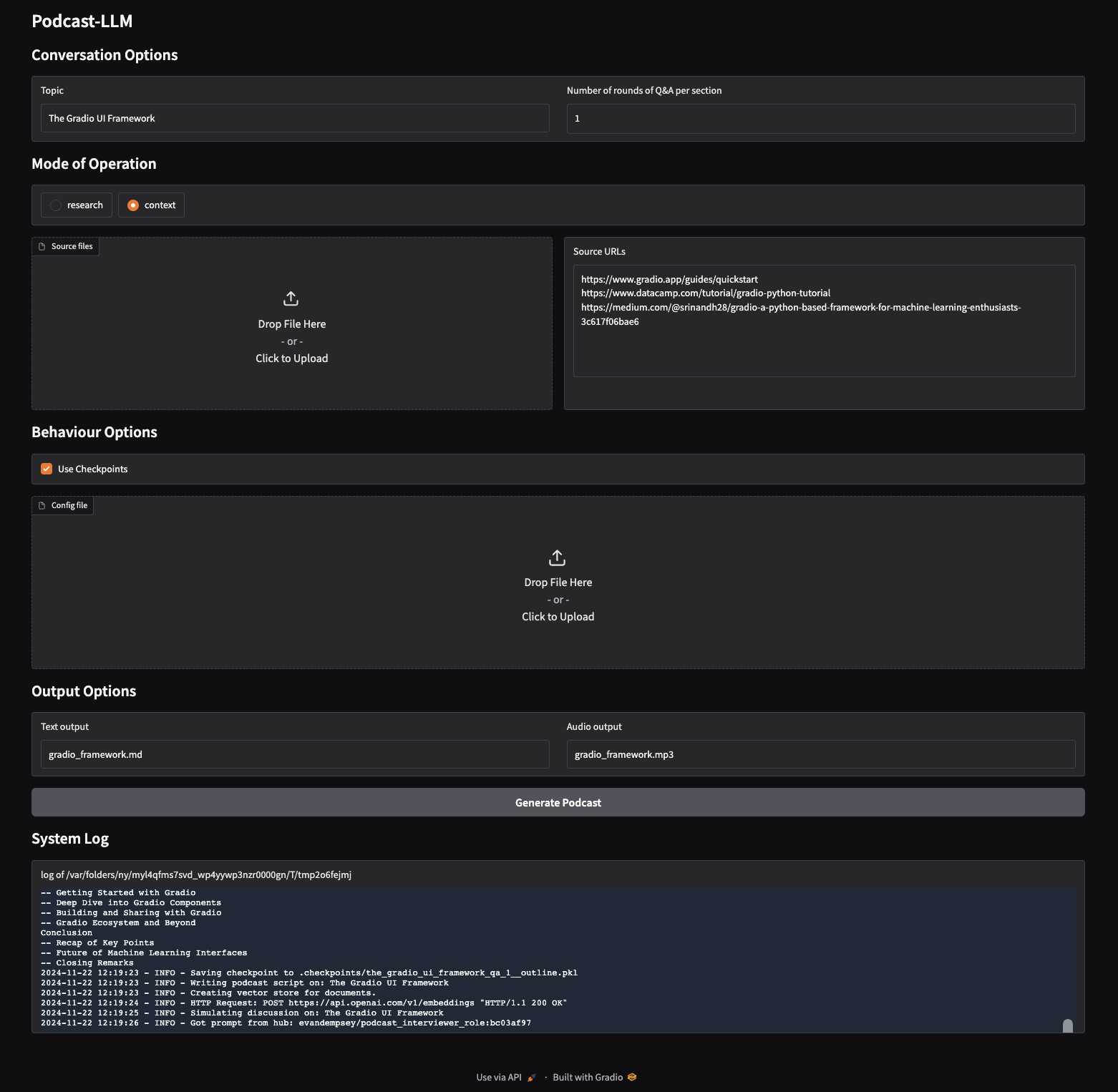
- Gradio UI
Examples
Listen to sample podcasts generated using Podcast-LLM:
Structured JSON Output from LLMs (Google multispeaker voices)

UFO Crash Retrieval (Elevenlabs voices)
The Behenian Fixed Stars (Google multispeaker voices)
Podcast-LLM Overview (Google multispeaker voices)
Robotic Process Automation (Google voices)
Web Interface
Installation
-
Install using pip:
pip install podcast-llm
-
Set up environment variables in
.env:OPENAI_API_KEY=your_openai_key GOOGLE_API_KEY=your_google_key ELEVENLABS_API_KEY=your_elevenlabs_key TAVILY_API_KEY=your_tavily_key ANTHROPIC_API_KEY=your_anthropic_api_key
Usage
-
Generate a podcast about a topic:
# Research mode (default) - automatically researches the topic
podcast-llm "Artificial Intelligence"

# Context mode - uses provided sources
podcast-llm "Machine Learning" --mode context --sources paper.pdf https://example.com/article
-
Options:
# Customize number of Q&A rounds per section
podcast-llm "Linux" --qa-rounds 3

# Disable checkpointing
podcast-llm "Space Exploration" --checkpoint false

# Generate audio output
podcast-llm "Quantum Computing" --audio-output podcast.mp3

# Generate Markdown output
podcast-llm "Machine Learning" --text-output podcast.md
-
Customize voices and other settings in
config/config.yaml -
Launch the Gradio web interface:
# Start the web UI
podcast-llm-gui
This launches a user-friendly web interface where you can:
- Enter a podcast topic
- Choose between research and context modes
- Upload source files and URLs for context mode
- Configure Q&A rounds and checkpointing
- Specify output paths for text and audio
- Monitor generation progress in real-time
License
This project is licensed under Creative Commons Attribution-NonCommercial 4.0 International (CC BY-NC 4.0)
This means you are free to:
- Share: Copy and redistribute the material in any medium or format
- Adapt: Remix, transform, and build upon the material
Under the following terms:
- Attribution: You must give appropriate credit, provide a link to the license, and indicate if changes were made
- NonCommercial: You may not use the material for commercial purposes
- No additional restrictions: You may not apply legal terms or technological measures that legally restrict others from doing anything the license permits
For commercial use, please contact evandempsey@gmail.com to obtain a commercial license.
The full license text can be found at: https://creativecommons.org/licenses/by-nc/4.0/legalcode
Acknowledgements
This project was inspired by podcastfy, which provides a framework for generating podcasts using LLMs.
This implementation differs by automating the research and content gathering process, allowing for fully autonomous podcast generation about any topic without requiring manual research or content curation.


Download files
Download the file for your platform. If you're not sure which to choose, learn more about installing packages.
Source Distribution
Built Distribution
Filter files by name, interpreter, ABI, and platform.
If you're not sure about the file name format, learn more about wheel file names.
Copy a direct link to the current filters
File details
Details for the file podcast_llm-0.2.1.tar.gz.
File metadata
- Download URL: podcast_llm-0.2.1.tar.gz
- Upload date:
- Size: 35.7 kB
- Tags: Source
- Uploaded using Trusted Publishing? No
- Uploaded via: poetry/1.8.4 CPython/3.12.7 Linux/6.5.0-1025-azure
File hashes
| Algorithm | Hash digest | |
|---|---|---|
| SHA256 |
11e191969438cdb4eca142825ea4f717ed6bcbf8a7893fb770fe5d0ff8993de7
|
|
| MD5 |
29f0dc6e38084214000e6c8e5e2f0e03
|
|
| BLAKE2b-256 |
cc1b9f7eea91efab5960874442580bf169f59d8720d8da3fba9e219f314996bf
|
File details
Details for the file podcast_llm-0.2.1-py3-none-any.whl.
File metadata
- Download URL: podcast_llm-0.2.1-py3-none-any.whl
- Upload date:
- Size: 45.5 kB
- Tags: Python 3
- Uploaded using Trusted Publishing? No
- Uploaded via: poetry/1.8.4 CPython/3.12.7 Linux/6.5.0-1025-azure
File hashes
| Algorithm | Hash digest | |
|---|---|---|
| SHA256 |
46c608299c51f3bc8a5e41c68c1cca8e8bc44ae2de229905aeb10a0409ee24ca
|
|
| MD5 |
066726472f469162bf2d7d7cb8ecb8c1
|
|
| BLAKE2b-256 |
73b282e16cd42dc30445ef10fb885246ac62e7641e9d5d6bfb4768795720ce57
|






